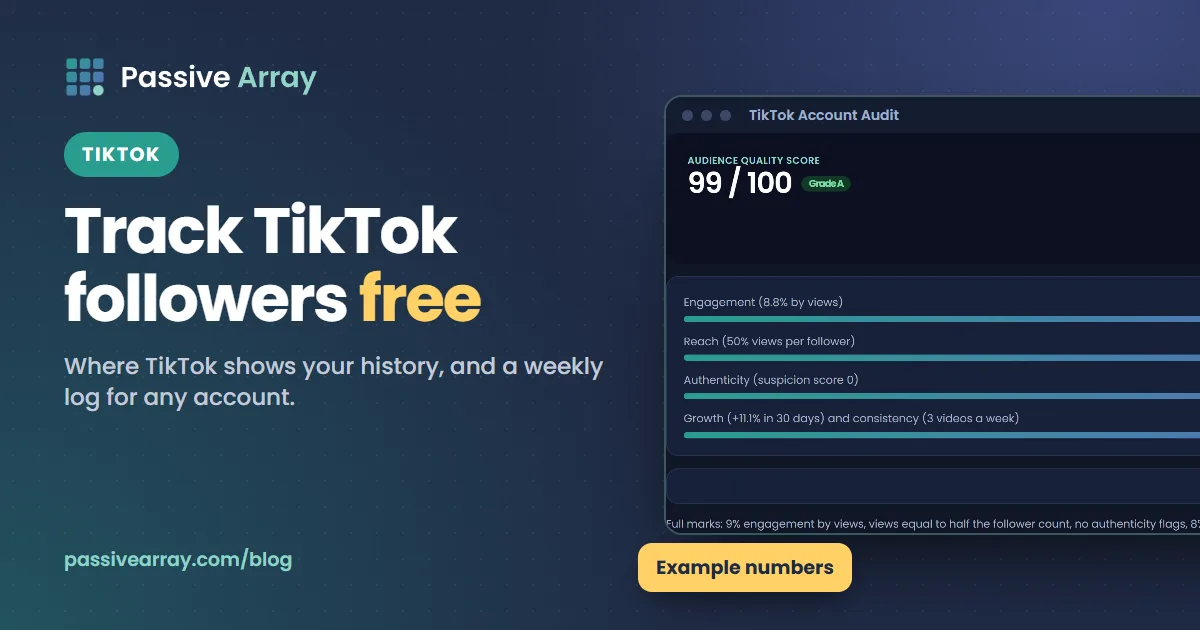
To track your own TikTok followers, open TikTok Studio, go to Analytics and look at the Followers section, which shows your follower count over time and who your followers are. To track anyone else's account, write down the follower count from their profile on the same day each week and work out the change yourself. TikTok does not offer a free public feed of other accounts' numbers, so every free method comes down to a regular log.
That log becomes useful once you put it next to views and engagement. A follower count on its own tells you how big an account is. Followers gained per week, per 1,000 views and against total likes tell you whether it is growing for the right reasons. The TikTok account audit on this site scores 30-day growth alongside engagement, reach and authenticity, from numbers you type in.
One thing to be clear about first: Passive Array does not track TikTok accounts automatically. The TikTok tools here work from figures you enter, because TikTok does not offer an open, free API for reading other accounts' stats. Any site that claims to show a minute-by-minute TikTok follower count for any account is either estimating or collecting data in ways TikTok has not offered publicly. Treat those numbers with care.
Where TikTok shows your own follower growth
TikTok's own analytics live in TikTok Studio, which TikTok Support describes on both the app and the web. TikTok says both Personal and Business accounts get general analytics, and that you need at least one public video posted before analytics will show.
In the app
- Go to your Profile.
- Tap the Menu button (three lines) at the top.
- Tap TikTok Studio.
- Under Analytics, tap View all for the full breakdown.
- Open the Followers section to see follower count over time and follower details.
On the web
- Go to tiktok.com/tiktokstudio and log in.
- Choose Analytics in the left menu.
- Switch between Key metrics (account performance), Content (each video) and Followers (who your followers are).
TikTok Support notes that you may need to turn analytics on before some metrics appear. If a section is empty, check that your account has a public video and look for a prompt to enable analytics in TikTok Studio.
What the Followers view is good for
The Followers section answers three questions well: how many followers you gained or lost in a period, which days the jumps happened, and who your followers are, such as where they are based. Use the daily chart to match spikes with specific videos. If followers jumped on a Tuesday, open the Content tab and find what you posted on Monday or Tuesday.
What it does not do well is keep a long, clean record you can compare across months and against other accounts. Date ranges on the analytics screens have changed over the years, and you cannot line your numbers up against a competitor's in the app. That is the job of your own log.
How to track any TikTok account's followers by hand
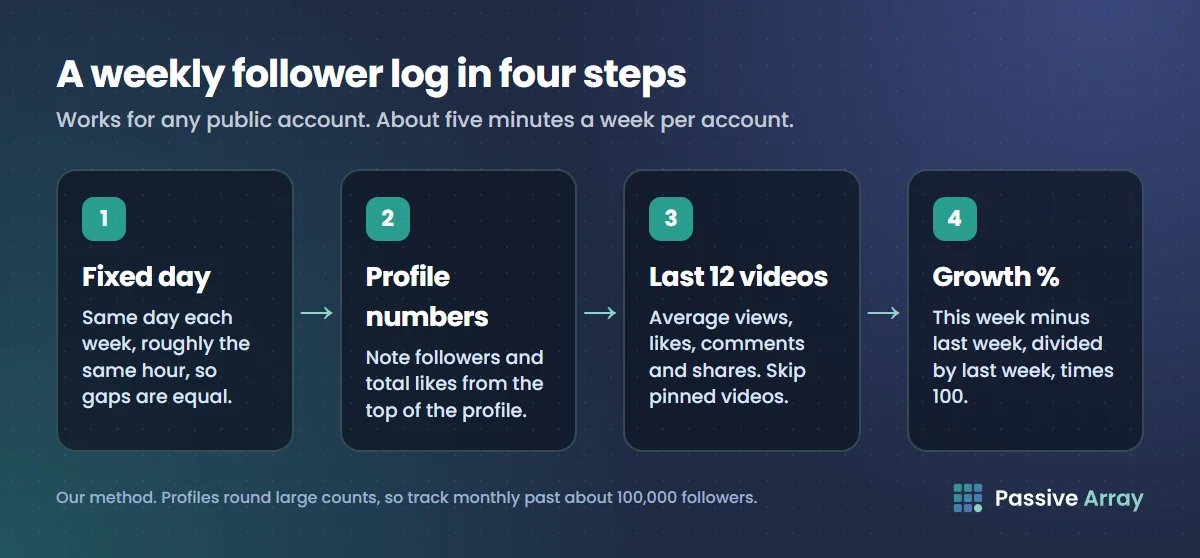
The free method that works for any public account, yours or someone else's, is a weekly snapshot in a spreadsheet. It takes about five minutes a week per account.
- Pick a fixed day and time. Same day each week, roughly the same hour. Growth comparisons only work when the gaps are equal.
- Open the profile. Note followers and total likes from the top of the page.
- Average the last 12 videos. Write down average views, likes, comments and shares across the 12 most recent videos. Skip pinned videos, which are usually old hits.
- Note how many videos were posted that week. This explains a lot of later swings.
- Write the exact figure if you can. Profiles round large counts (12.3K, 1.2M). For your own account, use TikTok Studio, which shows exact figures. For someone else's, rounding hides small weekly changes, so track monthly instead of weekly once an account passes about 100,000 followers.
- Work out the change. Weekly growth % = (this week's followers minus last week's) / last week's followers x 100.
A sheet with these columns is enough:
| Column | What to enter | Why it matters |
|---|---|---|
| Date | The day of the snapshot | Equal gaps make weeks comparable |
| Followers | From the profile or TikTok Studio | The headline number |
| Net change | This week minus last week | Raw growth |
| Growth % | Net change / last week x 100 | Comparable across account sizes |
| Total likes | From the profile | Feeds the likes-to-followers ratio |
| Avg views (last 12) | Averaged from the grid | Reach per video |
| Avg likes, comments, shares | Averaged from the 12 videos | Feeds the engagement rate |
| Videos posted this week | Count | Explains dips and jumps |
| Notes | Viral video, collab, break, trend | Context you will forget otherwise |
A worked example
Say a cooking account logs these numbers over four weeks. This is an example, not real data:
| Week | Followers | Net change | Growth % | Views that week |
|---|---|---|---|---|
| 0 | 8,200 | |||
| 1 | 8,450 | +250 | 3.0% | 60,000 |
| 2 | 8,610 | +160 | 1.9% | 45,000 |
| 3 | 9,300 | +690 | 8.0% | 410,000 |
| 4 | 9,420 | +120 | 1.3% | 52,000 |
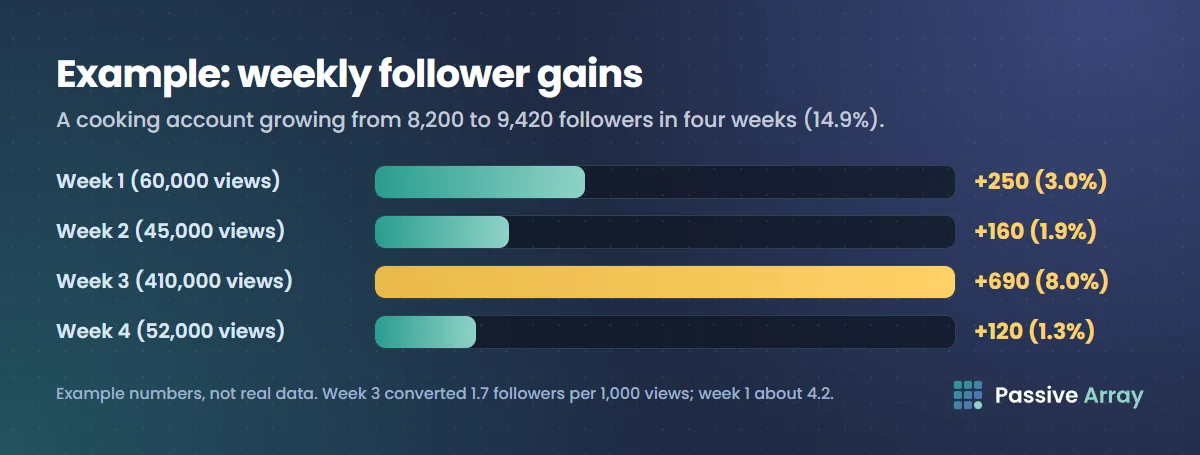
Over the four weeks the account grew from 8,200 to 9,420, which is 14.9%. That looks strong, but most of it came from week 3, when one video reached far beyond the usual audience.
Now divide followers gained by views, per 1,000 views. Week 1: 250 / 60 = about 4.2 followers per 1,000 views. Week 3: 690 / 410 = about 1.7. The viral video brought many more followers in total, but each viewer was less likely to follow. That is normal: a video pushed to a wide For You audience reaches many people who enjoy one video but are not interested in the account. The useful lesson is in week 1: whatever was posted that week converted viewers into followers at more than twice the rate.
Followers per 1,000 views: the number to watch
Growth % tells you how fast you are growing. Followers per 1,000 views tells you why. If views rise and followers per 1,000 views stays steady, your content is reaching more of the right people. If views rise and followers per 1,000 views drops sharply, you are reaching people who do not want more of the same. If views are flat and followers per 1,000 views rises, your videos are becoming more of a reason to follow, even without more reach.
For your own account, TikTok Studio gives exact video views for the period, so this figure is accurate. For someone else's, use the sum of views on videos posted that week as a rough stand-in. It will miss views on older videos, so compare accounts with each other only when you measured them the same way.
Turn the log into checks that mean something
A follower log answers "how fast". These checks answer "how healthy". Each one uses numbers you already wrote down.
Engagement rate by views
Take the averages from your last 12 videos and put them into the TikTok engagement rate calculator. It uses the same formulas as our TikTok engagement rate benchmarks:
Engagement rate by views = (likes + comments + shares) / views x 100
>
Engagement rate by followers = (likes + comments + shares) / followers x 100
The rate by views is the headline, because most TikTok views come from the For You feed rather than followers. The rate by followers is graded against a typical rate for each account size (from 12% for accounts under 10,000 followers down to 4% for accounts over 1 million, on this site's scale). Log both each week. A follower count that keeps rising while engagement by views slides is often a sign the new followers are not watching.
Likes to followers
Divide total profile likes by followers. The TikTok likes to followers ratio labels the result: 10 to 40 likes per follower is healthy on its scale, under 5 is low. Because total likes build up over the whole life of the account, this ratio moves slowly. That makes it a good sanity check on a sudden follower jump: if followers double in a week and total likes barely move, the new followers did not come from videos people liked.
Fake follower signals
Bought followers do not watch. The TikTok fake follower estimator checks whether average views, likes and comments match the follower count, and lists every red flag it finds, such as average views under 5% of followers or comments under 0.5% of likes. It is an estimate from public numbers, not proof. Our guide to spotting fake followers on Instagram and TikTok explains each signal and the innocent reasons it can fire.
The full audit
The TikTok account audit combines these into one 0 to 100 score: engagement (30 points), reach (25), authenticity (25), 30-day growth (10) and posting consistency (10). Growth scores full marks at +8% in 30 days and zero at a 2% loss or worse. Your log gives you the follower count from 30 days ago, which is the one figure people usually do not have. If you leave it blank, the audit gives growth a neutral 5 of 10.
How to compare your growth with other accounts
Tracking one account tells you whether you are improving. Tracking three or four similar accounts tells you whether your improvement is good for your niche and size.
- Pick accounts close to yours. Same niche, within about half to double your follower count. A 5,000-follower account learns little from tracking a 5 million one.
- Log them on the same day as yours. Same columns, same method, same 12-video window.
- Compare rates, not totals. Growth %, views per follower, engagement by views and share rate. Raw follower gains always favour the bigger account.
- Put them side by side. The compare TikTok accounts tool takes two or three accounts and marks the leader on each row: likes per follower, views per follower, engagement by views and share rate.
- Look at what the leader posted. When a comparable account pulls ahead for two or three weeks, its recent videos usually show why: a new series, a format change, a collaboration.
Tracking follower milestones that matter
Some follower numbers have real consequences, so they are worth tracking against a target date.
| Milestone | What it unlocks, per TikTok | Other conditions |
|---|---|---|
| 10,000 followers | Eligibility for the Creator Rewards Program | At least 100,000 authentic video views in the last 30 days, age 18 or over, a personal account, an eligible country, and videos at least 1 minute long |
TikTok's Creator Rewards Program terms say the follower and view counts must be authentic. Bought followers do not just fail to help; they put the whole application at risk. The old Creator Fund has been replaced, and our guide to the TikTok Creator Rewards Program explains how payouts work now.
For brand deals, follower count matters less than you might think. A sponsored TikTok is usually judged on the views it gets, which is why our guide to pricing a sponsored TikTok starts from average views. Your log is still valuable here: a steady growth line and stable engagement over three months is good evidence to put in a creator media kit.
What makes follower counts jump or drop
When your log shows a sudden change, the cause is usually one of these.
- One video reached far beyond your audience. The biggest single cause of jumps. Check the Content tab for the video with unusual views in that period.
- A collaboration, stitch or duet with a larger account. Their audience saw you, and some followed.
- A trend that matched your niche. Followers from trend videos often engage less with your regular videos later. Watch followers per 1,000 views.
- You posted less. Fewer videos means fewer chances to be shown. TikTok has said the number of videos you post does not affect how your content is recommended, but each video is still a new chance to reach people.
- TikTok removed inauthentic followers. TikTok's community guidelines say that when it detects inauthentic metrics it will remove fake likes, followers or other inflated signals. A sudden drop with no change in your posting can be this, and it can happen to accounts that never bought anything, because bots sometimes follow real accounts.
- People unfollowed after a change of topic. If you switch subjects, some followers who came for the old topic leave. A small, steady decline after a change is normal.
Mistakes that make tracking useless
- Checking every day. Daily numbers are noisy. Weekly snapshots show the trend; daily ones show random swings that lead to bad decisions.
- Comparing raw follower gains between accounts of different sizes. 500 new followers is huge for a 5,000-follower account and tiny for a 500,000 one. Use growth %.
- Using the rounded profile number on a large account. 1.2M to 1.2M looks like zero growth even when it was 40,000 followers. Track monthly, or use exact figures from TikTok Studio for your own account.
- Ignoring views. A follower count without views cannot tell you whether you grew from good content or from one lucky hit.
- Trusting live-counter sites blindly. Without an official public feed, these are often estimates. If one disagrees with the profile, the profile is right.
- Buying followers to "kick-start" the graph. TikTok's community guidelines do not allow services that artificially boost engagement or trick the recommendation system. Bought followers do not watch, so your views per follower and engagement rate fall, and the Creator Rewards terms require authentic followers.
For brands checking a creator's growth
If you are about to pay a creator, a few weeks of your own log beats any screenshot. Start logging when you first shortlist an account. Then:
- Run the engagement rate calculator and fake follower estimator on their last 12 videos.
- Compare them with two or three similar creators using the comparison tool.
- Ask for TikTok Studio screenshots of the Followers section and a recent Content breakdown. Only the account owner can see analytics.
- Look for a growth curve that matches their posting, not a sudden step with no viral video to explain it.
Our checklist for vetting a creator before you pay covers the rest of the process, including what to put in the contract.
Sources
- TikTok Support: TikTok Studio
- TikTok Support: Personal and Business Accounts on TikTok
- TikTok: Creator Rewards Program Terms (US), last updated 20 July 2026
- TikTok Community Guidelines: Integrity and Authenticity
- TikTok Newsroom: 5 tips for TikTok creators, 30 July 2020
Frequently asked questions
How do I see my TikTok follower history?
Open TikTok Studio from the menu on your profile, go to Analytics and choose the Followers section. It shows your follower count over time and details about your followers. On the web, the same section is at tiktok.com/tiktokstudio. You need at least one public video for analytics to show.
Can I track someone else's TikTok followers for free?
Yes, by hand. Note the follower count and total likes from their profile on the same day each week, and log them in a spreadsheet with average views and engagement from their last 12 videos. Only the account owner can see TikTok's own analytics.
Is there a free TikTok engagement rate tracker?
There is no free tool that reads any account's TikTok engagement automatically, because TikTok does not offer an open public feed of those numbers. You can track it yourself: log average views, likes, comments and shares each week and run them through a TikTok engagement rate calculator. The trend over several weeks matters more than any single reading.
How can I check if a TikTok account has fake followers for free?
Compare the follower count with what the videos actually get. Very low average views compared with followers, few comments compared with likes, and low total likes per follower are the main warning signs. A free TikTok fake follower estimator scores these from the profile numbers, but it is an estimate, not proof.
How many followers do you need for the TikTok Creator Rewards Program?
TikTok's program terms require at least 10,000 authentic followers and at least 100,000 authentic video views in the last 30 days. You also need to be 18 or over, use a personal account, live in an eligible country, and post videos of at least one minute.
Why did my TikTok followers suddenly drop?
The most common reasons are TikTok removing inauthentic followers, which its guidelines say it does when it detects fake signals, and unfollows after a change of topic. Check whether the drop matches a change in what you posted. A drop with no change in your content is often a cleanup of bot accounts.
How often should I check my TikTok follower count?
Once a week is enough for most accounts. Daily numbers swing too much to read, and weekly snapshots on the same day make growth rates comparable. For accounts above about 100,000 followers, track monthly if you are reading the rounded number from a profile.