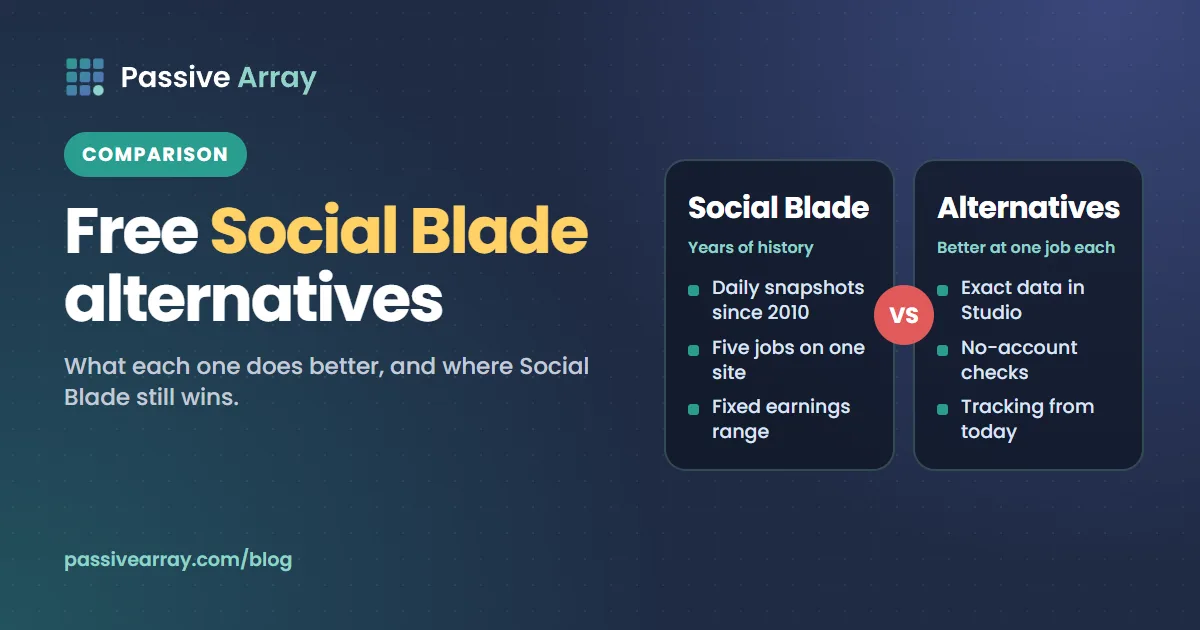
The best Social Blade alternative depends on what you used Social Blade for. To check any YouTube channel's current numbers, a free YouTube Subscriber Count Checker that reads the official API does the job. To track growth from today, a free daily tracker works. To find breakout videos and watch competitors, vidIQ, TubeBuddy's Channelytics or ViewStats go further. For your own channel, YouTube Studio beats every outside site, because it has exact private data.
What no alternative can give you is Social Blade's history. It has been collecting daily snapshots of YouTube channels since 2010, according to Wikipedia's article on the company, and that record cannot be rebuilt later by anyone. If you need to see how a channel grew in 2019, Social Blade is still the place. For almost everything else, there are free options that are as good or better, and some are more honest about their estimates.
Competitor details below come from each company's own website, checked on 1 November 2026. Where a price could not be confirmed on the company's own page, we do not give one.
What people use Social Blade for
Before choosing a replacement, be clear which job you need done:
- Checking a channel's current numbers: subscribers, total views, video count.
- Seeing growth over time: daily and monthly gains, charts, history.
- Ranking and comparing channels: top lists, side-by-side comparisons.
- Estimating earnings: the "estimated monthly earnings" line.
- Covering other platforms: Twitch, Instagram, TikTok and, until 2025, X.
Social Blade does all five on one site. Most alternatives do two or three of them better, and none does all five plus the history.
Social Blade alternatives at a glance
| Tool | Best for | Any channel? | History | Earnings estimate | Account needed | Cost (checked 1 Nov 2026) |
|---|---|---|---|---|---|---|
| Social Blade | Long history across platforms | Yes | Daily, going back years for tracked channels | Yes, default $0.25 to $4.00 per 1,000 views | Optional | Free with paid tiers (prices not confirmed on its own page) |
| YouTube Studio | Your own channel | No, yours only | Full, exact | Real revenue, not an estimate | Your channel | Free |
| Passive Array | Free, no-account checks and tracking | Yes | From the day you first track a channel | Separate calculator with an editable range | No | Free |
| vidIQ | Competitor watching, outliers, ideas | Yes | Not stated on its features page | Not stated | Yes | Free plan; Boost from $19/month |
| TubeBuddy (Channelytics) | Channel stats while browsing YouTube | Yes | Changes over the last 30 days | Not stated on the Channelytics page | Yes, Google sign-in | Channelytics listed in Pro (price varies by region) |
| ViewStats | Outliers, thumbnails, competitor tracking | Yes | Not stated on its homepage | Not stated | Free site and extension; paid for more | Business from $249/month; Pro price not shown when checked |
1. YouTube Studio: the best alternative for your own channel
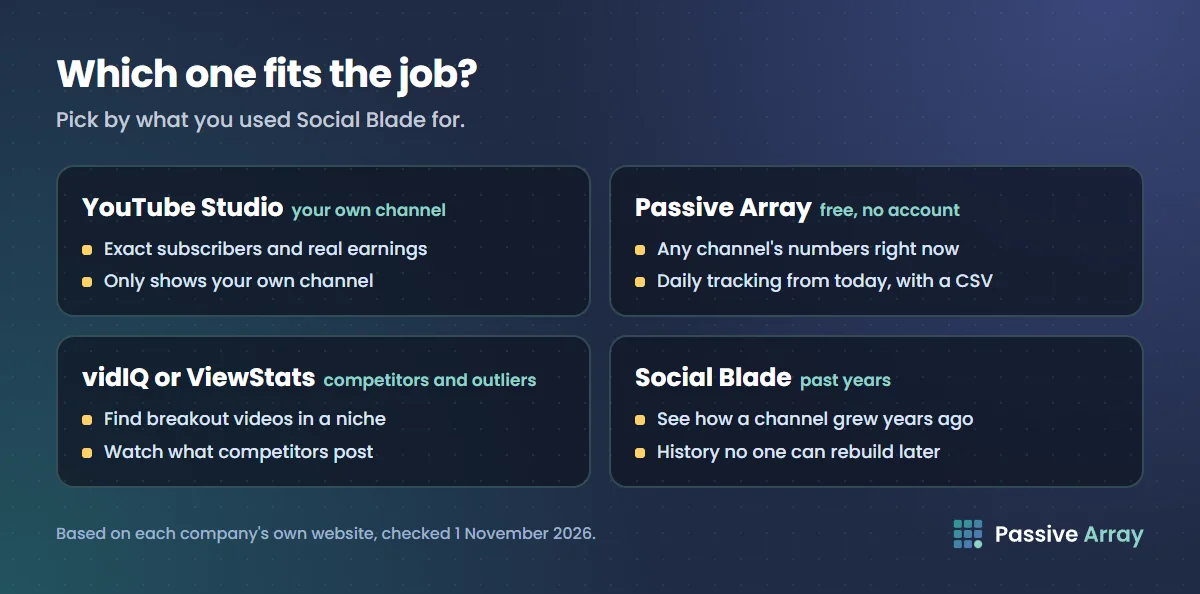
If the channel is yours, stop checking Social Blade. YouTube Studio has the exact subscriber count (Social Blade only sees the rounded public number), your real revenue and RPM, watch time, traffic sources and audience countries. None of that is visible to any outside site.
YouTube's Help Center says the public sees a shortened subscriber count that only changes in steps, for example 1.23K until a channel reaches 1,240. The exact live number is in YouTube Studio > Analytics > Overview, on the Realtime card, under See live count. Your real earnings are in the Revenue tab. If you have been comparing your Studio revenue with Social Blade's estimate, is Social Blade accurate explains why the two rarely match.
Where it falls short: it only shows your own channel.
2. Passive Array: a free Social Blade alternative with no account
Passive Array's YouTube tools read public numbers from the official YouTube Data API, and every tool is free with no account. The ones that replace Social Blade's main pages:
- YouTube Subscriber Count Checker: paste a channel link, @handle or name for current subscribers, total views, video count, and totals and averages from the last 10 uploads.
- YouTube Channel Growth Tracker: the first lookup adds the channel to a daily tracking list. Every day around 05:45 UTC it records subscribers, total views and video count, so you get a chart, 7-day and 30-day change, gains per day and a CSV of the full history.
- Compare YouTube Channels: two or three channels side by side, with the leader marked on each row.
- Most Subscribed YouTube Channels: the top of YouTube read live from the API, sortable by views or video count.
- Twitch Follower Tracker: daily follower history for any Twitch channel. Twitch publishes exact follower totals, so every change on the chart is real.
Where it is better than Social Blade: no account, nothing gated, and every estimate shows its formula. The YouTube money calculator, for example, uses an RPM range you can edit rather than one fixed range for every channel.
Where Social Blade is better: history. The growth tracker starts the day a channel is first tracked, and nothing earlier is backfilled or estimated. If nobody tracked a channel before today, its chart starts today. Social Blade also covers more platforms with automatic data: Passive Array's Instagram, TikTok and X comparison tools work from numbers you enter, not from automatic lookups.
3. vidIQ: for watching competitors and finding outliers
vidIQ's features page lists Competitors, Outliers, Most Viewed, Real-Time Stats and Scorecard among its tools, alongside keyword research and an AI coach. It works as a browser extension on YouTube, a web app and a mobile app, and covers YouTube and Instagram.
According to its pricing page, the free plan includes 150 AI credits a month, niche trends and content ideas. Paid plans start with Boost at $19 a month or $199 a year, which lists unlimited trends research and unlimited subscriber insights.
Social Blade vs vidIQ: Social Blade is a public statistics site you can browse without signing up. vidIQ is a growth tool for your own channel that also watches others. If you want to know why a competitor's video took off and what to make next, vidIQ is closer to that job. If you want a channel's growth chart from three years ago, Social Blade is.
4. TubeBuddy Channelytics: stats while you browse
TubeBuddy's Channelytics page says the tool appears automatically when you visit any channel on YouTube and shows its total views, subscriber count, upload frequency and the tags it uses, with changes over the last 30 days. TubeBuddy's pricing page lists Channelytics in the Pro plan and Competitor Upload Alerts in Legend. TubeBuddy says local-currency prices are estimates and that it charges in US dollars.
Where it is better than Social Blade: you see a channel's numbers without leaving YouTube.
Where it falls short: it needs Google sign-in, and 30 days of change is not the same as years of history. Our TubeBuddy vs vidIQ comparison covers both products in full.
5. ViewStats: for outliers and thumbnails
ViewStats describes itself as a YouTube analytics suite co-founded by MrBeast. Its homepage lists outlier videos (content performing well above where it "should be"), channel and video performance analytics, thumbnail analysis and search, competitor tracking, trend alerts, research boards, and a free Chrome extension that shows analytics while you browse YouTube.
When we checked, it offered a free site and extension, a Pro plan whose price was not displayed on the page, and a Business plan "starting at $249/mo" with team pricing and API access.
Social Blade vs ViewStats: they answer different questions. Social Blade tells you how a channel's numbers changed. ViewStats is built to show which videos and thumbnails are working in a niche. For a free daily list of breakout videos, the Passive Array outliers feed tracks long-form videos getting many times their channel's usual views.
Social Blade alternatives for Instagram, TikTok, Twitch and X
- Your own account: each platform's built-in analytics shows more than any outside site, including reach and audience data that is never public.
- Instagram: to compare accounts, the Compare Instagram Accounts tool puts two or three accounts side by side from the visible numbers you enter. It does not scrape Instagram.
- TikTok: the TikTok account comparison works the same way. How to track TikTok follower growth for free shows a manual method that does not need a third-party login.
- Twitch: the Twitch Follower Tracker records exact daily follower totals.
- X (Twitter): Wikipedia's article on Social Blade records that it removed X, along with Trovo, Mixer, Dailymotion and DLive, in March 2025, citing the cost of X's API. Passive Array's X account comparison works from numbers you enter.
How to pick the right alternative
| You want to | Use |
|---|---|
| Know your own exact subscribers and earnings | YouTube Studio |
| Check any channel's numbers right now, free, no sign-up | Subscriber Count Checker |
| See how a channel grew in past years | Social Blade |
| Track a channel's growth from today, with a CSV | Growth Tracker |
| Compare three channels before picking one for a sponsorship | Channel comparison, then the checks in how to vet a creator before you pay |
| Find breakout videos in a niche | Outliers feed, ViewStats or vidIQ |
| Get alerts when competitors upload | TubeBuddy Legend or vidIQ |
| Estimate a channel's ad income | A calculator that shows its formula, read as a range |
How to read channel stats from any of these tools
Whatever tool you use, the same public numbers mean the same things. A few rules keep you from being misled:
- Read recent average views before subscribers. Subscribers are a lifetime total; recent views show whether the audience still watches. Views per subscriber shows how to judge the ratio.
- Remember subscriber counts are rounded. YouTube's Data API rounds them down to three significant figures, so a large channel's daily gain can show 0 one day and a big jump the next. The YouTube live subscriber count guide explains why live counters lag.
- Treat every earnings figure as an estimate. No outside tool can see a channel's revenue. Social Blade's default range is $0.25 to $4.00 per 1,000 views, applied to all channels. Real RPM varies with niche, country, season and how many views are Shorts.
- Check consistency. Uploads per month on recent videos tells you whether the channel is active or living on old hits.
- Look at the shape of growth. Steady gains suggest a healthy channel; one spike followed by a flat line usually means one viral video. A full walkthrough is in how to audit a YouTube channel, and how to check any YouTube channel's stats lists what is public and what is not.
Start your own history today
The single biggest reason people stay with Social Blade is history, and the only way to get history is to start collecting it. If there are channels you will care about in six months (your own, three competitors, creators you might sponsor), add them to a daily tracker now:
- Open the growth tracker and enter each channel once. That puts it on the daily list.
- Come back in a week to see the first trend, and in a month for the 30-day change.
- Download the CSV when you want to chart it yourself or compare channels in a spreadsheet.
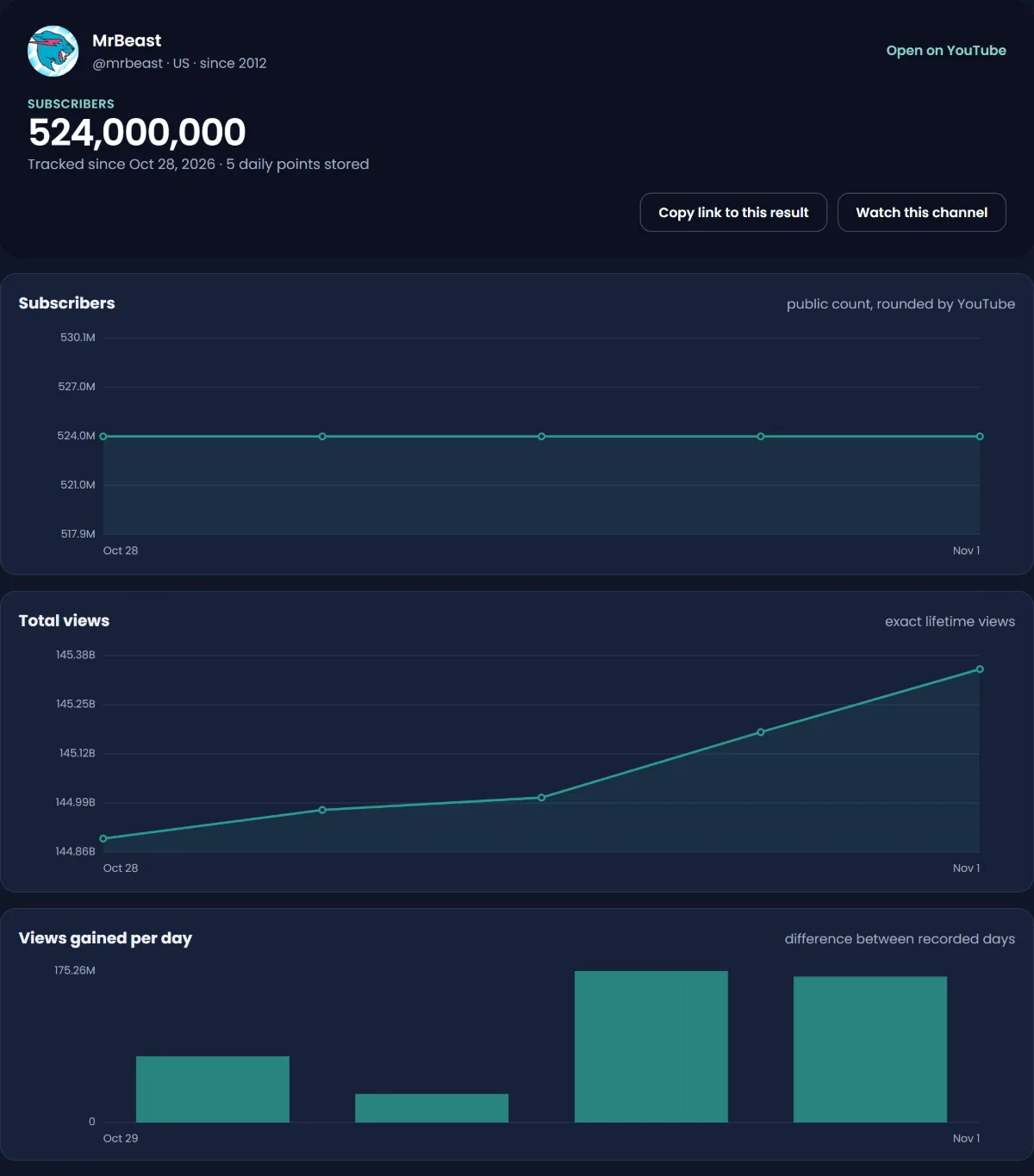
In a year you will have a clean daily record of the channels that matter to you, from a source that shows exactly how it was collected.
Sources
- YouTube Help: Check your YouTube subscriber count
- YouTube Data API: Channels resource (subscriberCount)
- Social Blade: How are estimated earnings calculated? (FAQ), as indexed on 1 November 2026
- Wikipedia: Social Blade, for the company's history and the 2025 platform removals
- vidIQ: Pricing and Features, checked 1 November 2026
- TubeBuddy: Pricing and Channelytics, checked 1 November 2026
- ViewStats: Homepage and plans, checked 1 November 2026
Frequently asked questions
What is the best Social Blade alternative?
It depends on the job. For your own channel, YouTube Studio, because it has exact data. For any channel's current numbers free and without an account, a subscriber count checker that reads the YouTube Data API. For competitor research and outliers, vidIQ or ViewStats. For historical growth charts, nothing replaces Social Blade.
Are there free websites like Social Blade?
Yes. Passive Array's YouTube subscriber count checker, growth tracker and channel comparison are free with no account, and its Twitch follower tracker records daily history. vidIQ, TubeBuddy and ViewStats also have free tiers or free extensions, but they ask you to sign in for most features.
What is a free Social Blade alternative for Instagram?
For your own account, Instagram's built-in insights show more than any outside site. To compare other accounts, a tool such as Passive Array's Instagram account comparison works from the public numbers you enter, without logging in to Instagram.
Social Blade vs vidIQ: which is better?
They do different jobs. Social Blade is a public statistics site with long daily history for many channels. vidIQ is a growth tool for your own channel that also tracks competitors and finds outlier videos. Use Social Blade for history and vidIQ for deciding what to make.
Social Blade vs ViewStats: what is the difference?
Social Blade tracks how channels' numbers change over time across several platforms. ViewStats focuses on YouTube outlier videos, thumbnails and competitor tracking. If you want to know which videos are working in a niche, ViewStats is closer; for a channel's growth history, Social Blade is.
Is there a Social Blade alternative for X (Twitter)?
Social Blade removed X in March 2025, according to Wikipedia, citing the cost of X's API. Free tools such as Passive Array's X account comparison work from the follower and following numbers you enter. For your own account, X's built-in analytics is the most accurate source.
Why does Social Blade show different earnings from my real YouTube income?
Social Blade applies a fixed $0.25 to $4.00 per 1,000 views range to every channel and assumes every view is monetized. Real RPM depends on niche, audience country, season, Shorts share and unmonetized views. Our guide to whether Social Blade is accurate walks through the differences.
By Nasir Uddin, founder of Passive Array. Rules and figures checked Nov 1, 2026.