Social Blade is accurate for public numbers and loose for money. Its subscriber and view figures come from YouTube's public data, so they match what YouTube shows anyone (with subscribers rounded by YouTube itself). Its earnings figures are not income data at all: Social Blade says it multiplies a channel's daily views by a fixed range of $0.25 to $4.00 per 1,000 views, and assumes every view is monetized. A channel's real income can fall inside that range, below it or above it.
So Social Blade is not "fake", but its earnings line answers a different question from the one most people ask. Below is what each number on a Social Blade page really is, how the earnings estimate is built according to Social Blade's own help pages, and how YouTube says real earnings vary. To check a channel's public numbers straight from the official source, the YouTube Subscriber Count Checker reads them from the YouTube Data API, free and with no account.
The short answer, number by number
| Number on Social Blade | Where it comes from | How accurate |
|---|---|---|
| Subscribers | YouTube's public data | As accurate as YouTube allows, which means rounded to three significant figures |
| Total views | YouTube's public data | Exact as reported by YouTube |
| Video count | YouTube's public data | Exact for public videos |
| Daily gains (subscribers, views) | The difference between Social Blade's daily snapshots | Accurate for views; subscriber gains move in rounded steps |
| Estimated earnings | Views multiplied by a fixed $0.25 to $4.00 range | An estimate; Social Blade says so itself |
| Real-time subscriber count | Built on public counts that YouTube rounds | Cannot be more precise than the rounded public number |
Social Blade has been tracking YouTube channels since 2010, according to Wikipedia's article on the company, which also quotes it saying it pulls data "from YouTube's public API". That long, daily record is genuinely valuable, and it is the part of Social Blade that no newer tool can recreate.
How accurate are Social Blade's subscriber counts?
As accurate as public data can be, and no more. YouTube's Data API documentation says a channel's subscriber count is "rounded down to three significant figures". A channel with 1,234,567 subscribers reports 1,230,000 to every outside tool, including Social Blade and ours.
YouTube's Help Center describes the same thing from the creator side: the public sees a shortened subscriber count, and the step size grows with the channel. Its example: a channel with 1,234 subscribers shows as 1.23K, and the next visible change is 1.24K. Only the channel owner sees the exact figure, in YouTube Studio.
That has three practical effects:
- Daily subscriber gains on big channels move in jumps. A channel above 10 million subscribers only changes its public count in steps of 100,000 (three significant figures), so a day of "+0" followed by a day of "+100K" is rounding, not a sudden spike.
- Live counters cannot be exact. A count that ticks up one by one on a large channel is estimating between rounded values. YouTube said as far back as December 2016, according to the same Wikipedia article, that third-party sites such as Social Blade do not accurately reflect subscriber activity.
- Hidden counts stay hidden. If a creator hides their subscriber count, the API marks it as hidden and no outside site has the real number.
Small channels (under 1,000 subscribers) are an exception: YouTube shows those counts exactly.
How accurate are Social Blade's view counts?
Total views come straight from YouTube and are exact as reported. Two caveats apply to anything built on them:
- Channel views include every format. YouTube's API documentation defines a channel's view count as the total for "all the videos in all formats", so long-form, Shorts and Live are mixed together. That matters a lot for earnings, as the next sections show.
- The definition changed in 2026. The same documentation says that from 24 August 2026, the API's view count counts a view "the moment a video begins to play", for long-form, Live and Shorts. Daily view gains measured from public totals after that date are not directly comparable with gains from before it.
YouTube also removes views it decides are not genuine. How YouTube counts views explains which views it throws away.
How Social Blade calculates estimated earnings
Here is the method, only as far as Social Blade itself documents it in its help pages and money calculator:
- Take the channel's daily views (the increase in total views from one day to the next).
- Divide by 1,000.
- Multiply by a low value of $0.25 and a high value of $4.00. Social Blade's calculator calls this "the accepted formula that Social Blade LLC uses to calculate the RPM range"; its blog calls it a default CPM range.
- Show the result as a daily, monthly and yearly range.
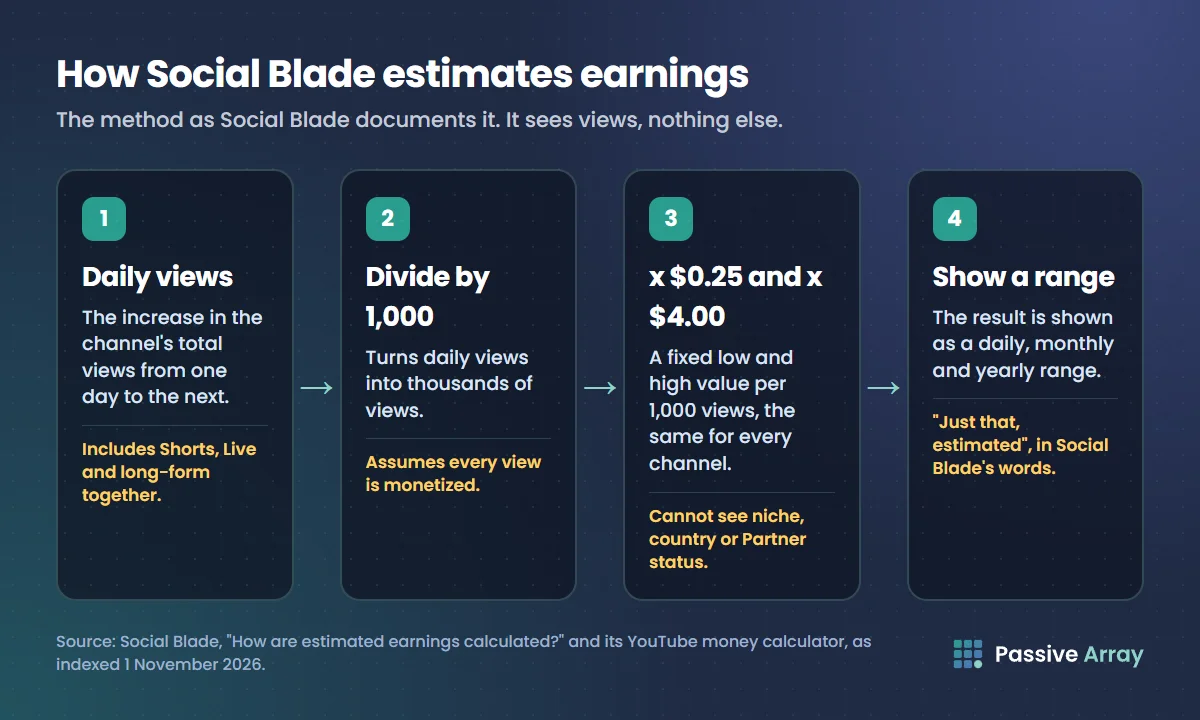
Social Blade's help page adds two important points. The estimate assumes every view on the channel is monetized, which it says is usually not the case. And estimated earnings are, in its words, "just that, estimated". Its calculator lists why the range is so wide: quality of traffic, source country, niche, the price of specific ads, adblock and the actual click rate. Logged-in users can set their own range in Social Blade's settings, which then replaces the default across the site.
We were not able to load Social Blade's help pages directly while writing this (its site blocked automated access); the quotes above are from its pages as indexed by search, on 1 November 2026.
What that method does not know
The formula only sees views. It cannot see:
- Whether the channel is monetized at all. A channel outside the YouTube Partner Program earns $0 from ads, whatever the range says. How to tell if a YouTube channel is monetized shows the public clues.
- The mix of Shorts and long-form. Shorts revenue works differently from long-form ad revenue. How much YouTube pays for Shorts explains the revenue pool.
- The audience's countries, the niche and the season.
- Income that is not ads: memberships, Super Chat, sponsorships, merchandise, affiliate links.
How YouTube says real earnings vary
YouTube's own Help Center on RPM and CPM is the best guide to why a single range cannot fit every channel:
- RPM is what the creator earns per 1,000 views, "calculated after YouTube's revenue share". CPM is what advertisers pay per 1,000 ad impressions, before that share. They are not the same number, and RPM is usually lower.
- RPM counts all views, including unmonetized ones. YouTube says your RPM may go down when there is an increase in unmonetized views.
- RPM includes more than ads. YouTube lists channel memberships, Super Chat, Super Stickers and YouTube Premium revenue in it, but not merchandise or brand deals.
- For Shorts, RPM uses engaged views; for videos, it uses all views.
- CPM fluctuates, and YouTube calls that normal. Its causes include the time of year, where viewers are and the mix of ad formats. YouTube also reminds creators that "CPM reflects what advertisers pay, not what you earn."
Put those together and the problem with one site-wide range is clear. A finance channel with a mainly US audience can sit well above $4.00 per 1,000 views; YouTube CPM by niche explains why advertisers pay more in some topics. A Shorts-heavy entertainment channel with a global audience can sit below $0.25. The causes of a low number are covered one by one in why is my YouTube RPM low.
A worked example
Say a channel gains 50,000 views a day. These figures are an example, not a real channel.
Social Blade's method: 50,000 / 1,000 x $0.25 = $12.50 a day at the low end, and 50,000 / 1,000 x $4.00 = $200 a day at the high end. Over 30 days, that is roughly $375 to $6,000 a month.
Now three different channels that all get those same 50,000 daily views:
| Channel | What is really happening | Where real ad income lands |
|---|---|---|
| A: personal finance, long-form, mostly US viewers, monetized | High advertiser demand, mid-roll ads on long videos | Can be above the $6,000 top of the range |
| B: comedy Shorts, global audience, monetized | Most views are Shorts, paid from a shared pool | Likely near or below the $375 bottom |
| C: gaming, long-form, not in the Partner Program | No ads served for the channel | $0 from ads |
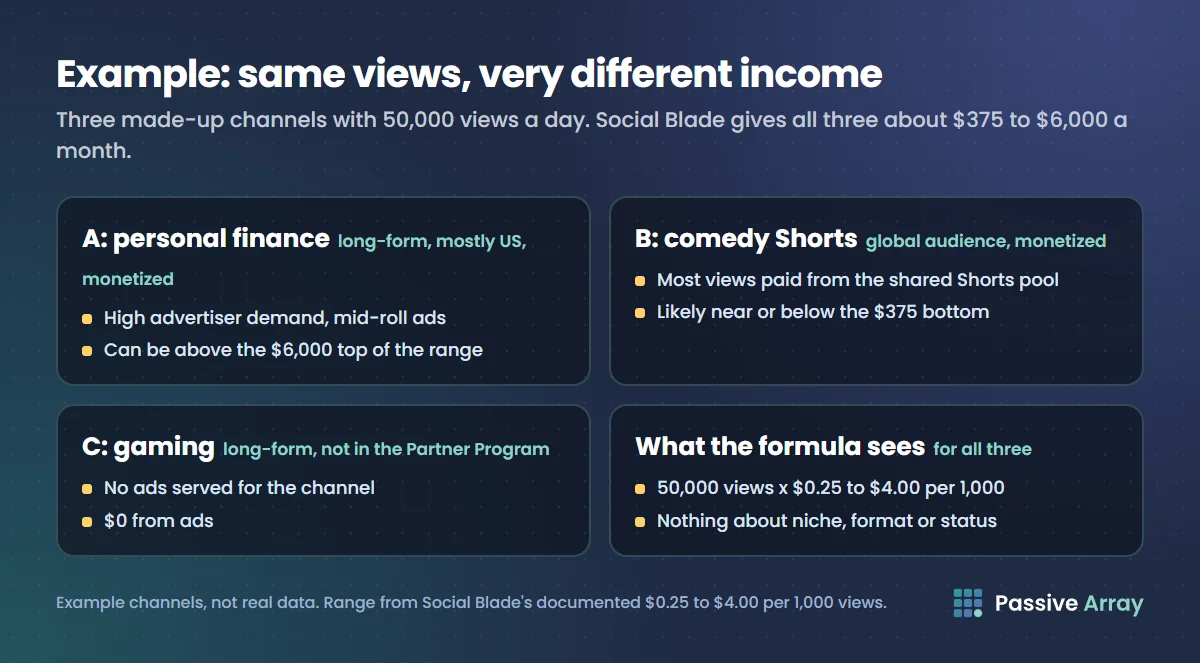
The Social Blade range is "wrong" for all three, in different directions, because the formula cannot see what makes them different. That is not a flaw in the arithmetic. It is the limit of what anyone can calculate from public view counts. Channel A's creator might also earn more from one sponsorship than from a month of ads; how much a YouTuber makes covers the other income lines.
Social Blade vs real income: why creators see big gaps
Creators often compare their Social Blade page with YouTube Studio and find the numbers far apart. The usual reasons:
- RPM outside the default range. If your actual RPM is $6, Social Blade's high estimate at $4 is too low. If it is $0.15, even the low estimate is too high.
- Lots of Shorts views. The channel's daily views include Shorts, which pay differently from long-form, so Shorts-heavy channels usually look richer on Social Blade than in Studio.
- Unmonetized views. Views on videos with limited or no ads, views from viewers using ad blockers, and views where no ad was served all count in the view total but earn little or nothing.
- Non-ad income. Studio's revenue can include memberships, Super Chat and Premium revenue. Social Blade's estimate is views times a rate and nothing else.
Does Social Blade underestimate or overestimate?
Both, depending on the channel. It tends to overestimate channels that are not monetized, Shorts-heavy channels, and channels with mostly low-RPM audiences. It tends to underestimate high-RPM niches such as finance, business and some tech, and any creator whose main income is sponsorships or memberships. The range is wide precisely because Social Blade cannot tell which kind of channel it is looking at.
How to check real YouTube earnings
Only one place has real numbers: YouTube Studio > Analytics > Revenue on the channel's own account. It shows estimated revenue, RPM and the revenue sources. Nobody outside the channel can see it, including Social Blade, vidIQ, TubeBuddy and Passive Array.
For someone else's channel, the best you can do is a transparent estimate:
- Check the public numbers with the subscriber count checker: subscribers, total views and averages from the last 10 uploads.
- Run the channel through the YouTube Money Calculator. It uses the channel's views on videos from the last 30 days and an RPM range you can edit (defaults $0.50 to $4.00). It is an estimate built the same basic way as Social Blade's, with the difference that every input is on the page and you can change it for the niche.
- Adjust the range using what you know: raise the high end for finance or software topics, lower both ends for a Shorts-heavy or kids audience.
- Treat the result as a bracket, never a figure. How much YouTube pays per view explains why.
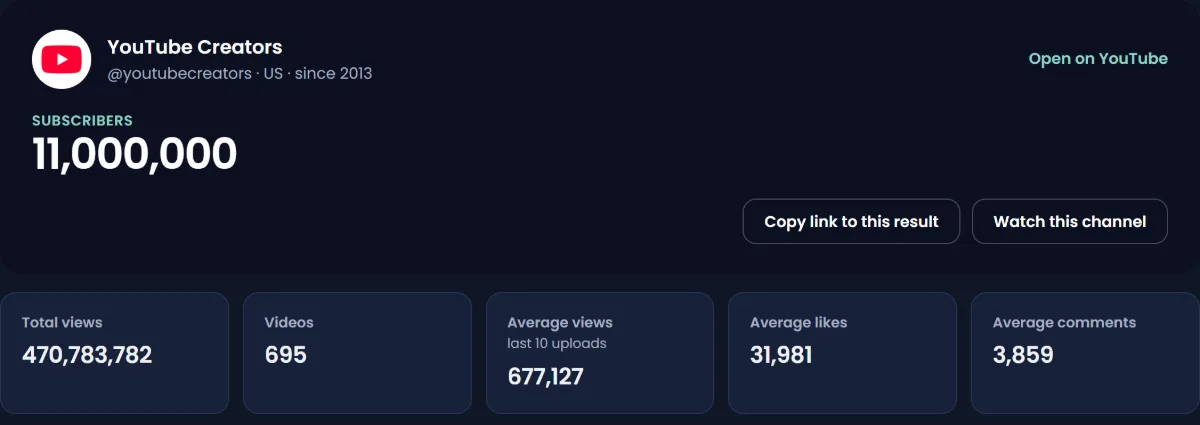
To watch a channel's public subscribers and views day by day from now on, add it to the YouTube Channel Growth Tracker. It records one point a day from the YouTube Data API, starting the day the channel is first tracked, with nothing backfilled or estimated. It does not have Social Blade's years of history.
Is Social Blade still useful?
Yes, for what it is good at. Its long daily history lets you see when a channel took off, whether growth is steady or spiky, and how a channel compares with others over years. For those questions it has an advantage that no newer tool can match, because history cannot be collected after the fact. Our list of Social Blade alternatives is honest about that too.
Use it for trends in public numbers. Do not use its earnings line to judge a creator's income, to price a sponsorship, or to decide whether a niche is worth entering. For sponsorship pricing, average views per video and an agreed CPM are a better basis.
Sources
- YouTube Help: YouTube RPM and CPM
- YouTube Help: Check your YouTube subscriber count
- YouTube Data API: Channels resource (subscriberCount, viewCount)
- Social Blade: How are estimated earnings calculated? (FAQ), as indexed on 1 November 2026
- Social Blade: YouTube money calculator, as indexed on 1 November 2026
- Wikipedia: Social Blade, for the company's history and YouTube's 2016 statement
Frequently asked questions
Is Social Blade real or fake?
Social Blade is real: its subscriber, view and video counts come from YouTube's public data. Its earnings figures are estimates, made by multiplying daily views by a fixed $0.25 to $4.00 per 1,000 views range. Treat the stats as accurate and the earnings as a rough bracket.
How accurate are Social Blade's estimated earnings?
Not very, for any single channel. Social Blade's own help page says the estimate assumes every view is monetized, which is usually not the case, and calls the figures just estimates. Real income can be above the range in high-paying niches or far below it for Shorts-heavy or unmonetized channels.
How does Social Blade calculate earnings?
According to Social Blade's help pages, it takes a channel's daily views, divides by 1,000, and multiplies by a low value of $0.25 and a high value of $4.00. Logged-in users can replace that default range with their own in Social Blade's settings.
Does Social Blade show real income?
No. No outside site can see a channel's real income, which exists only in the creator's YouTube Studio. Social Blade shows an estimate from public view counts, and so do vidIQ, TubeBuddy and Passive Array.
Why is my Social Blade income different from my real YouTube earnings?
Usually because your real RPM is outside the $0.25 to $4.00 range, a large share of your views are Shorts, many views earn no ad revenue, or your Studio revenue includes memberships and Super Chat. YouTube says RPM varies with country, season, ad formats and unmonetized views.
Is Social Blade's subscriber count accurate?
It is as accurate as YouTube's public data, which YouTube rounds to three significant figures for channels above 1,000 subscribers. That is why daily subscriber gains on large channels move in jumps. Only the channel owner sees the exact count in YouTube Studio.
Does Social Blade still work in 2026?
Yes. Social Blade still tracks YouTube, Twitch, Instagram, TikTok and Facebook, according to Wikipedia's article, which also records that it dropped X (Twitter) and several smaller platforms in March 2025 because of API costs. Its YouTube stats still come from YouTube's public data.
Is there an accurate YouTube income calculator?
No calculator can be accurate for someone else's channel, because RPM is private. The useful ones show their formula and let you change the RPM range for the niche, like the Passive Array YouTube Money Calculator. For your own channel, YouTube Studio's Revenue tab is the only real figure.