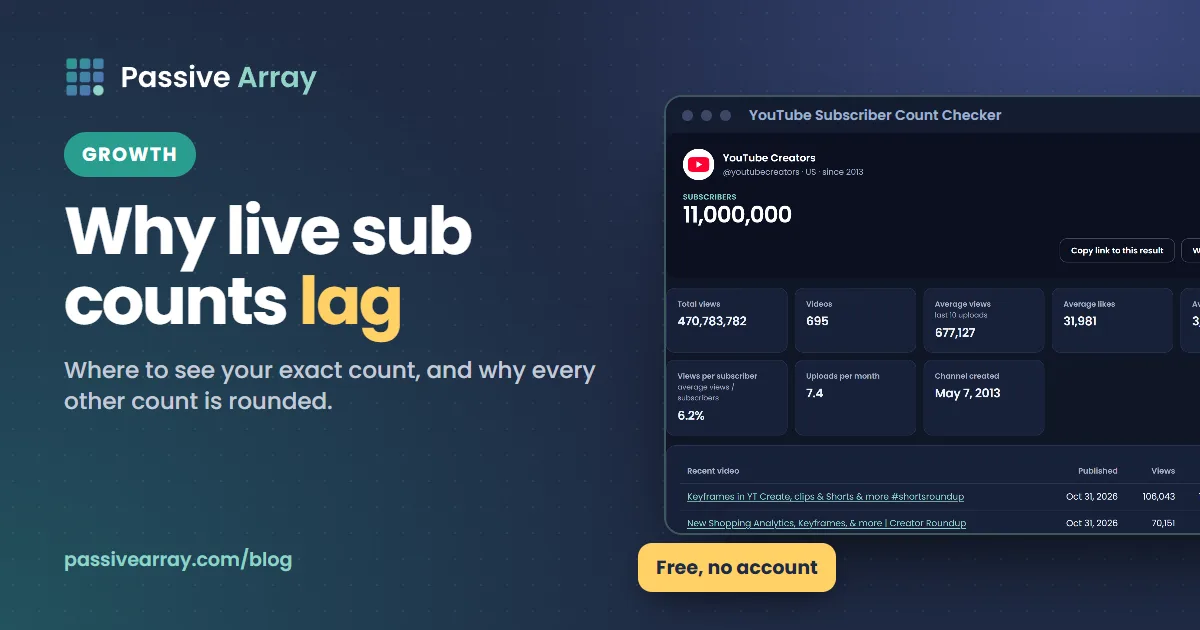
You can see a true live subscriber count for your own channel only: in YouTube Studio, open Analytics, go to the Overview tab, find the Realtime card and click See live count. For every other channel, the number anyone outside YouTube can read is rounded. YouTube shortens public counts for channels with 1,000 or more subscribers, and its official API returns the same figure rounded down to three significant figures. So a channel with 1,234,567 subscribers reads as 1,230,000 everywhere, including on live counter sites.
That is why live counters seem to "lag", jump or disagree with each other. They start from the same rounded number and fill the gaps with estimates. Our free YouTube subscriber count checker shows the public figure exactly as YouTube publishes it, says when it is rounded, and never animates digits it cannot see. The rest of this guide explains where each number comes from, which one to trust for which job, and why your count sometimes refuses to move.
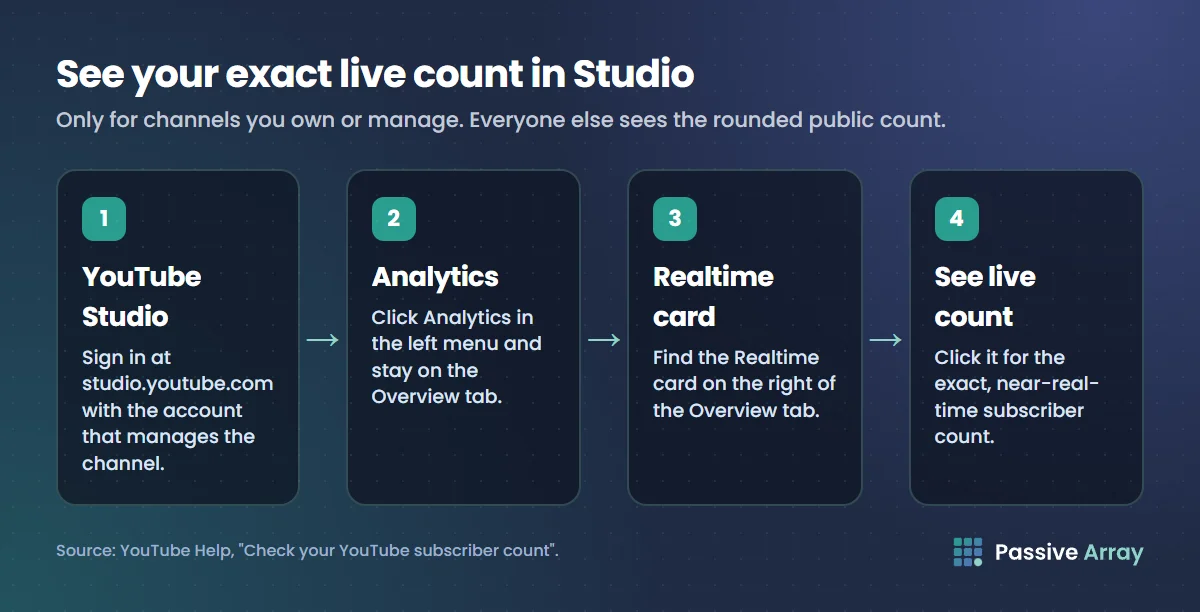
How to see your own live subscriber count
YouTube Studio is the only place that shows the exact, near-real-time subscriber count of a channel, and only to people who manage that channel.
On a computer
- Sign in to YouTube Studio (studio.youtube.com) with the account that owns or manages the channel.
- Click Analytics in the left menu.
- Stay on the Overview tab and find the Realtime card on the right.
- Click See live count. YouTube's Help page describes this as the place "to view your subscriber count over time".
The Channel analytics card on the Studio dashboard also shows your current subscribers, next to watch time and views for the last 28 days. That is the quickest check if you only want today's figure.
On a phone
The YouTube Studio app has the same Analytics section, with an Overview and a Realtime report. YouTube's Help page for the Realtime report says it gives "early insights into the performance of your recently published videos" and shows your top videos and subscriber count, with an expanded view that compares the last 60 minutes with the last 48 hours. The regular YouTube app only shows the public, shortened count under your channel name.
What you cannot do
You cannot see the exact count of a channel you do not manage. There is no setting, extension or website that unlocks it, because YouTube never sends the exact figure out of Studio. Any site that shows a stranger's count down to the last digit is estimating the final digits. The section on live counters below explains how.
How to check any channel's subscriber count
For channels you do not own, the public count is the only real number available. You can read it in three ways, and they all return the same rounded figure:
- On YouTube itself. The count appears under the channel name on the channel page and under the channel name on each watch page.
- With a checker. Paste a channel link, @handle or channel ID into the subscriber count checker. It reads the official YouTube Data API and adds total views, video count, average views on the last 10 uploads and uploads per month.
- With a ranking. For the biggest channels, the most subscribed YouTube channels list reads current public counts for a fixed list of top channels every six hours and sorts them by subscribers, total views or videos.
The checker and the ranking are free and need no account. They do not have access to anything a viewer cannot see, and neither does any other outside tool. Our guide on what public channel data can and cannot show lists every public number and how exact each one is.
Why the public count is rounded
In 2019 YouTube started abbreviating public subscriber counts. The YouTube Data API revision history records the change for developers on 10 September 2019: subscriber counts returned by the API "are rounded down to three significant figures". The current API reference still says the same about the subscriberCount field: "This value is rounded down to three significant figures."
YouTube's Help page on subscriber counts gives the exact steps the public number moves in:
| Real subscribers | Public count changes in steps of | Example |
|---|---|---|
| Under 1,000 | 1 | 847 shows as 847 |
| 1,000 to 9,999 | 10 | 1,234 shows as 1.23K |
| 10,000 to 99,999 | 100 | 45,612 shows as 45.6K |
| 100,000 to 999,999 | 1,000 | 312,940 shows as 312K |
| 1,000,000 to 9,999,999 | 10,000 | 1,234,567 shows as 1.23M |
| 10,000,000 to 99,999,999 | 100,000 | 23,456,789 shows as 23.4M |
| 100,000,000 to 999,999,999 | 1,000,000 | 312,345,678 shows as 312M |
The examples are made up, but the steps are YouTube's. Two things follow from this table.
First, the bigger the channel, the less often the number moves. A channel with 2 million subscribers has to gain up to 10,000 more before the public count changes at all. On a slow week that can take days, so the count looks frozen even while people subscribe every minute.
Second, rounding is always down. A channel at 1,239,999 still shows 1.23M. That is why a creator can feel the public number is behind: it is, by up to one full step.
Total views and video counts are not rounded. That matters for tracking, as you will see below.
How live subscriber counters work
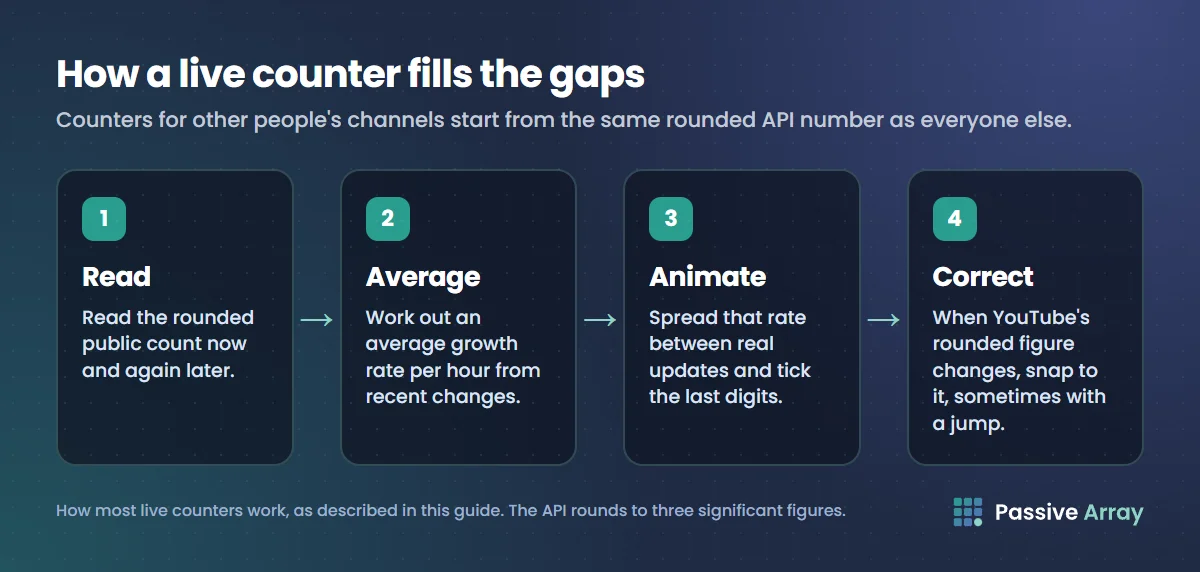
A live counter site, an OBS overlay or a "realtime" widget for someone else's channel has the same input as everyone else: the rounded public count from the YouTube Data API. To make the digits move, most counters do something like this:
- Read the rounded count now and again later.
- Work out an average growth rate per hour from recent changes.
- Spread that rate across the time between real updates and animate the last digits.
- When YouTube's rounded figure changes, correct the estimate, sometimes with a visible jump up or down.
Here is how that looks with numbers. Say a channel has 1,234,567 real subscribers and gains about 500 a day.
| What you look at | What it shows |
|---|---|
| YouTube Studio (owner only) | 1,234,567, near real time |
| Channel page on YouTube | 1.23M |
| YouTube Data API (every outside tool) | 1,230,000 |
| A live counter site | Something like 1,234,210, ticking up |
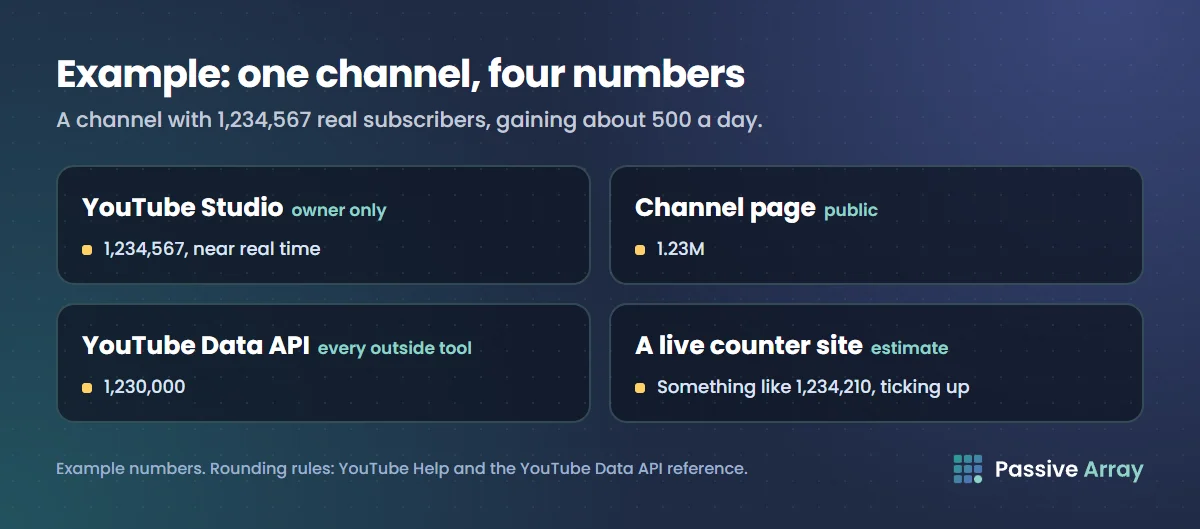
The live counter's last four digits are a model. The channel will not reach 1,240,000, the next public step, for roughly 11 more days at that pace, and the API will say 1,230,000 the whole time. A counter can be close to the truth on a steady channel and far off on one that just had a viral video or a spam cleanup. When the next real step arrives, the counter snaps to it.
This is why two live counters can show different numbers for the same channel at the same second. They use different growth models, different refresh times and different smoothing. Neither is reading the real figure. Is Social Blade accurate? explains the same problem for estimated earnings, and Social Blade alternatives compares what the main stats sites measure and what they estimate.
Live counters are fine for fun, such as watching a big channel cross a milestone. Do not quote their last digits as fact, and do not use them to settle a "sub race" between two channels within a few thousand of each other. At that distance the public data cannot tell you who is ahead.
Why your subscriber count is not updating
"My count is stuck" is one of the most common creator complaints. Work through these causes in order.
1. You are below the next rounding step
If your channel has 45,612 subscribers, the public count says 45.6K until you reach 45,700. Gaining 80 subscribers in a day changes nothing visible. Check the exact number in Studio's Realtime card instead.
2. You are looking at a cached number
Outside tools cache API results to stay inside YouTube's daily API quota. Our checker caches each channel for up to 6 hours, so a refresh within that window returns the same snapshot. Many other sites cache for longer. Studio is the only place without that delay.
3. Studio and the public count disagree
YouTube's Help page says it "may make corrections to site metrics in YouTube Analytics to fix consistency issues across different sources". Small differences between the Realtime card, the dashboard card and the public count are normal, especially right after a burst of subscribers or a cleanup.
4. Spam or closed accounts were removed
YouTube's Help page states: "Closed accounts and subscribers that are identified as spam won't count toward your total number of subscribers." When YouTube removes them, your count can stand still or drop even while real people subscribe. If spam subscribers were removed from your channel, YouTube says you will get an alert in YouTube Studio. Our guide on why YouTube subscribers go down covers every cause of a drop and how to check which one applies to you.
5. You are watching the wrong number
During a live stream, the number on screen may come from a third-party overlay that refreshes every few minutes or estimates between updates. If it disagrees with Studio, Studio is right.
Lakhs and crores instead of K and M
Some viewers in India see counts written as lakhs and crores (for example "12 lakh subscribers") rather than K and M. This is a regional number format, not a different count: 1 lakh is 100,000 and 1 crore is 10,000,000. YouTube has no Help page on switching the format. Users report that changing the app's language from English (India) to another English variant changes the display, but treat that as unconfirmed, since the format depends on the language and region settings of your app and device.
Showing a live subscriber count on stream (OBS)
Many creators want a subscriber counter on screen during a YouTube live stream. Most overlays work the same way: a third-party web page reads your channel's count and you add that page to OBS as a Browser source. The pattern is the one we describe for adding a Twitch follower count to OBS, and the same cautions apply.
- Expect the public number. An overlay that reads the YouTube Data API shows the same rounded count as your channel page. A medium-sized channel's overlay will not move for each new subscriber.
- Check whether the overlay estimates. If the digits tick up smoothly between real updates, the overlay is interpolating. That can look odd on stream if it later corrects downwards.
- Only connect your account to services you trust. Some overlays ask you to sign in with Google. Read what access the service requests, and remove access you no longer use in your Google Account settings.
- Do not promise an exact milestone moment. Because of rounding and refresh delays, "we hit 100K live" is easiest to verify in Studio after the stream, not on the overlay during it.
If the goal of the stream is growth rather than a ticking number, how to get more viewers on YouTube live streams covers what actually brings people in.
Live counts for the biggest channels
Searches like "top YouTube channels live sub count" or "live subscriber count of all YouTubers" usually want a leaderboard. YouTube does not publish an official ranking of its biggest channels. Our most subscribed channels page keeps a list of channels known to sit at the top, reads their current public numbers from the API every six hours, and leaves out auto-generated topic channels and any channel whose count is not public.
At the top of that list every channel is above 10 million subscribers, so each public count moves in steps of 100,000 or more. Two channels can show the same rounded number while being tens of thousands apart. Total views and videos are exact, so if you want a tiebreaker you can trust, sort by those.
Tracking subscriber growth instead of watching it tick
A live count tells you where a channel is this minute. It does not tell you whether the channel is growing faster or slower than last month. For that you need the same number recorded on a schedule.
The free YouTube channel growth tracker does this for any public channel. Once a channel is looked up, it joins a daily list, and every day around 05:45 UTC its public subscriber count, total views and video count are read from the official API and stored for 400 days. You get a subscriber chart, a views chart, views gained per day, 7 and 30-day change and a CSV download.
Because the subscriber line uses the same rounded public count, it moves in steps on big channels. Use views gained per day as the precise growth signal, since total views are not rounded. The history starts on the day a channel was first tracked: nothing earlier is backfilled or estimated.
| Question | Best number | Where |
|---|---|---|
| What is my exact count right now? | Live subscriber count | Studio, Analytics, Realtime card |
| What is any channel's count today? | Public rounded count | Subscriber count checker |
| Who are the biggest channels right now? | Public counts, ranked | Most subscribed channels |
| Is a channel growing faster this month? | Daily views and subscribers over time | Growth tracker |
| Are its subscribers still watching? | Average views divided by subscribers | Views per subscriber |
What Passive Array's tools can and cannot show
Our YouTube tools use the official YouTube Data API, so they inherit its limits.
They can show: the public subscriber count as YouTube publishes it, exact total views and video counts, per-video views, likes and comments for recent uploads, figures worked out from those (views per subscriber, engagement rate, upload pace), and a daily history from the day tracking started.
They cannot show: an exact subscriber count for channels with 1,000 or more subscribers, a second-by-second live count, subscribers gained and lost per day before rounding, history from before a channel was first tracked, or anything private to Studio such as watch time or where subscribers came from. If a channel's count is not publicly visible, the tools show "Hidden" rather than a guess. Can you hide your YouTube subscriber count? explains why that is now rare.
Common mistakes with live subscriber counts
- Treating estimated digits as real. If a site shows a non-owner's count to the last digit, the final digits are a model.
- Celebrating or panicking over one refresh. A single jump in a live counter is often a correction, not a real gain or loss.
- Comparing two counters. They use different estimates. Compare the API figure, which is the same for everyone.
- Ignoring views. On a large channel, daily views gained show growth days before the rounded subscriber number moves.
- Chasing the count with sub-for-sub. YouTube's fake engagement policy prohibits "offering to subscribe to another creator's channel only if they subscribe to your channel", and subscribers identified as spam do not count toward your total anyway.
Sources
- YouTube Help: Check your YouTube subscriber count
- YouTube Help: Get an overview of channel performance (Realtime report)
- YouTube Help: Use the YouTube Studio dashboard
- YouTube Help: Check your recent subscribers
- YouTube Help: Fake engagement policy
- YouTube Data API: Channels resource, statistics.subscriberCount
- YouTube Data API: Revision history, 10 September 2019 entry
Frequently asked questions
How do I see my YouTube live subscriber count?
Open YouTube Studio, click Analytics, stay on the Overview tab and click See live count on the Realtime card. That is the exact count, and it is only visible to people who manage the channel. The YouTube Studio app shows the same Realtime report on a phone.
Can I see the live subscriber count of someone else's channel?
Not the exact one. YouTube shortens public counts for channels with 1,000 or more subscribers, and its API rounds them down to three significant figures. Live counter sites start from that rounded number and estimate the rest.
Why is my YouTube subscriber count not updating?
Usually because you have not crossed the next rounding step, so the public number has not moved yet. Cached results on outside sites and the removal of spam or closed accounts can also hold the count still. Studio's Realtime card shows the exact figure.
Is a Social Blade style live subscriber count accurate?
The starting number is accurate to YouTube's rounding, because it comes from the same API. The digits that tick between updates are an estimate based on recent growth. Use them for fun, not as evidence.
Is there a free live subscriber count website or app?
Several sites offer animated counters for free, but they all read the same rounded API figure. Our free subscriber count checker shows that public figure without animation, and the growth tracker records it daily so you can see real change over time.
How do I add a live subscriber count to OBS?
Use an overlay page that reads your channel's count and add it to OBS as a Browser source. Expect it to show the public, rounded number and to refresh every few minutes, not with every new subscriber.
Which YouTube channels have the most subscribers right now?
YouTube does not publish an official ranking. Our most subscribed channels page reads current public counts for the top channels every six hours and ranks them, with exact total views and videos alongside the rounded subscriber counts.
Why does my channel show lakhs instead of millions?
That is a regional number format used for some viewers in India, not a different count. YouTube has not documented how to switch it, and user reports suggest the display follows your app's language and region settings.
By Nasir Uddin, founder of Passive Array. Rules and figures checked Nov 1, 2026.