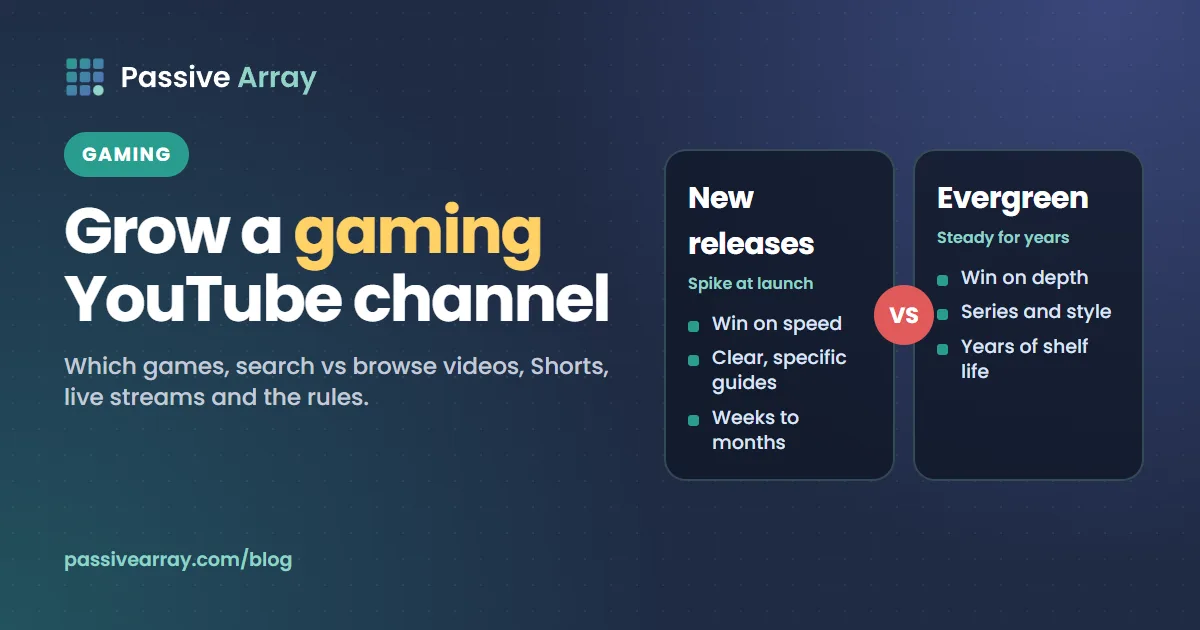
To grow a gaming YouTube channel, pick a lane of games narrow enough that one type of viewer wants every video, make videos that answer what those players search for, and use Shorts and live streams to feed your long-form uploads rather than replace them. Gameplay alone is not enough: the channels that grow add something a viewer cannot get by playing the game themselves, such as skill, knowledge, story or personality.
Gaming is one of the most crowded categories on YouTube, and it usually earns less per view than finance or tech. Before you commit, compare it with nearby options in the YouTube niche finder, which scores niches on earning potential, competition and how hard they are to film. If you still choose gaming, this guide covers the decisions that matter most: which games, which video types, how Shorts and live streams fit, and the YouTube and publisher rules that can quietly limit your ads.
Why gaming channels stall
Most new gaming channels upload full, lightly edited play sessions of whatever game they are enjoying that week. That fails for three reasons.
- Nobody searches for "my gameplay". A raw session has no question it answers, so it gets no search traffic.
- Nobody knows who the channel is for. One week is a horror game, the next a football game, the next a mobile shooter. YouTube recommends videos to viewers similar to the ones who liked earlier videos, so a channel that jumps between unrelated games gives it no consistent audience to learn from. The YouTube algorithm, explained covers how that works.
- It looks like reused content. YouTube's monetization policy on reused content says channels can be refused or lose monetization for "content downloaded or copied from another online source without any substantive modifications" or "similar or repetitive content with low educational value, commentary, narratives, or minimal variation across videos". Unedited, uncommented footage is the gaming version of that problem.
The fix for all three is the same: decide what you add to the game, and who it is for.
Choose your games: new releases vs evergreen
The biggest decision on a gaming channel is which games you cover. There are two broad strategies, and most successful channels mix them deliberately.
| New releases | Evergreen games | |
|---|---|---|
| Examples | A game launching this month, a big update or new season | Long-running games people play for years: Minecraft, Roblox, Fortnite, GTA V, football games, chess |
| Demand | Spikes at launch, then drops | Steady, with peaks around updates |
| Competition | Many channels upload on day one | Many channels, but also many specific questions left unanswered |
| What wins | Speed and clear, specific guides | Depth, series and a recognisable style |
| Shelf life | Weeks to months | Years |
| Risk | The game flops and your videos die with it | Big creators already own the broad terms |
When new releases make sense
New releases are where a small channel can briefly compete with large ones, because nobody has a back catalogue for a game that came out yesterday. The window is short. If you cover a new game, aim for the questions players have in the first weeks: beginner guides, best settings, boss help, where to find a specific item, whether a class or weapon is worth it. Upload as soon as you can do it well.
The risk is that you build an audience for a game, not for you. When the game fades, so do the views. Treat new releases as a way to gain viewers, then give those viewers a reason to stay for your next game.
When evergreen games make sense
Evergreen games reward depth. A broad title like "Minecraft survival" is owned by huge channels, but "how to build an automatic iron farm in Minecraft 1.21" is a specific question with a specific answer. Long-running games also have updates and seasons that create fresh questions on a schedule you can plan for.
A practical rule
Pick one main game or a tight family of games (for example, one survival game plus similar survival games), and allow a smaller share of uploads for new releases inside that family. A viewer who likes your survival guides will probably click on your guide to a new survival game. A viewer who likes your football game tips probably will not.
Decide what you add to the game
Every gaming video needs a reason to watch it instead of playing. Pick one or two of these and make them obvious in every video.
| What you add | Video types | Who it suits |
|---|---|---|
| Skill | High-level play, challenge runs, speedruns, ranked climbs | You are genuinely good at the game |
| Knowledge | Guides, tier lists, settings, explained mechanics, news and update breakdowns | You understand the game deeply and can explain clearly |
| Story | Lore videos, narrative playthroughs, documentaries about a game or its community | You can research and narrate |
| Personality | Commentary, reactions, playing with friends, roleplay | You are entertaining on camera or mic |
| Creativity | Builds, mods (where allowed), machinima, edits | You make things inside the game |
You do not need a face cam. Many gaming channels use voice only. What you cannot skip is something of your own: YouTube's reused content rules apply to the channel as a whole, and Nintendo's own Game Content Guidelines say "mere copies of Nintendo Game Content without creative input or commentary are not permitted."
Search videos vs browse videos
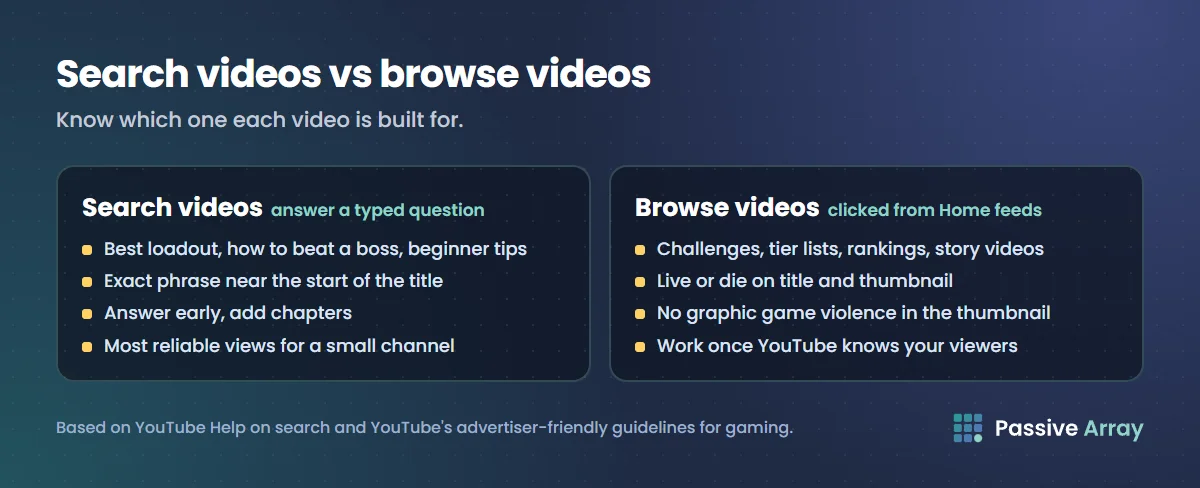
Gaming videos get views from two very different places, and you should know which one each video is built for.
Search videos
A search video answers a question a player types. "Best loadout for [weapon] season 3", "how to beat [boss]", "[game] beginner tips", "best settings for [game] on low-end PC". These are the most reliable views for a small channel, because YouTube search ranks on how well a video matches the query and satisfies the people who search it, not on how big your channel is.
How to build one:
- Start with the YouTube keyword generator or YouTube's own search suggestions. Type the game name followed by a letter, or by words like "how", "best" and "why", and note what appears.
- Put the exact phrase near the start of your title: "Elden Ring: how to beat Malenia (no summons)".
- Answer the question early. A player searching for a boss guide will leave if you spend two minutes on your intro.
- Add chapters so viewers can jump to the part they need. YouTube's rules for manual chapters: the first timestamp must be 00:00, you need at least three, and each chapter must be at least 10 seconds.
- After a week, open the video in YouTube Studio, go to Analytics > Reach, and check YouTube search terms to see which phrases found it.
Free YouTube keyword research covers the full method, including how to judge competition by looking at the results page.
Browse videos
A browse video is one people click because it appears on their Home feed or next to another video, not because they searched. Challenges, "I played 100 days of...", tier lists, rankings, story videos and big reactions to updates are browse formats. They can reach far more people than search, but only once YouTube knows which viewers like your channel.
Browse videos live or die on the title and thumbnail. Run thumbnails through the YouTube thumbnail tester to check how they look at real feed size in light and dark mode. One warning specific to gaming: YouTube's advertiser-friendly guidelines list "graphic game violence in the thumbnail or in the first seven seconds of the video" as a reason for no ad earnings. A dramatic thumbnail does not need gore.
A mix that works for small channels
For a channel under a few thousand subscribers, a reasonable starting mix is mostly search videos with one browse experiment every few uploads. As your search videos bring in viewers who return, browse videos have an audience to test on. That ratio is our suggestion, not a YouTube rule. Check Analytics > Content > Traffic source each month and shift toward whatever is working.
Use Shorts as clips, not as the channel
Gaming is naturally full of short moments: a clutch play, a funny bug, a fast tip. Shorts can be up to three minutes long and count as Shorts if they are square or vertical. They are a good way for new viewers to find you, but Shorts viewers swipe, and only some of them will ever watch a 20-minute video. How to grow a YouTube channel with Shorts goes deeper on that conversion problem.
Ways to make Shorts work for a gaming channel:
- Cut one moment from each long video. The best play, the funniest fail or the single most useful tip. In YouTube Studio you can attach a related video to a Short, which shows as a clickable link under your handle, so interested viewers can reach the full video. Links typed into Shorts descriptions and comments are not clickable.
- Make standalone tip Shorts. "One setting that doubles your FPS in [game]" is a complete idea in 30 seconds and can be found in search.
- Reframe for vertical. Do not upload a tiny 16:9 clip inside a vertical frame with black bars. Crop to the action, add your face cam or a short caption.
- Keep music and copyright in mind. YouTube says any Short over one minute with an active copyright claim of any type is blocked globally. If your clip includes licensed in-game music or a popular song, keep it under a minute or remove the music.
- Judge Shorts on their own numbers. Compare Shorts with Shorts in the Content tab, and long videos with long videos.
Live streaming a gaming channel
Live streams suit gaming better than almost any other category, because the audience can talk to you while you play. They also take a lot of time, so be clear about what they are for: building a loyal core audience and earning from viewers directly through features like Super Chat and memberships once you are eligible.
What you need to go live
From YouTube Help, as of 2026:
- To live stream at all, you must verify your channel and have had no live streaming restrictions in the past 90 days.
- You can stream from a mobile device, a webcam, an encoder (streaming software such as OBS), or a console.
- Mobile streaming needs at least 50 subscribers. Below 1,000 subscribers, YouTube may limit how many people can watch a mobile stream, and the archived stream is set to private by default.
- You may need to wait 24 hours before your first live stream.
- If you are under 16, an adult must be visibly present in the stream.
Most gaming streamers use an encoder on PC, because it handles game capture, overlays and alerts, and it does not have the mobile viewer limits.
How to make streams help the channel
- Stream on a schedule so regulars know when to show up. Publish time does not change a normal video's long-term performance, but it matters for live content because people need to be there.
- Title streams like videos. "Ranked grind to Diamond, day 12" tells a passing viewer what is happening. "Live!!" does not.
- Turn the best moments into videos and Shorts. A three-hour stream archive rarely gets many views later. A tight 12-minute highlight edit of it can.
- Keep chat in mind. Viewer messages you show on screen become part of your content.
How to get more views on YouTube Live covers stream titles, scheduling and promotion in detail.
YouTube's rules for gaming content
Most gaming content is fine for ads and recommendations. These are the specific rules where gaming channels most often get caught, all from YouTube's own pages.
Violence and ads
YouTube's advertiser-friendly guidelines say "violence in unedited video gameplay is generally acceptable for advertising", and that "violence that is unrealistic, playful, and generally acceptable for all ages" can earn ads. The problems start with graphic violence placed where it is most visible, or made the point of the video:
| Situation | Ad status, per YouTube |
|---|---|
| Normal gameplay violence, not graphic | Can earn ads |
| Graphic game violence in the thumbnail | Limited or no ads |
| Graphic game violence in the first seven seconds | No ads |
| Gameplay built to shock, such as gathering non-playable characters for mass killings | No ads |
| Graphic torture, or graphic violence against minors or real named people | No ads |
| Compilations of graphic cutscenes | Limited ads (yellow icon) |
YouTube defines graphic game violence as "brutal killings or severe injuries focusing on bodily fluids and parts". The practical rule: keep the opening and the thumbnail clean, and do not build videos around the goriest moments.
Language
YouTube's gaming monetization page lists moderate profanity in a title or thumbnail as limited ads, and stronger profanity in titles or thumbnails as no ads. Swearing in the gameplay itself is judged on how heavy and frequent it is. Keep titles and thumbnails clean even if your commentary is not.
Cheats, hacks and gambling
Tips, game cheats and mods can earn ads, according to YouTube. Using or encouraging hacking software in competitive e-sports cannot. YouTube's gaming monetization page also says betting with in-game currency falls under its illegal content policy, and that "obtaining virtual items outside of the normal course of gameplay is also policy violative." Skin gambling and item-selling sites are a fast way to lose ads.
Reused footage
Compilations of clips from other creators, or of game footage you did not play and did not comment on, fall under the reused content rules. YouTube's policy notes that it "applies even if you have permission from the original creator." Your own footage with your own commentary, analysis or editing is the safe ground. If you react to another creator's video, the reaction needs real commentary, not just your face.
Content ID and game footage
YouTube's Content ID rules say video gameplay footage is not eligible as a reference unless it comes from the game's publisher, so other gamers cannot claim your footage through Content ID. Publishers and music rights holders can. Licensed songs in a game's soundtrack can still be claimed by their rights holders, so it is worth turning off licensed in-game radio or music where the game allows it.
Made for kids
If your content is aimed at children, for example some Roblox or Minecraft channels, you must set the audience in YouTube Studio. YouTube says it is "your legal responsibility to comply with COPPA and/or other applicable laws and designate your content accurately." Made-for-kids videos lose features such as comments, the notification bell, end screens, cards and personalized ads. Set it honestly either way.
Publisher rules: check before you monetize
YouTube is not the only rule-maker. Game publishers own their games and set their own terms for videos. Two examples from the publishers' own pages:
- Nintendo allows gameplay videos and lists the YouTube Partner Program as an approved way to monetize, but does not allow unreleased content, pirated or emulated games, cheating or disruptive multiplayer play, or videos that imply Nintendo sponsors you.
- Microsoft's Game Content Usage Rules allow ad revenue through YouTube and Twitch programs and optional donations, but say "you can't sell or otherwise earn any compensation" from the content in other ways, and require a credit notice with a link to the rules. Minecraft has separate guidelines.
Other publishers have their own pages, and some games restrict streaming of story spoilers before a date. Search "[publisher] video policy" before building a channel around one game.
Name and brand the channel
A gaming channel name should still work if you change games. "TheMinecraftGuy" is stuck if you move to another survival game; a name based on you or a style lasts longer. The YouTube channel name generator suggests names in different styles with a length check, and YouTube channel name ideas covers handle rules and how to avoid trademarked game names.
A 60-day plan for a new gaming channel
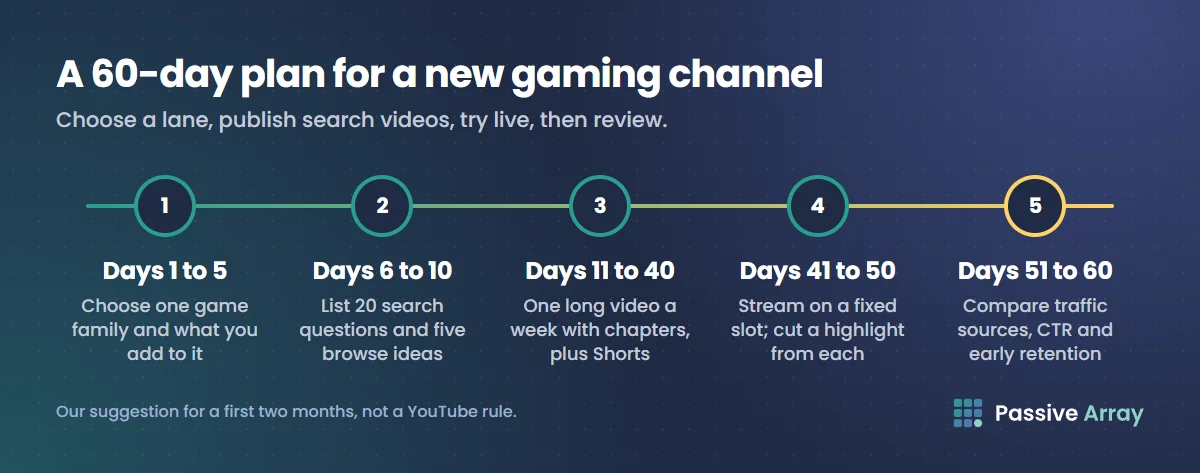
This is our suggestion for a first two months, not a YouTube rule.
- Days 1 to 5: choose. One main game or family of games, and one or two things you add (skill, knowledge, story, personality, creativity). Write them down.
- Days 6 to 10: build a list. Collect 20 search questions for your game from search suggestions and the keyword generator, plus five browse ideas. The YouTube video ideas generator gives twelve ideas with hooks for any niche if you are stuck.
- Days 11 to 40: publish. One long video a week, mostly search videos, each with chapters. Cut one or two Shorts from each.
- Days 41 to 50: try live. If you meet the requirements, stream on a fixed day and time. Cut one highlight video from each stream.
- Days 51 to 60: review. In Studio, compare traffic sources, click-through rate and the first 30 seconds of retention across your videos. Make more of what worked.
To see how other channels in your game are growing, add them to the YouTube channel growth tracker on Passive Array and watch their daily numbers. The outliers feed lists videos getting many times their channel's usual views, which is a good way to spot gaming formats that are working right now.
What gaming channels earn
Gaming videos often earn less per view than finance, business or tech, because advertisers pay less to reach gaming audiences. The YouTube CPM by niche guide explains why, and you need to be in the YouTube Partner Program before ads pay you anything. Many gaming creators rely as much on live features, sponsorships and memberships as on ads.
Sources
- YouTube Help: Advertiser-friendly content guidelines
- YouTube Help: Gaming and monetization
- YouTube Help: YouTube channel monetization policies (reused content)
- YouTube Help: Browse gaming content on YouTube
- YouTube Help: Get started with live streaming
- YouTube Help: Create a live stream on mobile
- YouTube Help: Avoid restrictions on YouTube live streaming
- YouTube Help: YouTube Shorts length and copyright claims
- YouTube Help: Video chapters
- YouTube Help: Content eligible for Content ID
- YouTube Help: Determining if your content is made for kids
- YouTube Help: Features restricted on made for kids content
- YouTube Help: Add a related video to your YouTube Shorts
- Nintendo: Game Content Guidelines for Online Video and Image Sharing Platforms
- Microsoft: Game Content Usage Rules
Frequently asked questions
What is the best way to grow a gaming YouTube channel?
Focus on one game or a tight family of games, and make search videos that answer what players type, such as guides, settings and boss help. Add something of your own in every video: skill, knowledge, story or personality. Use Shorts and live streams to bring viewers to your long videos, and check traffic sources monthly to see what works.
How do I get more views on a gaming channel?
Find out whether the problem is impressions, clicks or retention in YouTube Studio, then fix that one. For small gaming channels, the quickest gains usually come from specific search titles and openings that answer the question in the first 30 seconds. How to get more views on YouTube walks through the diagnosis.
Can I monetize a gaming channel without using my voice?
You can, but it is harder. YouTube's reused content policy targets content with little commentary, narrative or variation, so silent gameplay needs something else of value, such as high skill, careful editing, on-screen explanation or guides. Some publishers, like Nintendo, also require creative input or commentary for their footage.
How does the YouTube algorithm treat gaming channels?
The same way it treats every channel: it recommends each video to viewers similar to those who enjoyed it. That is why switching between unrelated games often stalls growth. Gaming videos also follow the advertiser-friendly rules on violence, which affect ads, not recommendations in general.
How much does YouTube pay gaming channels?
It depends on the audience's countries, video length and advertiser demand, and gaming usually earns less per view than finance or tech. The CPM by niche guide linked above explains the gap, and the YouTube money calculator on Passive Array gives an estimated range for any channel.
What are good video ideas for a gaming channel?
Beginner guides for a new release, settings and performance guides, boss or level walkthroughs, tier lists, challenge runs, update breakdowns and lore explainers all work. Pick the ones that match what you add to the game. The video ideas generator gives specific ideas with hooks for your game.
Do gaming tags and hashtags help?
Only a little. YouTube says tags play a minimal role, mainly helping with misspellings, and that title, thumbnail and description matter more. Hashtags can help viewers browse a topic, but more than 60 on a video are ignored. Selecting the Gaming category and the correct game in Studio is more useful.
By Nasir Uddin, founder of Passive Array. Rules and figures checked Nov 1, 2026.