To grow a YouTube channel with Shorts, make each Short hold viewers past the first seconds, keep every Short aimed at the same audience, and link each one to a longer video or series so viewers have somewhere to go next. Shorts are the fastest way for a small channel to reach new people, but a Shorts viewer swiped to you rather than chose you. Growth comes from turning some of those swipes into people who come back. Write the on-screen text and title first; the YouTube Title Generator suggests short, specific options you can adapt.
This guide covers how Shorts views are counted in 2026, the metrics in YouTube Studio that tell you whether a Short is working, how to plan and make Shorts that hold attention, and how to convert Shorts viewers into subscribers. For the channel-wide plan (positioning, series, community), read the hub guide on how to grow a YouTube channel.
What counts as a Short
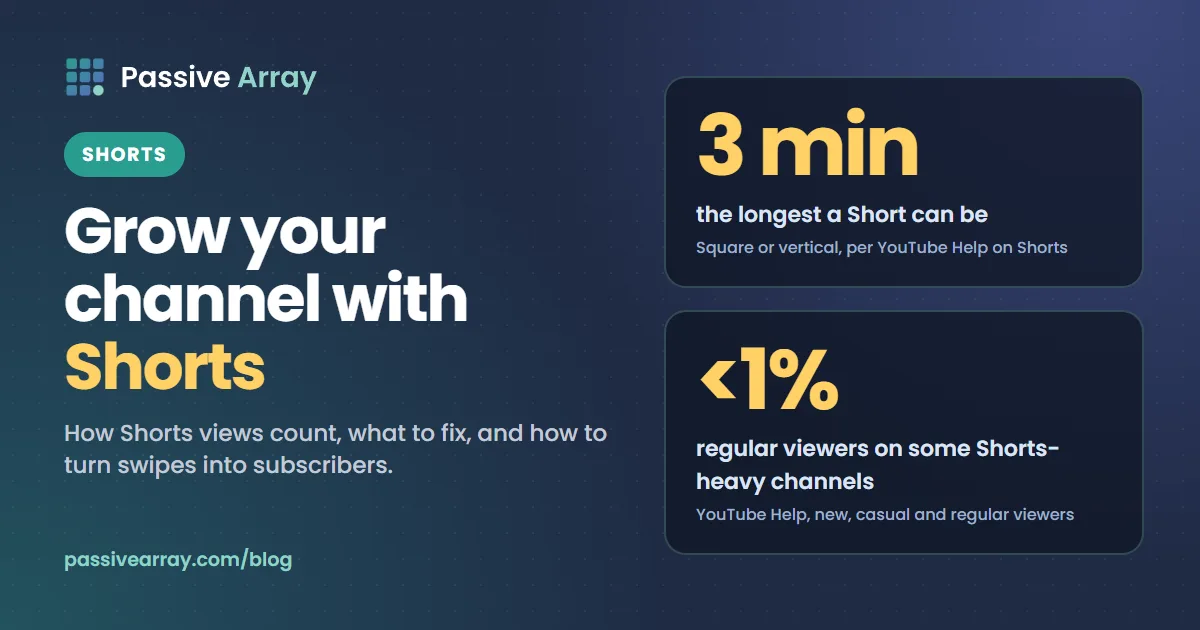
YouTube treats a video as a Short if it is up to three minutes long and square or taller in aspect ratio. YouTube's Shorts help page says you can create "short-form videos that are up to 3 minutes long" and upload vertical videos at a maximum resolution of 1080p.
That definition has consequences:
- A three-minute vertical video is a Short, with Shorts rules, Shorts analytics and Shorts monetization.
- Test & compare (A/B testing titles and thumbnails) does not work on Shorts. YouTube says "A/B testing is not available for Shorts."
- Shorts cannot be Premieres.
How Shorts views are counted
Since 31 March 2025, YouTube counts a Shorts view every time a Short starts to play or replays. In YouTube's words, views "count the number of times a Short starts to play or replay, with no minimum watch time requirement."
The older, stricter number still exists. YouTube renamed it engaged views and kept it in YouTube Analytics. YouTube defines engaged views as "how many times viewers stayed to watch past the initial seconds, not including any loops." Partner Program eligibility and Shorts revenue sharing are based on engaged views, not the public view count.
| Number | What it counts | Use it for |
|---|---|---|
| Views (public) | Every start or replay, no minimum watch time | Comparing with TikTok and Reels, public reach |
| Engaged views | Viewers who stayed past the first seconds, no loops | Judging whether a Short really held attention; monetization |
| Stayed to watch | The percentage of times viewers stayed past the first seconds | Comparing your Shorts with each other |
If you compare a Short from 2024 with one from 2026, use engaged views, because the public count rules changed in between. How YouTube counts views explains the counting rules for every format.
The Shorts metrics that tell you what to fix
Open YouTube Studio > Analytics > Content, then the Shorts tab. It shows a key metrics card (views, likes, subscribers), how viewers find your Shorts, how they engaged, and your top Shorts.
Read your last 10 to 20 Shorts with three questions:
- Did people stay? Look at stayed to watch for each Short. This is the Shorts equivalent of click-through rate: the opening second does the job a thumbnail does on long-form. Compare your Shorts with each other, not with other channels.
- Did they watch to the end, or loop? Open the retention graph for your best and worst Short. A drop in the first two seconds is a hook problem. A slow slide through the middle is a pacing problem.
- Did anyone subscribe? The key metrics card shows subscribers from Shorts. A Short with modest views that brings subscribers is often more valuable than a viral one that brings none.
| What you see | Problem | Fix |
|---|---|---|
| Low "stayed to watch" across most Shorts | The first second does not stop the swipe | Start on the payoff, add on-screen text that states the promise |
| Good "stayed to watch", sharp drop at one moment | One weak section | Cut that type of moment from future Shorts |
| Good retention, almost no subscribers | Viewers liked the Short but not the channel | Make Shorts that point to a series or longer video |
| Views spike then stop within two days | Normal Shorts behaviour | Judge each Short on its first week, then move on |
YouTube also offers a Get feedback button for Shorts, which YouTube says gives "an analysis of your video's hook, pacing, and more." Treat it as a second opinion, not a verdict.
YouTube Shorts engagement rate shows how to read likes and comments relative to views now that view counts are higher.
How to make Shorts that hold viewers
Start with the payoff, not the setup
Viewers decide in the first second. Long-form intros ("hey guys, today...") cost you most of the audience in a Short. Open on the result, the surprising fact, or the problem at its worst moment.
| Weak first second | Strong first second |
|---|---|
| Talking head says "So I wanted to try something" | Finished dish on screen with text "5 minutes, 3 ingredients" |
| Logo animation | The error message the viewer is stuck on, with "Fix in 20 seconds" |
| "Wait for the end" text over nothing | The end result shown first, then "here's how" |
One idea per Short
A Short that answers one question is easier to finish than one that lists five tips. If you have five tips, you have five Shorts, or a long video. The script outline generator can split a topic into a tight hook, one point and a close.
Write on-screen text for people watching without sound
Put the promise as text in the first frame, and keep it on screen long enough to read. Keep text away from the bottom and right edges, where the title, channel name and buttons sit in the player.
Design the loop
Because replays count as views and viewers who rewatch are clearly interested, a Short whose end leads naturally back to its start can earn rewatches. Do not fake it with "watch again" tricks; just avoid a long goodbye at the end. End on the last useful second.
Use length on purpose
Shorts can now run to three minutes, but longer is not automatically better. A 25-second Short that people finish and replay often beats a two-minute one they leave halfway. Use the extra length only for stories or tutorials that genuinely need it, and check the retention graph to see where people leave.
Titles and hashtags for Shorts
In the Shorts feed, viewers see the video before they read the title. Titles and hashtags still matter for search and for how YouTube and viewers understand the topic.
Titles. Keep them short and specific, with the main words first. "Fix a slow Android phone in 20 seconds" tells both viewers and YouTube what the Short is. A vague title such as "This changed everything" tells neither. The title generator linked above suggests variations; pick the one that matches what the first second shows.
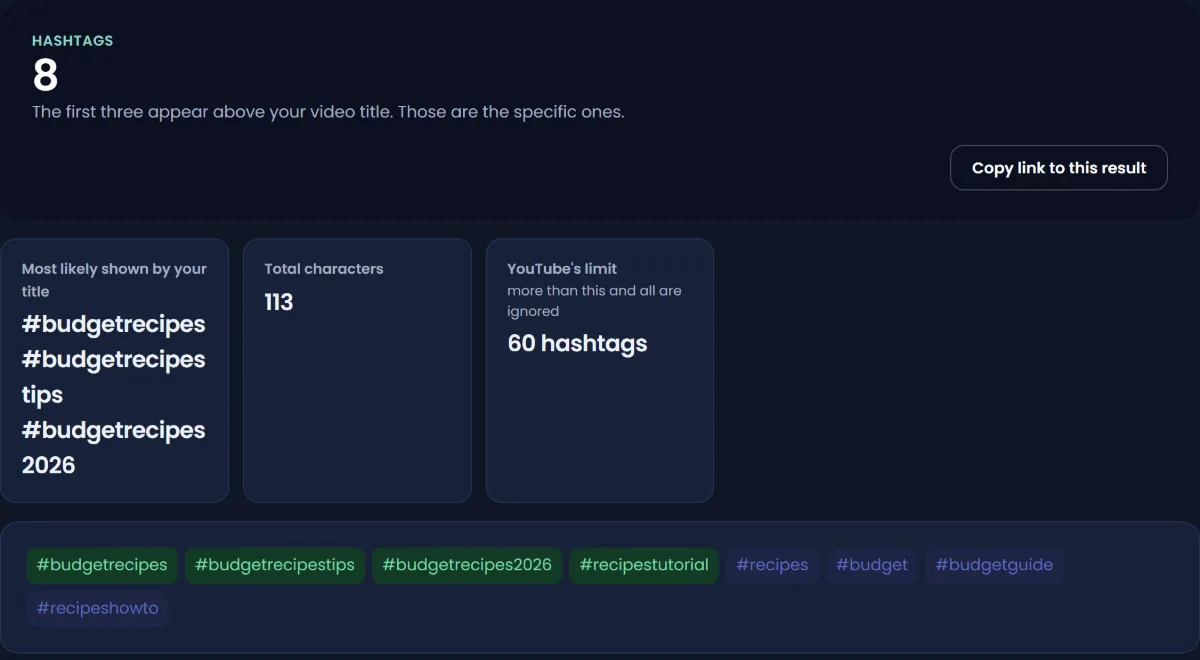
Hashtags. YouTube shows up to three hashtags "that are considered most engaging" by the title. Two rules from YouTube's hashtag policy matter:
- "If a video or playlist has more than 60 hashtags, we'll ignore each hashtag on that content." Not just the extras: all of them.
- "Don't add hashtags that are not directly related to the video." Misleading hashtags can get content removed.
So use a few relevant hashtags, not a wall of trending ones. The YouTube Hashtag Generator suggests topic hashtags from a keyword, and YouTube hashtags vs tags explains how the two differ. There are no "viral hashtags": a hashtag shows YouTube what the video is about, it does not push the video to more people.
For search-specific tactics, see YouTube Shorts SEO.
Turn Shorts viewers into subscribers who stay
This is the part most Shorts advice skips. YouTube's own help on audience segments warns that channels posting mostly Shorts can have a regular-viewer share "as low as <1%." Shorts bring reach; they do not automatically bring loyalty.
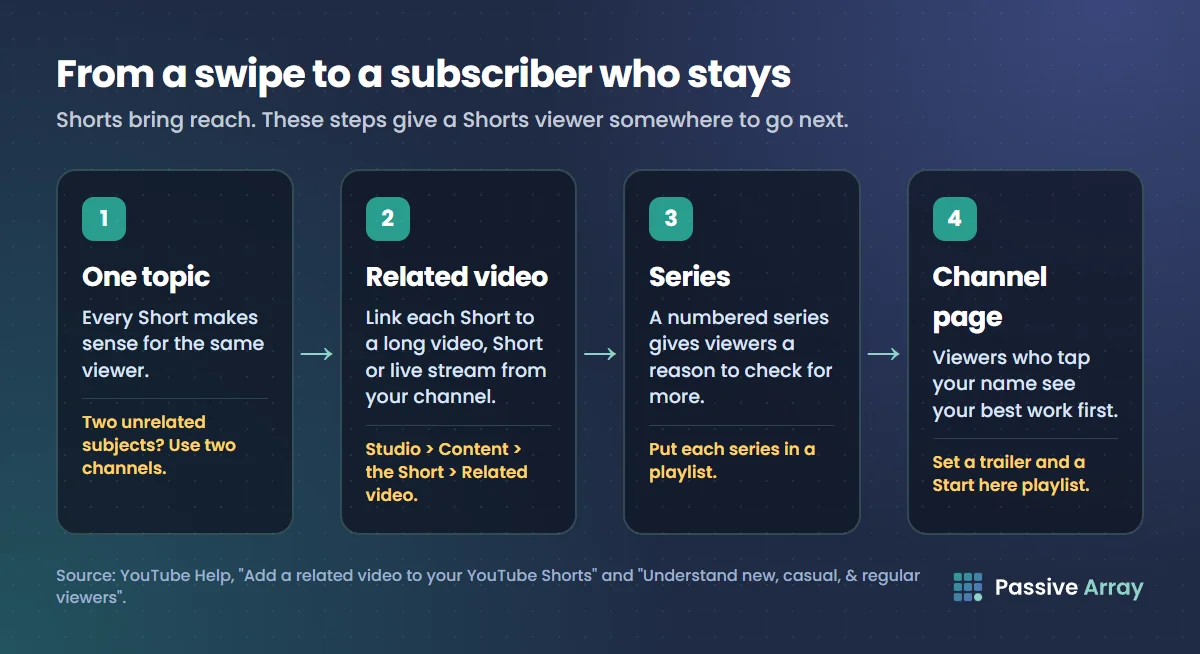
1. Keep the channel about one thing
A viewer who subscribes after a cooking Short and then sees gaming Shorts unsubscribes or stops watching. Every Short should make sense for the same viewer. If you want to post about two unrelated subjects, use two channels.
2. Link every Short to a related video
YouTube lets you attach a related video from your channel to a Short. It appears as a clickable link below your channel handle in the Shorts player. To add it:
- Sign in to YouTube Studio.
- Select Content in the left menu.
- Click the Short you want to edit.
- Choose a Related video from your channel.
- Click Save.
The linked video must be public or unlisted, and YouTube says the feature needs advanced feature access. It can point to a long video, another Short or a live stream.
3. Make Shorts that open a question your long videos answer
The best Shorts-to-long-form bridge is a Short that solves part of a problem and says where the rest is. "Here is the one setting that makes the biggest difference. The other four are in the full video, linked above." That works far better than cutting a random 30 seconds from a long video.
4. Build Shorts series
A numbered series ("Budget recipe #14") gives viewers a reason to check your channel for more, and makes your channel page look coherent when they get there. Put each series in a playlist.
5. Use the channel page
A viewer who taps your name lands on your channel. Set a channel trailer and a "Start here" playlist so they see your best work, not just your most recent upload.
Shorts and monetization
Shorts can count towards the YouTube Partner Program. YouTube's eligibility page lists 1,000 subscribers with 10 million qualified Shorts views in the last 90 days as one route, alongside 1,000 subscribers with 4,000 qualified watch hours in 12 months. Two details trip people up:
- Watch hours from Shorts in the Shorts feed "won't count towards the 4,000 qualified public watch hours threshold."
- Qualified Shorts views only count from public Shorts in the Shorts feed.
YouTube also says subscribers gained from Shorts count towards Creator Awards milestones, so a Shorts-heavy channel still earns play buttons.
Shorts earn far less per view than long-form. For the numbers, see can YouTube Shorts be monetized and how much YouTube pays for Shorts. Do not chase the 10 million view route with reposted clips: reused content is not eligible for monetization.
A 30-day Shorts plan
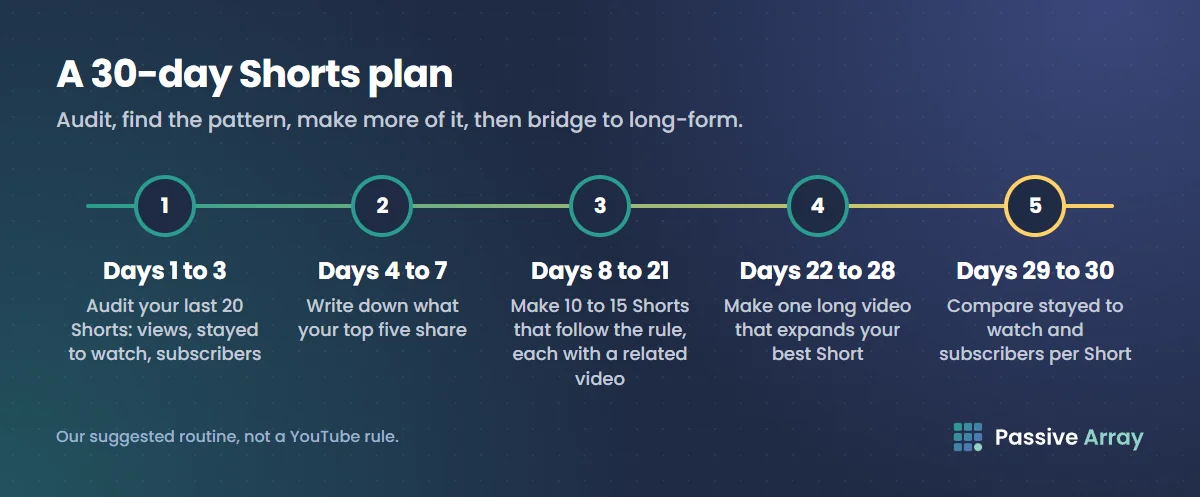
This is our suggested routine, not a YouTube rule.
- Days 1 to 3: audit. List your last 20 Shorts with views, stayed to watch and subscribers gained. Mark the top five on each measure.
- Days 4 to 7: find the pattern. What do the top five share: topic, first-second style, length, format? Write it down as a rule.
- Days 8 to 21: make 10 to 15 Shorts that follow the rule. Same audience, same promise, one idea each. Add a related video link to every one.
- Days 22 to 28: make one long video that expands the best-performing Short, and link the Short to it.
- Days 29 and 30: compare. Did stayed to watch and subscribers per Short improve? Did any Shorts viewers reach the long video? Keep what worked.
Track whether Shorts are growing the channel
Shorts views can rise while the channel stands still. Watch two things monthly:
- Subscribers gained, split by content type. Studio's Analytics shows subscribers by videos, Shorts and live streams. If Shorts bring most subscribers but long videos bring most watch time, your Shorts are working as a door.
- Returning viewers. If new viewers rise and returning viewers do not, people are passing through.
To see the public trend for your channel and for Shorts channels you want to learn from, add them to the YouTube Channel Growth Tracker, which records public subscribers and views daily.
What does not work
- Reuploading other people's clips. It can break copyright rules, and YouTube's reused content monetization policy "applies even if you have permission from the original creator."
- Posting the same Short twice. It splits views and can look like repetitive content.
- Hashtag walls. More than 60 hashtags means YouTube ignores all of them.
- Buying views or "engaged views". Artificial traffic is not counted and can lead to strikes under YouTube's fake engagement policy.
- Deleting Shorts that flopped. Each Short is judged on its own viewers. Deleting it does not help the next one.
Sources
- YouTube Help: Get started creating YouTube Shorts
- YouTube Help: Understand your YouTube content performance
- YouTube Help: Add a related video to your YouTube Shorts
- YouTube Help: A/B test titles and thumbnails
- YouTube Help: Hashtag policies
- YouTube Help: Understand new, casual, & regular viewers
- YouTube Help: YouTube Partner Program overview & eligibility
- YouTube Help: YouTube channel monetization policies
- YouTube Help: Fake engagement policy
Frequently asked questions
Can you grow a YouTube channel with Shorts only?
Yes, many channels gain subscribers mainly through Shorts. The risk is a low share of returning viewers: YouTube notes that Shorts-heavy channels can have under 1% regular viewers. Keep every Short for the same audience and link Shorts to series or longer videos so viewers have a reason to come back.
How do I get more views on my YouTube Shorts?
Improve the first second, because that is where viewers decide to swipe. Start on the payoff, put the promise in on-screen text, keep one idea per Short, and end without a long goodbye. Check "stayed to watch" in Studio to see which openings work.
How are views counted on YouTube Shorts?
Since 31 March 2025, a Shorts view counts every time the Short starts to play or replays, with no minimum watch time. The stricter measure, engaged views, counts viewers who stayed past the first seconds and excludes loops. Monetization uses engaged views.
Do hashtags help YouTube Shorts get more views?
They help YouTube understand the topic and can surface a Short on hashtag pages, but they do not push a video to more people on their own. Use a few relevant ones. If you add more than 60, YouTube ignores every hashtag on that video, and misleading hashtags can get content removed.
How many Shorts views do you need for monetization?
For ad revenue sharing, YouTube lists 1,000 subscribers and 10 million qualified Shorts views in the last 90 days as one route. Watch hours from the Shorts feed do not count toward the 4,000-hour long-form route. Meeting a threshold does not guarantee acceptance, because YouTube still reviews the channel.
How do I get more views on old YouTube Shorts?
Most Shorts get the bulk of their views in the first days, but old Shorts can pick up views again from search or when a new Short brings viewers to your channel. Add a related video link to old Shorts that still perform, put them in playlists, and make new Shorts on the same topic. Reposting the same Short is not a fix.
Do Shorts hurt long-form videos on the same channel?
YouTube has not said they do. Shorts and long-form are recommended on different surfaces to viewers in different moods, so judge each by its own numbers. Problems usually come from Shorts on a different topic from the long videos, which attracts subscribers who do not want the long-form content.
By Nasir Uddin, founder of Passive Array. Rules and figures checked Nov 1, 2026.