To get more viewers on YouTube live, schedule the stream in advance so people can set reminders, give it a specific title and a clear thumbnail, go live at a regular time when your audience is online, and give viewers a reason to stay and chat once they arrive. Timing matters more for live than for uploads: YouTube's performance FAQ says publish time is not known to affect a normal video's long-term performance, but "publish time is important for formats such as Live and Premiere videos." Start with the title, because a scheduled stream's title and thumbnail are what people see for days before it starts; the YouTube Title Generator suggests specific options you can adapt.
A live stream also has two lives: the live audience, measured in concurrent viewers, and the replay, which keeps earning views after the stream ends. This guide covers both, along with the live analytics YouTube gives you and the settings that help.
Before you start: who can go live
YouTube's live streaming help lists the basics: you need to verify your channel and have no live streaming restrictions in the past 90 days. Mobile streaming has its own extra requirements. YouTube also limits each channel to 10 active streams at a time.
There are three ways to go live: from a phone, from a webcam in the browser, or with an encoder such as streaming software. An encoder gives you scenes, overlays and screen sharing, which most gaming, tutorial and talk streams need.
Step 1: schedule the stream, do not just go live
An unannounced stream starts with nobody watching. A scheduled one starts with people who chose to come. YouTube's help says "scheduling a stream lets you promote your stream": viewers can get reminders and you can share the stream's URL in advance.
To schedule a stream in YouTube Studio:
- Click Create at the top right, then Go live. This opens the Live Control Room.
- Open the Manage tab and click Schedule stream.
- Reuse the settings from a previous stream or create new ones.
- Set the title, description, thumbnail, date, time and visibility.
- Save. The stream now has a watch page and URL you can share.
When it is time, connect your encoder or camera, wait for the preview, and click Go live. If you use an encoder, YouTube's auto-start and auto-stop settings let you start and stop streaming from the encoder itself.
Promote the watch page
The scheduled watch page is your event page. Use it.
- Share the link in a post on your channel, in the description of your latest upload, in a pinned comment and on your other platforms.
- Add a trailer. YouTube suggests you "get your audience excited about your upcoming live stream by showing a trailer."
- Mention it in your videos. "I'm answering your questions live on Thursday at 7 pm; the link is in the description."
- Watch the reminders count. Studio reports Reminders set for a scheduled stream. If a stream has very few reminders a day before, promote it more or rethink the topic.
Pick a regular time
YouTube says publish time matters for live, so choose a slot when your viewers are actually on YouTube. Studio's Audience tab has a When your viewers are on YouTube report for the last 28 days, and YouTube suggests it for planning your next live stream. A fixed weekly slot ("every Thursday, 7 pm") lets regulars build a habit. The best time to post on YouTube explains how to read that report.
Step 2: make the title and thumbnail do their job
A scheduled stream's title and thumbnail are on its watch page and every place you share the link, days before it starts, so they need to earn the click like any video.
| Weak live title | Specific live title |
|---|---|
| Live stream! | Fixing your channel thumbnails live: send yours in chat |
| Friday chill stream | Ranked grind to Diamond, day 12: can we do it tonight? |
| Q&A | Answering every budget travel question in 60 minutes |
| Just chatting | Building a budget gaming PC live, part by part |
A good live title says what happens and why it is worth watching live rather than later: audience participation, a goal, a reveal or a deadline. Avoid all-caps and "LIVE NOW!!!": the title should describe the content, not shout.
For the thumbnail, use the same rules as for uploads: one subject, high contrast, three words or fewer. Check how it looks at feed size, in light and dark mode, with the YouTube Thumbnail Tester. YouTube thumbnail examples shows patterns that win the click. Note that YouTube's A/B testing for titles and thumbnails does not cover scheduled live streams.
Step 3: run a stream people want to stay in
Concurrent viewers grow when people stay. A viewer who arrives and finds a waiting screen, silence or a host ignoring chat leaves.
The first five minutes
- Start on time. People who set a reminder arrive at the start.
- Do not wait for "more people to join" in silence. Tell new arrivals what the stream is about, then start the content. Repeat the topic every 10 to 15 minutes for people who arrive late.
- Pin a message in chat with the topic, the schedule and any rules.
Make chat part of the content
Live is the one format where viewers can change what happens. Use it.
- Read names and answer questions on stream.
- Run polls or let chat choose between options.
- Set a goal for the stream and show progress.
- Use moderators. A busy chat with spam or abuse drives regulars away. Comment settings let you hold messages for review.
Keep the stream structured
Long streams with no structure lose people in the middle. Plan segments ("first 20 minutes: news; next 30: your questions; last 10: next week's plan"), and say what is coming next before each segment ends. This is the live version of keeping viewers watching a video.
Bring in a guest
YouTube's Go live together feature lets eligible creators invite a guest to co-stream from a phone. Anyone with a YouTube channel can be invited, one guest appears at a time, and you can rotate guests during the stream. A guest brings their own audience, which makes collaboration one of the most reliable legitimate ways to reach new live viewers.
Step 4: read your live analytics
YouTube reports live numbers in three places. Knowing which number means what helps you improve each stream.
| Metric | YouTube's definition | Where |
|---|---|---|
| Concurrent viewers | "The number of simultaneous viewers" | Live Control Room, during the stream |
| Peak concurrent | "The highest number of viewers during a live stream" | Live Control Room and after the stream |
| Average concurrent viewers | "The average number of viewers that were simultaneously watching your stream at any one time" | Studio, the stream's analytics |
| Average view duration | "Estimated average minutes watched per view" | Live Control Room and after |
| Chat rate | Messages sent in live chat per minute | Live Control Room |
| New subscribers | "The number of users who subscribed to your channel during the stream" | Post-stream summary |
| Reminders set | Reminders viewers set for the stream, minus any removed | Studio, the stream's analytics |
To see a past stream's report, go to YouTube Studio > Content > Live tab, pick the stream and click Analytics. YouTube says live data in Analytics is available "within minutes" after the stream ends and can be downloaded as a CSV. Numbers in Analytics may differ from what the Live Control Room showed, because Analytics data is "processed and despammed".
How to use them:
- Average concurrent is your main number. Peak concurrent can spike from one shared link. Average concurrent shows how many people stayed together.
- Look at the key moments for audience retention. Find where viewers left in numbers and what was happening then.
- Compare like with like. A two-hour Saturday stream and a 30-minute Tuesday Q&A are different events. Compare each with the same format.
- Track new subscribers per stream. A small stream that brings subscribers is working.
YouTube Analytics explained covers the rest of Studio's reports.
Live subscriber counts
Many creators want a real-time subscriber count on screen during a stream; most add a counter as an overlay in their streaming software. Remember that YouTube shortens public subscriber counts: YouTube's help page says channels with 1,000 to 9,999 subscribers update in steps of 10, and bigger channels in larger steps, so any public counter moves in jumps, not one by one. How to show a YouTube live subscriber count covers the options.
Step 5: get views from the replay
When a stream ends, it becomes a video, and YouTube says likes transfer to the archived version. For many channels the replay earns more total views than the live audience did. Make it easy to watch.
- Rewrite the title for people who missed it. "Live Q&A Thursday" means nothing next week. "Budget travel Q&A: 23 questions answered" does.
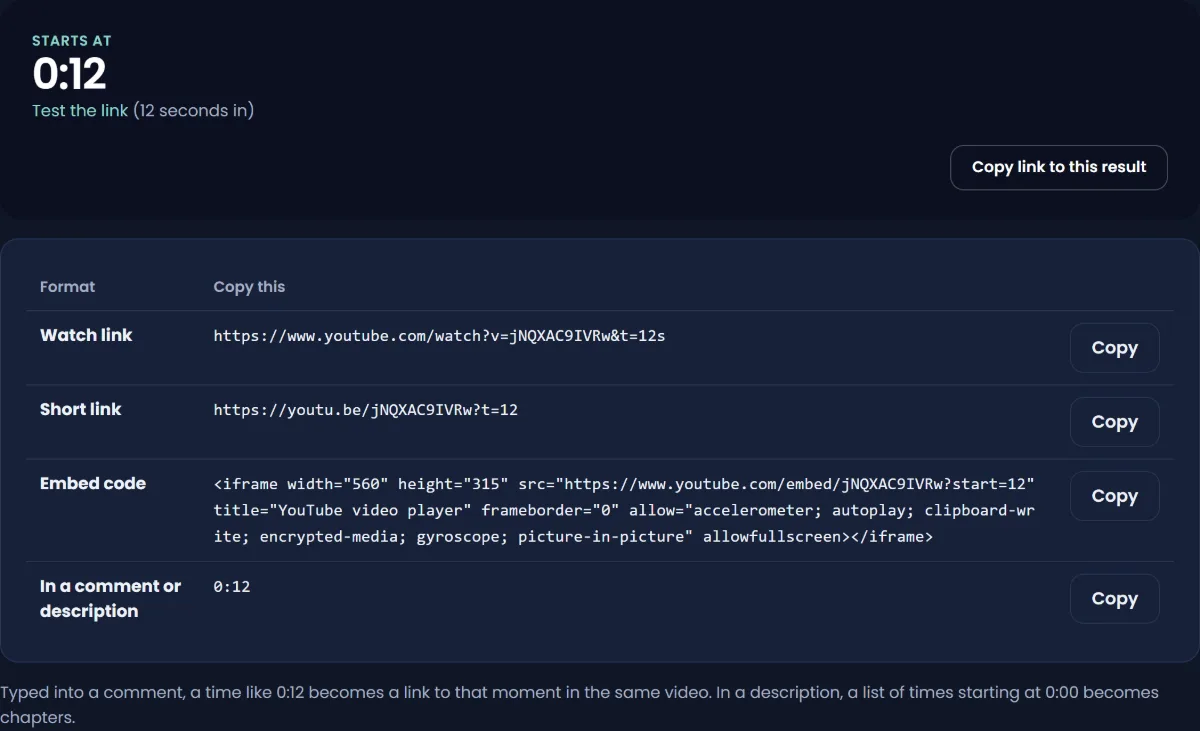
- Add timestamps in the description so viewers can jump to the part they want. The YouTube Timestamp Link Generator makes links that open at an exact moment, useful for sharing the best answers on social media. How to link to a specific time in a YouTube video explains the formats.
- Trim the waiting screen and dead air at the start if your tools allow it.
- Cut highlights into Shorts and short videos that link back to the full replay.
- Add the replay to a playlist of past streams, so regulars can catch up.
Use Live Redirect and Premieres
YouTube's Live Redirect lets you send your audience to a Premiere or another live stream when your stream ends. Set up the Premiere before the live stream, and tell viewers it takes a couple of seconds to reload.
A Premiere is an uploaded video that debuts like a live event: a public watch page, a countdown, live chat, and an optional trailer. YouTube says the view count from the Premiere "will transfer to the video afterwards." Premieres do not support Shorts. Ending a live stream with a redirect to a Premiere of your best new video sends a warm audience straight into it.
Monetizing live streams
If your channel is in the YouTube Partner Program and monetization is on for the stream, YouTube lists these ways to earn from live:
- Ads. Pre-roll and display ads, plus mid-roll ads during the stream. Mid-rolls can be automatic (YouTube picks natural breaks at a low, medium or high frequency), scheduled at fixed intervals, or manual. YouTube says scheduled and manual modes may earn less than automatic.
- Super Chat and Super Stickers. Viewers pay to highlight messages in chat.
- Channel memberships.
Ads do not always fill every slot, and ads do not run when the player is embedded elsewhere with autoplay. YouTube does not publish a standard live RPM; it varies by audience and niche like any other video. For an estimate based on views, the YouTube Money Calculator gives a range.
A four-week plan for a small channel
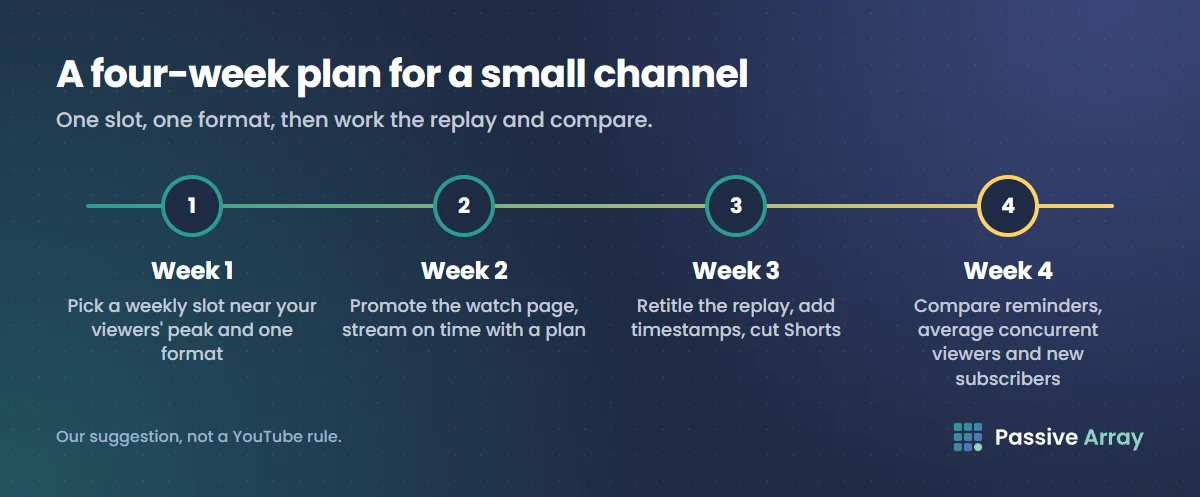
If your streams currently draw a handful of viewers, this routine builds a live audience step by step. It is our suggestion, not a YouTube rule.
- Week 1: pick the slot and the format. Check when your viewers are on YouTube, choose one weekly time near the peak, and choose one repeatable format, such as a Q&A, a build, a ranked session or a review of viewer submissions. Schedule the first stream at least a few days ahead.
- Week 2: promote and stream. Post the watch page link on your channel, pin it under your latest video, and mention it in that video. Stream on time, with a pinned chat message and a clear plan of segments.
- Week 3: work the replay. Retitle the replay, add timestamps, cut two or three highlights into Shorts that link to it, and schedule the next stream before you end the current one so viewers can set a reminder straight away.
- Week 4: compare. Line up reminders set, average concurrent viewers, average view duration and new subscribers for each stream. Keep the format that held people longest and drop what lost them.
Live streams work best as part of a channel, not instead of one. Uploads bring new viewers; streams turn some of them into regulars who know your name. YouTube lists "live premieres/chats" among the features that build regular viewers, and how to grow a YouTube channel shows how streams fit with series, playlists and posts. If you cut highlights into Shorts, how to grow a YouTube channel with Shorts covers linking each Short back to the full video.
What does not work
- Viewbots. YouTube's fake engagement policy names "any content that knowingly uses a service to artificially inflate live traffic ('viewbotting')". Artificial traffic is not counted and can lead to strikes.
- 24/7 loops of old videos to look live. Viewers leave, and repetitive content is not eligible for monetization.
- Streaming at random times. Regulars cannot build a habit around a schedule that does not exist.
- Ignoring chat. If viewers wanted a video with no interaction, they would watch an upload.
- Hours of waiting screen. People who arrive at a "starting soon" screen with no end in sight leave and do not come back.
Sources
- YouTube Help: Get started with live streaming
- YouTube Help: Create a YouTube live stream with an encoder (scheduling)
- YouTube Help: Manage live stream settings
- YouTube Help: See your live stream's metrics
- YouTube Help: Premiere a new video
- YouTube Help: Invite a guest to your live stream with Go live together
- YouTube Help: Monetize your live stream
- YouTube Help: YouTube performance FAQ and troubleshooting
- YouTube Help: Understand your YouTube audience
- YouTube Help: Check your YouTube subscriber count
- YouTube Help: A/B test titles and thumbnails
- YouTube Help: Understand new, casual, & regular viewers
- YouTube Help: Fake engagement policy
Frequently asked questions
How do I get more views on my YouTube live stream?
Schedule the stream in advance so viewers can set reminders, promote the watch page link, use a specific title and a clear thumbnail, and go live at a regular time when your audience is online. During the stream, interact with chat so people stay, and after it, give the replay a new title and timestamps.
Why does nobody watch my YouTube live streams?
Usually because nobody knew it was happening, or the title did not give a reason to watch live. Unscheduled streams on small channels start with no audience. Schedule ahead, promote the link, and build a regular weekly slot so viewers can form a habit.
What is a good number of concurrent viewers on YouTube?
YouTube does not publish a benchmark, and it varies hugely by channel size and niche. Compare each stream's average concurrent viewers with your own previous streams of the same format, and aim to grow that number over time.
How do I see my live subscriber count during a stream?
Most creators add an on-screen counter as an overlay in their streaming software. YouTube shortens public subscriber counts above 1,000, so a public counter moves in steps. The Live Control Room shows other real-time numbers such as concurrent viewers and chat rate.
Does the time I go live matter?
Yes, more than for normal uploads. YouTube's performance FAQ says publish time is important for Live and Premiere videos. Check when your viewers are on YouTube in Studio's Audience tab and pick a regular slot near that time.
Do live stream replays count as views?
Yes. After a stream ends, the replay stays on your channel as a video and keeps collecting views, and YouTube says likes from the stream transfer to it. Retitling the replay and adding timestamps helps people who missed the live stream find it.
How much does YouTube pay for live streams?
Live streams earn from ads, Super Chat, Super Stickers and memberships once the channel is in the Partner Program. YouTube does not publish a standard live RPM, because it depends on audience, niche and how many ads are shown. Treat any fixed "live RPM" figure online as an estimate.
By Nasir Uddin, founder of Passive Array. Rules and figures checked Nov 1, 2026.