To get more views on YouTube for music, treat your channel as more than a place to upload songs. Get your releases delivered properly through a distributor so they appear on YouTube Music, claim an Official Artist Channel when you qualify, and surround each release with videos people actually search for and share: Shorts, performances, behind-the-scenes and, for producers, clearly titled type beats. A lone audio upload with a still image rarely grows on its own.
Music search on YouTube works like any other search: people type specific phrases, and the videos that match and satisfy them get shown. The YouTube keyword generator turns one phrase, like an artist name plus "type beat" or a genre plus "cover", into the long-tail versions people type. This guide covers both sides of music YouTube: artists releasing their own songs, and producers selling beats.
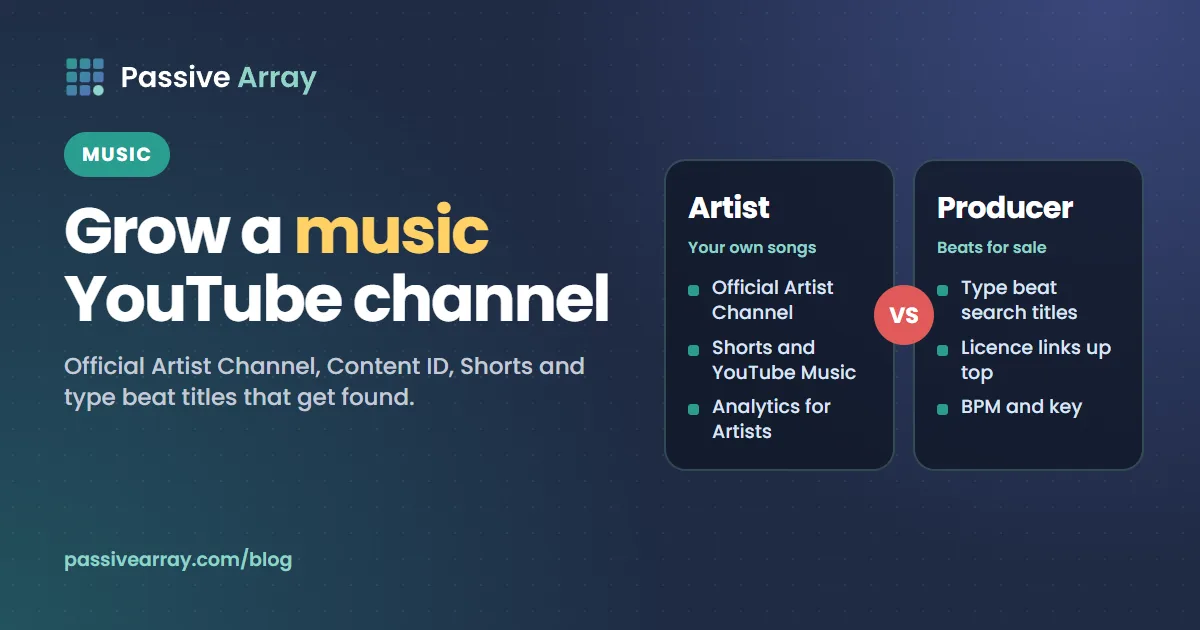
Two kinds of music channels
Most music channels fall into one of two groups, and they grow in different ways.
| Artist or band | Beat producer | |
|---|---|---|
| What you upload | Your own songs, videos, performances | Instrumentals for other artists to buy or lease |
| Who watches | Fans and new listeners | Rappers and singers looking for a beat |
| How they find you | Recommendations, Shorts, YouTube Music, your existing fans | Search, especially "[artist] type beat" |
| How you earn | Streams, ads, Content ID through your distributor, merch, tickets | Beat sales and licences, plus ads |
| Key YouTube tools | Official Artist Channel, Analytics for Artists, Shorts | Search titles, descriptions with licence links |
Some channels do both. If you do, keep the purpose of each video clear, because a fan of your songs and a rapper shopping for a beat are looking for different things.
For artists: the official YouTube tools you should be using
YouTube runs a separate set of resources for musicians at artists.youtube. These are the parts that matter most for growth.
Get your music distributed, not just uploaded
When a label or music distributor delivers your release to YouTube, it appears on YouTube Music and in YouTube's music catalogue, usually through an auto-generated "Topic" channel. That is different from uploading an MP3 with a picture to your own channel. Distribution is also the first requirement for an Official Artist Channel.
If you only upload the audio yourself, you miss the YouTube Music listing and you make it harder for YouTube to connect all your music to one artist.
Claim an Official Artist Channel
An Official Artist Channel (OAC) brings together your own channel, your Topic channel and, if you have one, your Vevo channel. YouTube says subscribers from those channels are combined into the new one, and the old channels lose their subscribe buttons and subscriber counts.
YouTube's eligibility requirements, from its Help Center:
- You own and operate a single artist's or band's channel that is focused on that artist's music.
- You have at least one official music release on YouTube delivered by a music distributor or label.
- You also meet one more condition: you work with a YouTube Partner Manager, are in the YouTube Partner Program, are in a label network that works with a Partner Manager, or have music distributed by one of YouTube's listed music partners.
- Your channel follows all YouTube policies, including the Community Guidelines.
YouTube also recommends having at least one public video on the channel besides the official release, and says channels without public videos may be rejected or need extra checks.
To request an OAC, ask your label or distributor. If you have neither, YouTube points you to a Music Service Partner, found through the YouTube Services Directory. If an OAC gets a Community Guidelines strike, YouTube says it is suspended back to a standard channel until the strike is gone.
Use Analytics for Artists
YouTube describes Artist Analytics as insight into "how your music and videos perform across YouTube", not just how your own uploads do in standard channel analytics. Use it to find which songs and which cities are growing, then make more content around those songs and plan shows or promotion in those places.
Content ID: who can use it
Content ID is the system that finds your music in other people's videos and lets the owner block, track or earn from those videos. YouTube describes it as built for owners "with the most complex copyright management needs, such as record labels and movie studios", and says many owners use a third-party service provider to manage it for them.
For an independent artist, that provider is usually your distributor. The key rule from YouTube: Content ID references must be content you hold exclusive rights to. YouTube lists these as not eligible:
- Music or video licensed to you without exclusivity
- Content under Creative Commons or other free licences
- Public domain recordings or compositions
- Sound effects, soundbeds or production loops
- Karaoke, remasters and sound-alike recordings
- Continuous DJ mixes and full-album recordings as single references
YouTube also says content "sold or licensed at scale for incorporation into other works must be routed for review". If your song uses a non-exclusive beat or a sample pack loop, tell your distributor before they register it, or you may claim other artists who licensed the same material. Copyright claim vs copyright strike explains what a claim does to the video that receives it.
Shorts for artists
YouTube has a dedicated Shorts for Artists section on its artist site, aimed at "bringing artists and their music closer to more fans". When creators use your distributed song in their Shorts, each one is a small advert for the full track.
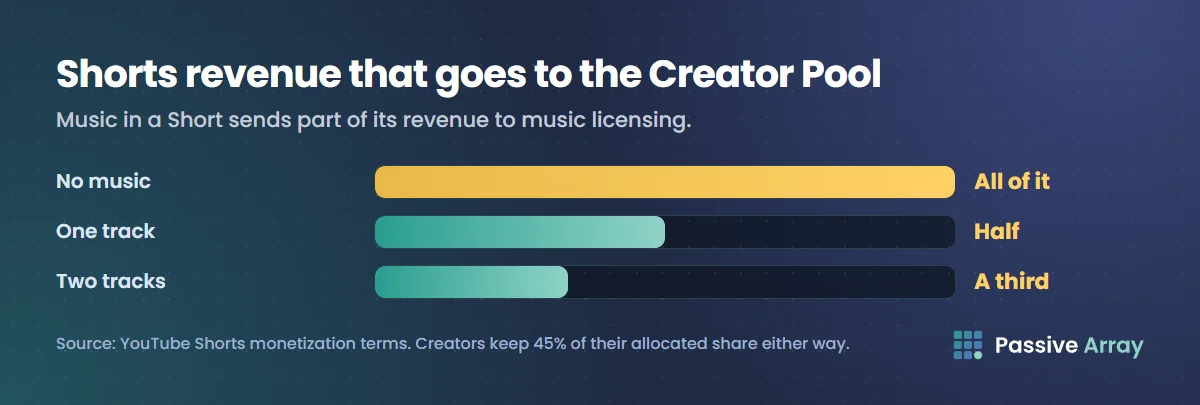
How the money works for Shorts with music, according to YouTube's Shorts monetization terms: ad revenue from the Shorts feed is pooled, and part of it pays for music licensing. A Short with no music puts all its revenue in the Creator Pool. A Short with one track puts half in the pool and half toward music licensing; with two tracks, a third goes to the pool. Creators keep 45% of their allocated share whether or not they used music. That licensing share is how rights holders, including artists through their distributor, earn from Shorts that use their songs. How much YouTube pays musicians covers what that adds up to.
Shorts rules that matter for musicians:
- Shorts can be up to three minutes long.
- Depending on the song, YouTube tools let you add up to 90 seconds of music to a Short.
- Any Short over one minute with an active copyright claim is blocked globally, so keep claimed music clips to a minute or less.
Ideas for artist Shorts
- The hook of your song, performed live in one take.
- A "how I made this" clip: the voice memo, then the finished song.
- Lyrics on screen for the most quotable line.
- A duet or remix invitation, where you ask others to use your sound.
- A behind-the-scenes moment from a shoot or a show.
Then make the long-form videos that keep fans on your channel: the official video, a live session, an acoustic version, a lyric video, a breakdown of the song's story.
Monetizing music on your channel: what is allowed
YouTube's rules on what music you can monetize trip up a lot of new channels.
| What you upload | Can it earn ads? |
|---|---|
| Your own songs, where you still hold the rights | Yes, subject to any label deal |
| Covers of other people's songs | Only if the publisher has claimed the song in Content ID and chosen to monetize it; otherwise no |
| Someone else's instrumental, karaoke track or live recording | No. YouTube lists commercial sound recordings like these as not monetizable |
| Music with samples or loops | Only if the sample or loop licence allows commercial use |
| Royalty-free or Creative Commons music | Only with proof you may use it commercially |
| Tracks from YouTube's Audio Library or Creator Music | Yes |
For covers, YouTube says explicit written permission from the song's rights owner should be obtained beforehand. Joining the YouTube Partner Program has its own channel requirements, covered in YouTube monetization requirements.
For producers: how to get more views on beats
The producer side of YouTube runs mostly on search. A rapper wants a beat that sounds like a particular artist, so they type the artist's name plus "type beat". Producers title their beats to match.
How type beat titles work
The standard pattern looks like this:
[Artist] Type Beat - "Beat Name"[Artist] x [Artist] Type Beat - "Beat Name"[Mood] [Genre] Type Beat - "Beat Name"[Artist] Type Beat [Year] - "Beat Name" | [Sub-genre]
The artist name tells searchers the sound. The beat name in quotes makes each upload unique and gives buyers something to refer to. A sub-genre or mood (dark, melodic, guitar, drill, afrobeats, R&B) narrows the match.
Use the keyword generator to see which artist and genre combinations people actually search, and the YouTube title generator to try variations with a character count. Put the most important words first, because long titles are cut off on phones.
Choosing artists to target
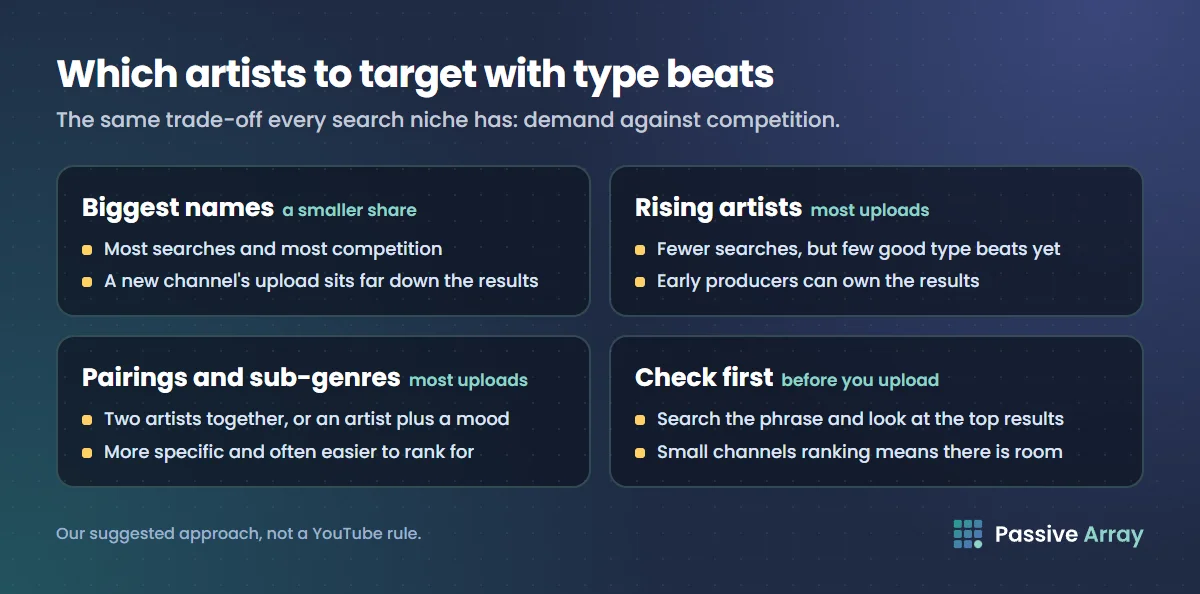
There is a trade-off, and it is the same one every search niche has:
- The biggest names get the most searches and the most competition. A new channel's upload will sit far down the results.
- Rising artists get fewer searches, but there may be few good type beats yet. Early producers can own those results while the artist grows.
- Pairings and sub-genres, like two artists together or an artist plus a mood, are more specific and often easier to rank for.
A practical approach is to upload mostly for rising artists and specific pairings, with a smaller share aimed at the biggest names. Check what appears when you search each phrase, and look at how many views the top results have compared with their channel sizes. If small channels are ranking, there is room.
What goes in a beat description
Buyers come to your video to buy, so the description has to make that easy. A good beat description includes:
- The purchase or licence link at the top, before the "show more" cut-off.
- BPM and key, which artists need before they write.
- Licence terms in plain words: what a lease includes, whether the beat can be bought exclusively, and what "free for non-profit use" means if you offer that. Name the conditions, such as credit in the title.
- Credit format, for example "(prod. YourName)", so you get credited when the beat is used.
- Contact details for custom work and exclusives.
- Links to playlists of similar beats, so a buyer who likes the sound keeps listening.
The YouTube description generator builds a description with a keyword-led opening, timestamps, links and hashtags, which you can adapt into this structure. YouTube description templates has more layouts.
Content ID and leased beats
This is where producers get into trouble. If you lease the same beat to many artists and also register it in Content ID through a distributor, every artist who leased it can receive a claim on their song. YouTube's own rules say non-exclusive licensed content and content sold at scale for use in other works are not suitable as normal Content ID references. If you register anything, keep it to music you have not licensed non-exclusively, and tell buyers clearly in your licence terms what to expect.
Thumbnails and visuals for beats
Most type beat videos use a still image or a looping visual. That is fine, because buyers are listening, not watching. What matters is that the thumbnail reads as the right genre at a glance: the mood, colours and style should match the artist named in the title. Avoid using an artist's photo in a way that suggests they made or approved the beat.
Use the artist's name honestly
Naming an artist in a "type beat" title describes a sound, and it is a long-standing convention. Do not go further: do not imply the artist is on the track, that it is an official release, or that they endorse you. YouTube's trademark policy covers channels and videos that use someone's trademark in a way likely to cause confusion, and well-known artist names are often registered trademarks.
Grow beyond single uploads
Whether you are an artist or a producer, single uploads are weak on their own. What helps:
- Playlists by sound or artist. "Dark drill type beats" or "Acoustic sessions" keep viewers listening, and playlists can appear in search.
- Regular uploads in the same lane. YouTube recommends videos to people similar to those who enjoyed earlier ones. A producer who uploads drill one week and lo-fi the next splits that audience. The YouTube algorithm, explained covers how this works.
- Collaborations. Features, joint beats and live sessions with other musicians put you in front of an audience that already listens to your style.
- Live streams. Beat-making streams and live performances build the core audience who buy and share.
- Shorts that point to the full track. Growing a channel with Shorts covers how Shorts viewers turn into long-form listeners. In YouTube Studio you can attach a related video to a Short, which appears as a clickable link under your handle.
What not to do
- Do not buy views or streams. YouTube's fake engagement policy covers services that artificially inflate views, likes and subscribers, and artificial traffic is not counted. For music it also distorts your analytics, so you cannot tell which songs real fans like.
- Do not upload other artists' songs, slowed or sped-up versions, or "8D audio" edits of tracks you do not own. These get claimed or removed, and they fall under the reused content rules for monetization.
- Do not stuff tags. YouTube says tags play a minimal role, mainly for misspellings. For music, the title and description do the work.
- Do not use more than 60 hashtags. YouTube ignores all hashtags on a video that has more than 60.
How to check what is working
- In YouTube Studio, go to Analytics > Content and compare your uploads by impressions, click-through rate and average view duration.
- For producers, open Reach > YouTube search terms for each beat. Note which artist names actually bring traffic and make more beats in that lane.
- For artists, use Analytics for Artists to see which songs are growing across YouTube.
- Change one thing at a time, such as title format or upload day, and compare the next few uploads with your usual numbers.
Sources
- YouTube Help: Official Artist Channel eligibility
- YouTube for Artists: artists.youtube
- YouTube Help: Qualify for Content ID
- YouTube Help: Content eligible for Content ID
- YouTube Help: Choose the right copyright management tool
- YouTube Help: What kind of content can I monetize?
- YouTube Help: YouTube Shorts monetization policies
- YouTube Help: Music eligibility for YouTube Shorts
- YouTube Help: Understand three-minute YouTube Shorts
- YouTube Help: Add a related video to your YouTube Shorts
- YouTube Help: Trademark
- YouTube Help: Fake engagement policy
Frequently asked questions
How do I grow a music channel on YouTube?
Distribute your releases through a distributor or label so they reach YouTube Music, then claim an Official Artist Channel when you qualify. Around each release, post Shorts, live versions and behind-the-scenes videos, and keep uploads in one musical lane so YouTube can find the right listeners.
How do I get more views on my type beats?
Title each beat with the exact phrase buyers search, such as "[Artist] Type Beat" plus a sub-genre and a beat name. Target rising artists and specific pairings where the results are less crowded, and put your licence link, BPM and key at the top of the description.
How does the YouTube algorithm treat music videos?
The same as other videos: it recommends them to viewers similar to those who enjoyed them, and it ranks search results on relevance, engagement and quality. For music, that means consistent genres, strong titles, and getting listeners to stay, replay and share.
What are the YouTube music monetization requirements?
Your channel must be in the YouTube Partner Program, and you must have the rights to the music. Your own songs can earn ads, covers only earn if the publisher has claimed and chosen to monetize them, and other people's instrumentals or karaoke tracks cannot be monetized.
How much does YouTube pay music artists?
It depends on views, the viewers' countries, and whether the money comes from your own uploads, YouTube Music, or other people's videos and Shorts using your songs through Content ID. Our guide to musician pay, linked in the Shorts section above, breaks down each source.
Can I monetize Shorts that use music?
Yes, if you are in the Partner Program. Shorts revenue is pooled, and a share of the revenue from Shorts with music goes toward licensing, but YouTube says using music does not change your allocation from the Creator Pool or your 45% share. Shorts over one minute with an active copyright claim are blocked.
What should I name a music channel?
Use your artist or producer name, the one fans will search and the one on your releases. Keep it consistent with your distributor profile so your channels can merge into an Official Artist Channel later. YouTube channel name ideas covers handle rules and naming patterns.
Which hashtags and tags work for music?
Use a few accurate hashtags, such as the genre and "typebeat" for producers, and do not go above 60, because YouTube then ignores them all. Tags play a minimal role, mainly for misspellings of artist names. Titles and descriptions matter far more.