YouTube Shorts SEO is about two places at once. Most Shorts are watched in the Shorts feed, where there is no search query and the first seconds decide everything. But YouTube also says Shorts appear "in search results across YouTube", and viewers can filter search to Shorts only. So a Short that gets found needs a hook that holds the swipe, plus a title, description and hashtags that tell YouTube what it is about.
The metadata part takes five minutes per Short if you have a routine. The YouTube Title Generator drafts ten title angles with a character count each, and the steps below cover the rest: keywords, hashtags, the related video link, and how to read Studio to see whether search is working. This guide stays on Shorts; for long-form search, start with how YouTube SEO works.
How Shorts get found
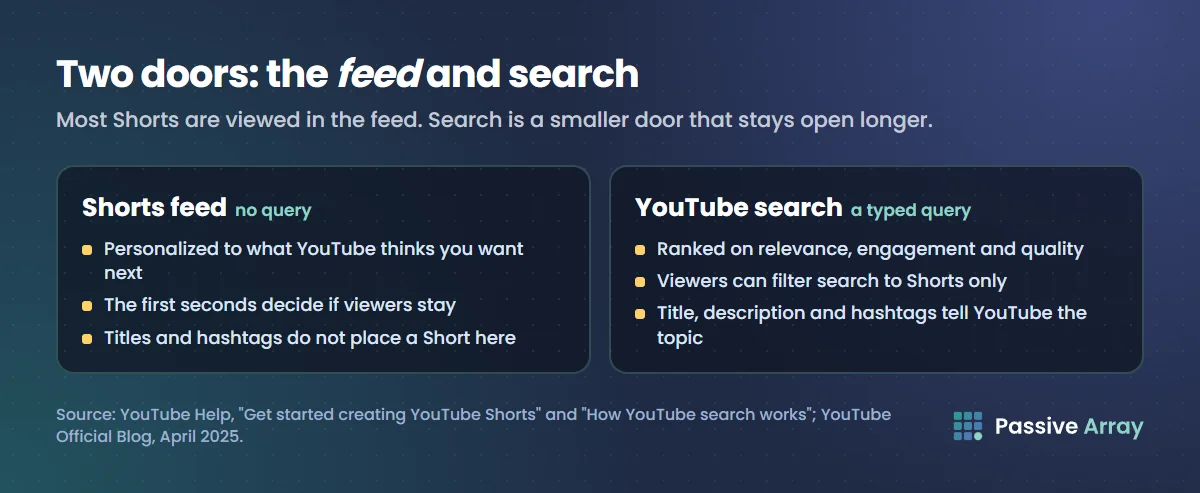
YouTube's Help Center lists where Shorts can appear: in the Shorts feed, "in search results across YouTube", on the YouTube homepage, on your channel homepage, in Subscriptions and in notifications. In YouTube Studio, views from the swipe feed are reported as the Shorts traffic source, described as "traffic from the Shorts vertical viewing experience". There is also a Sound pages source for the shared audio results page.
| Where | Is there a query? | What decides if your Short shows |
|---|---|---|
| Shorts feed | No | YouTube says the feed is "personalized to reflect what we think you want to see next" |
| YouTube search | Yes | Relevance, engagement and quality, the same three elements as all YouTube search |
| Search filtered to Shorts | Yes | The same; the viewer has chosen the Short type filter |
| Hashtag results pages | Sort of: the viewer clicked a hashtag | The hashtag, and how the Short performs |
| Sound pages | No | Using the same audio as other Shorts |
| Channel page and Subscriptions | No | Your existing audience |
YouTube's 2025 getting-started guide for Shorts says plainly that Shorts "are mostly viewed in feed". That is the honest framing for Shorts SEO: search is a real but secondary door. Metadata will not push a Short into the feed. What it does is help YouTube understand the topic, help search viewers find it, and give the Short a longer life after the feed moves on.
What counts as a Short
Before optimizing anything, make sure YouTube treats the upload as a Short. YouTube's upload help says a Short can be up to 3 minutes long and should have a square or vertical aspect ratio. You can upload Shorts at a maximum resolution of 1080p. A horizontal video under 3 minutes is a regular video, not a Short, and competes in long-form search instead.
Does Shorts SEO work?
For the feed, only indirectly. Nothing in YouTube's Help Center says titles or hashtags place a Short in someone's feed. The feed is personalized from what each viewer watches, and the general recommendation signals YouTube lists include watch history, likes, dislikes, "Not interested" feedback and satisfaction surveys. A Short that viewers swipe past quickly gives the system little reason to show it more. The YouTube algorithm, explained covers those signals in YouTube's own words.
For search, yes. A Short with a clear, specific title can be found for that query, either among regular results or under the Shorts filter. This matters most for:
- Quick answers: "how to fold a fitted sheet", "Excel shortcut to merge cells".
- Tips and demos: a single technique shown in under a minute.
- Searches where long videos feel too long: people who want the answer in 30 seconds.
YouTube itself points at this gap. In YouTube Studio > Analytics > Trends, the content gaps for Shorts card "shows search terms for Shorts" where, in YouTube's words, "viewers can't find enough quality search results on YouTube for a specific search." That is YouTube telling you which searches want a Short that does not exist yet. YouTube notes some of these insights are limited to certain countries, languages and devices.
How to do YouTube Shorts SEO, step by step
Step 1: start from a search, not just a trend
Trends bring feed views for a few days. Searches bring views for months. Ideally a Short has both: a format people enjoy in the feed and a topic people search.
To find Shorts searches:
- Check the content gaps for Shorts card under Analytics > Trends in Studio.
- Type your topic into YouTube search on your phone and note the autocomplete suggestions.
- Run the topic through the YouTube Keyword Generator and pick the question phrases. Questions with one clear answer suit Shorts best.
- Search the phrase, tap the filter and choose Shorts. If the results are few, old or off-topic, there is room.
Step 2: make the first second do the thumbnail's job
In the feed, the viewer does not choose from thumbnails. They see your Short already playing. YouTube Studio measures this directly: the "stayed to watch" metric is "the percentage of times viewers stayed to watch past the initial seconds of a Short", and engaged views count "how many times viewers stayed to watch past the initial seconds, not including any loops."
So the opening frame has to state the topic or the payoff. For a search-targeted Short, that also confirms to a searcher that they found the right answer. Show the result first, then how.
Step 3: write a title for the searcher
YouTube's Shorts guide says to "write clear and engaging titles that capture attention". For search, clear matters most. The title limit is 100 characters, but on a phone in the feed far fewer are visible, so put the searched words first.
| Weak title | Clear title |
|---|---|
| wait for it... | Fold a fitted sheet in 20 seconds |
| This changed everything | Excel shortcut to merge cells (Windows) |
| Day 47 | Beginner push-up mistake that hurts your wrists |
These are made-up examples. The title generator gives ten angles for a topic with a character count on each, so you can pick one that leads with the keyword.
Step 4: write a short description anyway
Many creators leave the Shorts description empty. It is still text YouTube reads, and YouTube lists the description among the relevance signals for search. One or two sentences that say what the Short shows, using the searched phrase once, is enough. Add hashtags at the end.
Step 5: add two or three specific hashtags
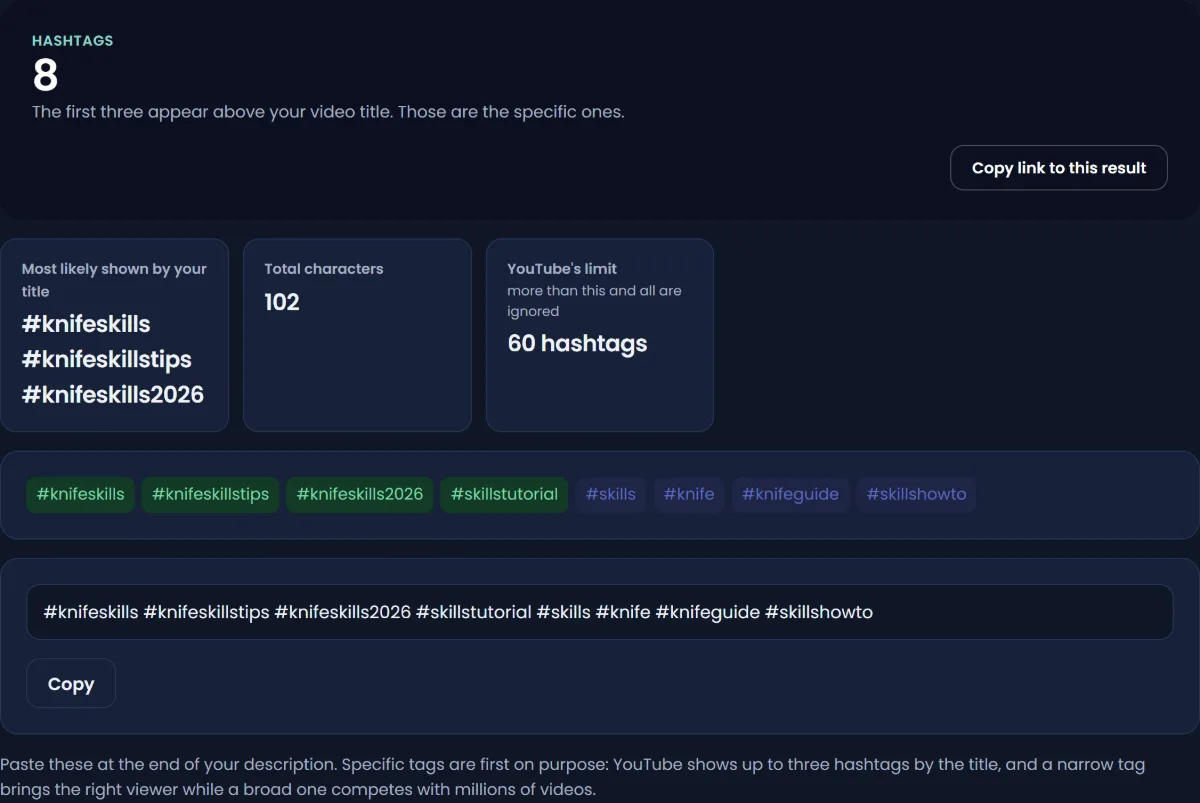
YouTube's Shorts guide says to "use relevant hashtags to increase discoverability", and names "#Shorts, #YouTubeShorts, and niche-specific tags" as popular ones. The rules from YouTube's hashtag policy apply to Shorts too:
- Hashtags in the title and description are clickable and link to a results page of other videos with the same hashtag.
- Up to three hashtags "that are considered most engaging" appear by the title.
- Hashtags cannot contain spaces.
- If a video has more than 60 hashtags, YouTube ignores all of them.
- Hashtags must be directly related to the video. Misleading or unrelated hashtags can lead to removal.
A practical set is one topic hashtag, one niche hashtag and, if you like, #Shorts. The YouTube Hashtag Generator builds an ordered set from your topic. The difference between hashtags and the hidden tag field is covered in YouTube hashtags vs tags.
Step 6: link a related video
Shorts have their own linking tool. YouTube lets you add a related video that shows as "a clickable link below your channel handle" in the Shorts player. It can point to your regular videos, other Shorts or a live stream. To add one:
- Open YouTube Studio and go to Content.
- Open the Short.
- Choose a related video from your channel.
- Save.
YouTube says this requires advanced feature access, and the linked video must be public or unlisted. A Short that answers one question from a longer video, with the long video linked, sends interested viewers somewhere useful. This does not directly help search ranking, but it turns Shorts views into long-form views, which is the main point for many channels. How to grow a YouTube channel with Shorts covers that strategy.
Step 7: consider trending audio, with care
YouTube's Shorts guide says "using trending audio will increase the likelihood of your shorts being shown to a wider audience." Audio also brings Sound pages traffic. Two cautions: trending audio does not make a search-targeted Short more relevant to its query, and copyrighted material can lead to a Content ID claim, as YouTube's upload page notes.
A worked example
Say a home-cooking channel with 12,000 subscribers has a long video on knife skills. This is a made-up example.
- Search: the content gaps for Shorts card shows "how to cut an onion without crying". Filtered Shorts results for it are mostly two years old.
- Short: 35 seconds. The first frame shows a fully diced onion and the text "No tears, one trick".
- Title: "How to cut an onion without crying (one trick)" (46 characters).
- Description: "Chill the onion for 15 minutes and keep the root end on. Full knife skills video linked above. #cooking #knifeskills #shorts"
- Related video: the 14-minute knife skills video.
- After two weeks: in the Short's Reach tab, YouTube search is a small share of views next to the Shorts feed, but it is still growing after the feed views have flattened. The YouTube search card shows "cut onion without crying" and "onion trick". The creator makes a second Short on the next most-searched knife question.
How to check whether Shorts SEO is working
Open the Short in YouTube Studio > Analytics > Reach. Look at the traffic sources:
- Shorts traffic is the feed.
- YouTube search traffic is search. Open its card to see the terms viewers searched.
- Sound pages traffic comes from the audio.
- Channel pages and Browse features come from your existing audience and Home.
Feed traffic often comes in a burst, while search traffic, when a Short has it, can keep arriving after the burst ends. Judge them separately. A Short with modest feed views but steady search views is doing exactly what Shorts SEO is for. For checking positions by hand, see how to check where your YouTube video ranks.
For the engagement side, compare stayed-to-watch rates between your own Shorts rather than against other channels. YouTube Shorts engagement rate explains what the numbers mean.
Shorts SEO myths
| Belief | What is actually known |
|---|---|
| "Add #Shorts or it will not be a Short." | YouTube's upload help defines a Short by length (up to 3 minutes) and a square or vertical aspect ratio. It does not list a hashtag as a requirement |
| "Post at the perfect hour." | YouTube says publish time "is not known to impact a video's long-term performance" |
| "Use 30 hashtags to reach more feeds." | Over 60 and YouTube ignores them all, and YouTube warns that the more you add, the less relevant they become |
| "Tags are the key to Shorts SEO." | YouTube says tags play a minimal role in discovery |
| "A/B test Shorts titles in Studio." | YouTube's Test & compare does not support Shorts at this time |
| "Delete and re-upload a Short that flopped." | A re-upload starts again with no views, likes or comments. A better Short on the same search is usually a better use of the time |
Mistakes that keep Shorts out of search
- Titles with no words people search. "Wait for it" ranks for nothing.
- Covering three topics in one Short. A Short that answers one question can match one search.
- Burying the answer. If the searcher has to wait 20 seconds, they swipe, and the Short loses the engagement it needs for that query.
- Irrelevant trending hashtags. YouTube's hashtag policy says not to add hashtags that are not directly related, and unrelated ones can lead to removal.
- Buying views to "boost" a Short. YouTube's fake engagement policy says artificial traffic "will not be counted on YouTube and can lead to strikes on your account". It also teaches the feed the wrong audience.
Sources
- YouTube Help: Get started creating YouTube Shorts
- YouTube Help: Upload YouTube Shorts
- YouTube Help: Add a related video to your YouTube Shorts
- YouTube Help: Explore trends on YouTube (content gaps for Shorts)
- YouTube Help: Understand your content performance (engaged views, stayed to watch, traffic sources)
- YouTube Help: How YouTube search works
- YouTube Help: How YouTube recommendations work
- YouTube Help: Search filters
- YouTube Help: Hashtag policies
- YouTube Help: YouTube performance FAQ and troubleshooting
- YouTube Help: Test and compare thumbnails and titles
- YouTube Help: Fake engagement policy
- YouTube Official Blog: Your guide to getting started with YouTube Shorts, 8 April 2025
Frequently asked questions
How do I do SEO for YouTube Shorts?
Pick a topic people search, make the first second show the payoff, write a title that leads with the searched words, add a one or two sentence description, use two or three relevant hashtags, and link a related video. Then check the YouTube search card in the Short's Reach tab to see which terms found it.
How does the YouTube Shorts algorithm work?
YouTube says the Shorts feed is personalized to reflect what it thinks each viewer wants to see next, using signals such as watch history, likes, dislikes and "Not interested" feedback. Studio's stayed-to-watch metric shows how often viewers kept watching past the first seconds, which is the clearest sign of whether the feed will keep showing a Short.
Do hashtags help YouTube Shorts get views?
They help a little with discovery. YouTube's Shorts guide recommends relevant hashtags, and hashtags link to results pages of other videos with the same tag. They will not make the feed show a Short that viewers swipe away, and over 60 hashtags means YouTube ignores all of them.
Do I need #Shorts in the title?
No. YouTube's upload help defines a Short as a square or vertical video up to 3 minutes long, with no hashtag requirement. YouTube's Shorts guide lists #Shorts as a popular hashtag, so you can use it, but it is optional.
How do I find keywords for YouTube Shorts?
Use the content gaps for Shorts card in YouTube Studio under Analytics > Trends, YouTube's search autocomplete, and a keyword generator for question phrases. Then search each phrase with the Shorts filter to see whether existing results are few, old or off-topic.
Do Shorts show up in YouTube search?
Yes. YouTube lists search results across YouTube as one of the places Shorts appear, and viewers can filter search by type, including Shorts. Most Shorts views still come from the feed.
Is there a best time to upload Shorts?
YouTube says publish time is not known to affect a video's long-term performance. Posting when your audience is active may bring faster early views, but it will not change how a Short does over time.
Are free Shorts SEO tools worth using?
They save time on drafting, which is what they are good for. A title generator, hashtag generator and keyword generator can produce a starting point in seconds. None of them can see YouTube's ranking or the feed, so check results in Studio rather than trusting a tool's score.
By Nasir Uddin, founder of Passive Array. Rules and figures checked Nov 1, 2026.