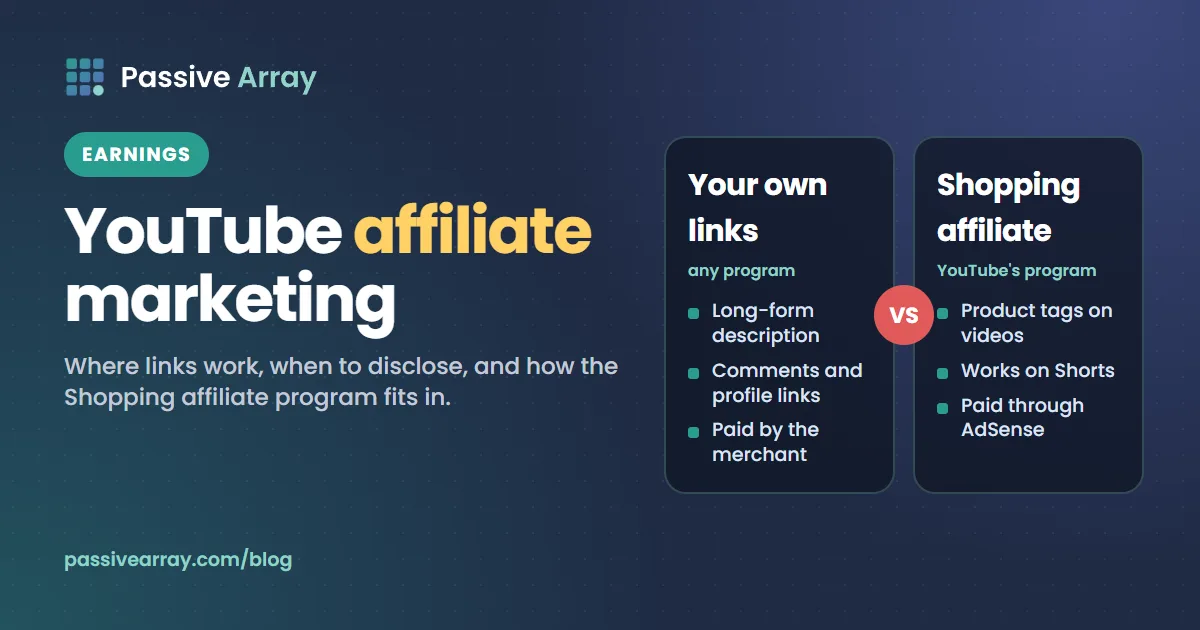
Affiliate marketing is allowed on YouTube. The external links policy says so in one line: "Affiliate content doesn't violate YouTube's Terms of Use." There are two ways to do it. You can put your own affiliate links from any program in a long-form video's description or comments, where they are clickable, or you can join the YouTube Shopping affiliate program and tag products directly on your videos, Shorts and live streams. Either way you have to disclose the relationship, and links typed into Shorts descriptions and Shorts comments are not clickable.
This guide covers where links can go, YouTube's disclosure rules, what the US Federal Trade Commission says, the Shopping affiliate program, and how to pick a program. It gives no commission rates or income figures, because they differ by merchant and change often. For the description that carries your links, the YouTube description generator drafts one with the keyword in the opening lines, placeholder timestamps, links and hashtags.
How affiliate links work on YouTube
An affiliate program gives you a link that identifies you. When a viewer follows it and buys, the merchant records the sale against you and pays a commission under its own terms.
With ordinary affiliate links, YouTube is not part of that arrangement. Its role is limited to its rules on links, spam and disclosure. In the YouTube Shopping affiliate program, the tagging, reporting and payout all happen inside YouTube Studio.
| Your own affiliate links | YouTube Shopping affiliate program | |
|---|---|---|
| Who can use it | Any channel; clickable links need advanced features | Invited Partner Program channels in listed countries |
| Where it appears | Description and comments of long-form videos, channel profile links | Product tags on videos, Shorts and live streams |
| Works on Shorts | Not as a clickable link in the description or comments | Yes, as a Shopping product sticker |
| Who sets the commission | The merchant's program | Each participating brand or retailer |
| Who pays you | The merchant or its network | AdSense for YouTube |
Is affiliate marketing allowed on YouTube?
Yes, with two limits that come from the same policy page.
The first is spam. Straight after confirming that affiliate content is permitted, YouTube adds: "Excessively posting affiliate content in dedicated accounts may violate our policies around spam."
The second is where the link leads. The external links policy bans links to content that would break the Community Guidelines, such as "websites or apps that install malware or unwanted software". It applies to "video, audio, channel, comments, pinned comments, live streams, and any other YouTube product or feature". YouTube also says: "If we can't verify that a link you post is safe, we may remove the link." You are responsible for where your affiliate link ends up.
Where affiliate links can go, and where they are clickable
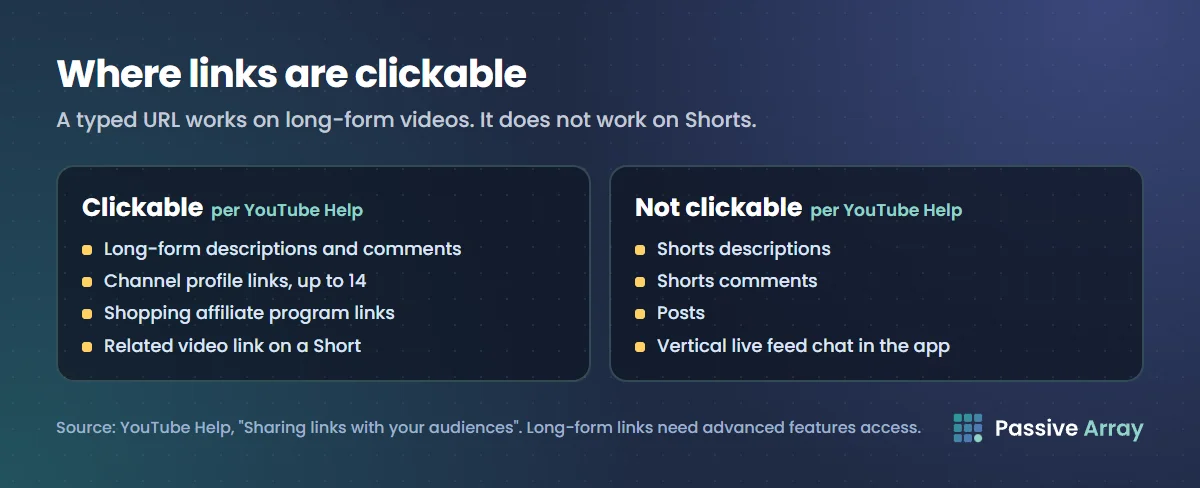
This is YouTube's table of clickable links, reduced to the placements that matter for affiliate links.
| Placement | Clickable? |
|---|---|
| URLs in long-form video descriptions and comments | Yes, with advanced features access |
| Channel profile links (up to 14 on your channel page) | Yes |
| URLs in Shorts descriptions and Shorts comments | No |
| Related video link on a Short | Yes |
| YouTube Shopping affiliate program links | Yes |
| URLs in live chat and channel descriptions on horizontal live streams | Yes |
| The same, viewed in the mobile app's vertical live feed | No |
| Posts | No |
YouTube gives the reason for the Shorts rule: "To reduce spam and scam attempts, URLs placed in YouTube Shorts comments and Shorts descriptions are non-clickable." The asterisk on long-form links matters as well: "To add clickable external links, you must enable your channel's access to advanced features."
The description
This is the main home for affiliate links on long-form videos. Put the video's own opening lines first, because viewers see only those before they expand the description, and place links lower down with a plain label for each. YouTube description templates has copy-ready layouts with a links block and a disclosure line.
A pinned comment
A pinned comment is still a comment, so a URL in it is clickable on a long-form video and not on a Short. The external links policy names pinned comments, so the same rules apply.
Shorts
A typed URL will not work. The options YouTube lists are the Related video link, which can send viewers to a long-form video whose description carries the link, your channel profile links, and product tags if you are in the Shopping affiliate program. YouTube also lists brand deal links, but those need the brand to report the partnership to YouTube first.
YouTube's disclosure rule: the paid promotion box
YouTube's branded content policy defines branded content as "any content on YouTube influenced by a brand partner in exchange for something of value, such as featuring or promoting a brand's products or services in exchange for payment, free products, or sponsorships (whether you receive the benefit now or later on)." If your video contains it, "you must let us know using the paid promotion declaration in Studio."
Does an affiliate link on its own count? YouTube's Help pages do not answer that in a single sentence. The product tagging page says: "Add appropriate disclosures to your content, including the YouTube paid product placements and endorsements disclosures." And the definition above includes benefits you receive "later on".
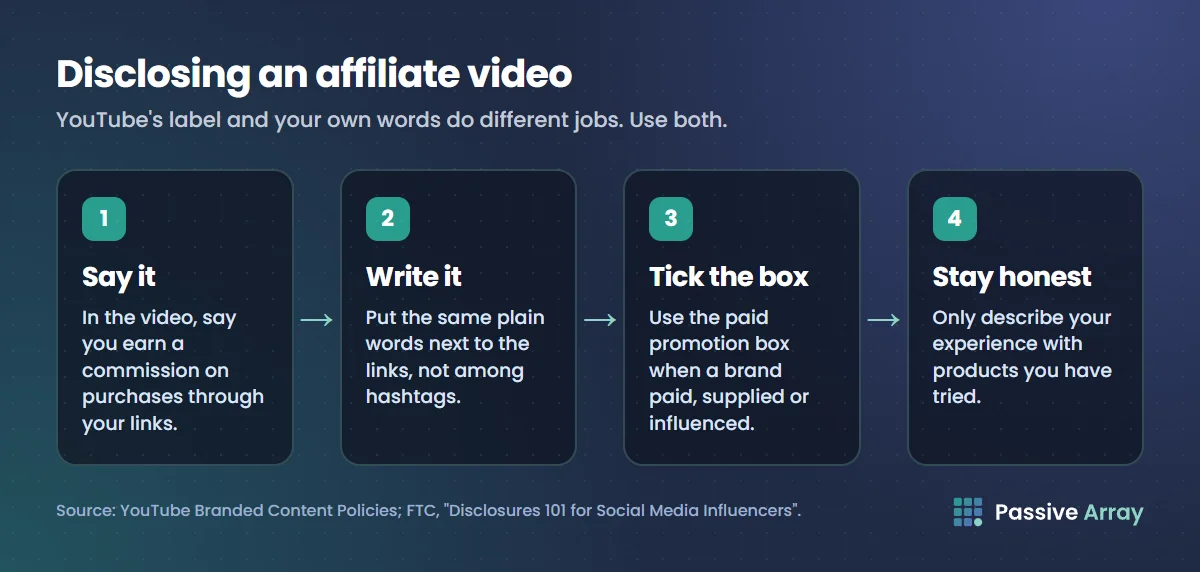
Our reading, which is not a YouTube ruling: tick the box whenever a brand has paid you, sent you the product or otherwise influenced the video, and treat a video built around a product you earn commission on the same way. Ticking it does not stop the video earning ad revenue.
How to set it
On a computer:
- Sign in to YouTube Studio.
- In the left menu, click Content, then the video you want to edit.
- At the bottom of the page, click Show More.
- Tick the box next to "My video contains paid promotion like a product placement, sponsorship, or endorsement."
- Click Save.
On mobile, select the video in the YouTube app or the YouTube Studio app, open the paid promotion setting under Show More and tap Yes.
What the box does
- "A disclosure will appear at the start of your video to let viewers know it contains branded content."
- Ads still run, but YouTube "may try to avoid showing an ad that competes with your brand partner."
If you do not disclose
YouTube says: "If our systems detect your video includes branded content you have not disclosed, we may automatically apply a branded content label to your video and notify you." It may also remove the content.
The label is not the end of your duty. YouTube states that "you are ultimately responsible for ensuring your disclosure is clear and prominent", and points creators to their local regulator, naming the Federal Trade Commission for the United States. If the video also contains realistic AI footage, that is a separate setting, covered in YouTube AI disclosure rules.
What the FTC says about affiliate links
This section quotes the FTC's two plain-language pages for influencers. It is not legal advice, and other countries have their own rules.
In "Disclosures 101 for Social Media Influencers", the FTC says to disclose "when you have any financial, employment, personal, or family relationship with a brand", and adds that "financial relationships aren't limited to money." A free product counts.
Its Endorsement Guides FAQ deals with affiliate links directly. For an affiliate marketer who earns a commission from a retailer, it says: "You should disclose your relationship to the retailer clearly and conspicuously on your site." It offers example wording: "I get commissions for purchases made through links in this post." And it advises: "The closer the disclosure is to your recommendation, the better."
Three more points from those pages matter on YouTube:
- The words "affiliate link" are not enough. The FAQ says: "Consumers might not understand that 'affiliate link' means that the person placing the link is getting paid." It adds that a "buy now" button would not be adequate either.
- The description is not enough on its own. Disclosures 101 says "the disclosure should be in the video and not just in the description uploaded with the video."
- The platform's tool is not enough on its own. The FTC warns: "Don't assume that a platform's disclosure tool is good enough". It also says: "You can't talk about your experience with a product you haven't tried."
The YouTube Shopping affiliate program
Instead of pasting links, you tag products from participating sellers, and viewers see a Shopping button on long-form videos or a "Shopping product sticker" on Shorts.
Who can join
YouTube's program page lists these minimum requirements "to be invited to the program":
- "Your channel is in the YouTube Partner Program."
- "Your channel meets the subscriber threshold for YPP."
- You are based in one of the listed countries. The program page names Argentina, Brazil, Germany, India, Indonesia, Japan, Korea, Malaysia, Mexico, Netherlands, Philippines, Poland, Singapore, Taiwan, Thailand, United Kingdom, United States and Vietnam.
- The channel is not a music channel, an Official Artist Channel, or associated with music partners.
- The channel's audience is not set as made for kids, and it does not have a significant number of videos set as made for kids.
YouTube's general Shopping page shows a shorter country list than the program page, so check the Earn section of YouTube Studio for your own channel. If you qualify, you join there.
How commissions work
YouTube publishes how commissions are set, not what they are:
- "Every participating brand and retailer will set their commission rates and attribution window for each product."
- The percentage shown when you tag "is an estimate based on the current rate." Your payout "reflects the rate on the day of each purchase, not the date you tagged the product."
- Commissions are "paid through AdSense for YouTube within 60 to 120 days after purchase to account for customer returns. If a customer returns the product, commissions will be reversed."
- YouTube is running "a temporary incentive program" in which "100% of commissions derived from affiliate merchants will go to creators." It says rates "may reduce in the future".
The tagging guidelines
Only tag products that meet all of YouTube's guidelines. In short, products must be:
- "Easily identifiable and featured prominently in your content", and mentioned verbally or in text.
- "Meaningfully related to your content."
- Something "a viewer may reasonably want to learn more or buy" based on the video, shown clearly rather than briefly or blurred.
- "Used as intended."
Tags that fail the guidelines may be removed, and "repeated instances of non-compliant tagging could result in your channel losing access to the YouTube Shopping affiliate program." You also cannot tag products on content that is made for kids or has a copyright claim against it.
Keep Shopping links on YouTube
One rule differs from ordinary affiliate links: "It is against our Terms of Service to route traffic from other non-YouTube sources to merchants using your YouTube affiliate links."
How to choose an affiliate program
This is our advice, not a platform rule. It leaves out commission rates, which vary by merchant and change.
- Start from products you already use. The FTC says you cannot describe an experience you have not had.
- Check the terms. Read how long a click counts towards a sale and where the merchant ships. A program that serves one country is of little use if most of your viewers live elsewhere.
- Check the payout terms. Look for the minimum balance before payment and the payment methods offered in your country.
- Read the program's own disclosure and placement rules. They apply on top of YouTube's.
A sponsorship is a different deal: the brand pays a fee for the placement whatever the sales. How much to charge for a sponsored YouTube video explains that pricing, the sponsorship price calculator applies it to a channel's average views, and how to make a creator media kit covers what to send a brand. For every other route, see ways to make money on YouTube.
A checklist before you publish an affiliate video
- The product is one you have used, and what you say about it is true.
- You say in the video itself that you earn a commission on purchases through your links.
- The same disclosure sits in plain words next to the links, not buried under hashtags.
- The paid promotion box is ticked if a brand paid you, supplied the product or influenced the video.
- Links are in a long-form description or comment, not typed into a Short.
- Product tags, if you use them, meet all four tagging guidelines.
Sources
- YouTube Help: External links policy (affiliate content is allowed, the spam warning, prohibited links, link removal)
- YouTube Help: Sharing links with your audiences (the clickable links table, Shorts, advanced features, 14 profile links)
- YouTube Help: YouTube Branded Content Policies (the definition, the paid promotion steps, what the box does, undisclosed content, regulators)
- YouTube Help: YouTube Shopping affiliate program overview and eligibility and Get started with Shopping on YouTube (eligibility, the two country lists, commissions, payment timing, off-YouTube linking)
- YouTube Help: Understand commission rates and earnings in the YouTube Shopping affiliate program (estimated rates, rate on the day of purchase, non-tagged products)
- YouTube Help: Tag products in your content (tagging guidelines, Shorts sticker, when tags cannot be added)
- YouTube Help: Brand Partnerships: External Links on Shorts (brand deal links)
- FTC: Disclosures 101 for Social Media Influencers (when and how to disclose)
- FTC: FTC's Endorsement Guides: What People Are Asking (the affiliate link questions)
Frequently asked questions
Is affiliate marketing allowed on YouTube?
Yes. YouTube's external links policy states that affiliate content does not violate its Terms of Use. It warns that excessively posting affiliate content in dedicated accounts may violate the spam policy, and links must not lead to content that breaks the Community Guidelines.
How do you do affiliate marketing on YouTube?
Join an affiliate program for a product that fits your videos, make a video that genuinely demonstrates or reviews it, put your link in the long-form description or a comment, and disclose the relationship in the video and next to the link. Eligible Partner Program channels in listed countries can instead tag products through the YouTube Shopping affiliate program.
Can you put affiliate links in YouTube Shorts?
You can type one, but it will not be clickable. YouTube says URLs in Shorts descriptions and Shorts comments are non-clickable to reduce spam and scams. The working options are the Related video link, your channel profile links, and product tags if you are in the Shopping affiliate program.
Do I have to disclose affiliate links on YouTube?
Yes, in practice. YouTube requires the paid promotion declaration for branded content, which covers videos influenced by a brand in exchange for something of value, and it holds you responsible for a clear disclosure. In the United States the FTC expects a clear statement of the relationship, in the video and not only in the description.
What is the YouTube Shopping affiliate program?
It is YouTube's own affiliate system. Invited Partner Program creators in listed countries tag products from participating brands and retailers on their videos, Shorts and live streams, and may earn a commission when viewers buy on the retailer's site. Each seller sets its own commission, and earnings are paid through AdSense for YouTube.
What are good affiliate programs for YouTubers?
The ones whose products you already use and that fit your videos. Compare programs on how long a click counts towards a sale, where the merchant ships, the minimum payout and payment methods, and their own rules on disclosure and link placement, rather than on the headline rate alone.