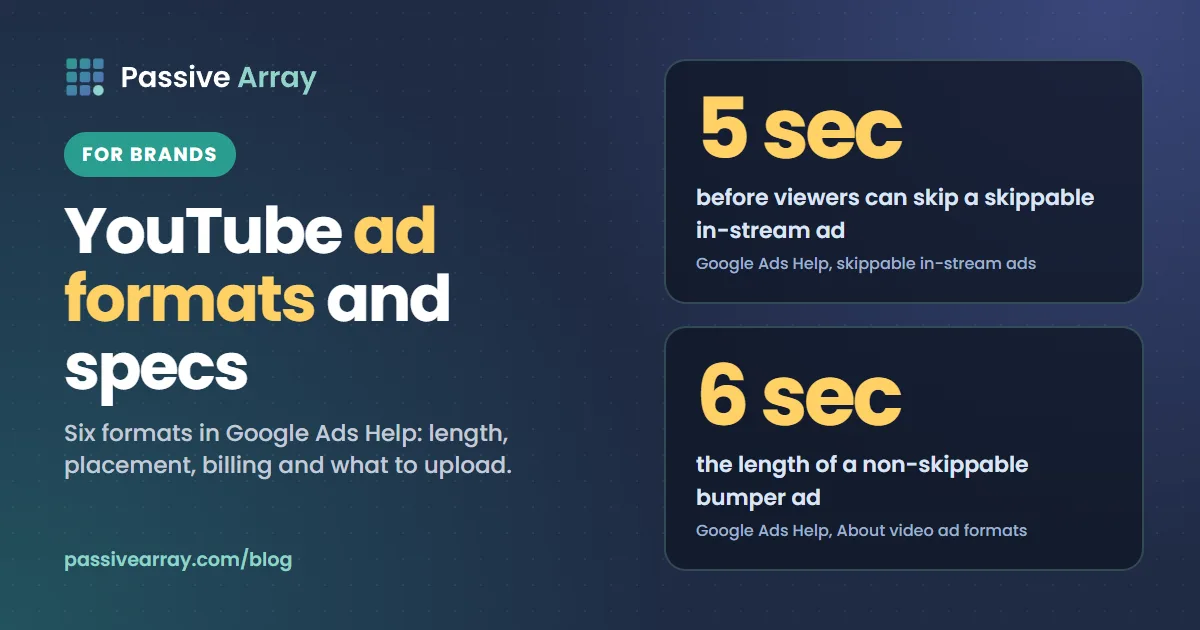
Google Ads Help lists six YouTube video ad formats today: skippable in-stream, non-skippable in-stream, in-feed video, bumper, YouTube Shorts and Masthead ads. Viewers can skip a skippable in-stream ad after 5 seconds. A bumper is a non-skippable ad of 6 seconds. Every video ad has to be hosted on YouTube first, Google recommends 1080p in 16:9, 9:16 or 1:1, and files must be under 256 GB. You do not usually buy a format on its own. You pick a campaign type, such as a Video reach, Video view or Demand Gen campaign, and the campaign decides which formats your video runs in.
This guide covers each format from the advertiser's side: how long it can be, where it shows, how you pay and what to upload, all as Google's Help pages stated on 15 November 2026. Google renames and retires formats often, so check the linked pages before you produce anything. The last sections compare buying ads with sponsoring a creator. If you want to look at creators as well, the free YouTube influencer finder searches channels by topic, size and country.
The six YouTube ad formats at a glance
The lengths, placements and billing below come from Google Ads Help, "About video ad formats", with the format-specific pages listed under Sources.
| Format | Can viewers skip? | Length | Where it shows | How you pay |
|---|---|---|---|---|
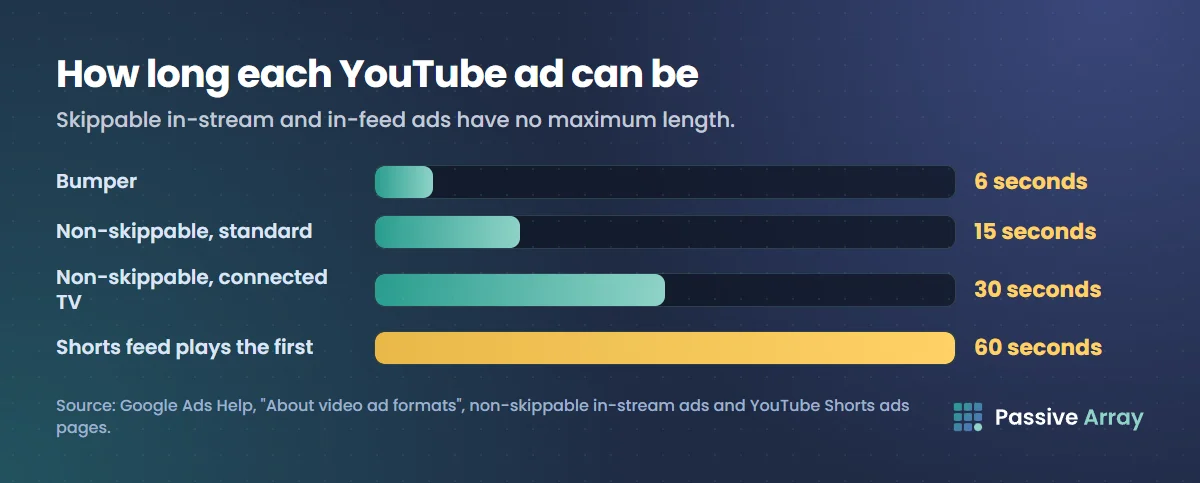
| Skippable in-stream | Yes, after 5 seconds | No maximum; under 3 minutes recommended | Before, during or after videos on YouTube watch pages; Google video partners | Per view with CPV bidding, or per impression with other bidding |
| Non-skippable in-stream | No | 15 seconds standard, 30 on connected TV; see the note below | Before, during or after videos; Google video partners | Per impression (Target CPM) |
| In-feed video | Viewer chooses to click | No maximum | YouTube search results, Watch Next, Home feed, Subscriptions feed | When someone clicks to watch |
| Bumper | No | 6 seconds | Before, during or after videos; Google video partners | Per impression (Target CPM) |
| YouTube Shorts | Yes, swipeable | Under 60 seconds recommended | Between Shorts in the Shorts feed | Per impression, TrueView view or engagement |
| Masthead | Not applicable | No maximum; more than 10 seconds recommended | Top of the YouTube Home feed | Fixed CPM or cost per hour, by reservation |
Each format in detail
Skippable in-stream ads
These are the ads most people picture. Google Ads Help says they "play before, during, or after other videos on YouTube", and that "After 5 seconds, the viewer has the option to skip the ad." They also appear in games on YouTube Playables and on sites and apps in Google video partners.
- Length. Help's table says "No max length ( <3 min recommended)". Its skippable in-stream page recommends 15 to 20 seconds for awareness and action goals and 2 to 3 minutes for consideration.
- Billing. With cost-per-view bidding, "you pay when a viewer watches 30 seconds of your video", or the whole video if it is shorter, or interacts with it, whichever comes first. With Target CPM, Target CPA or Maximize conversions bidding, "you pay based on impressions."
- Text. The format page gives a headline of up to 15 characters, or 10 if you use a call-to-action.
Non-skippable in-stream ads
Help describes these as ads where "Users can't skip so they view your whole message." They "use Target CPM bidding, so you pay based on impressions."
The length is where Google's pages differ, so plan around the strictest one that applies to you:
- The format page lists standard non-skippable ads as "Videos between 7 to 15 seconds long", and a longer type: "Videos 16-30 seconds long that are shown on Connected TV (CTV)." It adds: "For non-skippable in-stream, your ad should be 30 seconds (or shorter)."
- The overview table says "15-60 seconds (depending on the campaign subtype)."
- The reservation page lists a maximum of 15, 30 or 60 seconds for reserved non-skippable ads.
Our reading, not a Google ruling: make a 15-second cut, add a 30-second cut for connected TV, and confirm anything longer with Google. The format page also says "30-second video assets must be horizontal. Square or vertical assets will not be able to run."
In-feed video ads
An in-feed ad is not a video that interrupts anything. Help says it consists of "an image thumbnail, a headline, and up to 2 lines of text", and that it appears "in YouTube search results, YouTube watch next, YouTube app Home feed, and YouTube subscription feed". The viewer clicks it to watch.
- Billing. "You'll only be charged when someone clicks to watch the ad." In a Video view campaign you are also charged when the ad autoplays for at least 10 seconds.
- Text. The in-feed page gives a headline of "100 characters max", with a warning that text over 25 characters may be shortened on some devices, and a description of up to 2 lines of 35 characters each.
Bumper ads
Help calls a bumper a "Quick message that can't be skipped to raise awareness or reinforce other ads." The table gives the length as "6 seconds (>=5 seconds minimum)". Bumpers "use Target CPM bidding, so you pay based on impressions." The non-skippable page adds a useful rule: "If ad is ≤:06, it will run as a Bumper."
YouTube Shorts ads
Shorts ads run between Shorts in the Shorts feed. Help says they "serve on desktop, tablets, mobile (web and apps), and connected devices like streaming devices", games consoles and TVs.
- Shape. The Shorts ads page says vertical videos with a 9:16 aspect ratio are "best suited for the Shorts format." Horizontal videos still serve, but with blurred areas above and below.
- Length. Help recommends under 60 seconds. The Shorts page says video ads can be "up to 3 minutes long", but only the first 60 seconds play in the Shorts feed, with an overlay near the end inviting viewers to watch the rest on the watch page.
- Billing. "For Shorts ads, you are charged for an impression, TrueView view, or engagement." With CPV bidding, a TrueView view counts when the viewer watches 10 seconds or to the end, clicks the call-to-action, or likes, comments on or shares the ad.
Masthead ads
The Masthead is the large placement at the top of the YouTube Home feed, on desktop, mobile and the YouTube app for TVs. Help says it is bought by reservation: "you can buy Masthead on Cost-Per-thousand Impression (CPM) or Cost-Per-Hour (CPH)." The reservation page says the cost-per-hour option is available only through a Google representative, and that you need a representative for access to CPM Masthead campaigns too.
The specs page lists a horizontal 16:9 video at 1920 x 1080 pixels of any length, with a headline of up to 40 characters, a description of up to 60 and a call-to-action of up to 15.
Other names you may see
The reservation page also lists pause ads, a static image shown after a viewer pauses a video. Overlay ads are gone: YouTube Help says it stopped running them from 6 April 2023. YouTube's creator-facing Help page uses other names, such as Watch feed ads and Watch While ads, and describes non-skippable ads as 15 or 20 seconds, or 30 on TVs. That page is written for channel owners, so for buying decisions use the Google Ads Help figures above. YouTube ad revenue explained covers the creator's side of the same ads.
How you actually buy them: campaign types
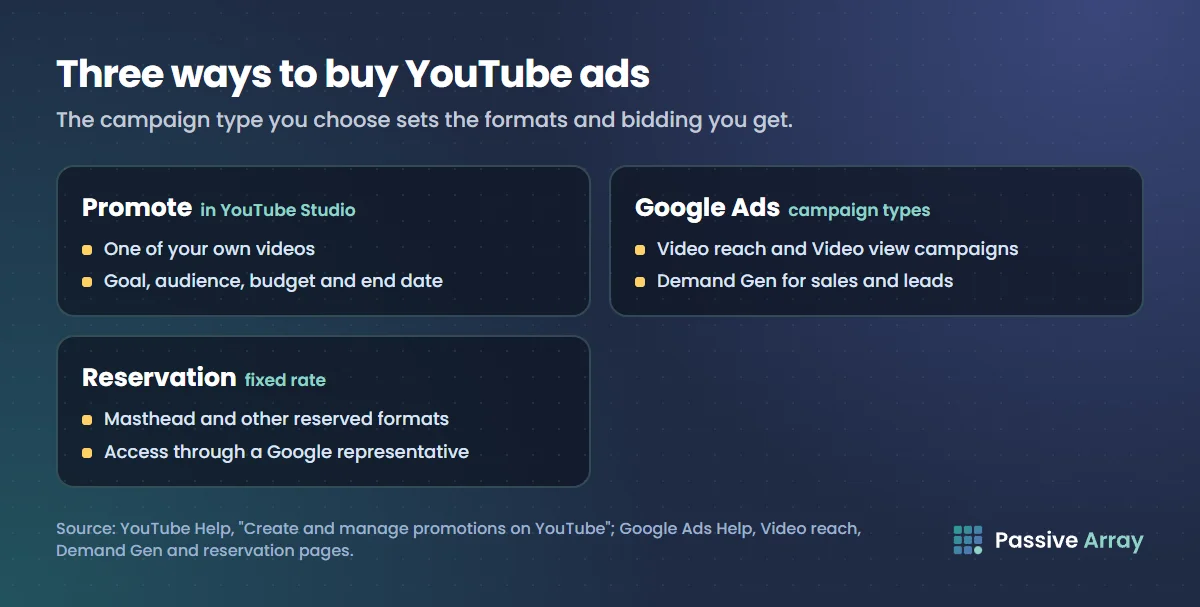
In Google Ads you choose a campaign type and goal, and that choice sets the formats and bidding you get.
Video reach campaigns
Help says "Video reach campaigns are optimized to reach as many unique users as possible for your budget and targeting criteria." There are three options:
- Efficient reach uses bumper and skippable in-stream ads, and with multi-format ads turned on, in-feed and Shorts ads too.
- Non-skippable reach uses 15-second non-skippable ads, with 30-second ads shown mainly on connected TVs.
- Target frequency aims to reach the same people a set number of times each week or month.
Video view campaigns
These use skippable in-stream, in-feed and Shorts ads and are the ones built on cost-per-view. Google now calls a paid view a "TrueView view". Help says the "Views" metric was renamed in October 2025 and that billing did not change.
Demand Gen campaigns
Demand Gen campaigns serve video and image ads across YouTube, including in-stream, in-feed and Shorts, and also on Discover, Gmail and the Google Display Network. Conversion-focused video campaigns now live here. Help states: "All Video Action Campaigns have been upgraded to Demand Gen as of May 2026." If an older guide tells you to set up a Video action campaign, this is what replaced it.
The Demand Gen video page gives these requirements: 1 to 5 videos per ad, a minimum length of 5 seconds, and a note that videos under 10 seconds cannot serve as YouTube in-stream ads. Text limits are 40 characters for a headline, 90 for a long headline, 90 for a description and 25 for the business name.
Reservation
Reservation means buying placements at a fixed rate. The reservation page lists Masthead, non-skippable in-stream, bumper, skippable in-stream, Shorts and pause ads, and says to talk to a Google representative for access.
Promote in YouTube Studio
The simplest route starts in YouTube Studio, where Promote runs a promotion on one of your own videos. Open YouTube Studio, go to Content, then the Promotions tab, and click New Promotion. You link a Google Ads account the first time, then choose a goal, confirm the video, set targeting by language, country, age, gender or interests, and set a budget and end date.
The video must be public or unlisted and at least 10 seconds long, and must meet Google's ad policies. Help says the cost "will not exceed your set budget." One line matters if the channel also wants to monetize: "Subscribers and watch-time earned through Promote don't contribute towards YouTube Partner Program eligibility."
YouTube ad specs: what to upload
Google's "Video ads specs and format requirements" page and the format pages give these figures.
| Spec | What Google Ads Help says |
|---|---|
| Hosting | "video ad content must be hosted on YouTube"; the video is set to public or unlisted |
| Horizontal | 16:9, 1920 x 1080 pixels |
| Vertical | 9:16, 1080 x 1920 pixels |
| Square | 1:1, 1080 x 1080 pixels |
| Resolution | 1080p recommended |
| File format | MPG (MPEG-2 or MPEG-4) recommended; .MP4, .MOV, .AVI, .WMV, .FLV, WebM, ProRes, HEVC (h265) and others accepted |
| File size | "Files should be less than 256 GB." |
| Audio-only files | Not accepted |
| Thumbnail | 16:9, 1280 x 720 pixels; .JPG, .GIF or .PNG; under 2 MB |
| Companion banner | 300 x 60 pixels; .JPG, .GIF or .PNG; under 150 KB; desktop only |
Demand Gen campaigns also accept a 4:5 vertical video at 1080 x 1350 pixels.
Use horizontal 16:9 for in-stream, bumper and Masthead ads, and vertical 9:16 for Shorts ads. The 30-second non-skippable ad must be horizontal.
Paid ads or a creator sponsorship?
These are different purchases, and the choice depends on what you need. We make no performance claims for either.
| YouTube ads | Creator sponsorship | |
|---|---|---|
| What you buy | Placements for a video you made | A mention or video made by a creator |
| Who makes the creative | You | The creator, to your brief |
| Targeting | Set in Google Ads: location, age, interests and more | The creator's existing audience |
| Price | Auction or fixed reservation rate | Negotiated with the creator |
| Lifespan | Runs while you pay | The video stays on the channel |
| Disclosure | Runs in an ad placement | The creator declares the paid promotion |
Ads tend to fit when you already have a video, you need to control who sees it and when, or you want reporting in one account.
A sponsorship tends to fit when you have no video of your own, your product needs explaining or demonstrating by someone the audience already watches, or you want content that stays published after the money is spent.
The two also combine. YouTube Help says that when a creator selects the paid promotion option and chooses the brand partner's channel, the video connects to the brand's Google Ads account, where the brand can review its performance and run the video as an ad.
To cost a sponsorship, the YouTube sponsorship price calculator takes a channel's average views on recent uploads and applies a CPM range you can edit, so you can compare the result with what you would pay per thousand impressions in Google Ads. How influencer marketing works covers the whole process from goal to report, how to vet a creator before you pay them covers the checks, and does influencer marketing work shows how to compare a deal with your ads on the same metric. For a channel of your own before either, see YouTube for small business.
Sources
- Google Ads Help: About video ad formats (the six formats, lengths, placements, billing)
- Google Ads Help: Video ads specs and format requirements (dimensions, file formats, file size, thumbnail, banner)
- Google Ads Help: Skippable in-stream ads (skip after 5 seconds, recommended lengths)
- Google Ads Help: Non-skippable in-stream ads (lengths, the bumper rule)
- Google Ads Help: In-feed video ads (placements, text limits)
- Google Ads Help: YouTube Shorts ads: asset specs and best practices (9:16, the 60-second rule)
- Google Ads Help: Video reach campaigns (the three options)
- Google Ads Help: About video assets specifications and ad format guidelines for Demand Gen campaigns (placements, minimum length, text limits)
- Google Ads Help: Video action campaigns (the May 2026 upgrade to Demand Gen)
- Google Ads Help: About reservation: Reserved media placements on YouTube (reserved formats, Masthead buying, pause ads)
- YouTube Help: YouTube advertising formats (the creator-facing list, overlay ads)
- YouTube Help: Create & manage promotions on YouTube (Promote)
- YouTube Help: Invite collaborators to your video (brand partner access)
Frequently asked questions
What are the types of YouTube ads?
Google Ads Help lists six video ad formats: skippable in-stream, non-skippable in-stream, in-feed video, bumper, YouTube Shorts and Masthead ads. Overlay ads were retired: YouTube stopped running them from 6 April 2023.
How long can a YouTube ad be?
It depends on the format. A bumper is 6 seconds. A standard non-skippable ad is 7 to 15 seconds, with 16 to 30 seconds available on connected TV. Skippable in-stream and in-feed ads have no maximum, though Google recommends under 3 minutes for skippable ads. Shorts ads are recommended at under 60 seconds.
What are the YouTube ad dimensions?
Google's specs page lists 1920 x 1080 pixels for horizontal 16:9 video, 1080 x 1920 for vertical 9:16 and 1080 x 1080 for square 1:1, with 1080p recommended. The file must be under 256 GB and the video has to be uploaded to YouTube first. Thumbnails are 1280 x 720 pixels.
How do you pay for YouTube advertising?
Either per view or per impression. With cost-per-view bidding on a skippable in-stream ad, you pay when a viewer watches 30 seconds, or the whole ad if it is shorter, or interacts with it. Non-skippable and bumper ads use Target CPM, so you pay for impressions. In-feed ads are charged when someone clicks to watch.
Can a small business advertise on YouTube without Google Ads experience?
Yes. The Promote option in YouTube Studio creates a promotion for one of your own videos in a few steps: pick the video, a goal, an audience, a budget and an end date. It needs a linked Google Ads account, and the video must be public or unlisted and at least 10 seconds long.
Is it better to run YouTube ads or sponsor a YouTuber?
Neither is better in general. Ads give you control over the creative, the audience and the dates, and reporting in one account. A sponsorship gives you a video made by someone the audience already watches, which stays on their channel. A sponsored video can also be run as an ad.