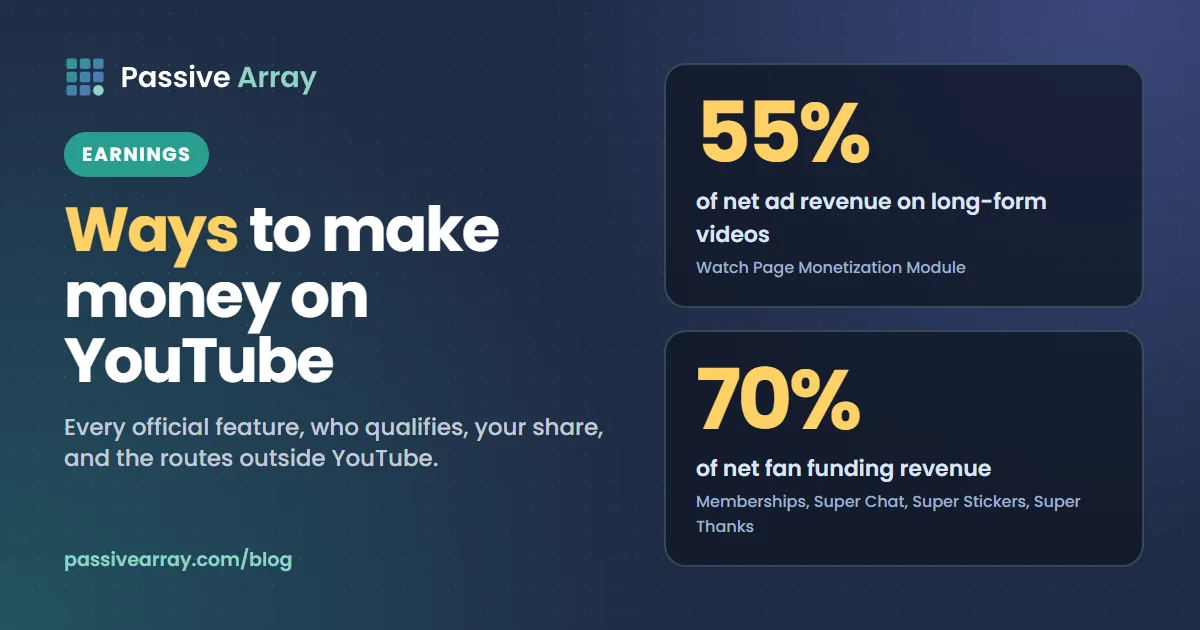
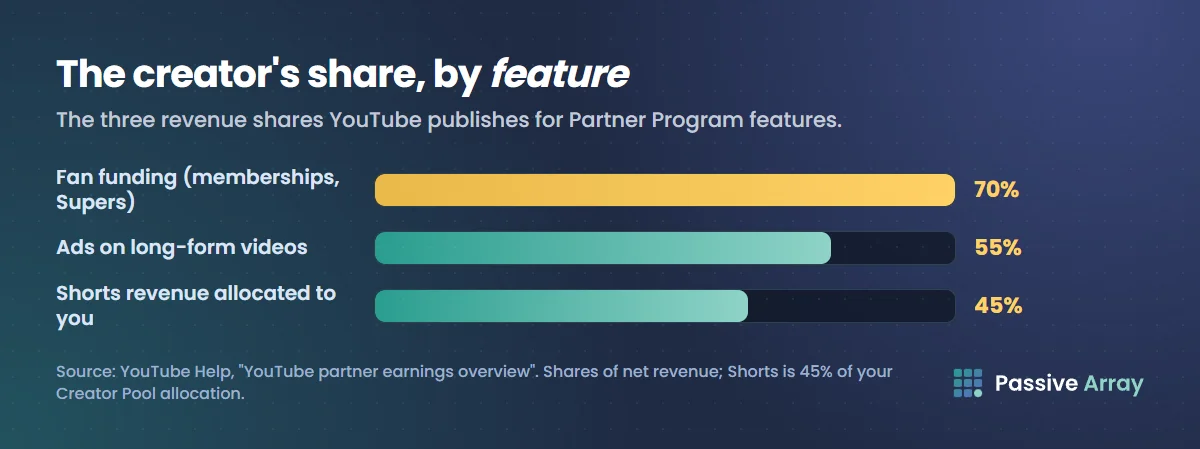
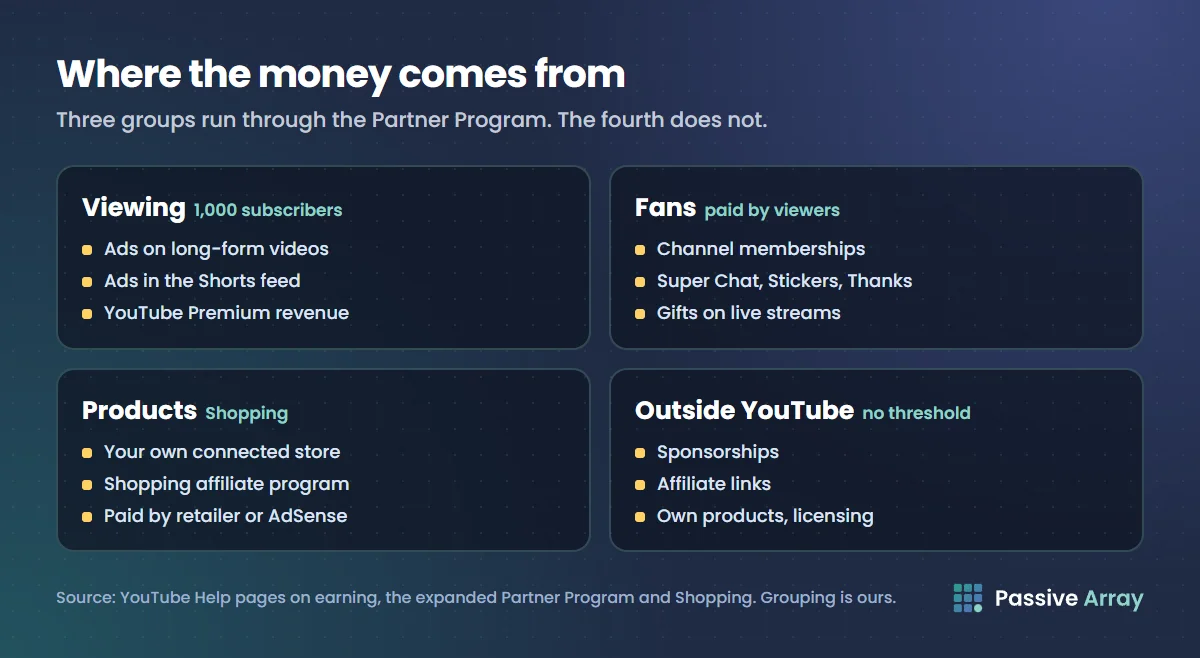
YouTube's Help Center lists six ways to make money inside the YouTube Partner Program: advertising revenue, Shopping, YouTube Premium revenue, channel memberships, Super Chat and Super Stickers, and Super Thanks. A seventh, gifts on live streams, has its own Help pages. The published shares are 55% of ad revenue on long-form videos, 45% of the Shorts revenue allocated to you, and 70% of fan funding revenue. Outside YouTube's own features, creators also earn from sponsorships, affiliate links, their own products and licensing, and those are not paid through YouTube.
This guide maps every official feature to who qualifies and what you keep, in YouTube's own wording, then covers the routes that do not run through YouTube. It makes no income promises, because YouTube makes none. To see what a channel's views might be worth from ads alone, the YouTube money calculator applies an adjustable RPM range to its recent views.
The short version: every route in one table
Every feature below also needs you to live where it is available and to accept the contract module that covers it.
| Feature | Who qualifies | Your share | Source |
|---|---|---|---|
| Ads on long-form videos | 1,000 subscribers plus 4,000 qualified watch hours in 12 months, or 10 million qualified Shorts views in 90 days | 55% of net ad revenue | Partner earnings overview |
| Ads in the Shorts feed | Same tier, plus the Shorts Monetization Module | 45% of the revenue allocated to you from the Creator Pool | Partner earnings overview |
| YouTube Premium revenue | Same tier; your content is watched by a Premium subscriber | Part of the subscriber's fee; no single percentage on the earnings page today | How to earn money on YouTube |
| Channel memberships | Partner Program, aged 18 or over, channel not made for kids | 70% of net revenue | Partner earnings overview |
| Super Chat and Super Stickers | Partner Program, aged 18 or over | 70% of net revenue | Partner earnings overview |
| Super Thanks | Partner Program, aged 18 or over | 70% of net revenue | Partner earnings overview |
| Gifts on live streams | Partner Program, aged 18 or over with a verified AdSense account | One Ruby for every two Jewels redeemed, paid at $0.01 per Ruby | Virtual Items program policies |
| Shopping: your own store | Partner Program and its subscriber threshold | Paid by your retailer, not by YouTube | Get started with Shopping |
| Shopping: affiliate program | Partner Program, its subscriber threshold, one of the listed countries | Commission set by each brand or retailer | Shopping affiliate program overview |
| Creator Partnerships (brand deals) | Partner Program, aged 18 or over, no active strikes, listed countries | Whatever you agree with the brand | Get started with YouTube Creator Partnerships |
The entry requirements, briefly
There are two levels. YouTube's expanded Partner Program opens fan funding and Shopping at 500 subscribers, with 3 valid public uploads in the last 90 days and either 3,000 qualified watch hours in 12 months or 3 million qualified Shorts views in 90 days, in a listed set of countries. The full level, which adds "revenue sharing from ads and YouTube Premium", needs 1,000 subscribers with 4,000 qualified watch hours in 12 months or 10 million qualified Shorts views in 90 days.
From 1 February 2027 the full level rises for new applicants to "8,000 qualified watch hours in the last 365 days, or 20M qualified Shorts views in the last 90 days, in addition to still needing 1k subscribers." YouTube adds that "there are no changes to the eligibility requirements for fan funding, YouTube Creator Partnerships, or YouTube Shopping."
YouTube monetization requirements covers the thresholds and the rules that are not numbers, so this guide does not repeat them. To check whether a channel you do not own looks monetized, the monetization checker reads its public signals and gives a confidence score, never a certainty.
Money that comes from viewing
Ads on long-form videos
This is what most people mean by "monetized". Once a partner accepts the Watch Page Monetization Module, "YouTube will pay them 55% of net revenues from ads displayed or streamed on their public videos on their content Watch Page." The same rate applies when your public videos play in the YouTube player on other websites or apps.
YouTube is direct about the lack of a floor: "There are no guarantees under the YouTube partner agreement about how much or whether you'll be paid." What you earn per 1,000 views depends on who watches, what the video is about and how many views carry ads. YouTube ad revenue explained and what CPM means on YouTube explain the mechanics, and YouTube ad formats covers the kinds of ads that can run.
Ads in the Shorts feed
Shorts do not earn per ad. Revenue from ads between Shorts goes into a Creator Pool, and under the Shorts Monetization Module "YouTube will pay them 45% of the revenue allocated to them based on their share of views from the Creator Pool allocation."
From 1 February 2027, to earn each month from the pool, creators "will now need to maintain 10M qualified Shorts views over the last 90 days". Missing it does not remove you from the program. How much YouTube pays for Shorts goes through the pool.
YouTube Premium revenue
When a Premium subscriber watches you, there is no ad to share. Instead you "get part of a YouTube Premium subscriber's subscription fee when they watch your content."
The partner earnings overview gives no percentage for Premium today. The announced 2027 terms do: "For Premium Lite, creators will share in a pool representing 60% of net subscription revenue. For Premium views, creators will share in a pool representing 30% of net subscription revenue." Those are pools shared among creators, not a rate per view.
Money that comes from fans
YouTube groups memberships, Super Chat, Super Stickers and Super Thanks as fan funding. One contract covers all of them: "If a partner turns on fan funding features by reviewing and accepting the Commerce Product Module, YouTube will pay them 70% of net revenues from channel memberships, Super Chat, Super Stickers, and Super Thanks."
The minimum requirements are the same for all four: the channel is in the Partner Program, you are at least 18, and you live where the individual feature is available. YouTube also notes that "fan funding features are not crowdfunding or donation tools".
Channel memberships
Members "make recurring monthly payments in exchange for access to special perks" such as badges and emoji. The channel must not be set as made for kids and must not have "a significant number of ineligible videos", meaning videos set as made for kids or videos with music claims. Our guide to YouTube channel memberships covers levels, perks and setup.
Super Chat and Super Stickers
These work only on live streams and Premieres. "Your fans pay to get their messages or animated images highlighted in live chat streams." They are not available on videos that are age-restricted, unlisted, private or made for kids.
Super Thanks
Super Thanks works on ordinary uploads, including Shorts. A viewer buys "a fun animation" and can post a highlighted comment. On the share, YouTube says: "Creators get 70% of Super Thanks revenue recognized by Google. The 70% is calculated after taxes and fees are deducted (including App Store fees on iOS)." So the 70% applies to what is left after those deductions, not to the price the viewer paid.
Gifts, powered by Jewels
Gifts sit under a separate contract, the Virtual Items Module. Viewers buy Jewels and redeem them for gifts during eligible live streams. YouTube's policy page explains the conversion: "Every two Jewels redeemed for gifts will earn you one Ruby", and "we will calculate your net revenue by multiplying the number of Rubies you earned by the revenue we pay per Ruby, which is $0.01."
You need to be in the Partner Program, be at least 18 "with a verified AdSense account or other form of age verification accepted by Google", and live where gifts are available.
Money that comes from products
Your own store
YouTube Shopping lets you connect a store and show your products in the channel's store, in the video description and in a product shelf below your content. You must be in the Partner Program and meet its subscriber threshold (or be an Official Artist Channel), and your audience must not be set as made for kids.
YouTube does not pay you for these sales: "all payments for the sale of merch and products are paid through your merch retailer or platform. YouTube and AdSense are not involved." What your retailer or platform charges is between you and them.
The YouTube Shopping affiliate program
Here you tag other brands' products in videos, Shorts and live streams, and "may earn a commission" when a viewer clicks a tag and buys on the retailer's site. The channel must be in the Partner Program, meet its subscriber threshold, not be a music channel or made for kids, and be based in one of the listed countries.
There is no fixed share. "Every participating brand and retailer will set their commission rates and attribution window for each product." Commissions are "paid through AdSense for YouTube within 60 to 120 days after purchase to account for customer returns." Our guide to affiliate marketing on YouTube covers this program and ordinary affiliate links, with the disclosure rules.
Money that does not come through YouTube
The routes below are not Partner Program features. YouTube does not pay them out, which is also why there are no official figures for them and why this section gives none.
Sponsorships and brand deals
A brand pays you directly to feature its product. You can do this at any size, but YouTube's rule applies either way: "If your video contains branded content, you must let us know using the paid promotion declaration in Studio." A sponsored video can still earn ad revenue if it follows the advertiser-friendly guidelines.
YouTube also runs YouTube Creator Partnerships, where eligible Partner Program creators "will be discoverable to brands" and get a Creator Partnerships tab in the Earn page of YouTube Studio.
Brands price on views, not subscribers. How much to charge for a sponsored YouTube video explains the method, the sponsorship price calculator applies it to a channel's average views on recent uploads, and how to make a creator media kit covers the page you send.
Affiliate links
You link to a product with a tracked link, and the merchant pays you a commission on sales it attributes to that link. YouTube's external links policy confirms the practice is permitted: "Affiliate content doesn't violate YouTube's Terms of Use." It adds: "Excessively posting affiliate content in dedicated accounts may violate our policies around spam."
Your own products and services
Courses, templates, books, software, coaching, physical goods. You can sell these through a connected Shopping store or link to your own site from the description. The limits are the ordinary ones: the external links policy and the law where you live.
Licensing your work
If you own what you film, other people may pay to use it, such as a news outlet that wants a clip or a brand that wants to run your video in its own advertising. This is a contract between you and the buyer, and YouTube is not part of it.
Which routes fit which channel
This is our reading of the eligibility rules above, not YouTube guidance.
- Under 500 subscribers: no Partner Program feature is open. Sponsorships, affiliate links and your own products are the only routes, and each still needs disclosure where it applies.
- In the expanded program (500 subscribers): fan funding and Shopping open before ads do, so a small, loyal audience can pay you through memberships or Super Thanks first. Super Chat, Super Stickers and gifts need live streams.
- Made for kids channels: memberships, Shopping and the affiliate program are closed by their own eligibility rules, and Super Chat is not available on made for kids videos.
A checklist once you are in the Partner Program
- Open the Earn section of YouTube Studio and accept each module you want: Watch Page Monetization, Shorts Monetization, Commerce Product and, for gifts, Virtual Items.
- Review the updated terms. YouTube asks existing partners to "review and accept the updated terms in YouTube Studio by January 31, 2027", or the associated features stop earning from 1 February 2027.
- Submit US tax information in AdSense for YouTube. YouTube says this "is required for all monetizing creators, regardless of their location in the world."
- Tick the paid promotion box on any video with a sponsorship, product placement or endorsement.
- Keep uploading. YouTube "may turn off monetization on channels that haven't uploaded a video or posted to the Posts tab for 6 months or more."
How the money reaches you is covered in how and when YouTube pays you. For worked ad revenue examples, see how much YouTube pays after monetization.
Sources
- YouTube Help: How to earn money on YouTube (the six features and the requirements table)
- YouTube Help: YouTube partner earnings overview (the 55%, 45% and 70% shares, Shopping payments, tax, "no guarantees")
- YouTube Help: YouTube Partner Program overview and eligibility (the 1,000-subscriber thresholds, the six-month activity rule)
- YouTube Help: Overview of the expanded YouTube Partner Program (the 500-subscriber thresholds)
- YouTube Help: Changes to the YouTube Partner Program (1 February 2027: thresholds, Premium pools, Shorts changes)
- YouTube Help: YouTube Commerce Products monetization policies, channel memberships, Super Chat and Super Stickers and Super Thanks (fan funding requirements and the 70% wording)
- YouTube Help: Virtual Items Program Policies for Creators and Gifts eligibility and availability (Jewels, Rubies and requirements)
- YouTube Help: Get started with Shopping on YouTube (own store eligibility and payments)
- YouTube Help: YouTube Shopping affiliate program overview and eligibility (commissions and payment timing)
- YouTube Help: YouTube Branded Content Policies (paid promotion declaration, ads on sponsored videos)
- YouTube Help: Get started with YouTube Creator Partnerships
- YouTube Help: External links policy (the note on affiliate content)
Frequently asked questions
What are the YouTube monetization methods?
YouTube's Help Center lists six inside the Partner Program: advertising revenue from Watch Page ads and Shorts Feed ads, Shopping, YouTube Premium revenue, channel memberships, Super Chat and Super Stickers, and Super Thanks. Gifts on live streams are documented separately. Outside YouTube, creators also use sponsorships, affiliate links, their own products and licensing.
What are the requirements to make money on YouTube?
For ads and Premium revenue you need 1,000 subscribers plus 4,000 qualified watch hours in 12 months or 10 million qualified Shorts views in 90 days. Fan funding and Shopping open earlier in eligible countries, at 500 subscribers with 3 public uploads in 90 days and 3,000 watch hours or 3 million Shorts views. Sponsorships and affiliate links have no YouTube threshold.
Can you make money on YouTube without ads?
Yes. Channel memberships, Super Chat, Super Stickers, Super Thanks, gifts and Shopping are all separate from ads, and the expanded Partner Program opens fan funding and Shopping before the ads threshold. Sponsorships, affiliate links and your own products do not depend on the Partner Program at all.
What percentage does YouTube take from creators?
It depends on the feature. YouTube pays partners 55% of net ad revenue on long-form videos, 45% of the Shorts revenue allocated to them from the Creator Pool, and 70% of net revenue from memberships, Super Chat, Super Stickers and Super Thanks. Sales from your own connected store are paid by your retailer, and YouTube says it is not involved.
Does YouTube take a cut of sponsorships?
YouTube's Help pages describe no share of them. A sponsorship is paid by the brand to you directly. What YouTube does require is that you declare the paid promotion in YouTube Studio, which adds a disclosure label at the start of the video.