YouTube SEO works by helping YouTube search match your video to what people type. YouTube says its search ranks videos on three things: relevance (how well the title, tags, description and video content match the query), engagement (how people who searched that query respond to videos) and quality (which channels show expertise and trustworthiness on the topic). You control relevance directly through your metadata and what you say in the video. You influence engagement and quality by making the video that best answers the search.
So YouTube SEO is not a trick you apply after upload. It starts before you film: you choose a phrase people actually search, using something like the YouTube Keyword Generator, and make the video that answers it better than what already ranks. The metadata then tells YouTube clearly what the video answers. This guide covers how each part works, what YouTube has said about it, and a process you can repeat for every upload.
What YouTube SEO is, and what it is not
YouTube has two kinds of discovery. Search is when a viewer types a query and picks from the results. Recommendations are Home, Up next and the Shorts feed, where YouTube chooses videos for the viewer without a query. SEO, in the narrow sense, is about search.
The two are connected, though. The words in your title and description help YouTube understand what a video is about everywhere, not just in search. And a video that satisfies the people who find it through search gives the recommendation system good data to learn from. That is why a video that ranks for a steady search phrase often starts picking up suggested traffic later.
What YouTube SEO is not:
- Not a score. No browser extension can see YouTube's ranking. "SEO scores" from third-party tools are each tool's own model of good practice, not a number YouTube uses.
- Not tags. YouTube says tags play a minimal role in discovery and are mainly useful when your topic is commonly misspelled.
- Not a list of the most-viewed videos. YouTube says search results "are not a list of the most-viewed videos for a given search". A small channel can outrank a large one if its video answers the query better.
- Not something you can pay for. YouTube says it "doesn't accept payment for better placement within organic search results."
If you want the bigger picture of how Home, Up next and Shorts choose videos, the YouTube algorithm, explained covers it in YouTube's own words. This guide stays on search.
The three things YouTube search ranks on
YouTube's Help Center names three elements. It also says "the importance of these elements may vary by search type", and it does not publish weights.
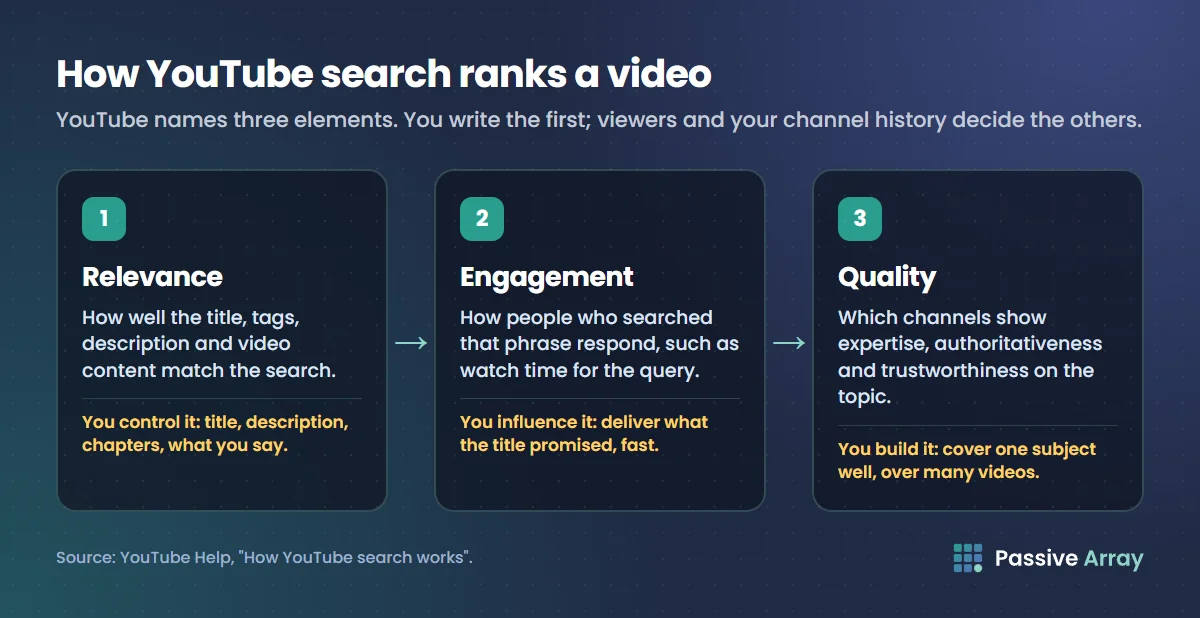
| Element | What YouTube says | What you control |
|---|---|---|
| Relevance | "How well the title, tags, description, and video content match your search query" | Your title, description, chapters, tags, and the words you say on camera |
| Engagement | "Engagement signals are a valuable way to determine relevance", such as watch time for a particular query | Whether the video delivers what the title promised, fast |
| Quality | Signals that help determine "which channels demonstrate expertise, authoritativeness, and trustworthiness on a given topic" | Covering one subject consistently and accurately, over many videos |
On top of these three, search is personalized. YouTube says its system "may also consider your search and watch history; if you have it turned on", which is "why your search results might differ from another user's search results for the same query." Keep this in mind when you search your own keyword to see where you rank: what you see is not what everyone sees.
Relevance: the part you write
Relevance is the only element you can fully control at upload time. It comes from four places:
- The title. The strongest relevance signal you write. It has a limit of 100 characters.
- The description. Up to 5,000 characters. YouTube's own tips for descriptions say to choose "1-2 main words that describe your video" and use them in both the title and the description, and to front-load the first lines, because those are what viewers see before they expand it.
- The video content. YouTube lists "video content" next to title and description. What you say and show is part of how the video is matched to a query. That is a good reason to say your main phrase naturally in the first part of the video, and to make sure your captions are accurate.
- Tags. Listed by YouTube, but with a minimal role. Five minutes per video is plenty.
Engagement: the part viewers decide
YouTube does not list every engagement signal it uses for search. It gives watch time for a query as an example. In practice this means a video that wins the click and then loses the viewer in 20 seconds tells YouTube it did not answer the search, whatever its title says.
This is also why keyword-stuffed titles fail. They can be relevant on paper and still lose, because the people who click them leave.
Quality: the part you build over time
Quality signals are about the channel's expertise and trustworthiness on a topic. YouTube does not explain exactly how it measures them. The practical reading is simple: a channel that has made twenty careful videos about one subject is more likely to be treated as an authority on it than a channel that made one video on it between unrelated uploads.
What each piece of metadata does
Here is every field that affects how YouTube understands a video, with the limits YouTube publishes.
| Field | Limit | Visible to viewers? | What it does for search |
|---|---|---|---|
| Title | 100 characters | Yes, cut short on many screens | The main relevance signal and the main reason people click |
| Description | 5,000 characters | First lines only, until expanded | Relevance, plus context for chapters, links and hashtags |
| Chapters (timestamps in the description) | First one at 00:00, at least 3, each at least 10 seconds | Yes, on the progress bar | Helps viewers jump to the answer; Google can use them as key moments |
| Tags | 500 characters in total | No | Minimal; mainly catches misspellings |
| Hashtags | Over 60 and YouTube ignores all of them | Yes, clickable | Link to a hashtag results page; up to three show by the title |
| Thumbnail | Not a text field | Yes | Not a relevance signal YouTube lists, but it decides the click |
| Captions | Not a limit | Yes, if turned on | Accurate captions make your spoken words readable to viewers |
The 500-character tag limit comes from YouTube's Data API documentation, which also says commas count toward the limit, and a tag that contains a space is treated as if it were wrapped in quotation marks, which also count. If you want to know how tags and hashtags differ in detail, read YouTube hashtags vs tags.
How to rank a video in YouTube search, step by step
This is the process we recommend. The rules inside it come from YouTube; the order and the decision rules are our advice.
Step 1: choose a phrase people actually type
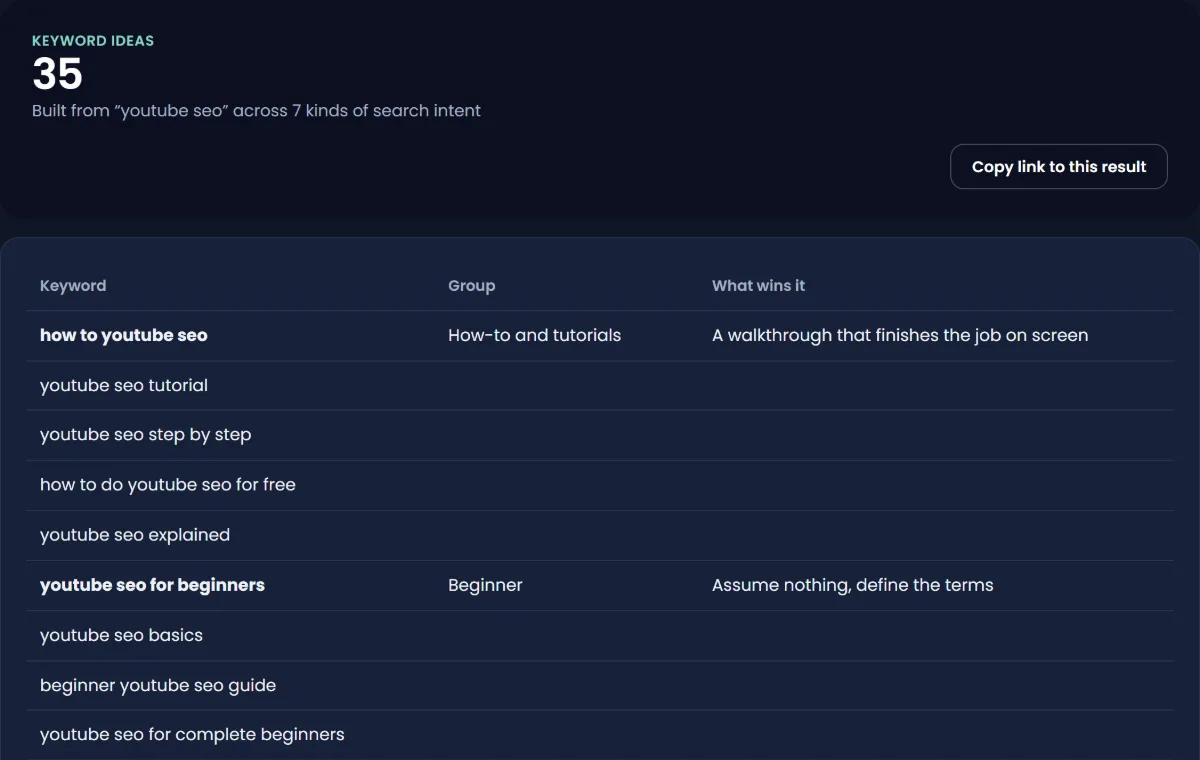
Start with the viewer's words, not yours. Type your topic into YouTube's search box and note the autocomplete suggestions, which come from real searches. Then put question words in front (how, why, what, best) and repeat. The keyword generator expands one seed keyword into long-tail phrases, questions and comparisons, grouped by what the searcher wants, so you can see which kind of video each one needs.
YouTube Studio has a search tool too. Go to YouTube Studio > Analytics > Trends. YouTube says the top searches card "shows the top searches based on your audience and your saves over the last 28 days", and the content gaps card for Shorts shows searches where viewers "can't find enough quality search results". YouTube notes some of these insights are limited to certain countries, languages and devices.
Prefer specific phrases of four or more words. "Sourdough starter" is a subject. "Sourdough starter not rising after 5 days" is a problem someone has right now, and a video can answer it completely.
Step 2: check whether you can win it
Search the phrase and look at the first ten results. This is the whole competition check, and our guide to free YouTube keyword research walks through it in more detail. In short, ask:
- Are channels under 100,000 subscribers ranking? If yes, the topic is open.
- Do any videos have more views than their channel has subscribers? That means search and suggested viewers found them.
- Are the top results old? A current answer has room.
- Do the results actually answer the phrase, or only the broad subject?
If every result is a large channel with a recent, exact-match video, choose a narrower phrase.
Step 3: write the title for the searcher
Put the phrase, or the most important words of it, near the front, in natural language. The full title can be 100 characters, but many screens cut it short, so the first words carry the weight. Then add the reason to click: a specific result, a number, or who it is for.
| Weak for search | Better for search |
|---|---|
| My starter journey | Sourdough starter not rising? 5 fixes that worked by day 7 |
| Excel stuff part 3 | Excel XLOOKUP for beginners: 6 real examples |
| Big news for runners | How to run your first 5K in 8 weeks (beginner plan) |
These are made-up examples. Check your draft with the YouTube Title Analyzer, which scores length, keyword position and click appeal, and shows each check separately.
Step 4: write the description for both readers
The description has two readers: the viewer, who sees only the first lines, and YouTube, which reads all of it. A layout that serves both:
- First two lines: what the video answers, using your main phrase once, naturally.
- A short paragraph: what the viewer will learn or get, using related words people search.
- Chapters: timestamps for each section.
- Links: related videos, playlists, sources.
- Hashtags: two or three, specific to the topic.
Write a unique description for each video. YouTube's tips say a unique description makes a video easier to find in search and helps it stand out from similar videos. The YouTube Description Generator drafts this layout from a short summary of your video, and you edit from there. For ready layouts by video type, see YouTube description templates.
Step 5: add chapters
Chapters help viewers find the exact part that answers their search, and they help outside YouTube too: Google's documentation says it will prioritize key moments set "through structured data or the YouTube description." The rules from YouTube's Help Center:
- The first timestamp must be 00:00.
- You need at least three timestamps, in ascending order.
- Each chapter must be at least 10 seconds long.
Name each chapter with the words a viewer would search, not inside jokes. "Why your starter smells like acetone" is a better chapter title than "The smell part".
Step 6: say it and deliver it early
YouTube lists video content as a relevance signal, so say your main phrase in the first part of the video, in a natural sentence. More importantly, answer the search quickly. If the title promises five fixes, the first fix should arrive within the first minute, not after a long intro. This is where engagement for the query is won or lost.
Step 7: add tags and hashtags, briefly
Tags: your main phrase, two or three variants, common misspellings and any other language your audience searches in. Stay under 500 characters. The YouTube Tag Generator builds a list inside the limit. Hashtags: two or three that are specific to the topic. Neither will save a weak title, so do not spend more than a few minutes here.
Step 8: publish, then read the search terms report
After a week, open the video in YouTube Studio, go to Analytics > Reach, and find the YouTube search card under traffic sources. YouTube describes this report as showing the terms viewers searched when they found your video. Compare those terms with the phrase you targeted:
- If the video is found for your phrase, leave it alone. YouTube's advice on changing titles and thumbnails is "don't change what's working".
- If it is found for a different phrase, consider adjusting the description and chapters to match what people actually searched.
- If there is no search traffic at all after a few weeks, the title probably does not match a real query, or the competition was stronger than it looked.
A worked example
Say a cooking channel with 3,000 subscribers wants a video about sourdough. This is a made-up example to show the process.
- Seed: "sourdough starter". Autocomplete and the keyword generator return phrases like "sourdough starter not rising", "sourdough starter smells like nail polish" and "sourdough starter feeding schedule".
- Competition check: for "sourdough starter not rising", two of the top ten results come from channels under 50,000 subscribers, and the best-ranked video is four years old. The phrase looks open.
- Title: "Sourdough starter not rising? 5 fixes, from a 3-day rescue" (59 characters).
- Description, first lines: "If your sourdough starter is not rising, the cause is usually temperature, flour or feeding ratio. Here are five fixes, in the order to try them."
- Chapters: 00:00 Why starters stop rising, 00:45 Fix 1: warmer spot, 02:10 Fix 2: switch flour, and so on.
- In the video: the first fix starts at 0:45, after one sentence of setup.
- After a week: the YouTube search card shows "sourdough starter not rising" and "starter not bubbling". The second phrase is not in the description, so the creator adds a line about bubbles. Nothing else changes.
That is the whole loop: pick, check, write, deliver, read the report, adjust once.
Does YouTube SEO still work in 2026?
Yes, for search traffic, and that matters most for small channels. Search is the one surface where a new video competes mainly on how well it answers a query rather than on how many people already watch the channel. YouTube's own description of search ranking, relevance, engagement and quality, is the same model this guide is built on.
What has changed is what "SEO" means. Older advice focused on tags and on repeating keywords in the description. YouTube now says tags play a minimal role, and adding excessive tags to a description is against its spam, deceptive practices and scams policies. Modern YouTube SEO is mostly topic choice, a clear title, an honest description, chapters and a video that answers fast.
YouTube SEO settings worth checking
These are the upload settings that relate to search. Paths are for YouTube Studio on a computer.
- Title and description: Content > select the video > Details.
- Tags: in the Details section of the upload flow, click Show more, then add tags. YouTube says you can also edit tags in the YouTube app on mobile.
- Automatic chapters: YouTube checks this box by default for new uploads. Chapters you write in the description override automatic ones.
- Subtitles: Content > select the video > Subtitles. YouTube creates automatic captions with speech recognition, in the video's default language only, so check them for errors on key terms.
- Default description: Settings > Upload defaults. YouTube recommends filling it so basic information appears on every upload, but write the first lines fresh for each video.
- Test & compare: Content > select the video > Test & compare. You can test up to three titles and thumbnails; the winner is the one with the highest watch time. It works only on computers, and not for Shorts, scheduled Lives or Premieres.
Common YouTube SEO mistakes
- Choosing the topic after filming. If no one searches for what you made, no metadata can fix it.
- Copying a big channel's title word for word. You are competing with the original on its strongest phrase.
- Writing the description for YouTube, not viewers. A block of keywords helps no one, and excessive tags in a description break YouTube's spam policy.
- Misleading titles. YouTube's spam policy names "maliciously misleading titles, thumbnails, descriptions, or imagery" as malicious clickbait. Even when it stays within the rules, a misleading title loses the viewer and the engagement signal with them.
- Judging rank by searching while signed in. Your own history shapes your results.
- Changing everything at once. If you edit the title, thumbnail and description together, you will not know which change helped.
- Treating a tool's SEO score as YouTube's. Use scores as checklists, not as verdicts.
What paid SEO tools add, and what they do not
vidIQ and TubeBuddy offer things Passive Array does not, such as integrated workflows inside YouTube Studio and their own keyword scores. If you want everything in one subscription, they are reasonable choices; our vidIQ alternative page sets out honestly where each one wins. What no tool outside Google can see is YouTube's ranking itself or its real search volume. Any monthly search number for a YouTube keyword is modelled, so treat it as a rough ordering signal between phrases. For a list of free options, see best free YouTube SEO tools.
Where to go next
YouTube SEO has a few branches. Each has its own guide in this series:
- Ranking the same video in Google as well: how to rank YouTube videos on Google.
- Short-form search and the Shorts feed: YouTube Shorts SEO.
- Measuring where you rank, properly: how to check where your video ranks.
Sources
- YouTube Help: How YouTube search works
- YouTube Help: Tips for video descriptions
- YouTube Help: Edit video settings (title and description limits)
- YouTube Help: Add tags to your videos
- YouTube Help: Hashtag policies
- YouTube Help: Video chapters
- YouTube Help: Explore trends on YouTube
- YouTube Help: Understand your video reach
- YouTube Help: YouTube performance FAQ and troubleshooting
- YouTube Help: Spam policy
- YouTube Help: Add subtitles and captions
- YouTube Help: Test and compare thumbnails and titles
- YouTube Data API: Videos resource (tag, title and description limits)
- Google Search Central: Video SEO best practices
Frequently asked questions
What is YouTube SEO?
YouTube SEO is the work of making a video easy for YouTube search to match to a query, and worth watching once it is found. YouTube says search ranks on relevance, engagement and quality. You control relevance through the title, description, chapters and what you say in the video, and you earn engagement and quality by answering the search well.
Does YouTube SEO actually work?
Yes, for search traffic. A video that targets a phrase people really type, with a clear title and a fast answer, can rank even on a small channel, because YouTube says results are not simply the most-viewed videos. SEO cannot rescue a video that viewers leave quickly.
What are the most important YouTube SEO keywords to use?
The words a viewer would actually type to find your video, taken from YouTube's autocomplete or a keyword tool. YouTube's own tips suggest choosing one or two main words and using them in both the title and the description. Specific phrases of four or more words are usually easier to rank for than broad terms.
Do tags and hashtags help YouTube SEO?
A little. YouTube says tags play a minimal role, mainly helping with misspellings, and the tag field holds 500 characters. Hashtags are clickable and link to a results page of videos with the same hashtag, and YouTube ignores all hashtags on a video that has more than 60.
How do I do SEO for a YouTube video step by step?
Choose a phrase people search, check that the top results are beatable, write a title with the phrase near the front, write a description whose first lines answer the query, add at least three chapters starting at 00:00, answer the question early in the video, add brief tags and hashtags, then read the YouTube search terms report after a week.
What is a YouTube SEO score?
It is a number that a third-party tool calculates from its own checklist, such as title length and keyword placement. YouTube does not publish or use any such score. Treat it as a reminder of good practice, not as a prediction of rank.
Does YouTube SEO work for Shorts?
Partly. YouTube says Shorts appear in search results across YouTube, and viewers can filter search to Shorts, but most Short views come from the Shorts feed, where there is no query. The Shorts guide in this series covers what helps in each place.
What are the best free YouTube SEO tools?
YouTube Studio itself is the most important free tool: the Trends tab for searches and the YouTube search terms report for results. For drafting, free tools such as a keyword generator, title analyzer and description generator save time, and none needs an account on Passive Array.
By Nasir Uddin, founder of Passive Array. Rules and figures checked Nov 1, 2026.