The best free YouTube SEO tools in 2026 are the ones YouTube gives you (the Trends tab in YouTube Studio, the search terms report, Test & compare and the search box itself), plus a small set of free generators for the jobs YouTube does not do for you: expanding a keyword, scoring a title, writing a description and building a tag list. You do not need a paid subscription to rank in YouTube search. You need the right phrase, a title and description that match it, and a video that satisfies the people who search it.
This guide sorts the free tools by the job they do, says what each one is good at, and flags where free tools mislead, mostly by showing "search volume" numbers nobody outside Google has. The Passive Array YouTube Keyword Generator and the other tools named here are free with no account. Where a paid tool genuinely does more, we say so.
What a YouTube SEO tool can and cannot do
YouTube's Help Center says search ranking weighs three things: relevance (how well the title, tags, description and video content match the query), engagement (for example, how long people watch videos for that query) and quality (signals that a channel has expertise on the topic). How much each one counts varies by search.
A tool can help with relevance. It can find the words people use, check that they are in your title and description, and remind you to add chapters. It cannot help directly with engagement or quality, because those come from viewers watching your video. That is why no tool, free or paid, can promise rankings. Our explainer on how YouTube SEO works covers the ranking side in detail.
Keep that split in mind when a tool shows you a "SEO score". A score can tell you whether a keyword is in the first half of your title. It cannot tell you whether the video is worth watching.
The free YouTube SEO tools, at a glance
| Tool | Job | Account needed | Free limits |
|---|---|---|---|
| YouTube Studio Trends tab | What people search on YouTube, content gaps | Your YouTube channel | None, but some insights only in some countries and languages |
| YouTube search box (autocomplete) | Real phrases people type | No | None |
| YouTube search terms report | Phrases that already found your video | Your YouTube channel | Only for your own videos |
| Test & compare | Pick the best of up to three titles or thumbnails | Your YouTube channel | Desktop, long-form only |
| Google Trends | Relative interest over time | No | Relative numbers only, 0 to 100 |
| Passive Array keyword, title, tag, description and hashtag tools | Expand phrases, score titles, draft metadata | No | None |
| vidIQ free plan | Ideas, trends, AI coach | Yes | 150 AI credits a month |
| TubeBuddy free plan | Browser extension tools | Yes, Google sign-in | Free plan contents not listed on its pricing page |
The vidIQ figure comes from vidIQ's pricing page, checked on 1 November 2026. TubeBuddy's pricing page lists paid plans and mentions a free plan without listing what it includes, so we do not describe it further here.
Free keyword research tools
Keyword research answers one question: what does the viewer type when they want your video? Three free tools answer it from real data.
YouTube Studio's Trends tab
This is the most underused free SEO tool on YouTube. Open YouTube Studio > Analytics > Trends on a computer. YouTube's Help Center describes what you get:
- Searched on YouTube: top searches on a topic over the last 28 days.
- Top searches: searches made by your audience over the last 28 days.
- Audience interest: a level that "ranges from very low to very high", not a fake precise number.
- Content gaps: searches where, in YouTube's words, "viewers can't find enough quality search results on YouTube".
Content gaps are the closest thing to a free "low competition keyword" list, and they come from YouTube itself. YouTube notes that some insights are limited to certain countries, languages and devices, and that the Studio layout is being updated gradually from July 2026, so the tab may look different on your account.
The YouTube search box
Autocomplete shows what real people type. Type your topic, then your topic followed by each letter of the alphabet, then question words such as "how", "why", "best" and "is". Write down the phrases with four or more words, because they tell you exactly what the viewer wants. Free YouTube keyword research walks through this method step by step, including how to judge competition by reading the results page.
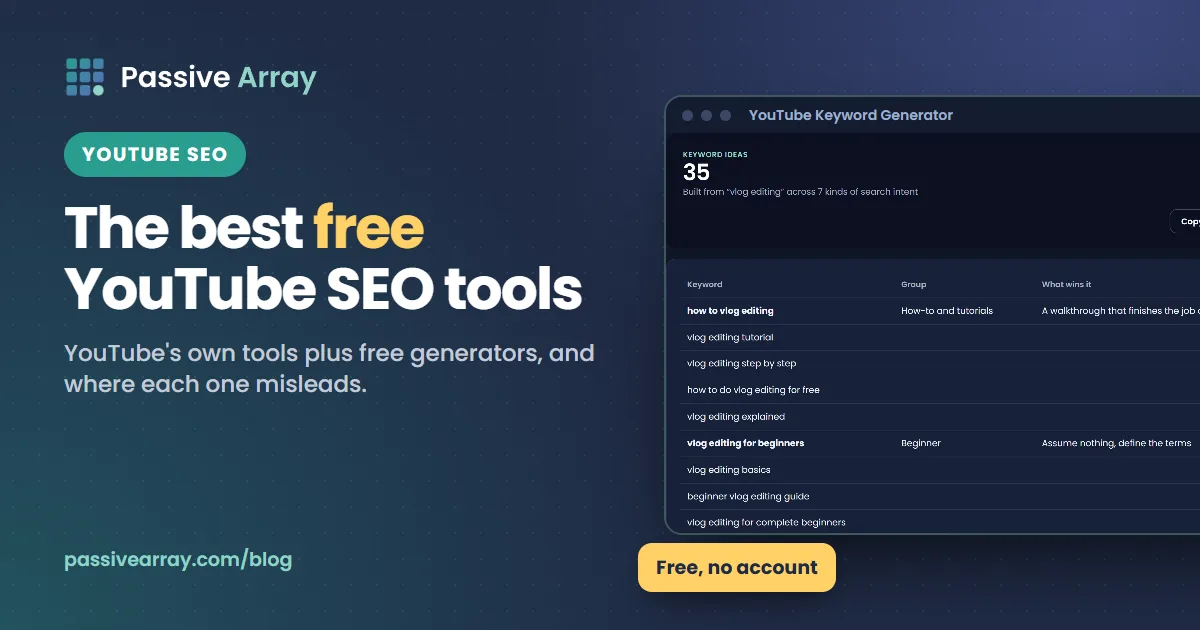
The YouTube Keyword Generator
Autocomplete gives you raw phrases. The YouTube Keyword Generator takes a seed keyword and expands it into long-tail phrases, questions, comparisons and buyer-intent versions, grouped by what the searcher wants. That grouping matters: "how to edit vlogs" and "best vlog editing app" need different videos, even though a keyword list puts them side by side.
It does not show a search volume number, on purpose. No tool outside Google has YouTube's search counts, so a "monthly searches" figure on a YouTube tool is modelled from other data. Treat any such number as a rough ordering between phrases, not as a forecast of views.
Google Trends
Google Trends shows how interest in a phrase changes over time, and you can switch the chart from web search to YouTube search. Google's Trends Help says the numbers are scaled "on a range of 0 to 100" relative to all searches, so they show relative popularity, not search volume. Use it to spot seasonal topics (a phrase whose line climbs at the same time every year is worth publishing a few weeks before the climb) and to compare two phrasings of the same idea.
Free title tools
The title carries more of your SEO than anything else you write, because it is the first relevance signal and the main reason people click.
YouTube Title Analyzer
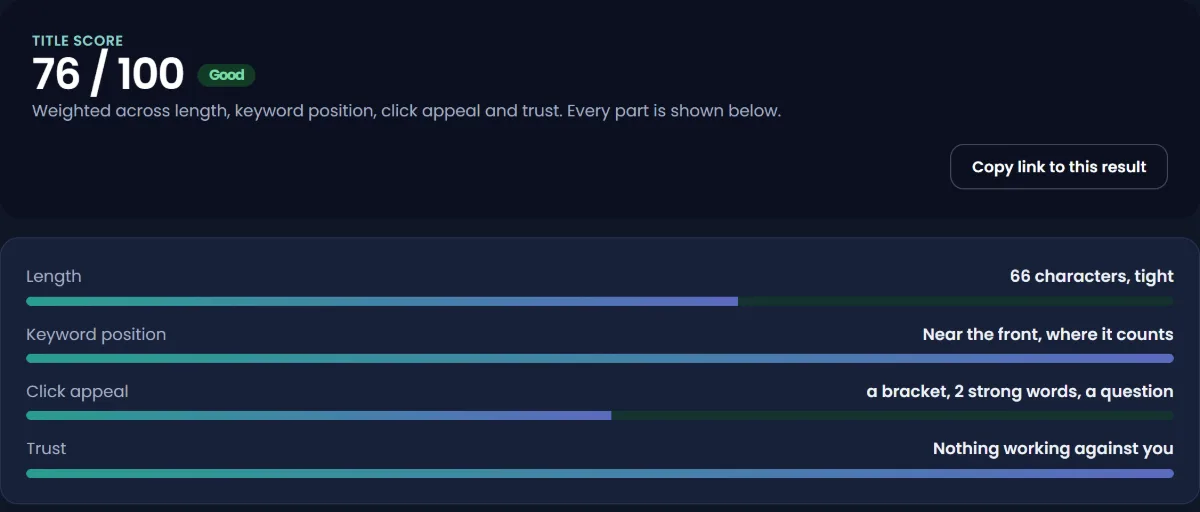
The YouTube Title Analyzer scores a title out of 100 and shows every check separately: length, where the keyword sits, and click appeal. The point is to see which part is weak. A title can score well and still be the wrong promise for the video, so use the score to catch mechanical problems (keyword at the end, title cut off on phones), not to judge the idea.
Test & compare in YouTube Studio
Once a video is live, YouTube's own Test & compare lets you test up to three titles, three thumbnails, or both. YouTube's Help Center says the option with the highest watch time share wins and is then shown to all viewers. It works on desktop through YouTube Studio, for long-form videos; Shorts, scheduled live streams and Premieres cannot be tested, and a test should finish within two weeks. Paid tools used to be the only way to A/B test on YouTube. For most creators, this free built-in version is now enough.
A worked example
Say you made a video about cleaning a cast iron pan.
- Autocomplete and the keyword generator give you "how to clean cast iron after cooking", "how to clean a rusty cast iron pan" and "can you use soap on cast iron".
- You pick the phrase your video answers best: the rusty pan.
- First draft: "My cast iron was ruined... so I tried this". The analyzer flags that the keyword is missing.
- Second draft: "How to clean a rusty cast iron pan (and stop the rust coming back)". The keyword is first, the promise is specific, and it adds a second benefit.
- After a week, run Test & compare between that title and "Rusty cast iron? Fix it in 20 minutes" and let watch time share decide.
Free description tools
YouTube's Help Center on descriptions gives three rules that matter for SEO: describe the video in the first lines (viewers see them before "Show more"), use one or two main words that describe the video in both the title and the description, and give every video a unique description. The limit is 5,000 characters.
The YouTube Description Generator drafts a description in that order: keyword-led opening, what the viewer learns, chapter timestamps, links and hashtags. Edit the draft so it sounds like you. For ready-made layouts by video type, see our YouTube description templates.
Free tag and hashtag tools
Tags are where free tools are most oversold. YouTube's Help Center says tags "play a minimal role in your video's discovery" and are mainly useful when your topic is commonly misspelled. It also says adding excessive tags to the description breaks its spam policies.
So a tag tool is worth two minutes, not twenty. The YouTube Tag Generator builds the exact keyword, a few long-tail variations, realistic misspellings and a broad category term, all within the 500-character limit of the tags field. Then move on. Do YouTube tags still matter explains what tags still do and what they do not.
Hashtags are a different feature. YouTube says up to three hashtags it considers most engaging can show by your title, hashtags must not contain spaces, and if a video has more than 60 hashtags, YouTube ignores every one of them. The YouTube Hashtag Generator puts specific hashtags first and keeps the list short. Our guide to YouTube hashtags vs tags covers the difference in more depth.
Free tools for checking whether it worked
SEO without measurement is guessing. Two free reports in YouTube Studio tell you whether your work is paying off:
- Traffic source: YouTube search. In YouTube Studio > Analytics > Content, open a video and look at how viewers found it. If YouTube search is a large share, your metadata is doing its job.
- YouTube search terms. In the same video's analytics, the search terms report lists the phrases that brought viewers. If you see phrases you did not use, add them to the description. YouTube's description guidance recommends exactly this.
- Your position for a phrase. Search your target phrase in a private or signed-out window and note where your video appears. Results are personalised, so treat this as a rough check. How to check where your YouTube video ranks explains how to get a cleaner reading.
Free plans of the paid tools: vidIQ and TubeBuddy
Most "best YouTube SEO tool" lists are really lists of vidIQ and TubeBuddy. Both are real products with real strengths, and both have free tiers.
- vidIQ (pricing checked 1 November 2026): the free plan includes 150 AI credits a month, niche trends, content ideas and tips from its AI coach. Paid plans start with Boost, shown as $19 a month or $199 a year, and add thumbnail creation, unlimited trends research and more credits.
- TubeBuddy (pricing checked 1 November 2026): paid plans are Pro and Legend; the page showed local-currency estimates for our region, so check it from yours. Its homepage advertises a free "Forever" plan. Keyword Explorer and SEO Studio are listed in Pro; A/B Testing, Click Magnet and the Title Generator are listed in Legend. TubeBuddy notes that local-currency prices are estimates and that it charges in US dollars, so the price you see may differ by region.
Where they are better than free generators: both connect to your channel, so they can read your private analytics, track your numbers over time, and (on paid plans) do things like bulk-edit descriptions across hundreds of videos. Passive Array's tools do none of that. They work only from public data and what you type in.
Where free tools are enough: if your work is finding phrases, writing titles and descriptions, and checking them before you publish, you do not need a subscription. Our full TubeBuddy vs vidIQ comparison covers which paid plan suits which channel, and the Passive Array pages on a free vidIQ alternative and a free TubeBuddy alternative list what each one does that we do not.
Free tools that are not worth your time
- "Search volume" checkers for YouTube. The numbers are modelled. A confident "8,100 searches" is not more accurate than YouTube's own "very low to very high" scale. It just looks more precise.
- Tag extractors used to copy competitors. Seeing another video's tags is harmless and sometimes interesting (how to find any YouTube video's tags shows how), but copying them does almost nothing, because tags play a minimal role.
- "SEO score" tools that grade the whole video. They check metadata length and keyword counts. They cannot see retention, which matters far more.
- View, subscriber or engagement boosters. These are not SEO tools. YouTube's fake engagement policy prohibits artificially inflating views, likes and subscribers, and artificial traffic is not counted.
A free SEO routine for every upload
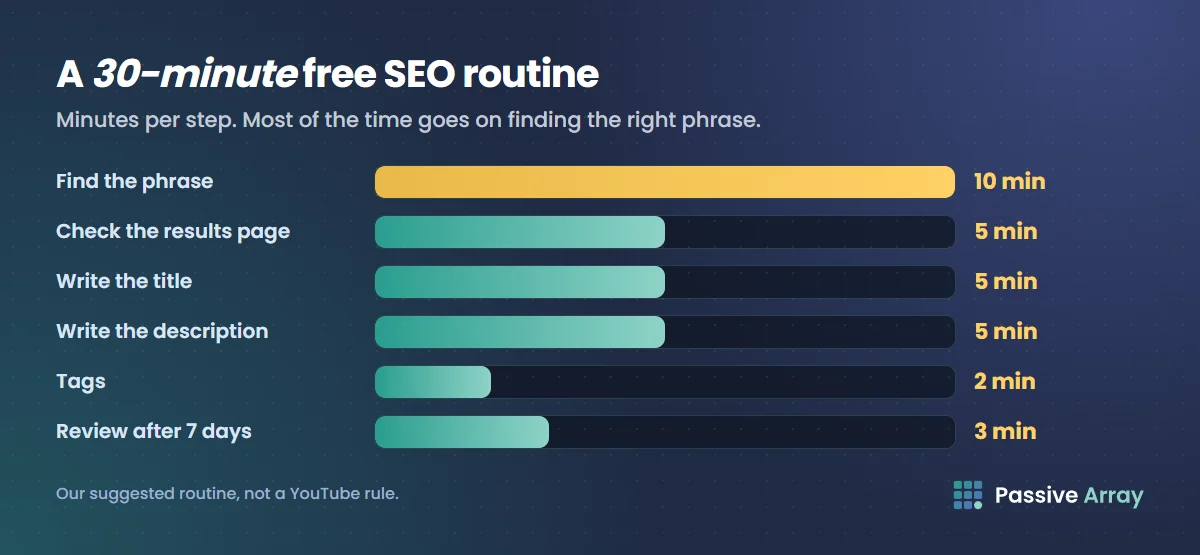
This is our suggested routine, not a YouTube rule. It takes about 30 minutes per video.
- Find the phrase (10 minutes). Check the Trends tab for content gaps in your topic, run autocomplete, then expand the best seed in the keyword generator. Pick one phrase your video truly answers.
- Check the results page (5 minutes). Search the phrase. If small channels rank and the top videos are old or off-target, you have a chance.
- Write the title (5 minutes). Keyword near the front, one specific promise. Run it through the title analyzer.
- Write the description (5 minutes). Phrase in the first two lines, then what the viewer learns, then chapters, links and two or three hashtags.
- Tags (2 minutes). Exact phrase, misspellings, one broad term. Done.
- Review after 7 days (3 minutes). Check traffic sources and the search terms report. Add missing phrases to the description. If impressions are good but clicks are low, run Test & compare.
Sources
- YouTube Help: How YouTube search works
- YouTube Help: Explore trends on YouTube (Trends tab)
- YouTube Help: Tips for video descriptions
- YouTube Help: Add tags to your videos
- YouTube Help: Tag videos with hashtags
- YouTube Help: Test and compare thumbnails and titles
- YouTube Help: Fake engagement policy
- Google Trends Help: FAQ about Google Trends data
- vidIQ: Pricing, checked 1 November 2026
- TubeBuddy: Pricing, checked 1 November 2026
Frequently asked questions
What is the best free YouTube SEO tool?
YouTube Studio's Trends tab, because it shows real searches on YouTube and content gaps straight from YouTube's data. Pair it with autocomplete for phrases, a title analyzer to check your title, and Test & compare to pick between titles once the video is live. All of these are free.
Is there a free YouTube keyword research tool with search volume?
Not a real one. No tool outside Google has YouTube's search counts, so any "monthly searches" number in a YouTube tool is modelled. YouTube's own Trends tab shows audience interest on a scale from very low to very high, which is less precise but comes from YouTube's data.
What is the best free YouTube tag generator?
Any generator that keeps the list under the 500-character limit and includes misspellings is enough, because YouTube says tags play a minimal role in discovery. The Passive Array tag generator does this with no account. Spend the time you save on the title and description.
Is there a good free YouTube hashtag generator?
Yes, but keep the output short. YouTube shows up to three hashtags by the title and ignores all hashtags on a video that has more than 60. A generator that orders specific hashtags first, like the Passive Array hashtag generator, is more useful than one that produces 30.
Is vidIQ's keyword research tool free?
vidIQ has a free plan with 150 AI credits a month, according to its pricing page checked on 1 November 2026. Its FAQ describes the free tier as limited access to its most popular tools. Paid plans add more credits and unlimited trends research.
Which YouTube SEO tools are best for videos, not just channels?
Video-level SEO depends on the title, description, chapters and the video itself. The free tools that work at that level are a keyword generator, a title analyzer, a description generator, and YouTube Studio's search terms report and Test & compare for each video.
Do YouTube SEO tools actually get more views?
They help YouTube match your video to the right searches, which is relevance. Rankings also depend on engagement and quality, which come from viewers. A tool can make a good video easier to find. It cannot make a weak video rank.