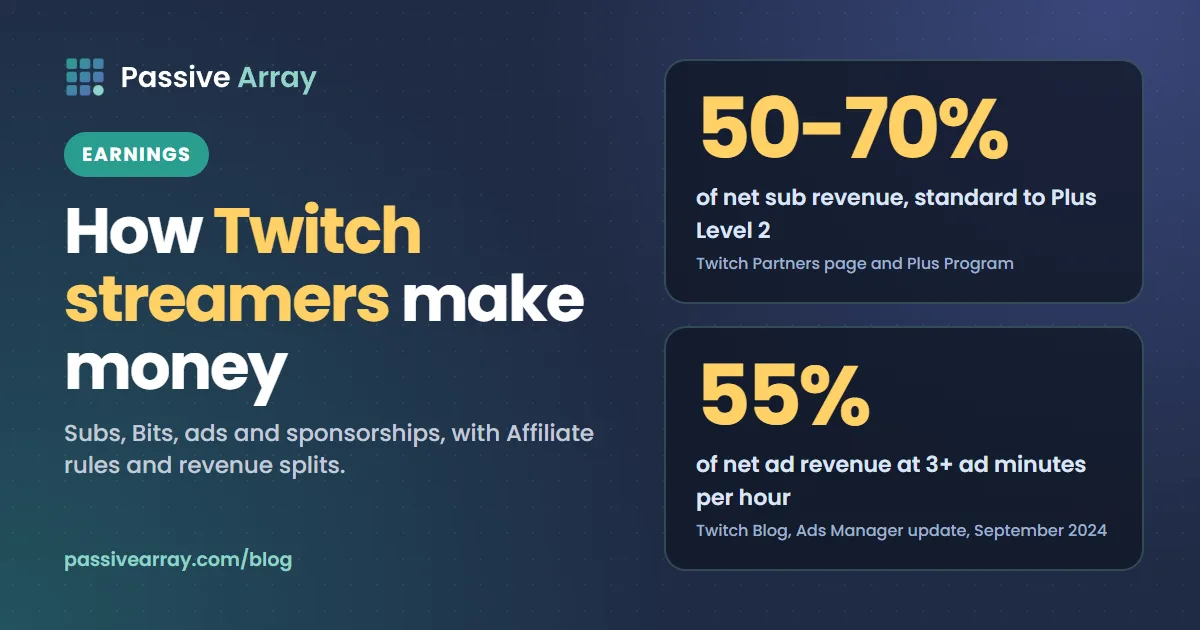
Twitch streamers make money from five main sources: subscriptions (including gift subs and Prime subs), Bits that viewers use to cheer, a share of ad revenue, sponsorships with brands, and income off Twitch such as merchandise and YouTube. To be paid by Twitch you need to be an Affiliate or a Partner. In 2026 Affiliate takes 25 followers, 4 hours streamed on 4 different days, and an average of at least 3 viewers on 4 of those days, all within 30 days.
Followers do not pay anything directly, but they are the first milestone and the audience every other income stream draws from. You can check any streamer's follower count, live status and recent VOD views for free with the Twitch follower count checker. This guide covers each income stream, what Twitch pays for it, who qualifies, and what the public numbers can and cannot tell you about a streamer's income.
The ways Twitch streamers earn, at a glance
| Income stream | Who pays | What the streamer gets | Who can earn it |
|---|---|---|---|
| Subscriptions | Viewers, monthly | 50% of net revenue as standard; 60% or 70% in the Plus Program | Affiliates and Partners |
| Gift subs | Viewers, for other viewers | Counted like paid subs | Affiliates and Partners |
| Prime subs | Amazon, via a viewer's Prime | A fixed rate set by the viewer's country | Affiliates and Partners |
| Bits (cheering) | Viewers | 1 cent per Bit, per Twitch's Partner page | Affiliates and Partners |
| Ads | Advertisers | 55% of net ad revenue at 3+ ad minutes per hour | Affiliates and Partners |
| Sponsorships | Brands | Whatever you negotiate | Anyone a brand will hire |
| Off-Twitch income | Fans and customers | Merch, YouTube, affiliate links, tips | Anyone |
All of the Twitch-paid lines need Affiliate or Partner status to be paid out. The rest of this guide goes through them one at a time.
Step 1: become a Twitch Affiliate
Affiliate is where Twitch income starts. You do not apply. Twitch tracks your progress in the Achievements section of the Creator Dashboard and sends an invitation, by email and as a dashboard notification, once you complete the criteria.
Twitch has lowered the criteria to make Affiliate easier for new streamers. Its blog post "Monetization for All" compares the old and new rules:
| Requirement | Old | New |
|---|---|---|
| Streaming time | 8 hours | 4 hours |
| Streaming days | 7 different days | 4 different days |
| Viewers | Average 3 concurrent viewers | At least 3 average concurrent viewers on 4 different days |
| Followers | 50 | 25 |
All four must be met within the last 30 days. If you have just hit them, give it a few days: Twitch's help pages say it can take a few days after you become eligible for the invitation to arrive.
Why your follower count might not count toward Affiliate
A common search is "twitch followers not counting towards affiliate". Twitch counts the follower total it holds for your channel, and that total can differ from what you expect for a few reasons:
- Removed accounts. Closed and banned accounts can drop out of follower totals, so a burst of bot follows can disappear later.
- Unfollows. Followers can leave at any time, and a total that touched 25 for an hour may be back at 24.
- Dashboard delay. Achievement progress is not always instant. Check again the next day before assuming something is wrong.
To see your own total the way Twitch's API reports it, look your channel up in the follower count checker. Results there are cached for up to 30 minutes.
Monetization tools before Affiliate
Twitch's May 2026 update also opened Channel Points, subs, emotes, badges and Bits to eligible streamers globally, not only Affiliates and Partners. The catch is in the same post: "streamers must earn Partner or Affiliate status to receive a payout." Money you earn before Affiliate builds up in your Twitch balance. In the US, Twitch's Spendable Balance lets you use that balance to buy Bits and gift subs before you reach the payout threshold, and Twitch says it plans to expand it globally.
Step 2: subscriptions, gift subs and Prime subs
Subscriptions are the steadiest Twitch income, because viewers pay every month until they cancel.
- Tiers. Twitch's Partner page lists the subscription tiers at $5.99, $9.99 and $24.99, plus the free Prime Gaming subscription. Prices vary by country and by where the viewer buys, for example on mobile, so treat these as the headline US prices.
- Gift subs. A viewer buys a subscription for someone else, often several at once during a hype moment. They count as paid subs for the streamer.
- Prime subs. Viewers with Amazon Prime get one free channel sub a month. Since June 2024, Twitch pays a fixed rate for Prime subs that depends on the subscriber's country, rather than matching a paid sub.
The revenue split
The standard split is 50/50 of net subscription revenue. Twitch's Plus Program (formerly Partner Plus) raises it for streamers who hold enough subscriptions:
| Level | Split | Plus Points needed |
|---|---|---|
| Standard | 50/50 | None |
| Plus Level 1 | 60/40 | 100 Plus Points for 3 consecutive months |
| Plus Level 2 | 70/30 | 300 Plus Points for 3 consecutive months |
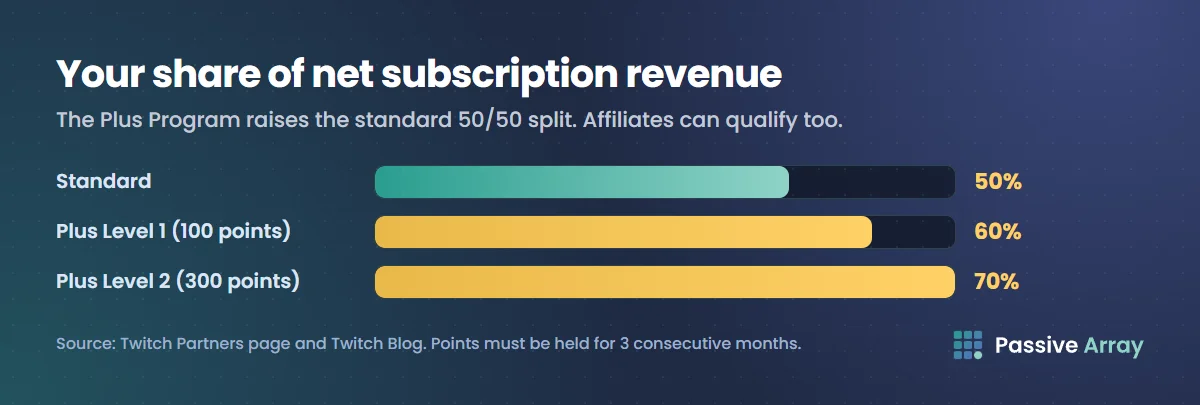
Plus Points count Tier 1 subs as 1 point, Tier 2 as 2 points and Tier 3 as 6 points. Since 2024, Affiliates can qualify too, not only Partners, and Twitch removed the old US$100,000 annual cap on the 70/30 share. Twitch has also announced region-specific criteria in some markets, such as lower thresholds in Latin America, so check the Plus Program details in your Creator Dashboard.
Note the word net. The split applies after taxes and platform fees, so a $5.99 sub does not put exactly $3.00 in your account.
Step 3: Bits and cheering
Viewers buy Bits and spend them to cheer in chat, often with an animated emote. Twitch's Partner page says streamers receive "1 cent per Bit used to Cheer for them". So 10,000 Bits cheered in a month is $100.
Bits are irregular. They spike during events, milestones and good moments on stream, and they depend heavily on a few generous viewers. Do not plan your income around last month's biggest cheer.
Step 4: ads
Twitch shares ad revenue with Affiliates and Partners. According to Twitch's 2024 Ads Manager update, "Both Partners and Affiliates can automatically earn 55% net ad revenue by running at least 3 ad minutes per hour." Ads Manager in the Creator Dashboard has a density slider that shows how many ad minutes you will run and which revenue share you get at that level.
What a minute of ads pays is not published and moves with advertiser demand, your viewers' countries and the season. Twitch's Affiliate FAQ warns that monthly ad revenue can change even when viewership is steady. Treat ads as a variable top-up, not a salary.
There is a trade-off. More ad minutes earn more but interrupt the stream. Many streamers run ads at natural breaks, such as between matches or when they step away, and tell chat before they do.
Step 5: sponsorships
For mid-sized and large streamers, brand deals often pay more than Twitch itself. Common formats are:
- A live read or segment during the stream.
- A sponsored stream, where you play or use the brand's product for a set time.
- A panel or overlay placement for a month.
- A bundle of streams plus clips on YouTube or TikTok.
Brands pricing Twitch deals look at average concurrent viewers and how much people watch afterwards, more than follower count. A streamer with 50,000 followers and 40 average viewers is a 40-viewer channel to a brand.
There is no single Twitch pricing formula. A sensible approach is to price the stream on how many people will actually see the sponsor, the same logic as pricing a sponsored YouTube video on views. If you post VODs or clips on YouTube as part of the deal, price that part with the YouTube sponsorship price calculator. Put your average viewers, peak viewers, chat activity and audience countries in a creator media kit.
Disclose sponsored streams
The FTC's guide for influencers says that in a livestream, "the disclosure should be repeated periodically so viewers who only see part of the stream will get the disclosure." Say it out loud more than once, and keep a visible "sponsored" note on screen while the brand segment runs.
Step 6: income off Twitch
The most stable streamers do not rely on Twitch alone:
- YouTube. Edited highlights and VODs earn ad revenue for years, and they bring new viewers back to the stream. Our guide on getting more views on YouTube Live covers streaming there too, and how to grow a gaming YouTube channel covers the clip side.
- Merchandise and digital products. Emote packs for other streamers, overlays, guides, coaching.
- Affiliate links. Commission on the gear, games or software you use on stream.
- Other live platforms. Some streamers multistream or move. Our comparison of YouTube alternatives and how each one pays includes Twitch and Kick side by side.
Twitch Partner: what changes
Partner is the higher tier. You apply for it after completing the Path to Partner achievement in your Creator Dashboard, which is built around streaming regularly with an average of at least 75 viewers per qualifying stream, or by showing a large, engaged audience elsewhere. Twitch says completing the achievement "is not a guarantee of Partnership." Applicants who complete it can expect a reply within 7 business days, and others may wait 2 to 4 weeks.
Per Twitch's Partner page, Partners get:
- Up to 50 channel emotes.
- VODs stored for 60 days, against 14 days for Affiliates.
- Support replies within 1 to 2 business days.
- A broadcast delay of up to 15 minutes.
- Up to 3 additional free lifetime channel subscriptions.
Partner does not automatically raise the subscription split. The higher splits come from the Plus Program, which Affiliates can also reach.
Getting paid
Twitch's payout threshold is $50. Its May 2026 post says you "automatically receive a payout when you reach the $50 minimum payout threshold if you're eligible." Before your first payout, set up your payout and tax details in the Creator Dashboard, because missing tax information delays payments.
A worked example
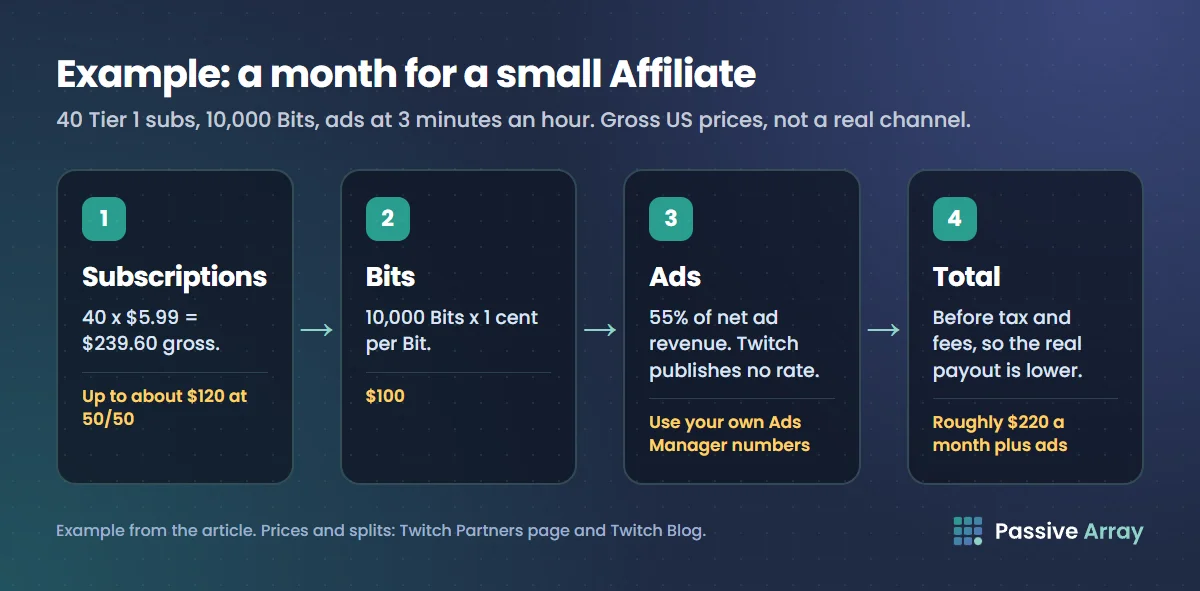
Say a streamer is an Affiliate with 40 Tier 1 subscribers, 10,000 Bits cheered a month and ads at 3 minutes an hour. This is an example, not a real channel, and it uses gross US prices, so the real payout will be lower after taxes and fees.
- Subscriptions. 40 x $5.99 = $239.60 gross. At the standard 50/50 split, up to about $120 before deductions.
- Bits. 10,000 x $0.01 = $100.
- Ads. 55% of net ad revenue. Twitch does not publish a rate, so use your own Ads Manager numbers after the first month.
- Total from Twitch. Roughly $220 a month plus ads, before tax.
Now say the same streamer reaches 100 Plus Points for three months in a row. The subscription share moves to 60/40, so the same subs pay up to about $144 instead of $120. At 300 points the split is 70/30. This is why streamers push Tier 2 and Tier 3 subs, which count for 2 and 6 points.
One sponsored stream at a fair rate can be worth more than the whole month above. That is the pattern for most mid-sized streamers: Twitch income covers the basics, sponsorships and off-platform income grow it.
What public Twitch stats can tell you about a streamer's income
Many people search for "twitch stats money" or "twitch stats subs" hoping to see what a streamer earns. Here is what is public and what is not:
| Number | Public? | What it says about income |
|---|---|---|
| Followers | Yes, exact | Audience size, not income |
| Live viewers | Yes, only while live | The best public clue to sponsorship value |
| VOD views | Yes | How much people watch after the stream |
| Partner or Affiliate status | Yes | Whether the channel can earn from Twitch at all |
| Subscriber count | No, private | The main income line, hidden |
| Bits and ad revenue | No | Hidden |
Any site that shows a precise subscriber count or monthly income for a channel is estimating, unless the streamer shared it. The same caution applies to stats sites on other platforms, as our look at whether Social Blade is accurate explains.
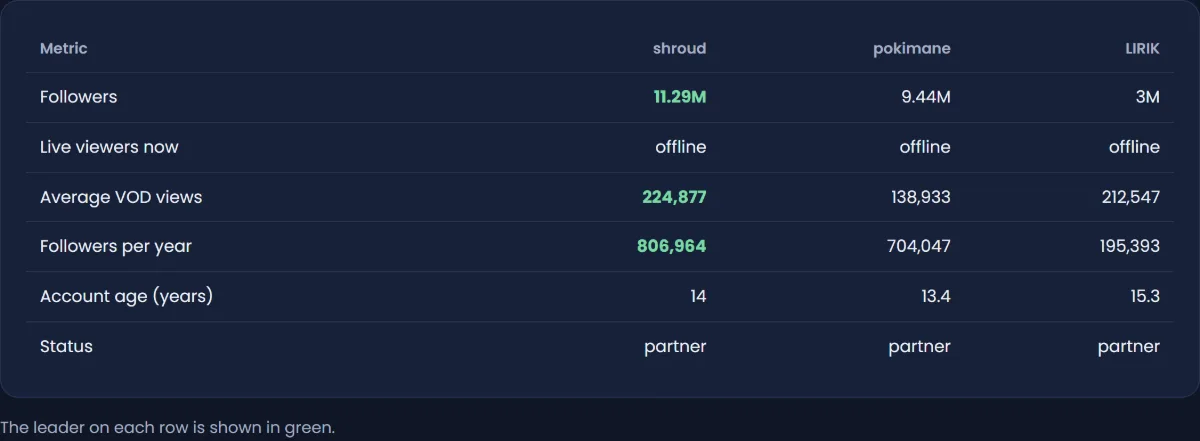
What you can do with public data is compare growth. The Twitch follower tracker records a channel's follower total every day, with 7, 30 and 90-day change, and the Twitch channel comparison puts two or three streamers side by side on followers, live viewers, average VOD views and growth pace.
Mistakes that hold Twitch income back
- Chasing followers over viewers. Followers get you to Affiliate, but average viewers drive subs, Bits, ads and sponsorships.
- Buying followers or using view bots. fake accounts can drop out of totals, and inflated numbers fall apart the moment a brand looks at chat activity.
- Running no ads, or far too many. Below 3 minutes an hour you lose the 55% share, and too many breaks push viewers away. Use the density slider and test.
- Ignoring the Plus Program. Tier 2 and Tier 3 subs count for more points. A small push on higher tiers can move you up a split level.
- Underpricing sponsorships. Quote on average viewers and include clips, overlays and usage rights as separate items.
- Forgetting to show your goals. A follower or sub goal on screen gives viewers a reason to act. Our guide on adding a Twitch follower count to OBS shows the setup.
Sources
- Twitch Blog: Monetization for All, May 2026
- Twitch Blog: An update to several streamer payout programs, January 2024
- Twitch Blog: Ads Manager evolves, September 2024
- Twitch Blog: Supporting streamers in Latin America, May 2025
- Twitch: Partners
- Twitch: Partnership FAQ
- Twitch Help: Joining the Affiliate Program
- Twitch Help: Twitch Affiliate Program FAQ
- FTC: Disclosures 101 for social media influencers
Frequently asked questions
How do creators make money on Twitch?
Through subscriptions, gift subs, Prime subs, Bits and a share of ad revenue, all paid by Twitch once they are an Affiliate or Partner. Most larger streamers also earn from sponsorships, merchandise and YouTube. For mid-sized channels, sponsorships often pay more than Twitch itself.
How many followers do you need for Twitch Affiliate?
25 in 2026, down from 50. You also need 4 hours streamed on 4 different days and at least 3 average concurrent viewers on 4 days, all within 30 days. Twitch invites you; you do not apply.
Why is my Twitch Affiliate follower count not updating?
Achievement progress and follower totals can lag, and closed or banned accounts can drop out of follower totals, which can push you back below the line. Check the next day, and remember the invitation itself can take a few days after you become eligible.
Can I see how much a Twitch streamer earns?
Not exactly. Subscriber counts, Bits and ad revenue are private, so any site showing a precise income or sub count is estimating. Followers, live viewers, VOD views and Partner or Affiliate status are public, and those are what free tools can show.
Do gifted subs count toward the Plus Program?
Yes. Twitch's Plus Program counts paid and gift subscriptions to the channel, with Tier 1 worth 1 point, Tier 2 worth 2 points and Tier 3 worth 6 points. You need 100 points for three consecutive months for 60/40, and 300 for 70/30.
How much does Twitch pay per Bit?
One cent per Bit, according to Twitch's Partner page. 1,000 Bits cheered is $10 to the streamer.
When does Twitch pay out?
Once your balance reaches the $50 minimum payout threshold and you are an Affiliate or Partner with payout and tax details set up. In the US, Spendable Balance also lets you spend your balance on Bits and gift subs before you reach the threshold.
By Nasir Uddin, founder of Passive Array. Rules and figures checked Nov 1, 2026.