YouTube pays nothing for reaching 1,000 subscribers or 4,000 watch hours. Those numbers only let you apply. Once you are accepted, you are paid for monetized views, at a rate per 1,000 views called RPM, and a channel that has just crossed the threshold usually earns somewhere between a few dollars and a few tens of dollars a month. Your first actual payment arrives when your balance reaches $100.
That is a smaller number than most creators expect, so this guide shows the arithmetic, with worked examples, and then what you can do to grow it. The YouTube money calculator runs the same formula on any channel if you want to skip ahead.
Does YouTube pay you for 1,000 subscribers?
No. Subscribers are an entry ticket, not a payment. YouTube's Partner Program page sets the bar at 1,000 subscribers plus either 4,000 qualified watch hours in the last 12 months or 10 million qualified Shorts views in the last 90 days. Meeting that lets you apply. Nothing is paid for the subscribers themselves, and nothing is paid for views from before you joined.
What changes after approval is that you start receiving a share of the money YouTube earns on your content. YouTube's own help page puts it plainly: if you do not meet the eligibility criteria, "you may still see ads being served on your content", but "you are not yet eligible to receive a share of the revenue." Joining the program is what turns that share on.
Our full guide to YouTube monetization requirements covers the thresholds, the 500-subscriber fan funding tier, and the rules that are not numbers.
What you actually get paid for after monetization
Once you are in the Partner Program, YouTube says you can switch on Watch Page Ads, Shorts Feed Ads, Memberships, Supers, and more in YouTube Studio. Each one is a separate module with its own terms you accept. The money comes in several lines:
| Income line | How it is paid | Share to you |
|---|---|---|
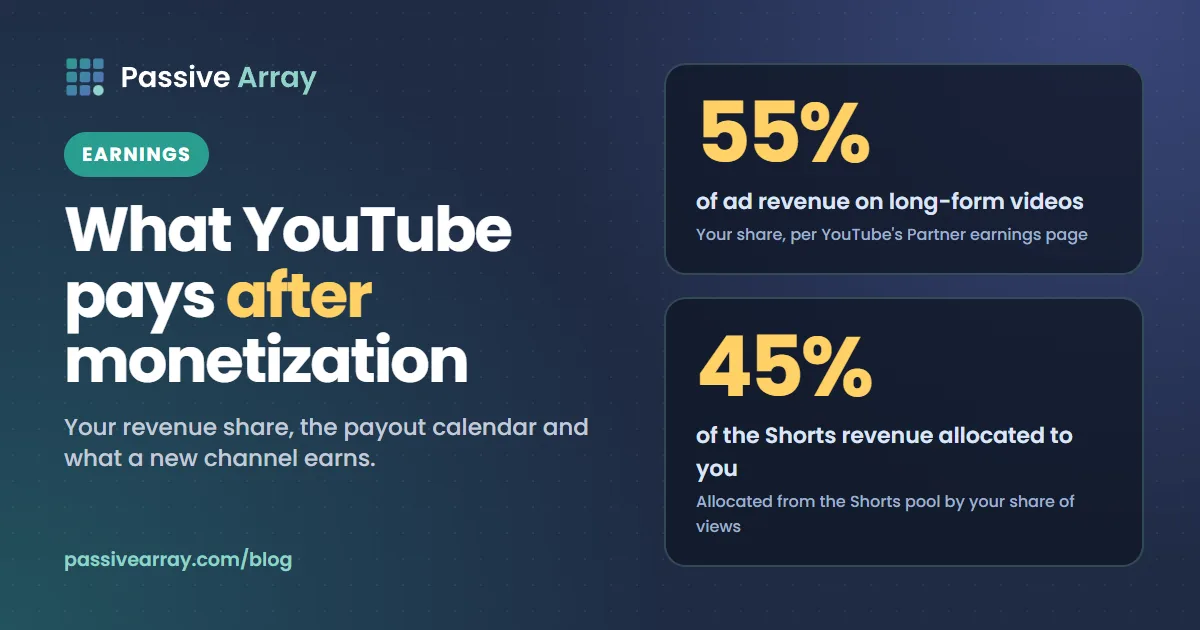
| Ads on long-form videos | Per ad shown on your public videos | 55% of net ad revenue |
| Ads in the Shorts feed | From a pooled Creator Pool, split by your share of engaged views | 45% of the revenue allocated to you |
| YouTube Premium | Shared according to how much Premium members watch you | Not published as one percentage |
| Channel memberships, Super Chat, Super Stickers, Super Thanks | Paid by fans, shared with you | Each feature has its own share |
| YouTube Shopping | Product sales and affiliate commissions | Set by the program and the merchant |
The 55% and 45% figures come from YouTube's partner earnings overview. YouTube ad revenue explained goes through how each split works.
Two details trip up new partners:
- Shorts revenue starts on the day you accept the Shorts Monetization Module. YouTube's Shorts monetization page is explicit that views from before your acceptance date do not count.
- Ads only earn on public videos. Unlisted and private videos do not carry revenue sharing, and neither do videos with limited ads or Content ID claims that send the money to someone else.
The formula: how much does YouTube pay per view after monetization?
All of those lines are rolled into one number in YouTube Studio: RPM, revenue per mille. YouTube defines it as "how much money you've earned per 1,000 video views", after YouTube's share, across ads, memberships, Premium, Super Chat and Super Stickers. It divides by every view, including the ones that showed no ad.
So the whole calculation is:
Monthly earnings = (monthly views / 1,000) x RPM
YouTube does not publish an average RPM, and it varies widely by audience country, topic and format. Our calculator starts from a default range of $0.50 to $4.00 per 1,000 views for long-form videos. That range is our editorial assumption, not a YouTube figure. You can change it in the tool, and once you are monetized, your own RPM appears in YouTube Studio > Analytics > Revenue after a few weeks.
Here is what the default range means at different monthly view counts:
| Monthly views | At $0.50 RPM | At $4.00 RPM |
|---|---|---|
| 5,000 | $2.50 | $20 |
| 20,000 | $10 | $80 |
| 50,000 | $25 | $200 |
| 100,000 | $50 | $400 |
| 500,000 | $250 | $2,000 |
Notice what is not in the table: subscribers. A channel with 1,000 subscribers and 100,000 monthly views earns more than a channel with 20,000 subscribers and 5,000 monthly views. How much YouTube pays for 1,000 views explains why the range is this wide.
Worked example: a channel that just qualified
Say a channel has just been accepted with exactly 1,000 subscribers and 4,000 watch hours in the last 12 months, and its average view lasts 4 minutes. This is an example, not a real channel.
- Convert watch hours to views. 4,000 hours x 60 = 240,000 minutes. At 4 minutes a view, that is 60,000 views a year.
- Turn that into a month. 60,000 / 12 = about 5,000 views a month.
- Apply the RPM range. 5,000 / 1,000 x $0.50 = $2.50. 5,000 / 1,000 x $4.00 = $20.
So the channel's first monetized months are likely to bring in between $2.50 and $20 a month, if its views stay at the level that got it accepted.
Now change one thing. Say the average view is 8 minutes instead of 4. The same 4,000 hours is only 30,000 views a year, or 2,500 a month, so the estimate falls to $1.25 to $10 a month. Longer videos reach the watch-hour threshold with fewer views, and since YouTube pays per view, they start out earning less. They can carry mid-roll ads, which helps (more on that below), but they begin from a smaller view base.
This is why so many creators are disappointed by their first month. The views that got them into the program are the same views now being monetized, and the threshold was set by watch time, not by income.
When will you get your first payment?
YouTube pays through AdSense for YouTube, once a month. According to YouTube Help:
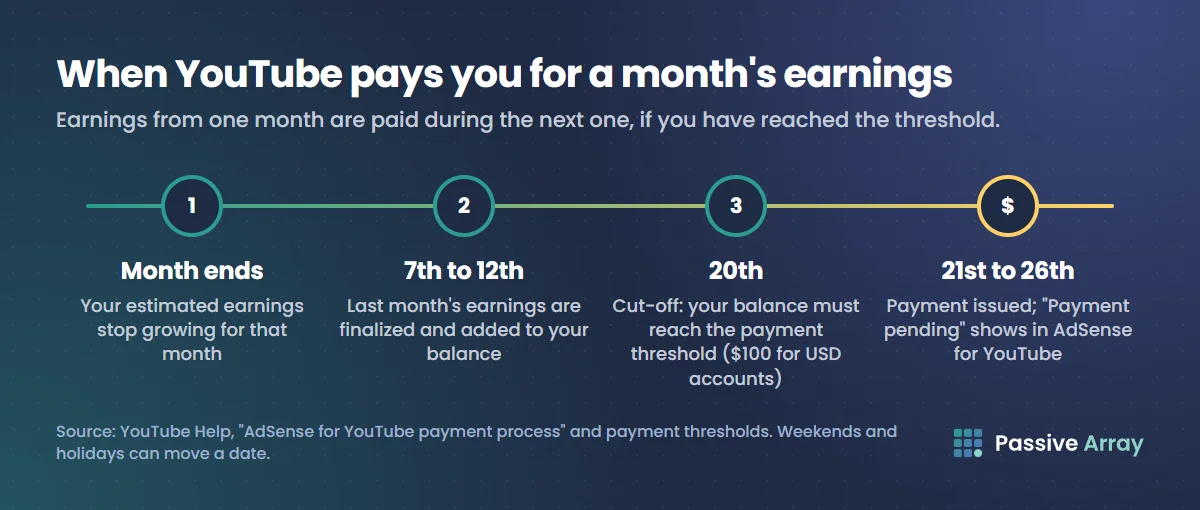
- At $10 in your balance, you are asked to verify your identity and your address. Payments are held until both are done.
- Last month's estimated earnings are finalized between the 7th and 12th of the month and added to your balance.
- Your balance on the 20th must have reached the payment threshold, which is $100 for USD accounts.
- Payment is issued between the 21st and 26th. If the 21st is a weekend or holiday, it may go out the next business day.
- Below the threshold, the balance rolls over to the next month. Nothing is lost.
Go back to the worked example. At $2.50 to $20 a month, reaching $100 takes 5 to 40 months. A channel that grows after joining will get there sooner, because growth raises the monthly figure. A channel whose views stay flat may wait a long time for its first payout.
Tax information also matters before the first payment. If you do not submit it in AdSense, Google can withhold more than you expect. How and when YouTube pays you covers verification, tax forms and payment methods step by step.
How much do Shorts pay after monetization?
The Shorts route into the program needs 10 million qualified Shorts views in 90 days, which is roughly 3.3 million a month. That sounds like it should pay well. It usually pays far less than the same number of long-form views, for three reasons YouTube describes on its Shorts monetization page:
- The money is pooled. Ads run between Shorts in the feed, so YouTube pools a month's Shorts feed ad revenue and divides it by each monetizing creator's share of engaged views, country by country.
- Music comes out first. A Short with no music sends all of its revenue to the Creator Pool. A Short with one track sends half, and a Short with two tracks sends a third. The rest pays for music licensing.
- Your 45% is of a share, not of the ads. You keep 45% of what is allocated to you, whether or not you used music.
YouTube does not publish a typical Shorts RPM, so we will not invent one. After your first full month, open Analytics > Revenue in Studio and look at how much of your revenue came from Shorts and how much from long-form. That ratio tells you more than any blog figure. How much YouTube pays for Shorts walks through the pool in more detail.
A change for Shorts earnings in 2027
From 1 February 2027, YouTube's Partner Program changes page says creators need to "maintain 10M qualified Shorts views over the last 90 days" to earn from the Shorts Creator Pool each month. A channel below that stays in the program and keeps earning from long-form, and Shorts revenue sharing resumes when it crosses 10 million again. YouTube's August 2026 announcement says channels below the bar will get other incentives, with details to come. If most of your income is from Shorts, watch this number every month.
Why the first months can look worse than the formula
Even with the formula, early earnings often land at the bottom of the range. The usual reasons:
- Audience country. Advertisers pay very different prices to reach viewers in different countries. A channel whose viewers are mostly outside the highest-paying ad markets earns less per view.
- Topic. Finance, software and business topics attract higher bids than entertainment or music. Advertisers pay more to reach viewers who are about to spend money.
- Short videos. Mid-roll ads only run on monetized videos of 8 minutes or longer, according to YouTube Help.
- Limited ads. A yellow dollar icon means fewer advertisers bid on the video.
- Advertiser demand that month. RPM moves from month to month as advertiser spending changes, so judge it over several months, not one.
Studio's estimated figure is also not the final one. AdSense pays the finalized amount, after invalid traffic and other adjustments, which is often a little lower. If your RPM looks low, why is my YouTube RPM low has a checklist for each cause.
How to grow your income after monetization
Getting accepted is the start. These are the levers that move the number, roughly in order of how much they usually matter.
- Grow monthly views, not subscribers. Income is views times RPM. Put your effort into the videos and topics that already bring in steady views, and track them. The channel growth tracker charts any channel's public views and subscribers day by day, including channels in your niche you want to learn from.
- Make long-form videos that earn mid-rolls when the topic supports it. A video of 8 minutes or more can carry ads during the video. Do not pad a five-minute idea to eight minutes; viewers leave, and the views you lose cost more than the extra ad slot earns.
- Pick topics advertisers pay for. Within your niche, videos that help people make a buying decision, such as reviews, comparisons and tutorials for paid software, usually attract higher bids than pure entertainment.
- Answer searches. Search traffic keeps arriving for months or years after upload, which turns old videos into steady earners. The keyword generator finds the exact phrases people type.
- Switch on fan funding. Memberships, Super Thanks and Super Chat can add income that does not depend on ad rates. They work best on channels with a loyal core audience.
- Price sponsorships properly. For many channels, one sponsored segment is worth more than a month of ads. The sponsorship price calculator suggests a range from average views.
- Use original audio in Shorts when you can. Because licensed tracks take a slice of the pool, Shorts with original sound keep a larger share for the Creator Pool.
Our guide to growing a YouTube channel covers the content side of this in more depth.
How to keep monetization once you have it
You can lose Partner Program status after getting it, and the rules are changing in 2027.
- Today: YouTube says it may turn off monetization on channels that have not uploaded a video or posted to the Posts tab for 6 months or more.
- From 1 February 2027: a channel counts as active if it has 1,000 qualified watch hours in the past 365 days, or 1 million qualified Shorts views in the last 90 days, or uploads 2 long-form videos or 5 Shorts every 90 days.
- Accept the new terms: existing members must review and accept the updated terms in YouTube Studio by 31 January 2027 to keep fully monetizing.
- Follow the monetization policies. Reused content and mass-produced, repetitive videos break them, and for reused content YouTube can remove monetization from the whole channel, not just one video.
If one video or the whole channel loses ads, YouTube demonetization explains what each icon means and how to appeal.
How to estimate any channel's earnings
To estimate another channel's ad income, check first that it is actually in the Partner Program. The monetization checker reads public signals, such as subscribers, recent uploads and whether recent videos carry ad placements, and returns a verdict with a confidence score rather than a yes or no. Then run the channel through the money calculator, which uses views on videos from the last 30 days and your chosen RPM range.
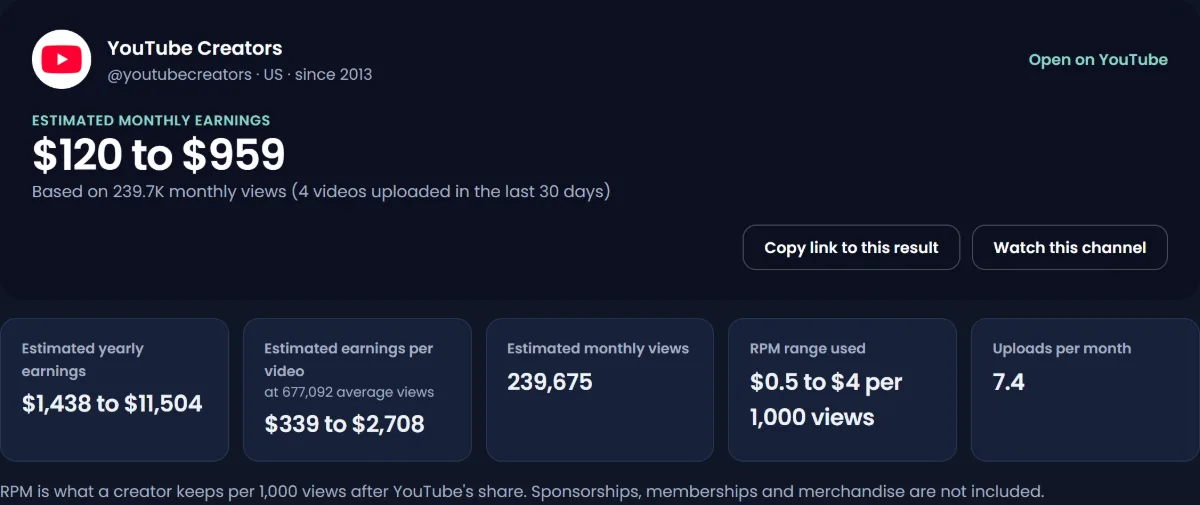
Both results are estimates from public data. Only the channel owner's YouTube Studio shows real revenue.
Sources
- YouTube Help: YouTube Partner Program overview and eligibility
- YouTube Help: Changes to the YouTube Partner Program
- YouTube Official Blog: New opportunities to earn and changes to the YouTube Partner Program, 10 August 2026
- YouTube Help: YouTube partner earnings overview (55% and 45% shares)
- YouTube Help: YouTube Shorts monetization policies (Creator Pool and music split)
- YouTube Help: Revenue metrics: RPM and CPM
- YouTube Help: Understand AdSense for YouTube's payment process
- YouTube Help: Meet YouTube's revenue thresholds for payment
- YouTube Help: Manage mid-roll ad breaks in long videos
- YouTube Help: YouTube channel monetization policies
Frequently asked questions
How much does YouTube pay after 1,000 subscribers?
Nothing for the subscribers themselves. Once your channel is in the Partner Program, you earn per monetized view at your RPM. A channel that has just qualified with a few thousand monthly views typically earns a few dollars to a few tens of dollars a month, using our calculator's default range of $0.50 to $4 per 1,000 views.
How much does YouTube pay for 1,000 subscribers and 4,000 watch hours?
The threshold itself pays nothing. As a worked example, 4,000 watch hours at a 4-minute average view is about 5,000 views a month, which works out to roughly $2.50 to $20 a month at $0.50 to $4 RPM. Your real figure depends on your audience's countries, your topic and how many views carry ads.
When do you get your first payment from YouTube?
When your AdSense for YouTube balance reaches $100 by the 20th of a month. Earnings are finalized between the 7th and 12th, and payment is issued between the 21st and 26th. You also need to verify your identity and address, which YouTube asks for at $10.
Do Shorts pay after monetization?
Yes, once you accept the Shorts Monetization Module, and only for views from that date on. Shorts revenue is pooled and split by your share of engaged views, and you keep 45% of what is allocated to you. From 1 February 2027 you also need 10 million qualified Shorts views in the last 90 days to earn from the Creator Pool that month.
Why is my first month of YouTube earnings so low?
Because the views that got you accepted are the same views now being monetized, and a threshold based on watch hours does not guarantee much income. Low early RPM is also common when viewers are mostly outside high-paying ad markets, videos are under 8 minutes, or many views are Shorts.
How do I grow my channel after monetization?
Focus on monthly views, because that is what you are paid for. Make videos that answer searches, use long-form formats of 8 minutes or more when the topic genuinely needs them, add memberships or Super Thanks if you have a loyal audience, and price sponsorships from your average views.
Can I lose monetization after getting it?
Yes. Breaking the channel monetization policies, such as uploading reused or mass-produced content, can remove it. YouTube may also turn it off on channels with no uploads or posts for 6 months or more, and new activity rules apply from 1 February 2027.