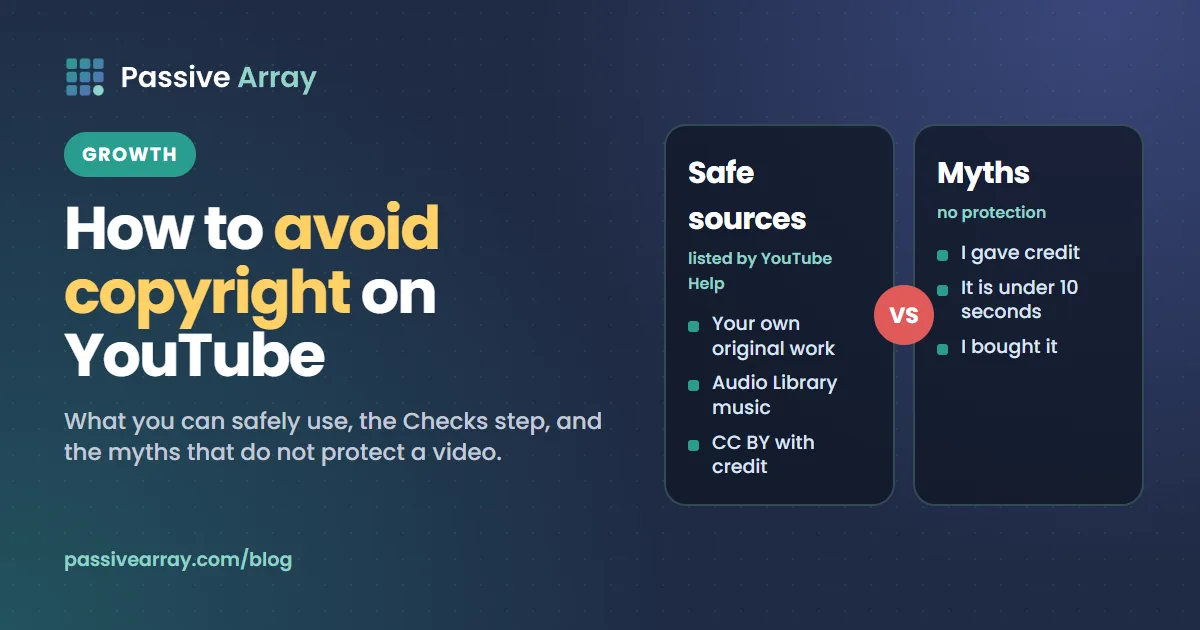
To avoid copyright problems on YouTube, upload only material you made yourself, have permission to use, or that falls under one of the options YouTube lists as safe: a copyright exception such as fair use or public domain, a Creative Commons licence, and for music the YouTube Audio Library or Creator Music. Then run the Checks step in YouTube Studio before the video goes public. There is no trick that makes someone else's content safe. YouTube's Help page says "any amount of copyright-protected content used without permission from the copyright owner, even if it's just a few seconds, may result in copyright issues."
This guide covers what you can safely use, how YouTube describes fair use, the Checks step, what to do when a claim appears anyway, and the myths that get creators into trouble. Copyright matters most once a channel earns, because a claim can send a video's ad revenue to someone else. To see whether a channel is likely in the Partner Program, the YouTube monetization checker reads its public signals and gives a confidence score. This article is general information, not legal advice.
What "getting copyrighted" means on YouTube
People use the phrase for two different events. A copyright claim is usually automatic: YouTube says it "may be automatically generated when an uploaded video matches another video (or segment of a video) in YouTube's Content ID system." A copyright strike follows "a legal copyright removal request", and the video is removed.
YouTube states that "copyright claims affect videos, but usually don't impact your channel or account." Strikes do. Our post on copyright claim vs copyright strike compares the two and covers strike deadlines, and YouTube Content ID: how it works explains the matching system. This guide is about prevention.
What you can safely use
YouTube's "Copyright on YouTube" page lists four "options for safely using copyrighted content":
- "Using content in a way that qualifies as a copyright exception, like fair use, fair dealing, or public domain"
- "Getting permission to use someone else's content"
- "Using content according to the terms of a Creative Commons license"
- "For music, sourcing from the YouTube Audio Library or Creator Music"
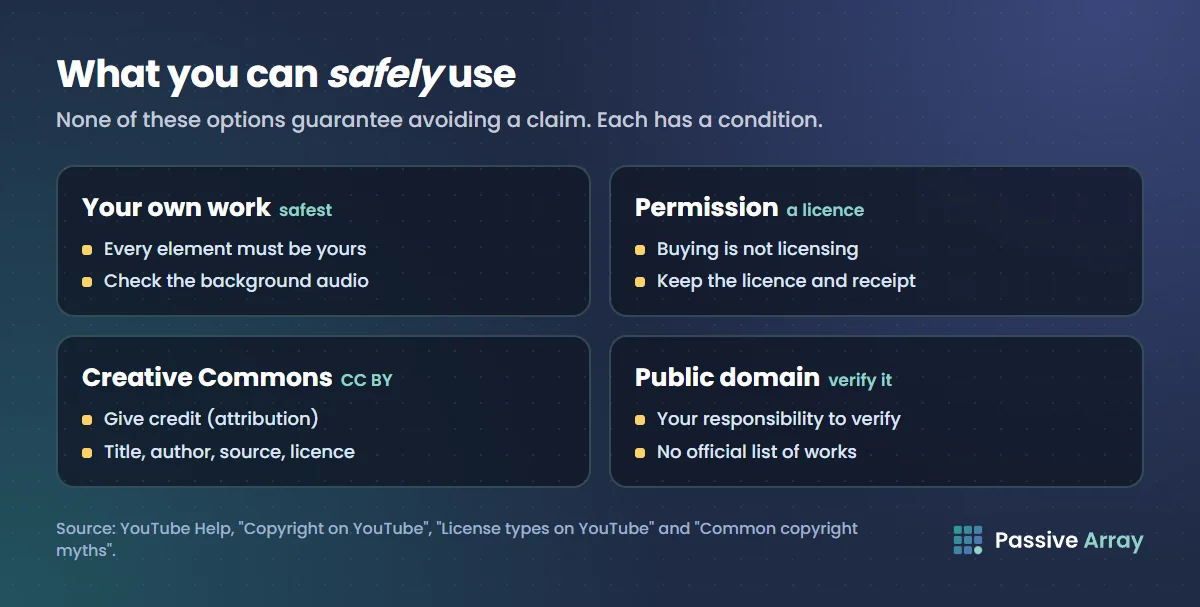
The same page adds a warning that applies to this whole guide: "None of the above options guarantee avoiding copyright issues on YouTube, like a copyright strike or Content ID claim."
Your own original work
This is the safest source, with one catch. Owning the camera does not mean you own everything it recorded. YouTube's myths page says: "If what you recorded includes someone else's copyrighted content, such as someone else's music playing in the background, then you'd need to get permission from the copyright owner before uploading it to YouTube."
So a vlog filmed in a shop with the radio on, or a screen recording of a film, can be claimed. Check the background audio before you publish.
Content you have permission to use
Permission means a licence from the person who owns the rights. YouTube stays out of this: "YouTube can't grant you rights to use someone else's content and we can't help you find the parties who can grant them to you."
Two practical points come from YouTube's pages:
- Buying is not licensing. "Just because you purchased content doesn't mean you own the rights to upload or distribute it on YouTube." A downloaded song or a DVD gives you a copy, not upload rights. A licence is different: "Licenses define how the content can and cannot be used."
- Content ID does not know about your licence. YouTube says Content ID "doesn't know if you bought the rights to the music on other websites or offline." A licensed track can still be claimed, and you then dispute with your licence as evidence. Keep the licence document and the receipt.
Creative Commons, with its conditions
YouTube lets uploaders mark a video with a Creative Commons Attribution (CC BY) licence, which means "other creators can reuse your work subject to the terms of the CC BY license." If you reuse such a video, "you need to give them credit (attribution)."
YouTube lists what the credit can include, in your video and its description:
- Title of the work
- Author of the work
- Source of the work (URL)
- Licence info, such as "is licensed under CC BY."
On earning from it, YouTube says: "You can monetize Creative Commons content if the license agreement grants you rights to use it commercially." Read the licence, because a CC label put on a video by someone who did not own it gives you nothing. That last point is our reading, not a YouTube ruling.
Public domain
YouTube defines public domain as "content not protected by copyright because the copyright has expired or the content wasn't eligible for copyright protection." It adds that "rules vary by country/region, but generally copyright lasts for the life of the author plus 50-70 years."
The burden is on you: "It's your responsibility to verify that a work is in the public domain before you upload it to YouTube", and "there's no official list of works in the public domain."
Music from the Audio Library or Creator Music
Music has its own safe sources. YouTube says "only music and sound effects from the Audio Library are known to YouTube to be copyright-safe." Our guide on how to use music in YouTube videos covers the Audio Library, Creator Music, Shorts audio, covers and live streams.
Fair use, as YouTube describes it
Fair use is narrower than most video disclaimers suggest. YouTube describes it as a US rule: "In US copyright law, fair use allows someone to use copyrighted content under certain conditions without needing permission from the copyright owner. Common examples can include works of commentary, criticism, research, teaching, or news reporting."
It is not a setting or a label. "Ultimately, courts decide fair use cases according to the facts of each unique case." YouTube lists the four factors a US judge weighs:
- Purpose and character of the use. "Adding new expression or meaning to the original material is more likely to be considered fair use than merely copying the original."
- Nature of the copyrighted work. "Using material from primarily factual works is more likely to be considered fair use than using purely fictional works."
- Amount and substantiality of the portion used. Small portions are more likely to be fair, but "if what's borrowed is considered the "heart" of the work, sometimes even a small sampling may not be considered fair use."
- Effect of the use upon the potential market. "Uses that harm the copyright holder's ability to profit from their original work are less likely to be fair uses."
Two things follow for a creator.
- Content ID does not judge fair use. YouTube says "automated systems like Content ID can't decide fair use because it's a subjective, case-by-case decision that only courts can make." A commentary video can be claimed first, and you argue fair use afterwards "through the Content ID dispute process."
- The rules differ by country. "In the EU, the use must fit into specific categories, such as quotation, criticism, review, caricature, parody, and pastiche. Other countries/regions have a concept called fair dealing that may work differently."
YouTube also has a fair use protection initiative that covers some creators "for up to $1 million of legal costs". It applies "in rare cases", by invitation, and only "to creators living in the United States", so do not plan around it.
Run the Checks step before you publish
YouTube Studio scans a video for copyright matches during upload. YouTube's upload page says: "Use the Checks page to screen your video for copyright issues. Checks help you fix issues before your video is published."
- Upload the video in YouTube Studio and fill in the details.
- Go through to the Checks page. "The Copyright check searches for copyrighted content in your video."
- Wait for the result. "Checks can take some time, but they run in the background, so you can return to the process later."
- If an issue is found, "you can remove the claimed content from your video or choose to dispute a claim."
- Publish once the check is clear.
You are allowed to "publish your video while checks are running and fix issues later", but that removes the point of the step. Our suggestion is to save the video as private or unlisted first, so the check can finish before anyone can watch.
A clear result is not a guarantee. YouTube says: "Copyright check results aren't final. For example, future manual copyright claims, copyright strikes, and edits to your video settings may impact your video."
What to do if a claim appears anyway
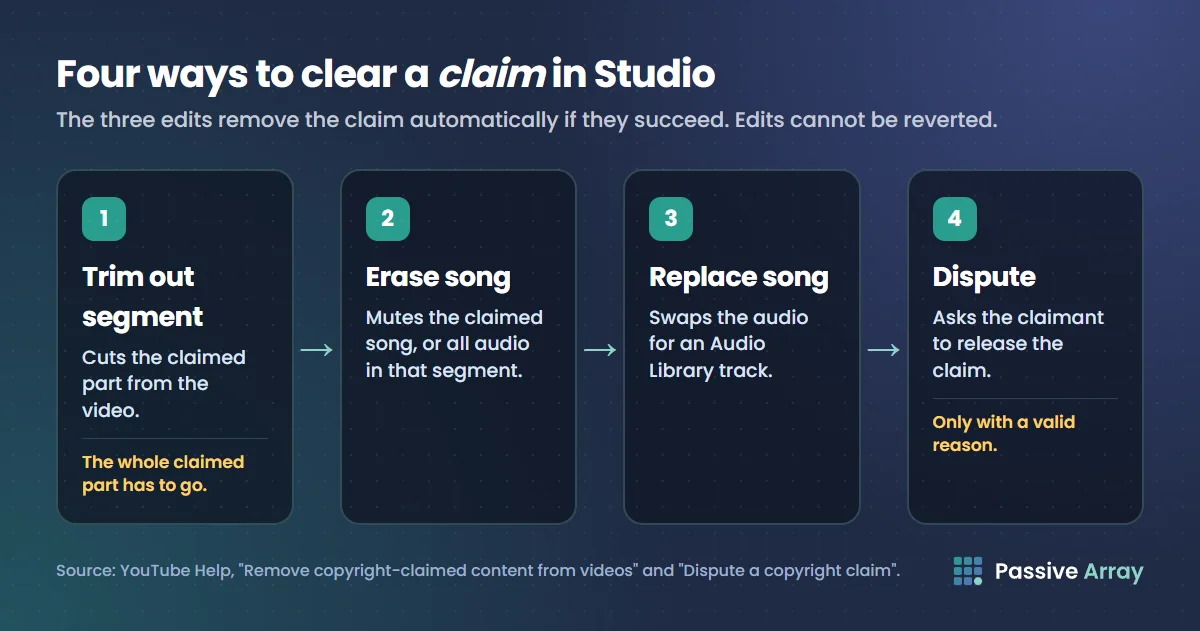
YouTube emails you about a claim, and the video shows Claims in the Restrictions column under Content in YouTube Studio. For a valid claim, the edits are the quickest way to get rid of it: "If done successfully, any of these options will automatically remove the claim."
| Option | What it does |
|---|---|
| Trim out segment | Cuts the claimed part from the video |
| Erase song | Mutes the claimed song, or all audio in that segment |
| Replace song | Swaps the audio for an Audio Library track |
| Share revenue | Splits revenue with the music publisher, on eligible music claims for Partner Program channels |
| Dispute | Asks the claimant to release the claim |
| Leave it | The claim stays, with whatever the owner chose |
Know these limits before you edit:
- Edits are permanent. "Starting in June 2025, once you save your edited video, you will not be able to revert the changes." Download a copy first.
- The whole claimed part has to go. "If some copyright-claimed content stays in your video, the claim won't be removed."
- Large videos on small channels. "If your channel is not in the YouTube Partner Program (YPP), you may not be able to save changes if your video has over 100,000 views."
- Long Shorts are blocked. For Shorts between one and three minutes, "claimed videos will be blocked if there is an active claim applied, regardless of policy." Once the claim is resolved, the Short is viewable again.
When to dispute
YouTube gives three valid reasons: you have "all the necessary rights to the content in your video", your use "qualifies as a copyright exception, such as fair use", or you believe "your video was misidentified or an error was made."
It also names three things that "are NOT legitimate reasons to dispute a claim": "Giving credit to the copyright owner", "Owning a copy of the video or song" and "Choosing not to monetize on the video".
A dispute goes to the claimant, not to YouTube, and it carries risk: "If you dispute a claim without a valid reason, the copyright owner may request the removal of your video. If we get a valid copyright removal request for your video, your account will get a copyright strike." It cannot be withdrawn either: "once you've submitted a dispute, it can't be canceled." Deadlines, appeals and held revenue are in the claim vs strike post and the Content ID guide linked above.
A claim is not the same as limited ads for advertiser suitability. For that, read YouTube demonetization.
Common copyright myths, and what YouTube says
YouTube publishes a page called "Common copyright myths". None of the habits below protect a video.
| Myth | What YouTube says |
|---|---|
| "I gave credit" | "Giving credit to the copyright owner doesn't automatically give you the rights to use their copyrighted content." |
| "It is under 10 seconds" | "Any amount of copyright-protected content used without permission from the copyright owner, even if it's just a few seconds, may result in copyright issues." |
| "No copyright infringement intended" | Such phrases "don't mean you have the rights to use the content." |
| "It is non-profit" or "for education" | "Not trying to make money from copyrighted content doesn't prevent copyright issues." |
| "Other channels do it" | Similar content on YouTube "doesn't necessarily mean you also have the rights to use the content." |
| "I bought it" | "Just because you purchased content doesn't mean you own the rights to upload or distribute it on YouTube." |
| "I changed it, so it is new" | "Using someone else's content to create something new, like a parody, cover song, or translation, usually still requires the copyright owner's permission." |
Changing a clip to get past detection
Forum advice often suggests altering copied material so the automatic match misses it: shifting the pitch or speed of a song, mirroring or cropping footage, adding a border. Treat these as myths too. YouTube Help lists no edit that turns someone else's content into yours, and the last row of the table applies: changing content "usually still requires the copyright owner's permission."
It also does not remove the risk. Content ID is not the only route to a claim. YouTube describes a Manual Claiming tool that "gives copyright claimants a way to manually claim videos not matched by Content ID", and a copyright owner can file a removal request, which leads to a strike instead of a claim. Our reading, not a YouTube ruling: hiding copied material from the scanner swaps a claim you could have fixed in Studio for a takedown you cannot. Reused content is also a monetization problem in its own right, which YouTube monetization requirements covers.
A checklist before every upload
- List every element that is not yours. Music, clips, images, game footage, background audio.
- Match each one to a source of rights. Your own work, a licence, CC BY with credit, verified public domain, or the Audio Library.
- Keep the paperwork. Licence text, receipt and date.
- Add the credits your licences require.
- Upload as private or unlisted and wait for Checks.
- Fix what the check finds by trimming, erasing or replacing, after saving an original copy.
- Dispute only with a valid reason and evidence in hand.
If a channel depends on ad income, it helps to know what is at stake before you choose between editing and disputing. The YouTube money calculator estimates a channel's monthly ad earnings from recent views, shown as a range. It is an estimate for the whole channel, not a figure for one claimed video.
Sources
- YouTube Help: Copyright on YouTube (the four safe options, public domain)
- YouTube Help: Common copyright myths (the myths table)
- YouTube Help: Fair use on YouTube (four factors, Content ID and fair use, other countries)
- YouTube Help: License types on YouTube (Creative Commons, credit, permission)
- YouTube Help: Upload YouTube videos (the Checks page)
- YouTube Help: Learn about copyright claims (claims, options, long Shorts, manual claims)
- YouTube Help: Remove copyright-claimed content from videos (trim, replace, erase and their limits)
- YouTube Help: Dispute a copyright claim (valid and invalid reasons, risks)
- YouTube Help: Understand copyright strikes (what a strike is)
- YouTube Help: Use music and sound effects from the Audio Library and Tips to find safe music
Frequently asked questions
How do you avoid copyright on YouTube?
Use only content you created, content you have a licence for, Creative Commons material with the required credit, verified public domain works, or music from the YouTube Audio Library. Then let the Checks step finish in YouTube Studio before you publish, and fix anything it finds. YouTube says none of these options guarantee you will avoid a claim, but together they remove the common causes.
How do you not get copyrighted on YouTube when using music?
Take music from the YouTube Audio Library, which YouTube says will not be claimed through Content ID, or from Creator Music if your channel has access. Music from other sites can still be claimed even when it is labelled free, because Content ID does not read your description or know about a licence you bought elsewhere.
How do you get rid of a copyright claim on YouTube?
Open the video's claim details in YouTube Studio and choose trim out segment, erase song or replace song. If the edit removes all of the claimed content, the claim is removed automatically. If you hold the rights or a real exception applies, you can dispute instead. Edits cannot be reverted, so keep an original copy.
Is it fair use if I use less than 10 seconds?
No fixed length makes a use fair. YouTube says any amount of copyrighted content, even a few seconds, may result in copyright issues, and that a small part can still fail if it is the heart of the work. Fair use depends on four factors weighed by a court.
Will a copyright claim get my channel deleted?
A claim by itself will not. YouTube says claims affect videos and usually do not impact the channel or account. Channels are at risk from copyright strikes, which follow legal removal requests. A badly judged dispute can turn a claim into a removal request, which is why YouTube advises disputing only when you are confident you have the rights.