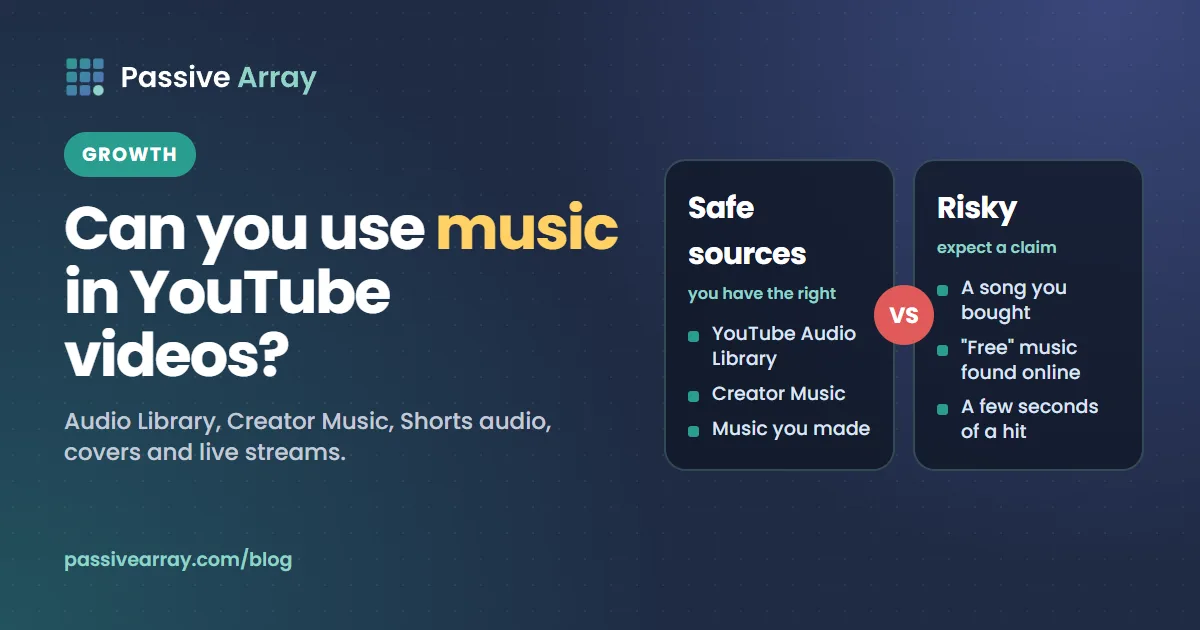
Yes, you can use music in YouTube videos, as long as you have the right to. YouTube describes safe music as "music that is in the public domain or music that you have received permission to use from the copyright owner." In practice that means music you made, music you licensed, the YouTube Audio Library, or Creator Music. Use a commercial song without permission and the video will usually get a Content ID claim, which can block it or send its ad revenue to the rights holder, "even if you only use a few seconds".
This guide covers each music source and its conditions: the Audio Library and its attribution rule, Creator Music as it works today, the Shorts audio library, licensing a commercial track yourself, cover songs, what "royalty-free" and "no copyright" really mean, and live streams. Creator Music is limited to Partner Program channels, so if you are unsure whether a channel is in the programme, the YouTube monetization checker reads its public signals and gives a confidence score. This article is general information, not legal advice.
Your options at a glance
| Source | Who can use it | Cost | Can you monetize? |
|---|---|---|---|
| YouTube Audio Library | Anyone with YouTube Studio | Free | Yes, if you are in the Partner Program |
| Creator Music, licensed track | US creators in the Partner Program | No cost | Yes, full revenue share |
| Creator Music, revenue-sharing track | US creators in the Partner Program | Nothing upfront | Yes, split with rights holders |
| Shorts Audio Library | Shorts creators | No purchase step | Yes, through the Shorts model |
| A track you licensed yourself | Anyone | Set by the licence | If the licence allows it |
| Music you wrote and recorded | You | None | Yes |
| A commercial song with no permission | No one safely | None | Usually not: expect a claim |
YouTube Audio Library
This is the simplest safe source. YouTube says: "In the Audio Library in YouTube Studio, you can find royalty-free production music and sound effects to use in your videos."
- Sign in to YouTube Studio.
- From the left menu, select Audio library.
- Search or filter by genre, mood, artist, duration or attribution.
- Click Download to get an MP3 file.
What YouTube promises about these tracks:
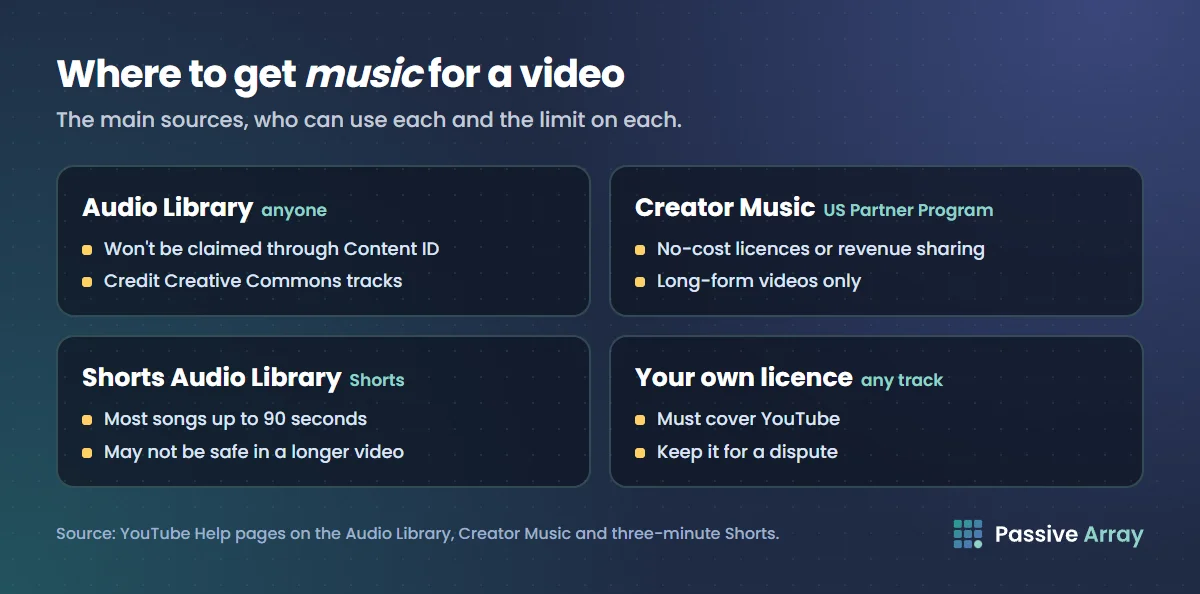
- No claims. "Copyright-safe music and sound effects downloaded from the Audio Library won't be claimed by a rights holder through the Content ID system."
- Monetization. "If you're in the YouTube Partner Program, you can monetize videos with music and sound effects from the Audio Library."
- Reuse. YouTube's licence page says "only YouTube Audio Library licenses are valid to use in multiple videos uploaded to YouTube."
- Fresh tracks. "New releases are added to the Audio Library twice a month."
The attribution rule
Some Audio Library tracks carry a Creative Commons licence. For those, YouTube says "you must credit the artist in your video's description."
- In the Audio Library, find the track.
- In the "License type" column, click the Creative Commons icon.
- Click Copy to copy the attribution text.
- Paste it into your video's description.
To skip this, use the Attribution not required filter, which shows tracks with "a standard YouTube Audio Library license that doesn't require attribution."
YouTube also adds a "Music in this Video" section to the watch page automatically, but that does not replace the credit: "if your video uses music with a Creative Commons license, the attribution info is still required in your video's description."
Creator Music
Creator Music is a catalog in YouTube Studio. YouTube's FAQ calls it "a growing catalog of mainstream music that can be used in monetized videos without worrying about copyright claims."
Who has it
YouTube's pages say: "Creator Music is now available to U.S. creators in the YouTube Partner Program (YPP). Expansion to YPP creators outside of the U.S. is pending." If you are outside the US, or not yet in the programme, it is not an option today. YouTube monetization requirements lists what joining takes.
It is also "currently not available to" commercial brands whose channels promote their own goods, or to companies that mainly produce content for cinema, television or streaming services.
What changed in August 2026
Creator Music used to sell paid licences. By YouTube's own notice, that has ended: "Starting in August 2026, Creator Music will be phasing out paid licenses", and the catalog "will transition to focus exclusively on offering tracks available at no-cost and tracks available for revenue-sharing, as set by the track's rights holder."
Creators had "until August 10, 2026 to continue to purchase and use paid licenses". YouTube says "existing paid licenses already applied to your videos will remain valid until their expiration." Older guides that quote licence prices are out of date.
No-cost licences
With a licensable track, "creators use music in their video at no cost and keep the video's full revenue share." You find these with the Usage terms filter set to No-cost music, download the track, and "when you upload the video with the track, the license for the track will be auto-applied."
The limits:
- One video per licence. YouTube calls it "a single-use synchronization (or "sync") license".
- YouTube only. "You can only use the track in videos uploaded to YouTube."
- Long-form only. Creator Music tracks "can only be used in long-form videos, not Shorts or live streams."
- No remixing. "No fundamentally altering the Creator Music tracks (e.g., no remixing)."
- No paid promotions. Tracks cannot be used in a video "where the creator has been paid by a brand or service to make content that's primarily dedicated to endorsing or promoting that brand or service."
Revenue-sharing tracks
Other tracks cost nothing upfront: "you split the video's revenue with the track's rights holders." YouTube explains the maths: "the standard 55% revenue share is adjusted to cover the costs of clearing music rights."
YouTube's own example for one revenue-sharing track:
| Step | Share of the video's revenue |
|---|---|
| Standard long-form revenue share | 55% |
| One revenue-sharing track: 55% divided by 2 | 27.5% |
| Example deduction for additional music rights costs | minus 2.5% |
| Creator earns | 25% |
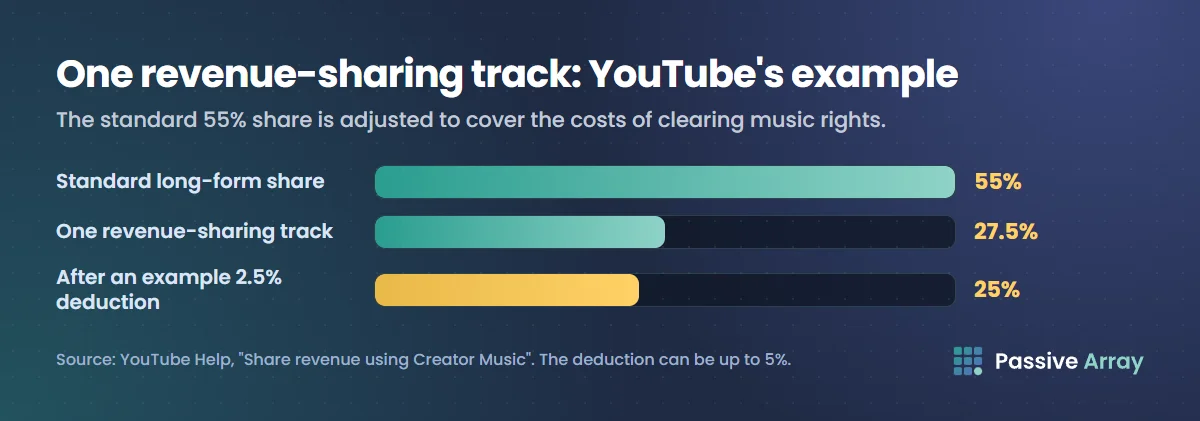
The deduction "can be up to 5%". In a second example, with two revenue-sharing tracks and one licensed track, the creator "earns 1/3 of the standard 55% revenue share (18.33%)" before the deduction. So each added revenue-sharing track cuts your share again.
Two conditions apply. The video "can't be a live stream or a Short", and it cannot have other monetization issues. Terms can also change after you publish: "the rights holder could later disable monetization for the track, which would disable monetization for your video."
Not every song in the catalog is usable. YouTube warns that "you may still see some tracks that aren't available for licensing or revenue sharing. If you choose to use one of those tracks, your video could get a Content ID claim or a copyright removal request."
Music in Shorts
Shorts have their own library inside the Shorts creation tools. YouTube says: "You can use any song available in the Shorts Audio Library. You can use most songs for up to 90 seconds in a 3 minute Short. However, some tracks may be limited to 60 or 30 seconds." You can also use Audio Library music, which "won't receive a Content ID claim."
Three limits matter:
- The licence stays in Shorts. YouTube warns: "Music that's safe to use in a Short that's less than 60 seconds may not be safe to use in a longer video. For longer videos, stick to safe resources, like the YouTube Audio Library or Creator Music."
- Claims block long Shorts. "Any Short that is over one minute in duration with an active copyright claim of any type, including manual claims, will be blocked globally on YouTube." There are "no penalties to your channel", and the Short returns once the claim is resolved.
- Music changes the pool, not your rate. When a Short uses music, part of the revenue linked to its views covers music licensing. But YouTube says "using music in a Short won't affect a creator's allocation from the Creator Pool or their revenue share rate." Creators "keep 45% of their allocated revenue, regardless if music was used or not."
Can YouTube Shorts be monetized and how much YouTube pays for Shorts explain the pool.
Using a copyrighted commercial song
If you add a chart song to a long-form video without permission, expect a Content ID claim. YouTube's fair use page says: "The claim will keep you from monetizing the video, even if you only use a few seconds, such as short uses of popular songs."
What happens next is the rights holder's choice. YouTube's page on claimed music lists the policies:
- Monetize: "ads may appear on your video. Sometimes, the copyright holder may elect to share some of that revenue with you."
- Block worldwide: "your video may be muted or may be entirely unavailable on YouTube."
- Block in some countries/regions: "your video won't be viewable where the music is blocked on YouTube."
Two warnings sit under that list. Policies can change: "Your video's status could change in the future and may even be removed from YouTube." And "the policies may differ when we believe that you've uploaded a full album or most of an album."
A claim is not a strike, and Studio lets you erase or replace the song. How to avoid copyright on YouTube covers those fixes, copyright claim vs copyright strike covers the difference, and YouTube Content ID explains the system.
How to get permission to use a song
YouTube does not help with this. "If you plan to include copyright-protected material in your video, you'll generally need to seek permission to do so first. YouTube cannot grant you these rights. We can't assist creators in finding and contacting the parties who may grant them to you."
What you can take from YouTube's pages:
- Find who holds the rights. A song can have more than one rights holder. YouTube notes that cover videos are claimed by "the music publisher or publishers who own the copyright in the musical composition performed", and that one video can get claims "from different copyright claimants".
- Get a licence that names YouTube. YouTube says licences "will usually specify where and how you're allowed to use the music", and warns that some services "may not give rights to use or monetize the music on YouTube".
- Keep the document. Content ID "doesn't know if you bought the rights to the music on other websites or offline", so a licensed track can still be claimed.
- Dispute with the licence if a claim arrives. "Having all the necessary rights to the content in your video" is one of the valid reasons YouTube lists for a dispute.
Buying a song is not permission. YouTube's myths page says: "Just because you purchased content doesn't mean you own the rights to upload or distribute it on YouTube."
If you are the musician and want your own tracks protected and paid, read how much YouTube pays musicians.
Cover songs
Recording your own version of a song does not make it yours. YouTube's myths page says: "Using someone else's content to create something new, like a parody, cover song, or translation, usually still requires the copyright owner's permission."
There is a route to earning from covers. YouTube says: "Some cover songs may be eligible for monetization. To be eligible, the music publisher must claim the song through the Content ID system and elect to monetize it." Then "creators participating in the YouTube Partner Program can share revenue from eligible cover song videos", paid "on a pro rata basis."
You can tell by the notice on the video. It is eligible when it shows what YouTube calls a "Sharing ad earnings" notice. YouTube adds that "both new uploads and prior uploads may be eligible." If the publisher has not chosen to monetize, the cover can still be claimed without any share for you. Our guide to growing a music YouTube channel covers the audience side.
What "royalty-free" and "no copyright" really mean
These labels are everywhere on YouTube and on music sites. YouTube's position is cautious.
- Only one library is vouched for. "Only music and sound effects from the Audio Library are known to YouTube to be copyright-safe."
- YouTube takes no responsibility for the rest. "YouTube is not responsible for issues that arise from "royalty-free" music and sound effects from YouTube channels or other music libraries."
- "Free" can still be claimed. "Even if you find music online that's labeled "free," Content ID might still flag it. This could lead to visibility and earning restrictions."
- Your description changes nothing. "If you write "Blue Jay by Jane Doe - free song" in your video description, Content ID may still flag your video if the music isn't copyright-safe."
- Read the terms. For royalty-free and licensing sites, "be sure to read the terms and conditions carefully."
Our reading, not a YouTube ruling: "royalty-free" describes the terms of a licence, and "no copyright" in a video title is a claim made by an uploader. Neither tells you that the person offering the track owns it, or that the licence covers a monetized YouTube video. Check both before you use the music.
Music in live streams
Live streams are scanned while they run. YouTube says: "All live streams are scanned for matches to third-party content." If a match is found, "a placeholder image may replace your live stream. You'll be warned to stop streaming the third-party content." If it continues, "your live stream will be temporarily interrupted or terminated."
Three points for streamers:
- A licence may not be enough. "If you've licensed third-party content to use in your stream, ask the owner of the content to add your channel to their allowlist through Content ID." Without that, "your live stream can be interrupted even if you've licensed the third-party content."
- Creator Music does not cover live. "Currently, Creator Music doesn't support licensing for live content."
- The archive can be claimed. "Content ID claims are only made after you complete your live streams, if you decide to archive the video."
Our suggestion for background music on a stream is the Audio Library, the one source YouTube vouches for. For more on streaming, see how to get more views on YouTube Live.
Sources
- YouTube Help: Use music and sound effects from the Audio Library (what is safe, attribution, monetization)
- YouTube Help: Tips to find safe music (the definition of safe music, "free" music, Shorts warning)
- YouTube Help: Get started with Creator Music (availability, the August 2026 change)
- YouTube Help: License tracks, Share revenue using Creator Music, Understand Creator Music usage details, Creator Music eligibility and restrictions and Creator Music FAQ
- YouTube Help: Understand three-minute YouTube Shorts and YouTube Shorts monetization policies
- YouTube Help: Restrictions on claimed music (monetize and block policies, permission)
- YouTube Help: Monetizing eligible cover videos and What kind of content can I monetize?
- YouTube Help: Copyright issues with live streams
- YouTube Help: Fair use on YouTube, Common copyright myths, Dispute a copyright claim and Learn about copyright claims
Frequently asked questions
Can you use music in YouTube videos?
Yes, if you have the right to use it. Music you made, music you licensed, tracks from the YouTube Audio Library and tracks from Creator Music are the safe sources. A commercial song used without permission will usually get a Content ID claim, which can block the video or send its ad revenue to the rights holder.
What are YouTube's rules on copyrighted music?
The copyright holder decides. Through Content ID they can monetize your video, block it worldwide or block it in some countries, and they can change that policy later. YouTube says a claim can stop you monetizing even if you use only a few seconds of a popular song.
How do I get permission to use a song on YouTube?
You have to get it from the rights holders yourself, because YouTube cannot grant rights or help you find the owners. Get a licence that covers YouTube and monetization, keep the document, and use it as evidence in a dispute if Content ID claims the video anyway.
Is royalty-free music safe to use on YouTube?
Only if the licence covers your use. YouTube says only Audio Library music is known to it to be copyright-safe, and that it is not responsible for royalty-free music from other libraries or YouTube channels. Music labelled free can still be flagged by Content ID.
Can I monetize a cover song on YouTube?
Sometimes. A cover is eligible when the music publisher has claimed the song through Content ID and chosen to monetize it. Partner Program creators then share the revenue, and the video shows a Sharing ad earnings notice.
Can I play music on a YouTube live stream?
Only music you have the rights to stream. Live streams are scanned for third-party content and can be interrupted or terminated. Even with a licence, YouTube says to ask the owner to add your channel to their Content ID allowlist, and Creator Music does not cover live content.