Your YouTube subscriber count goes down for one of a few reasons: viewers unsubscribed, YouTube removed subscribers it identified as spam, subscribers closed their Google accounts, or the public number dropped to a lower rounding step. YouTube's Help Center lists the first three as the normal causes of fluctuation and says that "in every case" it has looked at, there was "no issue causing viewers to be unsubscribed by YouTube". So a drop is almost never a bug, and it is rarely as big as it first looks.
The fastest way to tell which cause hit you is YouTube Studio, which shows the exact count and the daily movement. For a quick outside view, our free YouTube subscriber count checker shows the public count exactly as YouTube publishes it, so you can see what viewers see. Below: each cause, how to confirm it, when a drop deserves your attention, and what not to do about it.
The short answer: five reasons subscribers go down
| Cause | What it looks like | Is it a real loss? | How to confirm |
|---|---|---|---|
| Normal unsubscribes | A slow, steady trickle, sometimes more after certain videos | Yes | Subscribers lost by day and by video in Studio |
| Spam subscribers removed | A sudden drop, often on one day | No, they were not real viewers | An alert in YouTube Studio |
| Closed accounts removed | Small drops spread over time | They were not watching any more | Closed accounts in YouTube Analytics |
| Rounding step | The public count falls by 10, 100 or 1,000 at once | Usually only a few people | Exact count in Studio's Realtime card |
| A known issue or correction | A change far outside your usual pattern | Sometimes not | Known issues card on the Studio dashboard |
YouTube's own list of reasons, from its Help page on recent subscribers, reads: "Viewers are subscribing and unsubscribing to your channel normally." "We've removed spam subscribers from your channel. If impacted, you'll get an alert in YouTube Studio." "We've removed closed accounts from your channel." And: "If subscriber changes seem like they're outside the average fluctuation rate, it could be due to a known issue." The rounding step is not on that list because it only affects how the public number is displayed, but it is behind many "I lost 1,000 subscribers overnight" posts.
Reason 1: viewers unsubscribed
Every channel loses subscribers every day. YouTube's Help page says plainly: "Generally, it's common to see fluctuations in your subscriber count." A channel that gains 50 people and loses 20 on the same day grows by 30. You only notice the losses when gains slow down, for example during an upload break.
YouTube does not publish why individual viewers leave. From the patterns that show up in Studio, these are the usual triggers. They are our observations, not YouTube rules:
- A change of topic or format. Viewers who subscribed for one kind of video may leave when the channel moves to another.
- A video that reached the wrong audience. A video that spreads far beyond your usual viewers can bring subscribers who never watch again and later unsubscribe.
- Titles that promise more than the video delivers. Viewers who feel misled stop trusting the next title too.
- A long gap. Some viewers tidy their subscriptions and remove channels they have not seen in months.
- A single controversy. One video, comment or sponsorship can cost more subscribers in a day than the channel lost in the previous month.
Normal unsubscribes are a real loss, but a small and steady one is healthy. What matters is whether the people who stay still watch, which is covered further down.
Reason 2: YouTube removed spam subscribers
YouTube's Help page on subscriber counts states: "Closed accounts and subscribers that are identified as spam won't count toward your total number of subscribers." YouTube describes spam subscribers as ones gained through artificial means, such as buying subscribers. Its fake engagement policy says the same thing: "subscribers that are identified as spam will not count toward your total number of subscribers."
Two details surprise most creators:
- YouTube does not unsubscribe spam accounts. Its Help page says: "We don't unsubscribe spam viewers from channels." The account stays subscribed from its own side but is no longer counted in your total. That is why your subscriber list and your count can seem not to match.
- You do not have to have bought them. Spam accounts subscribe to many channels on their own, sometimes to look like real users. A cleanup can lower the count of a channel that never paid for anything.
YouTube has done large removals before. In 2014 it announced it would remove suspended accounts from all channels' subscriber counts and then run "an automated system" that removes them "as they occur". That post warned that "some of you will notice a minor drop in your subscribers" and added that "these are not active viewers, so you shouldn't see any impact on your views or watch time." The same logic holds now: if your views did not drop with your subscribers, the removed accounts were not watching.
If spam subscribers were removed, YouTube says you will get an alert in YouTube Studio. Check the notifications bell and the Important notifications card on the Studio dashboard.
If you did buy subscribers or join a sub-for-sub group
Expect those subscribers to disappear over time, and expect them to keep disappearing. YouTube's fake engagement policy prohibits services that "artificially inflate metrics like views, likes, and subscribers" and names "offering to subscribe to another creator's channel only if they subscribe to your channel" as a violation. Content that breaks the policy can be removed, and three strikes in 90 days can lead to termination. Stop using any such service now. The subscribers it sold you never watched, so losing them does not cost you any real audience.
Reason 3: subscribers closed their accounts
YouTube's Help page explains: "When someone closes their Google Account entirely, they don't exist on YouTube anymore," and "Closed accounts don't count toward your subs." Closed accounts include ones closed by the person and ones terminated or suspended for breaking the rules. You can see how many of your subscribers were removed this way in YouTube Analytics, where they are counted as closed accounts.
This cause is usually small and steady. It grows with channel age: a channel whose subscribers joined ten years ago has more of them who have since stopped using that account. Old channels therefore lose a little more to closed accounts than new ones, which is not a sign of anything wrong.
YouTube has run a big closed-account cleanup before. In 2012 it finished removing closed accounts from subscriber counts and told creators to "expect to see additional decreases in your subscriber counts" during the removal. The point for today is the same: these accounts were not driving views.
Reason 4: the public count dropped a rounding step
YouTube shows a shortened public count for channels with 1,000 or more subscribers. Its Help page lists the steps: by 10 between 1,000 and 9,999, by 100 between 10,000 and 99,999, by 1,000 between 100,000 and 999,999, and by 10,000 between 1 million and 9,999,999. The YouTube Data API, which every outside tool uses, rounds the count down to three significant figures.
Because the count is rounded down, losing a handful of subscribers just above a step makes the public number fall by a whole step. Here is a made-up example:
| Day | Exact count in Studio | Public count | What it looks like |
|---|---|---|---|
| Monday | 100,004 | 100K | |
| Tuesday | 99,996 | 99.9K | "We lost 100 subscribers" |
| Wednesday | 100,021 | 100K | "We got them back" |
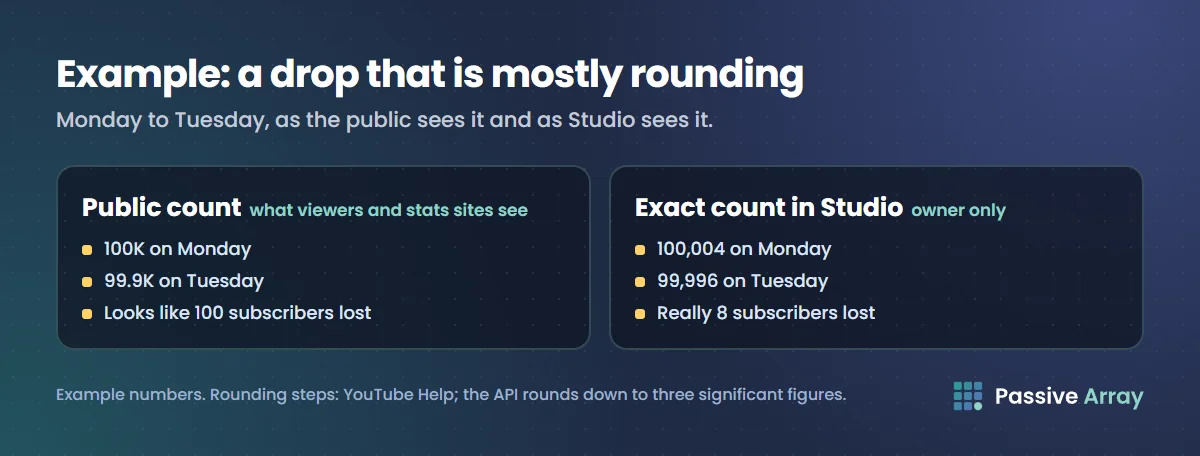
The channel lost 8 subscribers on Tuesday, not 100. A creator who only reads the public count, or a stats site that reads the API, sees a drop twelve times bigger than the real one. The same thing happens at every step, and it is most dramatic right after a milestone, when the channel is just above the line.
Check the exact number in YouTube Studio: Analytics, Overview tab, Realtime card, See live count. Our guide to the YouTube live subscriber count explains the rounding table in full and why live counters lag behind.
Reason 5: a known issue or an Analytics correction
Sometimes the cause is on YouTube's side. YouTube's subscriber count Help page says it "may make corrections to site metrics in YouTube Analytics to fix consistency issues across different sources". And its recent subscribers page says a change well outside your usual pattern "could be due to a known issue".
The Studio dashboard has a Known issues card for ongoing problems that affect many channels. If your count moves sharply and there is no spam alert, check that card before you change anything about your channel. A correction can also go the other way and restore a number that looked lost.
How to find out which reason hit your channel
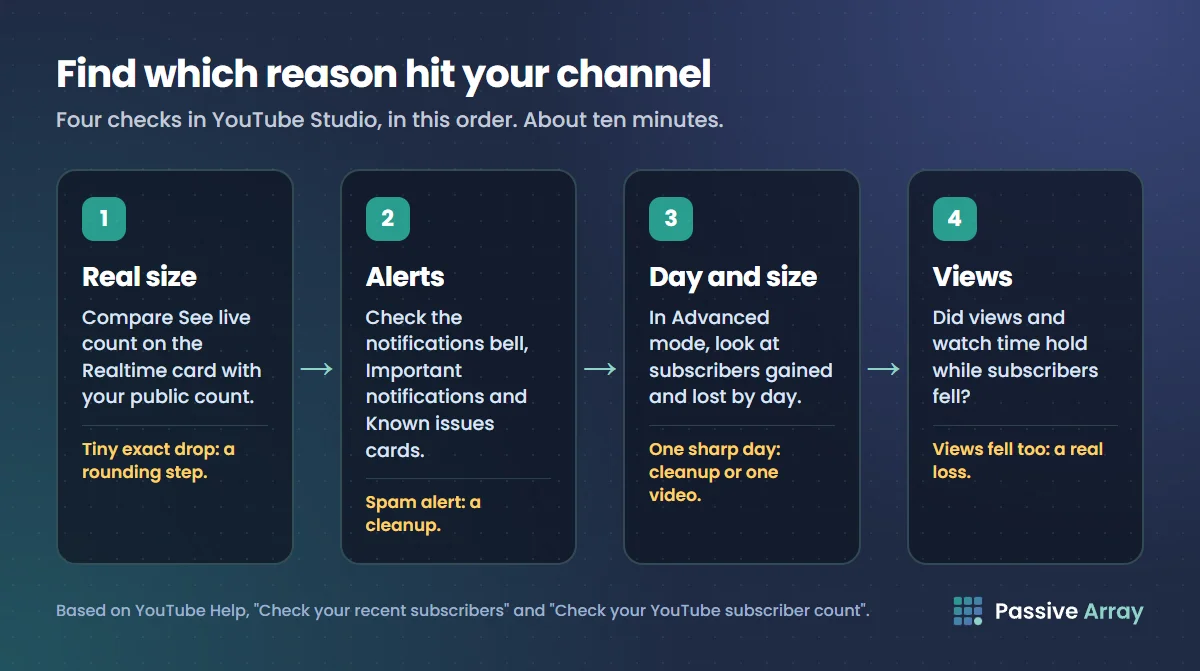
Work through these steps in YouTube Studio. It takes about ten minutes.
- Check the real size of the drop. Open Analytics, then the Overview tab, and click See live count on the Realtime card. Compare it with your public count. If the exact drop is tiny, you are looking at a rounding step.
- Look for alerts. Open the notifications bell and the Important notifications card on the dashboard. A spam removal alert answers the question.
- Check the Known issues card on the dashboard for a YouTube-wide problem.
- Find the day and the size. Open Advanced mode from any Analytics report and set the date range to cover the drop. YouTube's Analytics API defines subscribers gained as "the number of times that users subscribed to a channel" and subscribers lost as "the number of times that users unsubscribed from a channel". Look at both by day. A steady trickle of losses is normal churn. A single sharp day is usually a cleanup or one video.
- Break the losses down by content. In Advanced mode, view subscribers by video. If one video gained and then lost many subscribers, it probably reached people outside your audience.
- Compare with views. If views and watch time held steady while subscribers fell, the people you lost were not watching. If views fell too, the loss is real and you have a content problem to work on.
Here is a worked example with made-up numbers. A channel normally gains about 60 subscribers a day and loses about 20. On one Tuesday, Advanced mode shows 58 gained and 410 lost, a Studio alert says spam subscribers were removed, and daily views are unchanged. That is a spam cleanup. Nothing about the channel needs fixing, and the lower count is now more accurate than the old one.
A second example: a channel shows 30 gained and 45 lost every day for three weeks, with no alert, and views per video falling. That is real churn. The next sections are for this case.
When a subscriber drop is actually a problem
A falling count only matters if it goes with a falling audience. Three checks tell you whether it does.
Views per video. Compare average views on your last ten videos with the ten before them. If views held up, the lost subscribers were mostly inactive. Views per subscriber explains how to read this ratio at each channel size, and why a big count with low views is a weaker channel than a smaller count with high views. The free YouTube channel quality checker works out this ratio and engagement from your last 10 public uploads, so you can repeat the check after a drop without opening Studio.
Watch time from subscribers. In the Audience tab, YouTube has a report that "tells you what percent of your watch time comes from subscribers and viewers who aren't subscribed". If that share is falling, your existing subscribers are watching less.
Returning viewers. The Audience tab also shows returning viewers, defined by YouTube as people "who already watched your channel, and returned to watch in the selected time period". A drop in returning viewers is a stronger warning than a drop in subscribers.
YouTube Analytics explained walks through each of these reports. If all three are falling together, the channel is losing its audience, and how to revive a dead YouTube channel covers the rebuild.
How to stop losing subscribers
There is no setting that stops people unsubscribing. These habits reduce the reasons they have to:
- Keep the promise of the channel. If people subscribed for one kind of video, make most of your videos that kind. Test new formats as a minority, not a sudden switch.
- Match titles and thumbnails to the video. Viewers who feel tricked unsubscribe. Deliver what the title says in the first 30 seconds.
- Ask for the subscribe after you have delivered something. A viewer who got value is more likely to stay subscribed than one pushed at the start.
- Tell your audience about breaks and changes. A community post explaining a pause or a new direction keeps people who would otherwise drift off.
- Look at the videos that lost the most subscribers. Studio shows subscribers by video. Rewatch those, and work out what made viewers leave.
YouTube's recommendations follow viewer satisfaction, not your subscriber number. The YouTube algorithm explained covers what the system actually responds to, and how to grow a YouTube channel covers building an audience that stays.
What not to do after a drop
- Do not buy subscribers to "replace" them. Bought subscribers are exactly the kind YouTube identifies as spam and removes, and buying them breaks the fake engagement policy.
- Do not join sub-for-sub groups. YouTube names them as fake engagement, and the people you gain never watch.
- Do not delete your old videos in a panic. Each video is judged on its own viewers. Deleting removes views, watch time and search traffic without bringing anyone back.
- Do not react to one day. Look at at least two to four weeks of subscribers gained and lost before deciding there is a trend.
Tracking subscriber changes over time
Studio shows your own channel's exact history. For any other channel, such as one you collaborate with or compete against, the only outside record is the public count taken on a schedule.
The free YouTube channel growth tracker records any public channel's subscriber count, total views and video count once a day, around 05:45 UTC, from the official YouTube Data API, and keeps the points for 400 days. It shows 7 and 30-day change and lets you download the history as a CSV.
What it can and cannot tell you about a drop:
| It can show | It cannot show |
|---|---|
| The day the public count fell | The exact number of subscribers lost |
| Whether total views kept rising | Whether the cause was spam, closed accounts or unsubscribes |
| 7 and 30-day change from the day tracking started | Any history from before the channel was first tracked |
| A daily CSV for your own records | Subscribers gained and lost separately |
Because it uses the same rounded public number as everyone else, a large channel's subscriber line moves in steps. Total views are exact, so daily views gained is the more precise signal. If a channel you are evaluating shows a sudden large drop followed by low engagement, our guide on spotting fake followers covers the other checks to make. If the count stops being visible altogether, see whether a channel can still hide its subscriber count.
Sources
- YouTube Help: Check your recent subscribers
- YouTube Help: Check your YouTube subscriber count
- YouTube Help: Fake engagement policy
- YouTube Help: Use the YouTube Studio dashboard
- YouTube Help: Understand your YouTube audience
- YouTube Help: Learn how to use Advanced mode for analytics reports
- YouTube Analytics API: Metrics, subscribersGained and subscribersLost
- YouTube Data API: Channels resource, subscriberCount rounding
- YouTube Official Blog: Making sure your subscribers count (2014)
- YouTube Official Blog: Closed account removal concludes today (2012)
Frequently asked questions
Why did my YouTube subscriber count decrease?
Usually because viewers unsubscribed, YouTube removed subscribers it identified as spam, or subscribers closed their Google accounts. On channels above 1,000 subscribers, the public count can also fall by a whole rounding step when only a few people leave. YouTube says it has found no issue that unsubscribes viewers by itself.
Why did I lose so many subscribers overnight?
A large one-day drop is most often a spam cleanup or a rounding step. Check for a spam removal alert in YouTube Studio, then compare the exact count on the Realtime card with the public count. If views and watch time did not fall, the accounts you lost were not watching.
Does YouTube remove subscribers?
YouTube does not unsubscribe anyone. It stops counting closed accounts and subscribers identified as spam in your total, and spam accounts stay subscribed from their own side. That is why the count can drop while your subscriber list seems unchanged.
Is it normal for my subscriber count to keep going down?
Small daily losses are normal on every channel, and YouTube calls fluctuations "common". A steady decline is worth investigating when views per video and returning viewers are falling too. If those hold up, the lost subscribers were mostly inactive.
Why does my subscriber count go up and down?
New people subscribe and others unsubscribe every day, and the public count only shows the rounded total. Near a rounding step, a few subscribers either way can make the public number flip between two values. Studio's Realtime card shows the exact movement.
Will my subscribers come back after a spam removal?
Not those accounts, because they were not counted as real subscribers in the first place. If an account was suspended by mistake and later restored, YouTube's 2014 post says the change is reversible. The rest of your audience is unaffected.
Can I see who unsubscribed from my channel?
No. YouTube shows how many subscribers you gained and lost, and by which video, but not who unsubscribed. The recent subscribers list on the dashboard only includes people who made their subscriptions public and subscribed in the last 28 days.
By Nasir Uddin, founder of Passive Array. Rules and figures checked Nov 1, 2026.