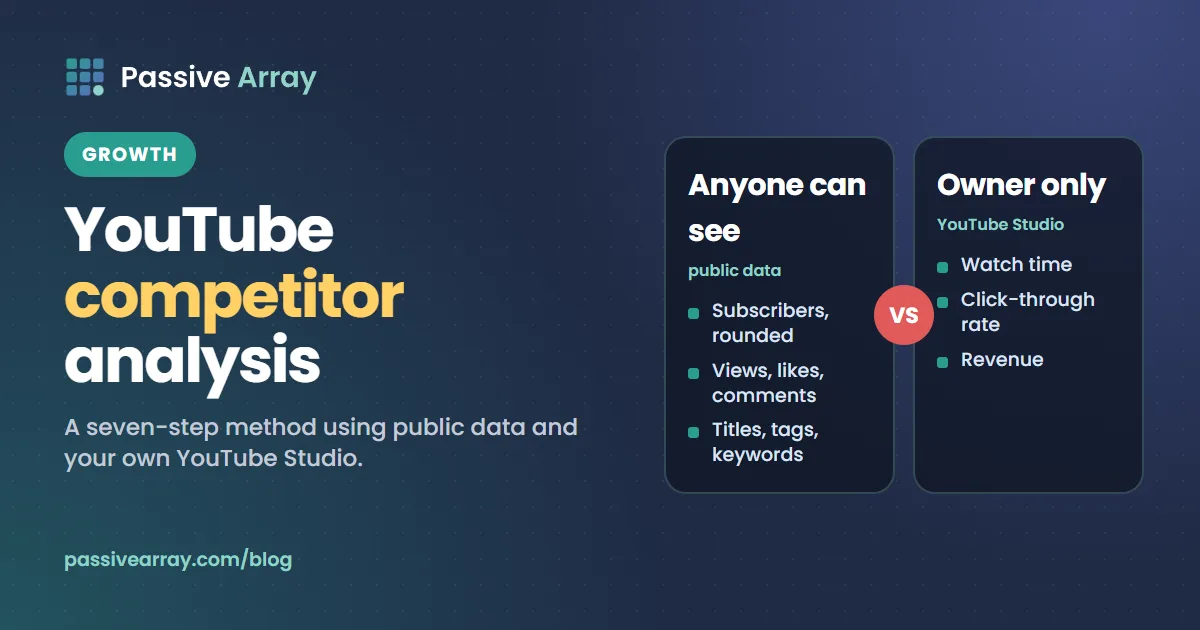
A YouTube competitor analysis is a structured look at the channels competing for your viewers, to find out what they make, what works for them and what they leave unanswered. You can do it for free with two sources: public data that anyone can read for any channel (subscribers, views, uploads, titles, tags, comments) and your own YouTube Studio, which shows the channels and videos your audience watches outside your channel and, in the new Research tab, videos with a high Outlier Score. What you cannot see is any competitor's watch time, click-through rate or revenue. Those stay in the owner's Studio, and any site showing them is estimating.
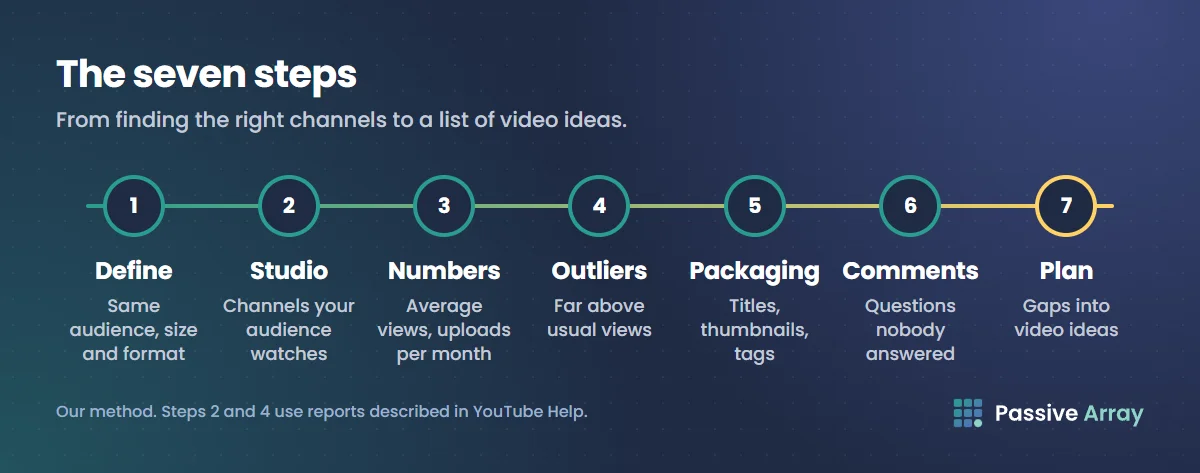
This guide walks through a seven-step method: define your competitors, ask Studio who your viewers also watch, collect the public numbers, find outlier videos, read their packaging, read their comments, and turn it all into a content plan. It ends with a template table you can copy. To put two or three channels side by side straight away, compare YouTube channels shows subscribers, views, average views, engagement and uploads per month in one table.
What you can and cannot see about a competitor
The public numbers come from the official YouTube Data API, which is what our tools read.
| Data | Public? | Notes from YouTube's documentation |
|---|---|---|
| Subscribers | Rounded | "This value is rounded down to three significant figures" |
| Total channel views | Yes | Counts views "the moment a video begins to play" |
| Video count | Yes | "The number of public videos uploaded to the channel" |
| Per-video views, likes, comments | Yes | Dislikes were "made private as of December 13, 2021" |
| Video tags | Yes | Listed for each video in the API |
| Channel keywords | Yes | Set by the owner; up to 500 characters in total |
| Watch time, CTR, traffic sources, demographics, revenue | No | Only in the channel owner's YouTube Studio |
So spying on competitors really means reading public data well. How to check any YouTube channel's stats explains each public number in detail, and is Social Blade accurate explains why outside earnings figures are estimates built from view counts.
Step 1: define your competitors
A competitor is a channel that serves the same viewer with the same kind of video. Our suggested rules, not YouTube's:
- Same audience. Cooking for students and cooking for chefs share a topic, not viewers.
- Similar size, plus one or two above you. Peers show what works at your stage; larger channels show where the niche can go.
- Same format. Compare long-form with long-form and Shorts with Shorts.
- Still active. A channel that stopped uploading a year ago tells you about the past.
Aim for three to five direct competitors. To find more, the lookalike channel finder reads one channel's topics and keywords from the YouTube API, searches for channels covering the same ground and sorts them by how close their subscriber count is. It uses YouTube search, so at busy times it may show a quota message; try again later if it does.
Step 2: ask YouTube Studio who your viewers also watch
Your own Studio holds the best competitor data you will find, because it is about your actual viewers. On desktop, the analytics area is now called Insights ("We've updated the "Analytics" page to the "Insights" page on desktop"), and some Help pages still say Analytics.
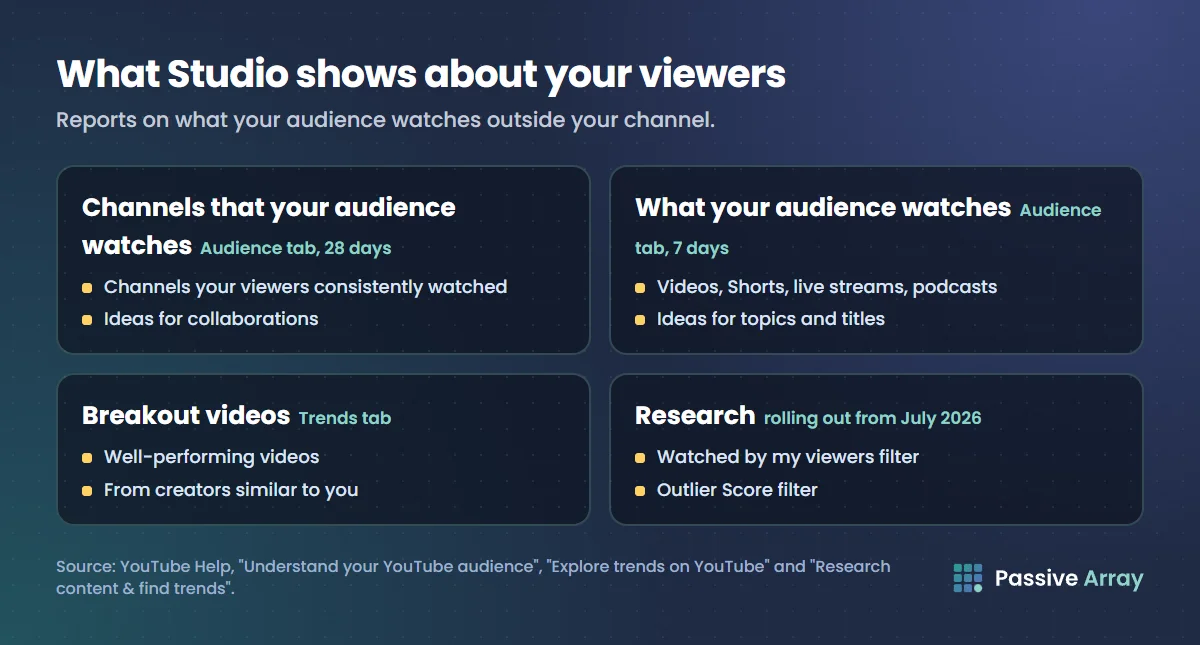
In the Audience tab, YouTube Help describes three reports:
- Channels that your audience watches: "what other channels your viewers consistently watched outside your channel over the past 28 days." YouTube suggests using it to find "what channels your viewers are interested in and for collaboration opportunities."
- What your audience watches: "what other videos, Shorts, live streams, and podcasts your viewers watched outside your channel over the past seven days." YouTube suggests it for "topics for new videos and titles" and "thumbnail ideas".
- Formats your viewers watch on YouTube: whether they watch videos, Shorts or live streams, over the last 28 days.
The first report is a competitor list chosen by your viewers. Add any channel on it that your Step 1 list missed.
In the Trends tab, the Breakout videos card "highlights well-performing content from other creators who are similar to your channel." YouTube notes that some Trends insights "are limited to certain countries, languages, and devices."
The Research tab is newer. The Trends Help page says YouTube is "gradually rolling out" an updated YouTube Studio from July 2026 and points to Research for the latest, so you may not have it yet. YouTube Help says Research "shows high-performing videos to help you explore content ideas, titles, and thumbnails". To use it, select Insights in Studio on a computer, click Research and enter a topic. Two filters matter most here:
- Watched by my viewers: "Filter for what your audience watched on other channels in the last month."
- Outlier Score: "Find videos that get significantly higher traffic than the channel's average from previous videos." YouTube's example: "A 5x score on a long-form video means it got five times more views than previously uploaded long form videos."
Other filters include type, views, upload date, subscribers, duration and channel age; the subscribers filter lets you study channels your size. YouTube Help also says Ask Studio "has access to the same YouTube-wide search capabilities that power Research."
Step 3: collect the public numbers
For each competitor, record the same numbers on the same day. The channel comparison tool uses each channel's last 10 uploads for average views and engagement, and measures uploads per month from those 10 upload dates.
Record at least:
- Subscribers (rounded by YouTube) and total views.
- Average views on recent uploads, and average views divided by subscribers.
- Uploads per month, and the share of recent uploads that are Shorts. Count this from the channel's Videos and Shorts tabs.
One day's numbers show size, not direction. Add each competitor to the growth tracker, which reads public subscribers, total views and video count once a day and charts 7 and 30-day change. History starts the day the channel is first tracked and is never backfilled, so start tracking early.
YouTube's Data API now says channel views count "the moment a video begins to play", so read jumps across that change with care. How to audit a YouTube channel covers the date and the full outside audit.
Step 4: find their outlier videos
An outlier is a video that did far better than its channel usually does. It shows a topic or format the channel's own audience responded to above its normal level.
Three ways to find them:
- The Research tab's Outlier Score, if you have it, measured against the channel's previous videos.
- By hand. Sort a competitor's videos by popular, then compare each one with the channel's typical recent views. Our rule of thumb, not YouTube's: anything at three or more times the typical number is worth a closer look. Compare videos of similar age, because older videos have had longer to collect views.
- Our outlier feed. The outliers page lists long-form videos getting many times their channel's usual views, updated daily.
For each outlier, write down the topic, the title, the thumbnail idea, the length and the upload date. Then ask why it beat the channel's average. Our suggestion: look at the topic and the promise in the title before the editing.
Step 5: read titles, thumbnails, tags and descriptions
YouTube Help says "Your video's title, thumbnail, and description are more important pieces of metadata for your video's discovery," and that tags "play a minimal role" unless your topic is "commonly misspelled." So spend most of your time on titles and thumbnails.
- Titles. List the titles of each competitor's last 20 uploads and their outliers. Look for the promise each one makes: a result, a mistake to avoid, a comparison, a number.
- Thumbnails. Put the outlier thumbnails next to each other. Note what is readable at a small size and what is repeated across the niche, since a thumbnail that looks like everyone else's is easy to skip.
- Descriptions. Check the first lines, chapters and links. The video SEO checker reads any video's public title, description, tags, hashtags, chapters and captions and scores them against what YouTube documents.
- Tags. The tag extractor shows any public video's tags. Treat them as a hint about the phrases a creator was targeting, not a ranking secret. Do YouTube tags still matter explains why.
- Channel keywords. The channel keywords finder shows the keywords a competitor typed into its channel settings, plus the topics YouTube assigned. Many channels leave them empty.
Read, do not copy: a copied title and thumbnail gives viewers no reason to pick yours. The YouTube algorithm explained covers how recommendations work.
Step 6: read the comments for unmet questions
Comments are where viewers say what a video did not give them. On each competitor's outliers and recent uploads, look for:
- Questions the creator did not answer, and requests for a video on something.
- Confusion about a step, a sign that a clearer video could win.
- Complaints about length, pace or missing detail.
The YouTube comment analyzer does the reading at scale on any public video: it reads up to 2,000 comments from the YouTube Data API and lists the questions nobody answered, the creator's reply rate, buying and collab comments, top words and a heat map of when viewers comment. Its question and buying matches are simple rules, not AI, so read the comments themselves before acting on them.
In our view, a question that appears under several competitors' videos and has no good answer anywhere is the strongest idea a competitor analysis can give you.
Step 7: turn findings into a content plan
Sort what you found into four kinds of gap. These labels are ours, not YouTube's.
| Gap | What it looks like | What to make |
|---|---|---|
| Proven topic | An outlier on a competitor's channel, a topic you have not covered | Your own take, with a stronger angle or more depth |
| Unanswered question | The same question in comments across channels | A video that answers it directly in the title |
| Format gap | Competitors only make long videos, or only Shorts, on a topic | The format they are missing |
| Search gap | A content gap in the Trends tab | The video searchers cannot find |
On that last row, YouTube Help says "A content gap happens when viewers can't find enough quality search results on YouTube for a specific search." It can happen when viewers find no results, no exact match, or only content that is "old or low quality."
Pick three to five ideas, write a title for each, and check each title answers a viewer need rather than echoing a competitor. Then make the videos and compare their results with your own channel's usual numbers, not with the competitor's.
A YouTube competitor analysis template
Copy this into a spreadsheet, one row per channel. Every column is something you can read from public data or your own Studio; there are no benchmarks to fill in.
| Column | Where it comes from |
|---|---|
| Channel and link | Step 1 or "Channels that your audience watches" |
| Subscribers (rounded) | Public channel page or the comparison tool |
| Average views, last 10 uploads | Comparison tool |
| Views per subscriber | Average views ÷ subscribers |
| Uploads per month | Comparison tool |
| Share of Shorts in recent uploads | Count from the Shorts and Videos tabs |
| Top 3 outliers (title, views, date) | Research tab, by hand or the outliers page |
| Recurring title pattern | Step 5 |
| Channel keywords | Channel keywords finder |
| Unanswered questions | Step 6 |
| Gap for you | Step 7 |
| Date checked | Today |
Repeat it every few months, because channels change direction and so does your own audience.
What competitor analysis cannot tell you
- Why a video worked inside YouTube. You can see an outlier's views, but not its click-through rate, retention or traffic sources.
- What a channel earns. Any earnings figure for another channel is an estimate from views and an assumed rate.
- Whether views were paid. YouTube lists "YouTube advertising" as a traffic source when a video is used as an ad, and traffic sources are only in the owner's Studio. From outside, promoted views look like any others.
So use competitors for ideas and judge your results with your own Studio data.
Sources
- YouTube Help: Understand your YouTube audience (Channels that your audience watches, What your audience watches, Formats your viewers watch)
- YouTube Help: Research content & find trends (Research tab, Watched by my viewers, Outlier Score, Ask Studio)
- YouTube Help: Explore trends on YouTube (Breakout videos, content gaps, July 2026 rollout)
- YouTube Help: Get started with YouTube Insights (Analytics renamed Insights on desktop)
- YouTube Help: Understand your YouTube video reach (YouTube advertising as a traffic source)
- YouTube Help: Add tags to your YouTube videos (title, thumbnail and description matter more than tags)
- YouTube Data API: Channels (subscriber rounding, view counting, video count, channel keywords)
- YouTube Data API: Videos (tags, likes, comments, private dislikes)
Frequently asked questions
How do I analyze YouTube competitors?
Pick three to five channels that serve the same viewers in the same format, and check your Studio for the channels your audience also watches. Record their public numbers, find the videos that beat their usual views, study those titles and thumbnails, read the comments for unanswered questions, and turn the gaps into video ideas.
Can I see my competitors' YouTube analytics?
No. Watch time, click-through rate, traffic sources, demographics and revenue are visible only to the channel owner in YouTube Studio. You can see public numbers such as rounded subscribers, views, uploads, likes, comments and tags. Any site showing another channel's watch time or earnings is estimating.
What is the best free YouTube competitor analysis tool?
Start with YouTube Studio: the Audience tab shows the channels and videos your viewers watch elsewhere, and the Research tab, where available, filters videos by Outlier Score. For public numbers, use tools that read the YouTube Data API, such as a channel comparison, a growth tracker and a comment analyzer.
How do I find my competitors on YouTube?
Open the Channels that your audience watches report in your Studio Audience tab. It lists the channels your viewers consistently watched in the last 28 days. Add channels of similar size and format from YouTube search or a lookalike channel finder.
How can I spy on YouTube competitors?
You can only read what is public: subscribers, views, upload dates, titles, thumbnails, descriptions, tags, channel keywords and comments. That is enough to find their best videos and unanswered questions. Nothing legitimate shows a competitor's private analytics.
What is an outlier video on YouTube?
A video that got far more views than its channel usually does. YouTube's Research tab measures it as an Outlier Score against the channel's previous videos, where a 5x score on a long-form video means five times the views of its earlier long-form uploads.