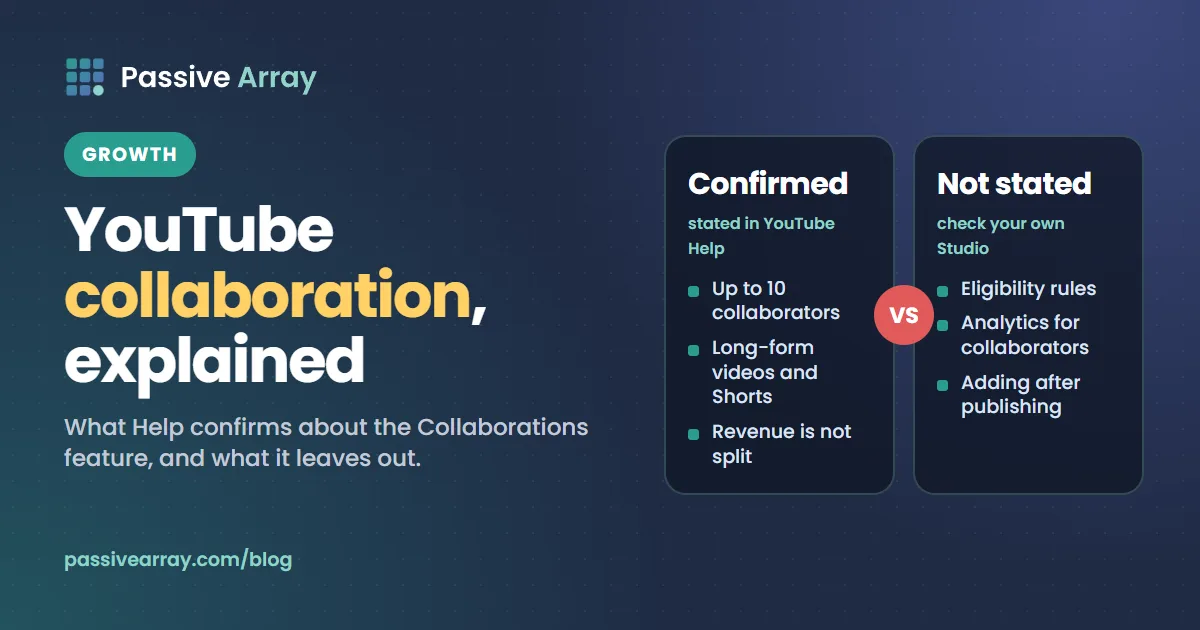
A YouTube collaboration is a video made by two or more channels together. YouTube now has a built-in feature for it, announced in September 2025: YouTube Help says "Collaborations let you invite up to 10 creators to be added as collaborators in your video", on long-form videos and Shorts. Each collaborator's name and a subscribe button appear on the video once they accept, and YouTube says its goal is to recommend the video to the audiences of every channel involved. One point surprises people: "Revenue is not split between collaborators." The channel that posted the video receives it.
This guide has two halves. The first covers the Collaborations feature exactly as YouTube documents it today, including the parts the Help page leaves out. The second is the practical side: how to find a partner, how to pitch, which formats work and what to agree before you film. To build a shortlist of possible partners, the free YouTube lookalike finder lists channels that cover the same topics as yours.
What a YouTube collaboration is
There are two things people mean by "YouTube collab":
- The practice. Two or more creators appear in, or make, a video together. This needs no special feature.
- The feature. YouTube's Collaborations feature, which attaches other channels to a single video as named collaborators.
You can do the first without the second. Plenty of collabs are still two separate videos, one on each channel, that point at each other. The feature adds official credit and a subscribe button for each channel on one shared video.
The Collaborations feature: what YouTube Help says
Everything in this section comes from the YouTube Help article "Invite collaborators to your video", checked on 15 November 2026.
What it does
- "Collaborations let you invite up to 10 creators to be added as collaborators in your video."
- "You can invite collaborators to both long-form videos and Shorts."
- "You can invite collaborators to an archived live stream, but not active live streams."
- "Viewers can see collaborations on desktop, mobile, and TV."
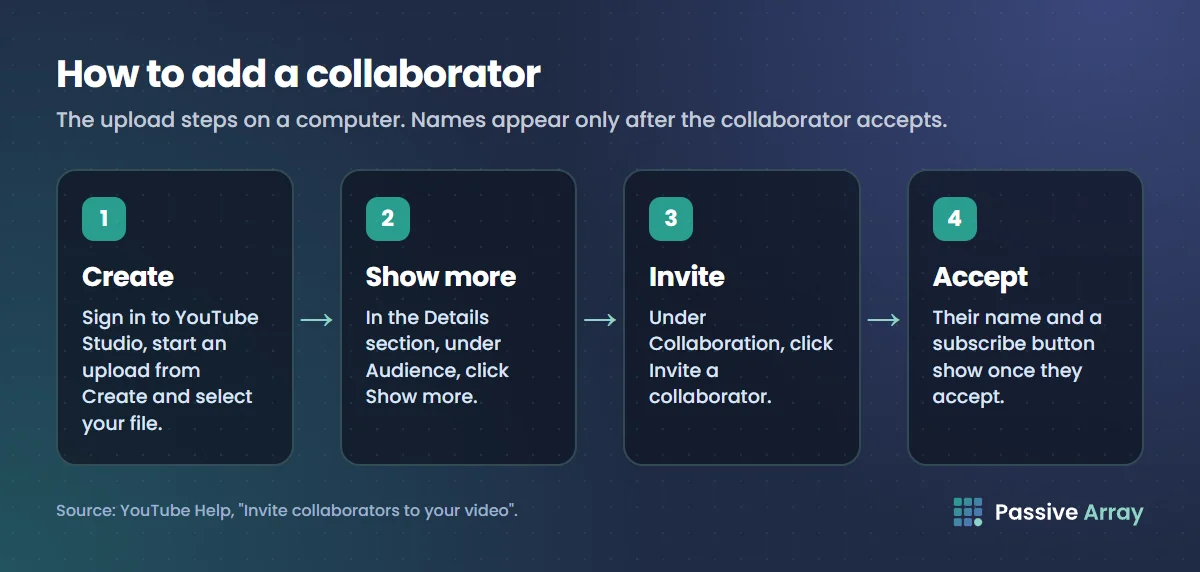
- "Each collaborator's name and a subscribe button for each channel will be shown once the collaborator accepts your invitation."
So the collaborator has to accept. Until they do, their name does not appear.
How the video is recommended
Help describes the aim like this: "Our goal is to recommend the video to the audiences of both the collaborators and the channel where the video was posted." It adds a caution: "you may not notice changes in search or recommendations at first."
Who gets the revenue
Two sentences settle it:
- "The channel where the collaboration video was posted receives the earned revenue."
- "Revenue is not split between collaborators."
If you and your partner want to share the money, that is a private arrangement between you, made outside YouTube. YouTube ad revenue explained covers how a channel's share of ad money is worked out.
Five collaborators or ten?
The feature was announced on the YouTube Official Blog on 16 September 2025, in a post by Amjad Hanif, Vice President of Creator Products. That post said: "You can add up to five collaborators to one video", and that the video "will get shown to the audiences of all participating creators."
The Help article now says up to 10. The two official sources disagree, and Help is the current one, so this guide uses 10. If you see "five" quoted elsewhere, it comes from the launch post.
How to add a collaborator to a video
Help gives the steps for adding a collaborator while uploading.
On a computer:
- Sign in to YouTube Studio and start an upload from Create.
- Select your file.
- In the Details section, under Audience, click Show more.
- Under "Collaboration", click Invite a collaborator.
In the YouTube Studio app on Android:
- Open the YouTube Studio app and tap Create.
- Select the file you want to upload.
- In the "Add details" section, tap Collaborations, Comments & more.
- Tap Invite a collaborator.
Collaborations with a brand
The same Help article covers branded content. When a video contains a paid promotion, you select the paid promotion option in YouTube Studio and choose your brand partner's channel. Help says this connects the video to the brand partner's Google Ads account, where they can review its performance, and that if the partner runs the video as an ad, the ad can show both names with a subscribe button for each channel.
That is a commercial deal, with disclosure rules attached. How influencer marketing works covers what has to be disclosed and how.
What the Help page does not confirm
This matters as much as what it does say. On the Help article as we read it on 15 November 2026, we could not find any statement on the points marked "Not stated" below.
| Question | Documented on the Help page? |
|---|---|
| Maximum collaborators | Yes: up to 10 |
| Long-form and Shorts | Yes: both |
| Live streams | Yes: archived streams only, not active ones |
| Who receives revenue | Yes: the posting channel, with no split |
| Eligibility (subscriber count, country, channel age) | Not stated |
| How the invitation reaches the collaborator | Not stated |
| Adding a collaborator after the video is published | Not stated; the steps describe the upload flow |
| Whether collaborators can see the video's analytics | Not stated |
| Whether the video appears on a collaborator's channel page | Not stated |
| How to remove a collaborator or leave a collaboration | Not stated |
We have left those answers out rather than guess. If the option is missing from your upload screen, or you need one of the answers above, the reliable test is to open the upload flow in your own YouTube Studio and to ask your partner what they see on their side.
One practical consequence, and this is our reading, not a YouTube statement: because Help does not say collaborators get analytics access, do not build your agreement on the assumption that they will. Agree in advance that the posting channel will share screenshots of the video's results.
Three ways to run a collab
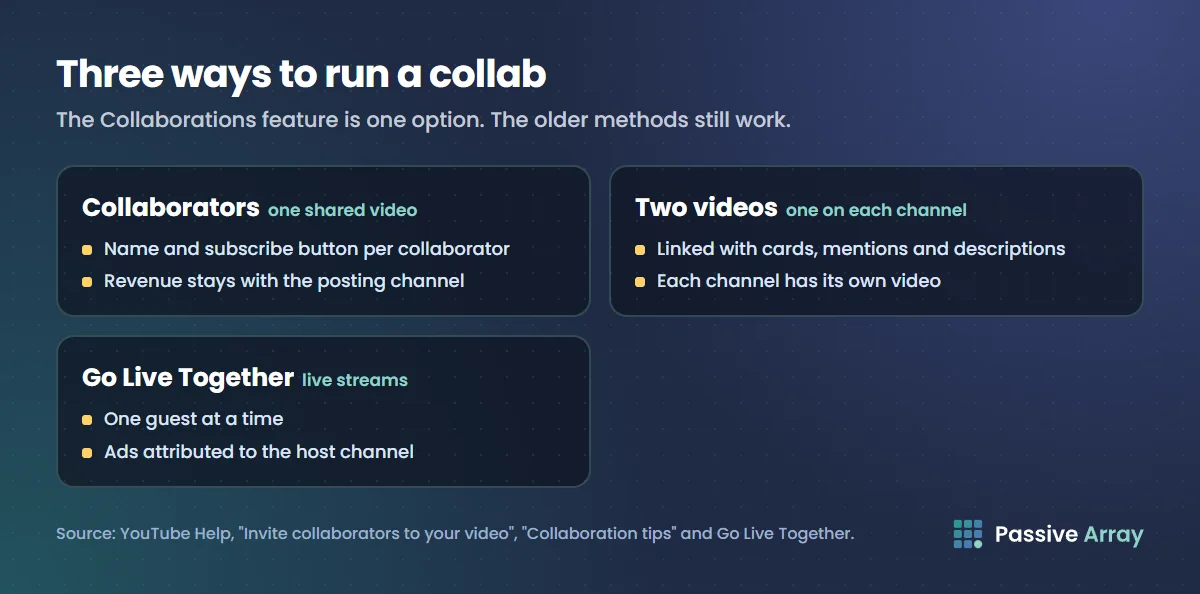
The feature is one option. YouTube's "Collaboration tips" page describes the older method, and live streams have their own tool.
1. One video with collaborators attached
One channel uploads and invites the others through the Collaborations feature. Every accepted collaborator is named with a subscribe button. Revenue stays with the posting channel. This suits a single piece that all of you made together and want to credit properly.
2. Two videos, one on each channel
This is the method on YouTube's tips page: upload two different videos, one to each creator's channel. The page suggests showing different sides of the same event, for example a prank on one channel and the behind-the-scenes on the other. It then lists ways to send viewers across:
- Use cards and mentions to link between the channels.
- Use a spoken call-to-action that points viewers to the other channel.
- Mention the channels in titles and descriptions, which the page says can improve discovery in search.
Each channel keeps its own video, with its own analytics and its own earnings. That makes it the simplest arrangement to keep fair.
3. Go Live Together
For live streams, YouTube has a separate tool. Go Live Together lets an eligible creator invite a guest to stream with them from a mobile phone. Help says you can rotate guests, but only one guest can appear at a time. It also says the host can view the stream's analytics in YouTube Studio and the guest cannot, and that the pre-roll, mid-roll and post-roll ads on the stream are attributed to the host channel. How to get more views on YouTube Live covers the rest.
How to find a collab partner
YouTube's tips page puts it in four words: "Think beyond subscriber count." It tells creators to look for aligned audiences, growth potential and personality, and to ask whether viewers of the other creator's videos would plausibly watch yours next. It also says: "If you don't connect with the creator's work, it probably wouldn't be a successful collaboration."
A working method:
- Start with channels your viewers already watch. The tips page gives the example of a creator who noticed in YouTube Analytics that viewers of their series also watched another creator's videos. YouTube Analytics explained shows how to read your audience reports.
- Build a list of similar channels. Paste your own channel into the lookalike finder. It reads your channel's topic categories and keywords, searches for channels matching them, and sorts the results by how close their subscriber count is to yours. It relies on YouTube search, which we can only call a limited number of times a day, so at busy times it may show a quota message instead of results. Try again later if so.
- Compare the shortlist. The channel comparison tool puts two or three channels side by side: subscribers, views, engagement and upload pace, using each channel's last 10 uploads. Put your own channel in the first box.
- Look at recent views, not totals. A channel with a large subscriber count and quiet recent videos brings fewer viewers than the number suggests. Views per subscriber explains how to read that ratio.
- Watch their videos. Tone, quality and how they treat their audience do not show up in numbers.
Why similar size helps
A collab is an exchange, and it is easiest to agree when both sides bring something comparable. The tips page lists what that can be under "know your value": broad audiences, including fans off the platform, unique skills, production resources, or access to locations or people. If you are the smaller channel, lead with one of the last three.
The checks brands run before paying a creator work just as well here. How to vet a creator before you pay them lists them, and they take about ten minutes. If you want more ways to search for channels by topic or country, free influencer marketing tools walks through the free search tools and their limits.
How to pitch a collaboration
YouTube's guidance on reaching out is short and worth following exactly:
- Use the partner's preferred contact method, which the page says is often listed in the channel's About tab.
- "Make it personal. Use their name and don't just copy and paste the same note to multiple creators."
- Its sample message is built on four headings: "Keep it honest", "Stay specific", "Make the value clear" and "Be flexible".
Turned into a message, that looks like this:
Hi [name], I run [channel], where I [one line on what you make and for whom]. Your video on [specific video] covered [specific point], and my viewers keep asking about the same thing from the other side. I would like to suggest [one concrete idea, in one sentence]. I can handle [filming, editing, location, research]. Happy to do it as one video with both of us credited or as one video on each channel, whichever suits you. If the idea is not right, I am open to yours.
Keep it to that length. Send it once, follow up once, and then leave it. A media kit helps when the other creator does not know you: how to make a creator media kit shows what to put in one.
What to agree before you film
Most collab disputes come from things nobody discussed. Settle these in writing, even if it is only an email both of you reply "agreed" to.
- Format. One video with collaborators attached, or one video on each channel.
- Who posts. With the Collaborations feature, the posting channel receives the revenue and YouTube does not split it. Decide whether that is fine or whether you will share it privately, and how.
- Results. Which numbers the posting channel will share, and when. Screenshots a week and a month after publishing is a reasonable ask.
- Editing and approval. Who edits, and whether the other side sees the cut before it goes live.
- Publish date and time. Especially for the two-video format, where both should go live together.
- Cross-promotion. What each of you will do: cards, a pinned comment, a post, a Short.
- Music and footage. That everything used is cleared, so a copyright claim does not land on the posting channel.
- Sponsors. Whether either of you may include one, and how it will be disclosed.
After the collab goes live
Some of the other channel's viewers will click through to yours. YouTube's tips page says to prepare for them: ask viewers to subscribe at the end of the video, customise your channel layout to highlight the videos new viewers are most likely to enjoy, add a channel trailer, and give new viewers a reason to come back regularly. How to grow a YouTube channel covers turning first-time viewers into subscribers in detail.
Sources
- YouTube Help: Invite collaborators to your video (the limit of 10, eligible video types, upload steps, recommendation goal, revenue, branded content)
- YouTube Official Blog: Transform your creative journey with the latest YouTube Studio updates, 16 September 2025 (the launch announcement and the original limit of five)
- YouTube Help: Collaboration tips (choosing partners, reaching out, the two-video method, cross-promotion)
- YouTube Help: Invite a guest to your live stream with Go Live Together (guests, analytics and ad attribution on live collabs)
Frequently asked questions
How does YouTube collaboration work?
One channel uploads a video and invites other creators as collaborators in YouTube Studio. YouTube Help says you can invite up to 10, on long-form videos and Shorts. Once a collaborator accepts, their name and a subscribe button for their channel are shown on the video, and YouTube says its goal is to recommend the video to the audiences of all the channels involved.
What is the YouTube collaborators feature?
It is the Collaborations option in the upload flow, announced on the YouTube Official Blog in September 2025. It attaches other channels to one video as named collaborators. It is separate from Go Live Together, which is the tool for inviting a guest to a live stream.
Do YouTube collaborators share the revenue?
No. YouTube Help says the channel where the collaboration video was posted receives the earned revenue, and that revenue is not split between collaborators. If you want to share earnings with a partner, you have to arrange and pay that yourselves.
How many collaborators can you add to a YouTube video?
Up to 10, according to the YouTube Help article as of 15 November 2026. The launch post on the YouTube Official Blog in September 2025 said five, so the two official sources differ. Help is the current one.
Can you collab on YouTube Shorts?
Yes. YouTube Help says you can invite collaborators to both long-form videos and Shorts. You can also invite collaborators to an archived live stream, but not to an active one.
How do I find YouTubers to collab with?
Look for channels with a similar audience and a similar size, not just a large subscriber count. Start with channels your viewers already watch, build a list of similar channels, compare their recent views and upload pace, and watch their videos before you write. YouTube's advice is to think beyond subscriber count and to pick creators whose work you connect with.
Can small YouTubers do collaborations?
The Help page does not list any eligibility rules for the Collaborations feature, so it neither sets nor rules out a subscriber minimum. Check your own upload screen. The older method needs no feature at all: make two videos, put one on each channel and link them with cards, mentions and descriptions.