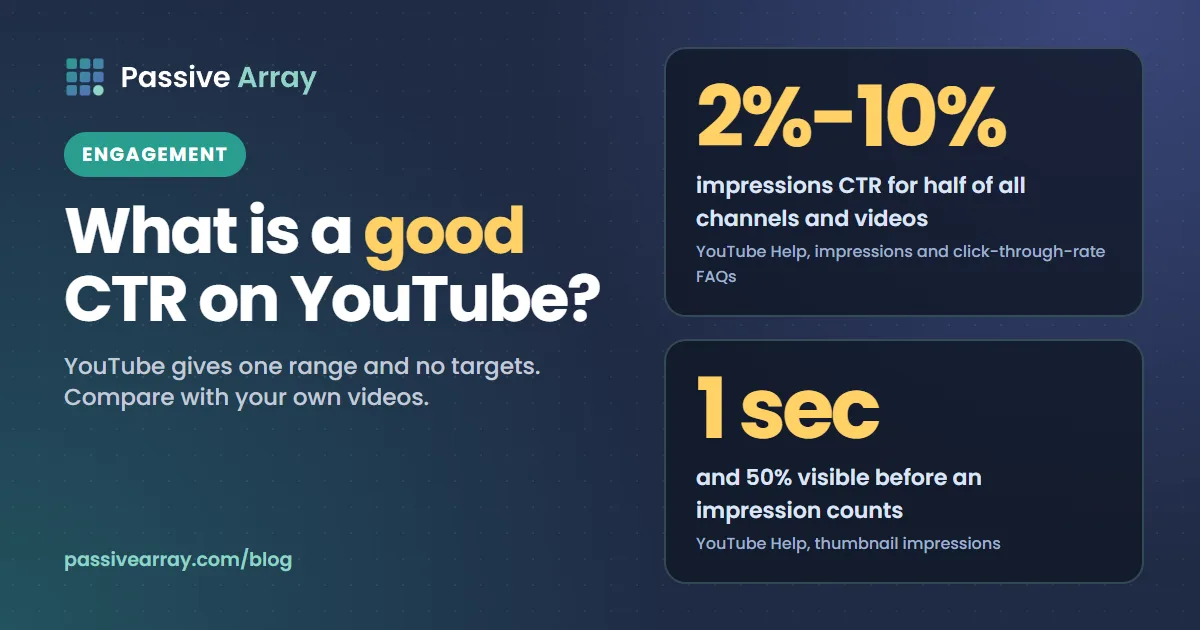
YouTube gives one figure and no targets. Its Help Center says: "Half of all channels and videos on YouTube have an impressions CTR that can range between 2% and 10%." It does not publish a "good" number by niche, channel size or format. It also says new videos and videos with fewer than 100 views "can see an even wider range", and that when a video gets a lot of impressions, "it's natural for the CTR to be lower." So a good click-through rate is one that is in line with or above your own recent videos of the same type, from the same traffic sources, on a video that viewers also keep watching.
This guide covers what YouTube counts as an impression, what the 2% to 10% statement does and does not say, why CTR drops as a video spreads, how to read it next to average view duration, and how YouTube's own A/B testing works. Before you publish, the free YouTube title analyzer scores a title on length, keyword position and click appeal, with every check shown.
What click-through rate means on YouTube
YouTube's full name for the metric is impressions click-through rate, usually shortened to CTR. Recent Help pages also call it "thumbnail impressions click-through-rate". YouTube defines the two parts like this:
- Thumbnail impressions: "How many times your thumbnails were shown to viewers on YouTube through registered thumbnail impressions."
- Thumbnail impressions click-through-rate: "How often viewers watched a video after seeing a thumbnail."
In plain terms, CTR is the share of counted thumbnail impressions that became a view. If a video had 10,000 counted impressions and 500 of them led to a view, its CTR is 5%. Those numbers show the arithmetic. They are not a benchmark.
You find it in YouTube Studio under Analytics: on the Content tab at channel level, in the report "Impressions and how they led to watch time", and on the Reach tab for a single video. Our guide to YouTube Analytics walks through every tab; this article stays with CTR.
What counts as an impression, and what does not
Not every time a thumbnail appears on a screen is an impression. YouTube's rule is specific: "Impressions are counted if the thumbnail is shown for more than 1 second and at least 50% of the thumbnail is visible on the screen."
It then lists where impressions are and are not counted.
| Impressions are counted on | Impressions are not counted on |
|---|---|
| YouTube on computers, TVs, game consoles, Android, iPhone and iPad | External websites and apps, such as links and embeds outside YouTube |
| YouTube Search | The YouTube mobile website |
| The YouTube homepage, including auto-play | The YouTube Kids app and the YouTube Music app |
| YouTube feeds: subscriptions, trending, history, Watch Later | Content within the video player, such as cards or end screens |
| "Up Next" recommendations beside the player, including autoplay | Email or notifications |
| Playlists | Videos that play in a background tab |
| Thumbnails less than 50% visible, or visible for less than 1 second | |
| TrueView video discovery ads |
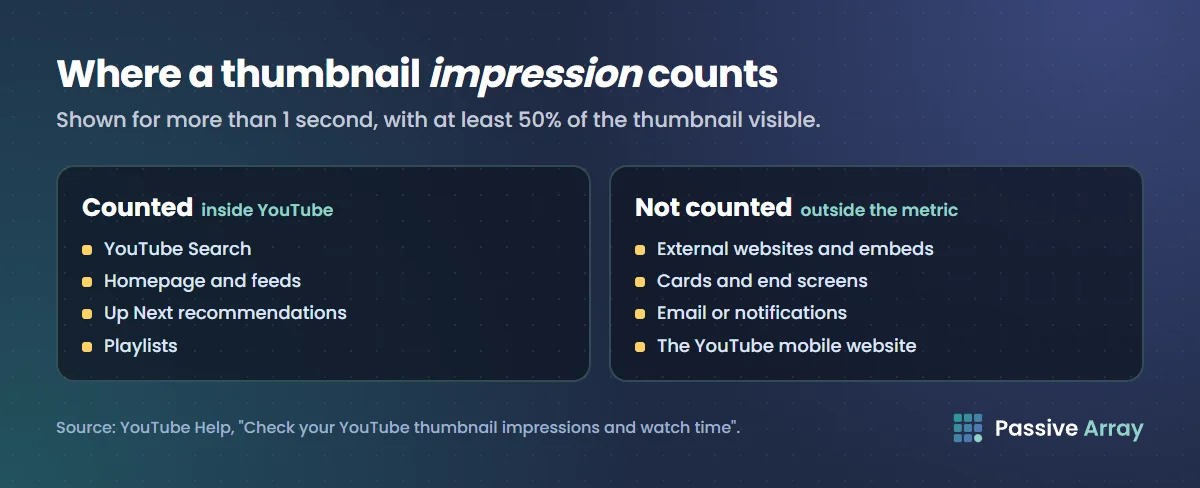
Three things follow from that list.
- CTR covers only part of your views. YouTube says impressions CTR "likely represents a subset of your channel's total views, since not all impressions are counted in this metric".
- Views divided by impressions is not CTR. "Click-through rate is based on views that come from counted impressions."
- You can have more views than impressions. "If a large amount of traffic to your video comes from outside of YouTube, you may have more views than impressions." How YouTube counts views covers the view side.
The range YouTube states, and its caveats
Here is the full statement from YouTube's impressions and click-through-rate FAQ, in order:
"Half of all channels and videos on YouTube have an impressions CTR that can range between 2% and 10%."
"New videos or channels (like those less than a week old), or videos with fewer than 100 views can see an even wider range. If a video gets a lot of impressions (such as if it appears on the Home Page), it's natural for the CTR to be lower. Videos where most of the impressions are from sources like your channel page may have a higher rate."
We checked the page on 15 November 2026 and the wording is still there. Note what it does not say. It does not call 2% bad or 10% good. It says nothing about the half of channels and videos outside the range. It gives no separate figure for small channels, and no typical CTR for any niche or format.
YouTube adds that CTR "will vary based on the type of content, audience, and where on YouTube the impression was shown." It does not publish averages by niche, by subscriber count or by country, and neither do we.
YouTube's own advice on what to do with the number is one sentence: "Ultimately, it's best to compare CTRs between videos over the long-term and keep in mind how their traffic sources will affect their CTRs."
Why CTR falls as a video reaches more people
Many creators watch a video open with a high CTR and then see it slide as views grow. YouTube describes this as expected, not as a fault.
The first people to be shown a new video tend to be the ones who already know the channel. YouTube says in its A/B testing help that "early impressions are more likely to come from viewers who are already familiar with your channel, while later impressions are more likely to include viewers who haven't yet watched your channel." People who know you click more readily than strangers.
So two videos can have very different CTRs for reasons that have nothing to do with the thumbnail. A video shown mostly on your channel page is in front of people who came looking for you, and YouTube says such videos "may have a higher rate." A video shown widely on Home or in Up Next sits beside videos from every other channel.
A falling CTR on a video whose impressions are climbing usually means YouTube is offering it to a wider, colder audience. That is what growth looks like. The pattern to worry about is a low CTR on a video whose impressions are flat. YouTube algorithm explained covers how each surface chooses what to show.
CTR and average view duration belong together
CTR measures the click. It says nothing about whether the click was worth it. YouTube ties the two together in the same FAQ:
"YouTube will recommend a video to viewers if the video is relevant to them and if the video's average view duration indicates that viewers find it interesting. Clickbait videos tend to have low average view duration and therefore are less likely to get recommended by YouTube."
It even gives a test: "You can tell if your thumbnail is clickbait if it's getting high CTR but low average view duration and lower than expected Impressions."
The table below is our reading of how to combine the two, not a YouTube ruling. "High" and "low" mean compared with your own recent videos of the same type.
| CTR | Average view duration | What it usually means | What to do |
|---|---|---|---|
| High | High | The packaging and the video match | Leave it alone and make more like it |
| High | Low | The title or thumbnail promises something the video does not deliver | Make the promise accurate, or deliver it sooner |
| Low | High | Viewers who click like it, but few click | Change the title or thumbnail; run an A/B test |
| Low | Low | The topic or the audience is wrong | A new thumbnail will not fix it; rethink the topic |
The third row is the one worth hunting for in your back catalogue. How to get more views on YouTube has a ten-minute diagnosis that sorts every video into "not shown", "not clicked" or "not watched".
How to judge your own CTR
YouTube lists three things to avoid doing with CTR data:
- "Deciding without enough data." Look at CTR "after getting a substantial number of impressions", not straight after uploading.
- "Improving for small changes in click-through-rate." Small variations are common and are not "cause for immediate action."
- "Testing several thumbnails or titles on the same video." If you swap them by hand, each version meets a different audience. YouTube warns that "differences in click-through-rate might be due to traffic sources, rather than the title or thumbnail."
For a fairer comparison, YouTube's thumbnail and title tips suggest reading CTR by traffic source. For general audiences, "look at the click-through rate (CTR) on Home and Suggested in the first 24 hours after publication", on videos with above-average impressions. For subscribers, look at CTR "in the Subscriptions Feed in the first 24 hours after publication", because that feed "represents your most engaged fans."
A/B testing titles and thumbnails in YouTube Studio
YouTube Studio has a built-in tool for the problem in point 3 above. Our older guides call it Test & compare. The Help page is now titled "A/B test titles & thumbnails", and its steps tell you to click A/B Testing. This is how Help describes it today.
What it does. "Creators can test and compare up to 3 different titles and thumbnails. At the end of the test, the title or combination of title and thumbnail with the highest watch time will be shown to all viewers." You can test the title only, the thumbnail only, or both.
Who can use it. It is "currently only available on computers through YouTube Studio", and you need advanced features enabled. You cannot test Shorts, scheduled live streams or Premieres "at this time". Videos that are made for kids, for mature audiences or private cannot be tested either.
How long it takes. A test "can take a few days or up to 2 weeks to complete". If you change the title or thumbnail during the test, "the test will automatically stop."
How it decides. The winner is chosen on watch time share, not CTR. YouTube's explanation: "we optimize tests for overall watch time over other metrics, like click-through-rate."
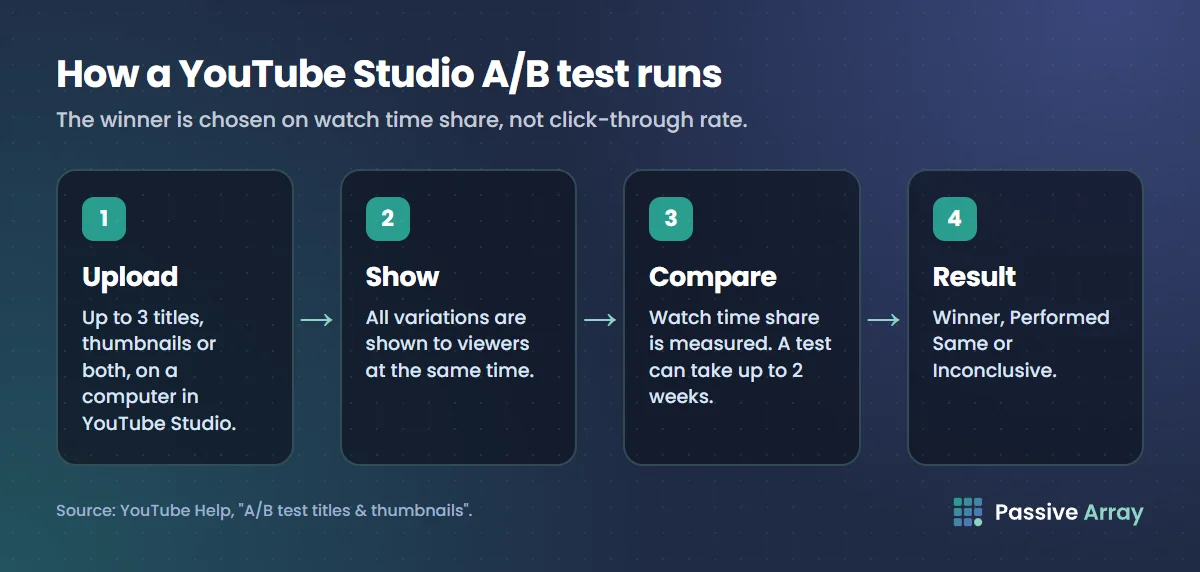
There are three possible results. Winner means one option "clearly outperformed the others based on watch time share". Performed Same means "all your options performed about the same", so "pick the option you prefer". Inconclusive means there was "no strong statistical difference in engagement between your options", and the first title and thumbnail you uploaded becomes the default. YouTube says "it's normal not to receive a "Winner" test result", usually because the options were too similar or the video had too few impressions.
Unlike swapping thumbnails by hand, "YouTube's A/B tests are true, concurrent A/B/C tests. This means all variations are shown to viewers at the same time."
How to improve your click-through rate
None of this needs a trick. YouTube's advice is to make the title and thumbnail tell the truth about the video, clearly, to the right viewer.
- Find the right videos to fix. Look for a CTR below your usual for that format with an average view duration at or above it. Those videos are under-clicked, not under-watched.
- Simplify the thumbnail. "Try not to make the design too complex", and upload the image "as large as possible" because thumbnails "show up differently across devices." The thumbnail tester shows your image as viewers see it in the phone home feed and in suggested videos, in light and dark mode, and checks contrast and clutter at small size. For patterns to borrow, see YouTube thumbnail examples.
- Put the important words first. Viewers "may only see part of your title", so "put the most important words near the beginning."
- Choose a searchable or an intriguing title on purpose. YouTube describes "searchable titles that clearly outline what to expect" and "intriguing titles that spark curiosity". The title generator drafts ten titles across different angles, each with a character count, so you have real alternatives to test.
- Run an A/B test with two or three clearly different options, and let it finish. YouTube suggests testing older videos first, "to reduce the impact to your channel's overall views."
YouTube also states that "90% of the best-performing videos have custom thumbnails." If you still rely on auto-generated frames, change that first. YouTube thumbnail size covers the dimensions.
A checklist before you change a thumbnail
- The video has had a substantial number of impressions
- Its CTR is below your other videos of the same format and traffic mix
- Its average view duration is healthy, so the video itself is not the problem
- The new option is clearly different from the old one
- The title and thumbnail still describe what the video delivers
CTR is not the measure for Shorts
In the Shorts feed, viewers scroll from one playing Short to the next, and YouTube gives Shorts their own metric, "stayed to watch": "the percentage of times viewers stayed to watch past the initial seconds of a Short." Our guide to the YouTube Shorts thumbnail explains what you can change there.
Sources
- YouTube Help: Impressions and click-through-rate FAQs (the 2% to 10% statement and its caveats, what to avoid, clickbait, views versus impressions)
- YouTube Help: Check your YouTube thumbnail impressions and watch time (the 1 second and 50% rule, where impressions are and are not counted, metric definitions)
- YouTube Help: A/B test titles and thumbnails (eligibility, how a test runs, watch time as the deciding metric, results, tips)
- YouTube Help: Thumbnail and title tips (design and title advice, checking CTR on Home, Suggested and the Subscriptions feed, the 90% custom thumbnail figure)
- YouTube Help: Understand your YouTube content performance (where the report sits, the "stayed to watch" definition for Shorts)
All pages were read on 15 November 2026.
Frequently asked questions
What is a good CTR on YouTube?
YouTube does not set a target. Its Help Center says half of all channels and videos have an impressions CTR between 2% and 10%, and that the figure varies with the type of content, the audience and where the impression was shown. A good CTR is one at or above your own recent videos of the same format and traffic sources.
What does CTR mean on YouTube?
CTR stands for click-through rate. YouTube's full name is impressions click-through rate, and it defines it as how often viewers watched a video after seeing a thumbnail. Only registered impressions are included, so it covers a subset of a video's views.
Is a 2% click-through rate bad on YouTube?
Not necessarily. YouTube says it is natural for CTR to be lower when a video gets a lot of impressions, for example on the homepage. Compare the video with your own videos that had a similar reach and traffic mix.
Why is my YouTube CTR going down?
The most common reason is reach. YouTube says early impressions are more likely to come from viewers already familiar with the channel, and later impressions include more people who have not watched it. A falling CTR with flat or falling impressions is the pattern that deserves attention.
Does YouTube pick the A/B test winner by click-through rate?
No. YouTube says the winning title or thumbnail is the one with the highest watch time share, and that it optimizes tests for overall watch time over other metrics such as click-through rate.
Why do I have more views than impressions on YouTube?
Because many views do not start from a counted thumbnail impression. YouTube says that if a large amount of traffic comes from outside YouTube, a video may have more views than impressions.