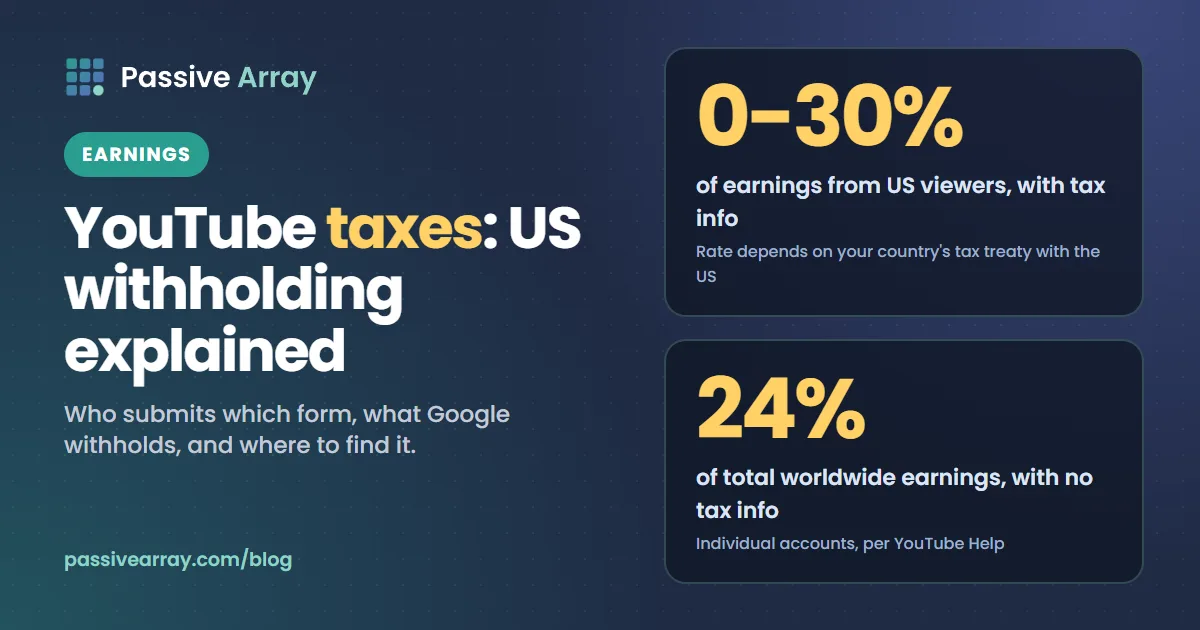
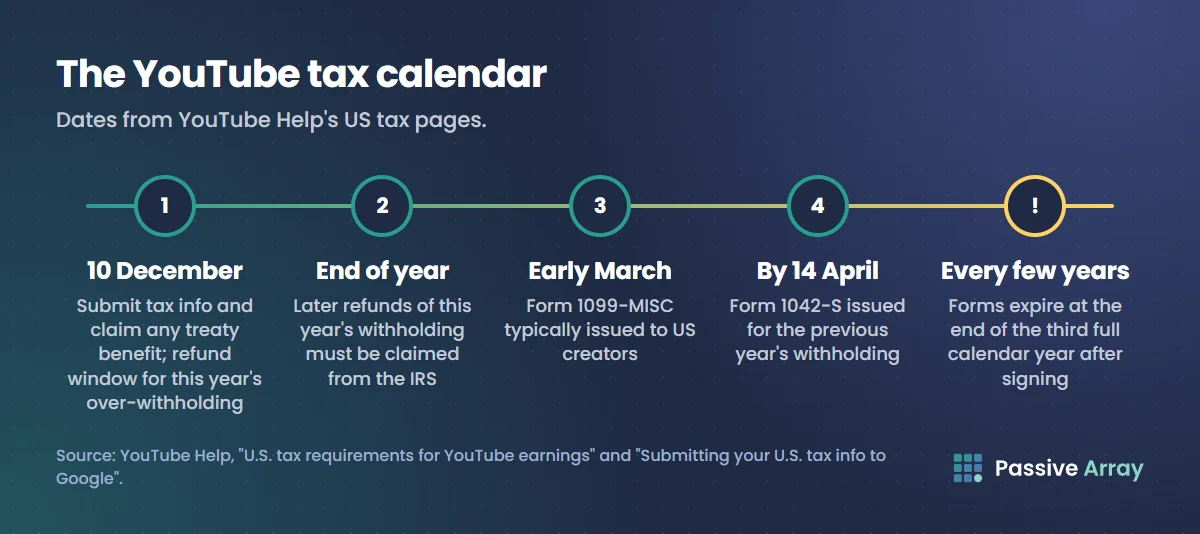
Yes, YouTubers pay taxes, and part of it can be taken before the money reaches you. Every creator in the YouTube Partner Program, wherever they live, must submit US tax information in AdSense for YouTube. Google then withholds US tax on the part of your earnings that comes from viewers in the US. For creators outside the US who submit tax info, the rate is between 0% and 30% of those US earnings, depending on whether their country has a tax treaty with the US. US creators with valid tax info have nothing withheld. An individual who submits nothing can have 24% of total worldwide earnings withheld. YouTube asks creators to submit, and claim any treaty benefit, by 10 December each year.
This is information, not tax advice. YouTube itself says "YouTube and Google can't provide advice on tax issues", and nor can we. This guide covers the official mechanics: why Google withholds, the rates, which form you fill in, how to submit it, and where to find withheld amounts and year-end forms. To work out your earnings before withholding, the YouTube RPM calculator turns RPM and views into income.
Why Google withholds US tax on YouTube earnings
YouTube Help says "Under U.S. tax law, Google is a withholding agent", and explains: "Google has a responsibility under Chapter 3 of the U.S. Internal Revenue Code to collect tax info, withhold taxes, and report to the Internal Revenue Service (the U.S. tax authority, also known as the IRS) when a YPP creator on YouTube earns royalty revenue from viewers in the U.S."
Two words matter. Royalty: Partner Program earnings fall under "Other Copyright Royalties", the income type you select when claiming a treaty benefit. US viewers: withholding applies to earnings from viewers in the US, wherever you live.
Our guide to how YouTube pays you has a short version of this step inside the full payout process. This article goes through the tax part in detail.
Which YouTube earnings are affected
YouTube Help lists them: "YouTube earnings from viewers in the U.S. from ad views, YouTube Premium, Super Chat, Super Stickers, Super Thanks, and Channel Memberships." How ad and Premium money is split in the first place is in YouTube ad revenue explained.
With valid tax info, the rest is left alone: "Only the portion of your earnings from viewers in the United States will be subject to tax withholding and reporting if you provide valid tax information." Other AdSense income is not affected either. Your country is "determined by the country of residence you declare in your tax info."
US withholding rates in each case
These are the rates as YouTube Help states them. Your own rate is shown in AdSense for YouTube once your form is submitted.
| Your situation | What Google withholds |
|---|---|
| US creator, valid tax info submitted | Nothing |
| Outside the US, tax info submitted, treaty benefit claimed | The treaty rate on US-viewer earnings (between 0% and 30%) |
| Outside the US, tax info submitted, no treaty benefit | 30% of US-viewer earnings |
| Individual account, no tax info | 24% of total earnings worldwide ("backup withholding") |
| Business account outside the US, no tax info | 30% of US earnings |
| Business account in the US, no tax info | 24% of total earnings worldwide |
The last three rows are defaults when Google has nothing on file. YouTube says "These withholding rates will be adjusted in the next payment cycle once valid U.S. tax info is provided in AdSense for YouTube."
YouTube's own example
YouTube Help describes a hypothetical creator in India who earns $1,000 in a month, $100 of it from US viewers:
- No tax info: $240 withheld, "because the withholding tax rate is up to 24% of total earnings worldwide".
- Tax info, treaty claimed: $15 withheld, because "India and the U.S. have a tax treaty relationship that reduces the tax rate to 15% of earnings from viewers in the U.S."
- Tax info, no treaty: $30 withheld, because "the tax rate without a tax treaty is 30% of earnings from viewers in the U.S."
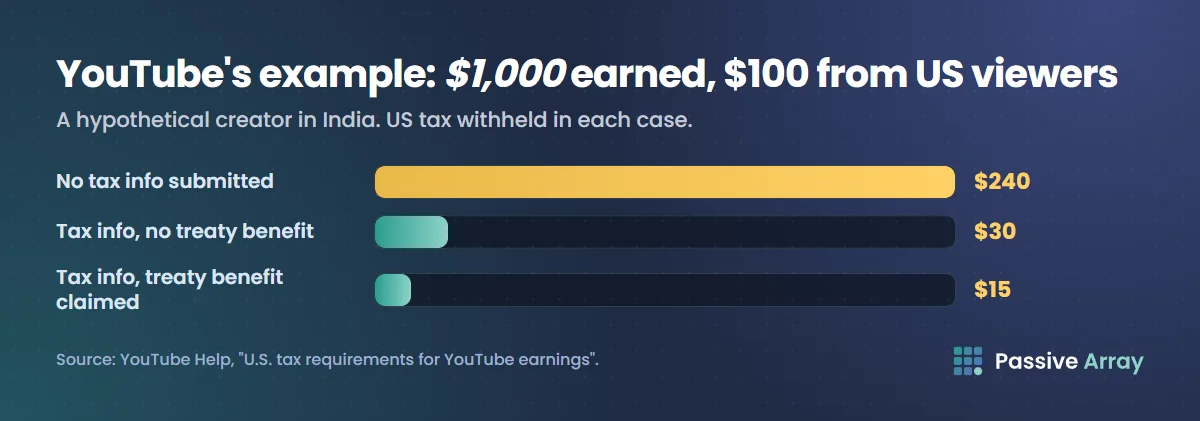
Without a form, the 24% hits everything, including the $900 earned from viewers outside the US. That is the reason to submit early.
To estimate your own figure, YouTube suggests taking the estimated US revenue for the payment period from the Revenue report in YouTube Analytics (filtered by geography; our YouTube Analytics guide shows where) and multiplying it by the rate shown in AdSense. It "only produces an estimate"; the final amount appears in AdSense.
Which tax form you submit
You do not pick the form from a list: "The appropriate tax form is automatically generated based on the answers you provide." The first question is whether the account is an individual's, "owned and operated by an individual person and not a legal organization", or a business account "that's separate from its owner for tax purposes."
| Form | Who it is for, per YouTube and AdSense Help |
|---|---|
| W-9 | US persons, companies, partnerships and so on |
| W-8BEN | Individuals outside the US who are the beneficial owner of the income; can claim a treaty benefit |
| W-8BEN-E | Entities outside the US who are the beneficial owner of the income; can claim a treaty benefit |
| W-8ECI | Non-US persons with income effectively connected with a US trade or business; needs a US TIN |
| W-8IMY | Certain intermediaries, partnerships and flow-through entities outside the US |
| W-8EXP | Non-US central banks, international organizations, tax-exempt organizations and similar bodies |
Most individual creators outside the US get a W-8BEN, and most US creators a W-9. The IRS says the W-8BEN goes to the payer "if you are a foreign person and you are the beneficial owner of an amount subject to withholding."
Tax ID numbers and treaty claims
- A treaty claim needs a tax ID. "If you are claiming a tax treaty benefit, you are required to provide either a Foreign TIN or a U.S. TIN." AdSense Help's examples include India's PAN, Japan's Individual Number and the UK's UTR or National Insurance Number.
- The tool finds your treaty. "If your country and the United States have an income tax treaty in place, then the tax tool in AdSense will identify the details of that during tax form submission."
- Select every eligible income type: "Other Copyright Royalties (such as Play and YouTube Partner Program)", "Motion Picture & TV Royalties" or "Services (such as AdSense)".
- Latin characters only, because of IRS rules, and no PO Box or "in care of" address as your permanent residence.
Whether you qualify for a treaty rate is a question for an adviser. YouTube says the same: "Confirm with your tax advisor if you're eligible to make a claim for treaty benefits."
How to submit tax info in AdSense for YouTube
The steps from YouTube Help:
- Sign in to your AdSense for YouTube account.
- Click Payments, then Payments info.
- Click Manage settings.
- Scroll to "Payments profile" and click edit next to "United States tax info".
- Click Manage tax info.
- Answer the questions. The tool produces the right form and a PDF preview for you to check.
After you submit, the status is In review ("This may take up to 7 business days"), then Approved or Declined. YouTube asks you to "Double check that your tax form status is a green "Approved" in AdSense for YouTube." A decline usually means the tax ID is not in IRS records or does not match your name; submit a new form.
Timing affects your next payment. AdSense Help says that if payments are held for missing tax info and "you provide your tax information after the 20th of the month, you won't be eligible to receive a payment in that month's payment cycle." New AdSense for YouTube accounts need tax info before their first payment. The rest of the payment calendar is in what YouTube pays after monetization.
Keep your tax info valid
Even if nothing changes, "your tax forms expire at the end of the third full calendar year, after the year of signing", so you resubmit every few years. YouTube's example: a form submitted in June 2021 expires at the end of 2024. A change of circumstances that affects the form means submitting a new one sooner. If you move, keep your permanent residence and legal addresses the same so year-end forms reach you; US creators "must resubmit your W-9 form with your updated legal address."
Getting back over-withheld tax
"Google may refund U.S. withholding tax in certain circumstances if updated tax info is provided by December 10." You may need an affidavit of unchanged circumstances, in the "Status change affidavit" section in Step 6 of the tax tool, which applies your new form to earlier payments. Refunds appear in the next payment cycle. After the year ends, Google cannot help: "you will have to file a request for a refund directly with the IRS."
Where to see how much was withheld
Not in YouTube Studio: "Tax withholding amounts are not visible in YouTube Analytics." In AdSense for YouTube, select Payment info under Payments, then View transactions. Withholding shows a month behind: "withholding amounts for April are listed in the payments report for May." This is one reason a payment can be lower than the estimated revenue you saw in Studio.
Year-end tax forms: 1099 and 1042-S
| Form | Who gets it | When, per YouTube Help |
|---|---|---|
| 1042-S | Creators who submitted a W-8 (or are presumed non-US) and received US source income | On or before 14 April, for the previous year |
| 1099-MISC | US creators | Typically by early March |
AdSense Help says a 1099 goes to W-9 filers who are not exempt and "were paid at least US $600 in a calendar tax year", or who had backup withholding. That $600 figure is now out of date for new years: the IRS instructions for Forms 1099-MISC and 1099-NEC say that "For tax years beginning after 2025", the minimum threshold for reporting certain payments "increased to $2,000 and may be adjusted for inflation beginning in calendar year 2027." AdSense Help still said $600 when we checked on 19 November 2026; the IRS page is the current rule. The IRS describes the 1042-S as reporting "Income and amounts withheld".
Choose online or paper delivery under Settings, then Manage tax info, in the tax tool. For a missing or wrong form, AdSense has a year-end tax form request page, which takes requests for the latest year from 5 February for a 1099 and from 15 March for a 1042-S.
If your channel is in an MCN
Affiliates still submit their own tax info in the AdSense for YouTube account linked to their channel. Any withholding is taken from YouTube's payment to the network, the MCN gets a monthly report of it, and Google sends year-end forms directly to the affiliate. More in our guide to YouTube MCNs.
You may also owe tax where you live
This section is short on purpose, because the answer depends on your country.
YouTube's earnings page says: "Keep in mind that you may be liable to pay taxes to your country or region of residence on any income earned from your monetized videos on YouTube." Google's withholding covers only the US part: "Google is only required to withhold U.S. taxes from your YouTube earnings from viewers in the U.S." Working out and paying tax at home is up to you.
YouTube adds that "Many countries have tax treaties that reduce or eliminate double taxation" and some "may allow for foreign tax credits". Whether US tax withheld by Google counts against what you owe at home is a question for a local tax professional. Money paid to you outside AdSense for YouTube, such as a sponsor's fee, never passes through Google's withholding, so ask about that too. Ways to make money on YouTube lists which income goes through YouTube.
A checklist for YouTube taxes
- Submit US tax info as soon as you join the Partner Program, even with no US viewers yet.
- Outside the US, ask an adviser about a treaty rate and have your tax ID ready.
- Confirm the status turns green "Approved" and note the rate shown.
- Review your form and any treaty claim before 10 December each year.
- Resubmit before the form expires, or sooner if your circumstances change.
- Check withheld amounts in Transactions each month.
- Download your 1042-S or 1099 each spring for your local tax return.
To estimate a channel's ad earnings from recent views, the YouTube money calculator gives a range.
Sources
- YouTube Help: U.S. tax requirements for YouTube earnings (why Google withholds, affected income, rates, the India example, refunds, year-end forms)
- YouTube Help: Submitting your U.S. tax info to Google (steps, form types, TINs, treaty income types, expiry, review statuses)
- YouTube Help: YouTube partner earnings overview (tax info before first payment, tax in your country)
- YouTube Help: AdSense for YouTube (where to see tax deductions)
- YouTube Help: Tax requirements for MCNs and affiliate channels
- AdSense Help: Submit your US tax info to Google (the 20th of the month cut-off)
- AdSense Help: Contracting entity is Google LLC (forms, when a 1099 or 1042-S is sent)
- AdSense Help: 1099 tax form issues (request dates for year-end forms)
- IRS: Instructions for Forms 1099-MISC and 1099-NEC (the $2,000 reporting threshold for tax years after 2025)
- IRS: About Form W-8 BEN and About Form 1042-S
Frequently asked questions
Do YouTubers pay taxes?
Yes. Google withholds US tax on the part of Partner Program earnings that comes from US viewers, at a rate set by your tax info and any treaty, and you may also owe income tax in your own country on everything you earn. Google only handles the US withholding.
What tax form does YouTube need?
US tax information, submitted in AdSense for YouTube; the tax tool picks the form from your answers. US persons usually complete a W-9, individuals outside the US a W-8BEN, and businesses outside the US a W-8BEN-E.
How much tax does YouTube take from non-US creators?
With tax info submitted, between 0% and 30% of earnings from US viewers, depending on your country's treaty with the US and whether you claim it. Earnings from other viewers are not withheld. With no tax info, an individual account can have 24% of total worldwide earnings withheld.
Do I need a W-8BEN for YouTube?
If you are an individual living outside the US and the beneficial owner of your YouTube income, the AdSense tax tool will usually produce a W-8BEN from your answers. It is also how you claim a treaty rate, which needs a tax ID number.
What is the 1042-S from YouTube?
It is the IRS form Google sends to creators who submitted a W-8 form and received US source income. It reports the income and US tax withheld for the previous year, and YouTube says it is issued on or before 14 April.
Does YouTube withhold US tax on earnings from viewers outside the US?
Not if your tax info is valid. Only earnings from viewers in the US are subject to withholding. Without tax info, an individual account can have 24% withheld from total worldwide earnings, including viewers outside the US.
Where can I see how much tax YouTube withheld?
In AdSense for YouTube, under Payments, Payment info, then View transactions. It is not shown in YouTube Analytics, and it usually appears a month after the earnings it relates to.